The days of queuing up at photo studios for a basic 3×4 shot are fading fast. Between busy schedules, rising costs, and the sheer annoyance of getting it “just right”, many adults are turning to apps that let them capture their passport photo without leaving home. It sounds too good to be true, but it’s not.
With the right app, you can snap, format, and print document-ready photos in minutes — no expensive photographer, no extra trips to the mall. And yes, they’re accepted by official agencies when done properly. If you’re tired of wasting time and money on something so simple, here’s everything you need to know about taking your passport photo at home.
- The Best 3×4 Photos App to Take For Documents
- Capture stunning shots with the best smartphones for pictures
- Un'app per foto in time-lapse per le vostre immagini fino all'invecchiamento
Passport photo: take 3×4 pictures at home for free with this app
The idea behind a passport photo app is simple: replicate studio-quality images with software that adjusts size, lighting, and background.
One of the best options today is Passport Photo Maker, designed specifically to meet government regulations.
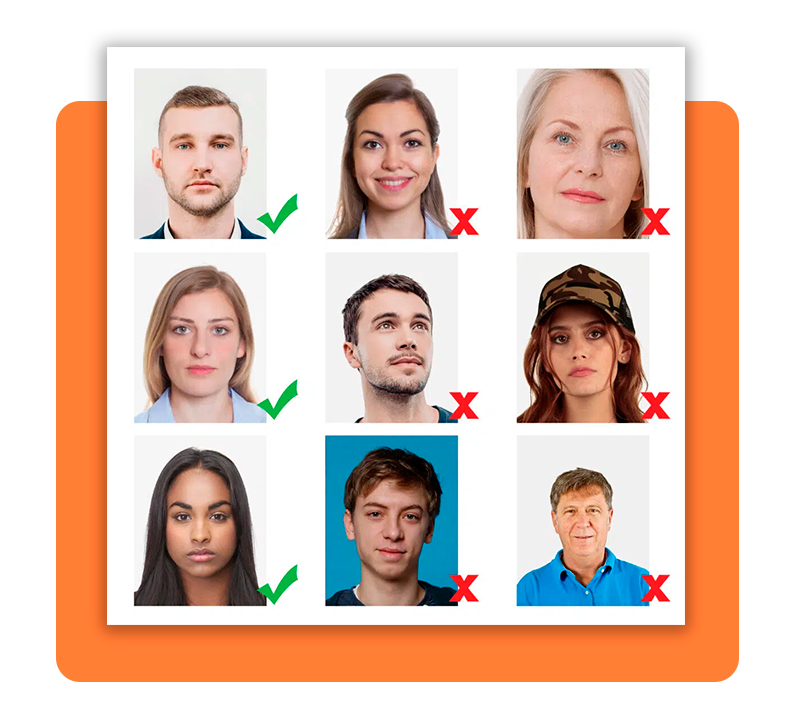
According to the U.S. State Department, official passport photos must meet strict requirements, including size, background color, and facial positioning.
Passport Photo Maker helps users hit these exact benchmarks automatically, reducing the chance of rejection.
In other words, you don’t need to be a professional photographer. You just need decent lighting, a phone camera, and an app that knows what “official standards” mean.
Step-by-step: how to capture and format your photo
Snapping your own passport photo is surprisingly straightforward. Here’s the process:
- Choose a plain, well-lit background with no patterns;
- Stand or sit upright, keeping your face neutral — no exaggerated smiles;
- Center your face in the app’s guide frame to ensure correct proportions;
- Allow the app to adjust background brightness and crop the image to 3×4 format;
- Save the file digitally or order printed copies directly from the app.
It’s a five-minute task that saves you from spending hours running errands.
Features that ensure photos meet official standards
Not every camera app can guarantee your picture will pass government checks, but Passport Photo Maker comes packed with features that reduce the risk of rejection:
- Automatic cropping to 3×4 dimensions: you don’t need to fiddle with rulers or editing tools. The app instantly formats your photo to the exact size required for official IDs. No more “almost right” pictures that end up being rejected;
- AI-powered background removal for a clean, white finish: government offices don’t accept photos with patterned walls, plants, or random furniture in the background. The app’s AI wipes out distractions and replaces them with a crisp, regulation-approved backdrop in seconds;
- Compliance checker based on official U.S. and EU passport regulations: this is where most DIY photos fail. Passport Photo Maker actually scans your image to verify head size, eye level, and brightness before you hit save. It’s like having a digital inspector telling you, “yes, this will pass”;
- Direct printing options or downloadable files ready for upload: once your passport photo is approved, you can decide how you want it—print copies at home, order professional prints through the app, or download a ready-to-use file for online applications.
These tools mean less stress and fewer do-overs. Instead of worrying whether your photo is “good enough,” the app does the heavy lifting.
Where to download the app
You can start taking passport photos at home today. The app is available across devices, so whether you’re team Android o iOS, you’re covered.
If you’re also managing other documents, you may find it useful to check out how to renew a driver’s license without unnecessary stress.

4.7/5
Why this matters more than you think
Sure, a passport photo doesn’t sound like a big deal, but anyone who’s had one rejected knows the headache it causes. From delayed applications to wasted money on retakes, a single wrong detail can throw your plans off track.
Apps like Passport Photo Maker remove that risk by streamlining the process. Plus, let’s face it: there’s something empowering about doing this at home.
It’s one less errand, one less bill, and one more reminder that technology actually makes life easier sometimes.
So whether you’re renewing a passport, applying for a visa, or just updating an ID card, taking control of the process with a passport photo app saves time, money, and sanity.
Final thoughts
A passport photo may be the smallest part of your travel prep, but it’s also the one detail that can cause the biggest delays if done wrong.
With apps like Passport Photo Maker, you don’t just get convenience — you get accuracy, affordability, and peace of mind.
Forget overpriced studio visits. All you need is your phone, a few minutes of patience, and a little help from tech designed to simplify your life.