Workdays keep you busy, and a gym membership costs money you’d like to keep, but a workout app can turn the spare minutes you spend on the couch into a fun, sweaty training session.
In this Insiderbits guide, you’ll meet the Seven app and its quick bodyweight plans, and learn the routine that lets you build lasting strength at home even without hours of free time.

Which is the best workout app for quick exercises?
Seven (Android | iOS) wins the race for quick exercises by compressing interval training into sessions of about 7 minutes, with movements you can run through on a small bedroom floor.
Pick a goal like losing weight or getting stronger, and this workout app assembles a weekly routine around that target, then tunes the difficulty to the fitness level you select.
The developer says its workouts rest on scientific studies, and friendly competition with friends you bring along gives you a nudge to keep going once the initial novelty wears off.
Key features within Seven
- Animated form guides: a moving figure performs every exercise on your screen, giving you a visual cue for clean posture and depth as the countdown begins;
- Gentler alternatives: modified versions of high-impact moves ease pressure on sensitive joints and on the lower back, rescuing a session you might have skipped;
- Paced recovery gaps: brief rests punctuate the circuit, letting your muscles catch up and your breathing settle into a comfortable rhythm before the following effort starts;
- Data safeguards: encryption protects your personal information as it travels, and you can request deletion of the data attached to your profile and your training history.
Who gets the most out of Seven?
If you split your week between hotel rooms, school runs, and an office desk, the compact blocks in the app can slot into the gaps that longer group classes and studio visits leave unused.
If you walk or practice yoga, you can log both next to your interval rounds through this workout app, and a partner or a child can jump in beside you anytime.
What you get free and what costs extra
The download carries no price tag, ‘Freestyle’ and ‘Live Sessions’ drop a free class every hour, and sticking with the ‘7-Month Challenge’ for two months earns a bonus workout.
The 7 Club membership costs $9.99 monthly or $79.99 yearly, covering all workouts, over 200 exercises, and certified trainer guidance, while Core and Fat Burn cost $9.99 each.
Step-by-step: how to start a daily 7-minute bodyweight routine
Seven (Android | iOS) offers daily sessions of 7 minutes that add up to close to 43 hours of training over a year, and the first one needs your phone and floor space to stretch out.
Decide where the routine will live before you start, whether that means a hallway, a garage corner, or a strip of grass, and this workout app will follow you there.
Treat the first week as an attendance test, finishing every session at a pace you control, and let intensity climb once showing up feels automatic and your legs stop complaining.
Step 1: download the Seven app
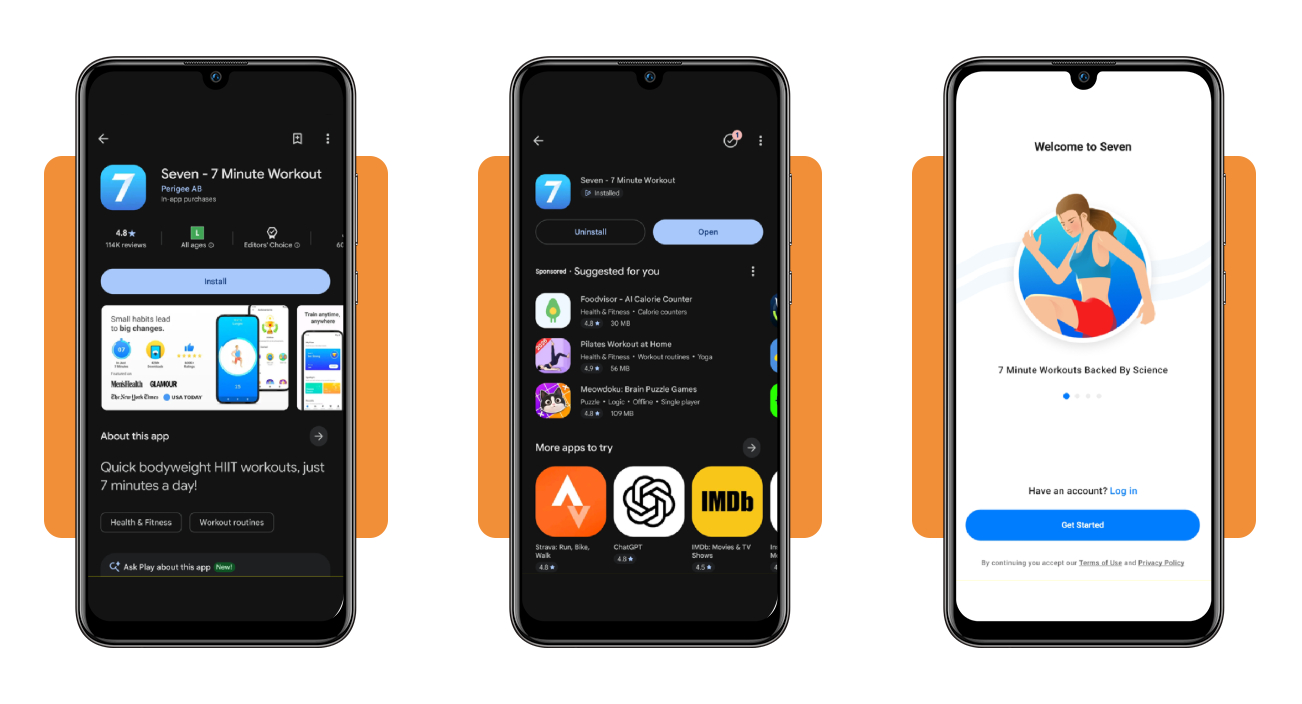
Open Google Play if you use Android or the App Store if you use iOS, search for ‘Seven’, and confirm the developer reads Perigee before you press ‘Install’ or ‘Get’.
Launch the app once the download finishes and tap ‘Get Started’ to begin the setup questions that tailor your daily plan to the goal you choose on the next screen.
Step 2: set your goal and workout schedule
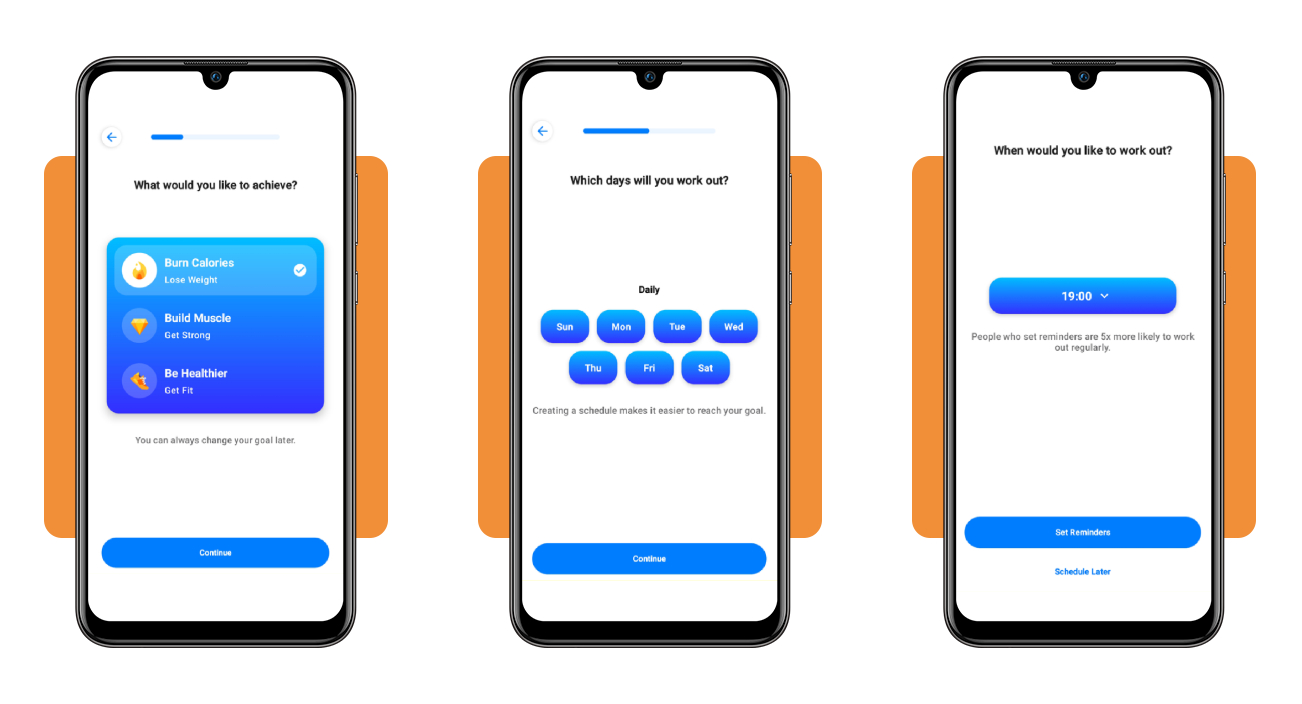
Choose ‘Burn Calories’, ‘Build Muscle’, or ‘Be Healthier’ as your goal, then hit ‘Continue’ and mark all seven days on the schedule question to turn this into a daily routine.
Open the time picker, replace the default evening time with a slot you can repeat, and select ‘Set Reminders’ for a nudge, or pick ‘Schedule Later’ to skip this choice.
Step 3: open your plan and start training
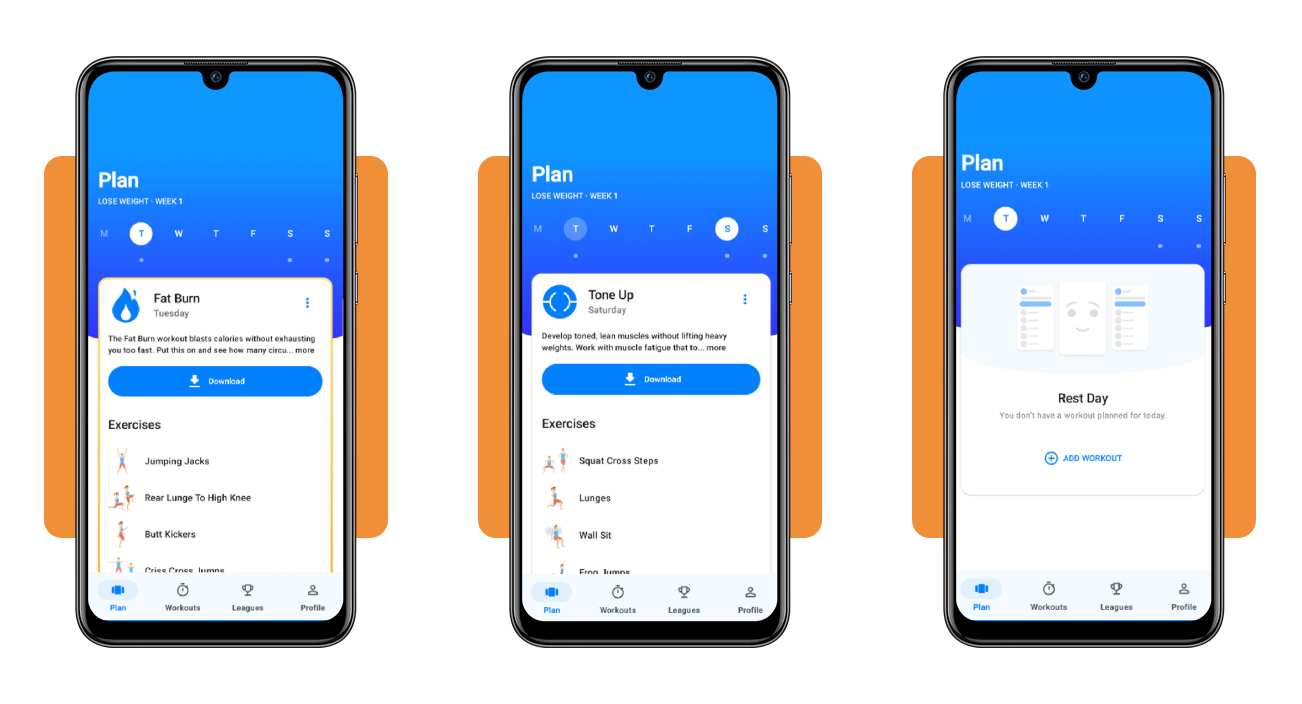
Open the ‘Plan’ tab, tap today’s letter in the weekly row, read through the exercise list, then press ‘Download’ to save the workout on your phone and begin your training.
Rest days carry an ‘Add Workout’ button for bursts of extra energy, and once the session starts, this workout app runs the timer while you work through the listed moves.
How to build daily home workout habits
A habit sticks when it hangs on a cue that already exists in your day, like morning coffee, the commute home, or the moment you kick off your work shoes.
Morning, lunch hour, and late evening sessions all count the same, and the slot you can protect on a normal weekday will outlast the slot that sounds ideal on paper.
Lower the barrier by letting this workout app pick the moves and set the pace, and the only decision you face is whether you’ll press start when the cue hits.
Squeeze activity snacks into your busy day
Activity snacks are bursts of movement you tuck between obligations, such as calf raises while you brush your teeth, wall squats during a phone call, or lunges down the hallway.
Attach a snack to a trigger you can’t miss, like the elevator doors opening or the microwave beeping, and the habit fires without you negotiating with yourself over your motivation.
Progress slowly so the habit lasts
Start with the steps you already take and raise the target in comfortable stages from 2,500 to 5,000, then 7,500, and finally 10,000 once that level feels routine and repeatable.
Aim for 150 minutes of moderate activity weekly plus two strength days, ask your doctor to sign off before you add intensity, and frame your sessions with a 10-minute warm-up.
Build a home gym for under $100
A jump rope, a sturdy chair, a towel that slides on smooth floors, a backpack loaded with books, and a water bottle turn an empty corner into a workable gym.
Pair the gear with this workout app, and your corner covers strength, cardio, and mobility, with the chair serving dips, step-ups, and incline push-ups whenever a move needs a base.
Best fitness apps
Seven (Android | iOS) covers quick bodyweight blocks, and somewhere around the third week you might start craving a different style, a fresh voice, or a deep menu of moves to pick from.
Plenty of apps cater to that itch with their own formats, and many slot beside your routine as a dependable fallback when travel or a busy week derails the plan.
Choose an app that fits your mood, fill the gaps in your week with it, and let this workout app keep anchoring the daily core routine you’ve already built.
Nike Training Club for variety at home or in the gym
Nike Training Club (Android | iOS) packs strength, HIIT, yoga, pilates, and mindfulness into one library, and trainers lead classes on video with form cues you can copy from across the room.
Home sessions rely on bodyweight alone, gym sessions call for barbells and machines, and you can alternate between them when a trip or a closed gym changes your training plans.
FitOn for quick HIIT and live classes
FitOn (Android | iOS) offers HIIT sessions as short as 10 minutes, led by celebrity trainers, with cardio, strength, and meditation classes waiting on days when you want a break from intervals.
You can join a live class to chat with other participants and climb the leaderboard and pair that energy with the Seven (Android | iOS) app for solo days when you prefer a quiet routine.
Freeletics for workouts that adapt to you
Freeletics (Android | iOS) asks about your goals, fitness level, and schedule, then its AI coach builds plans from a library of 700 exercises and adjusts sessions on how your last workouts felt.
Free accounts include 34 bodyweight HIIT workouts and over 100 exercises, enough to test the style before you decide whether the paid coaching tier suits how you like to train.
Seven minutes today beats an hour someday
Seven (Android | iOS) asks for some open floor space and a slice of time that fits inside a sitcom episode, and that arrangement makes consistency feel natural on crowded days.
With this guide, Insiderbits showed you how to build a routine you can keep, add variety when boredom hits, and lean on this workout app on rough days.
Want to keep moving? Then read more Insiderbits guides for simple routines you can start tonight, honest app picks for your goals, and fresh ways to stay consistent.