
Getting the biggest possible tax refund starts with knowing which deductions and credits may apply to you. A tax refund maximizer can help you find potential savings.
In this Insiderbits guide, we’ll explain how H&R Block (Android | iOS) works, how to prepare your return online, and what to know when maximizing your refund.

4.7/5
Which is the best app to maximize your tax refund?
H&R Block (Android | iOS) provides online tax preparation tools that guide users through filing. You can access the service on different devices or use the mobile app.
The platform asks about your income, filing status, deductions, and credits. Your answers help determine which tax forms you need to complete.
H&R Block (Android | iOS) offers different filing options based on your tax situation. Free Online is for eligible simple returns, while paid plans cover more complex cases.
A tax refund maximizer cannot guarantee a specific refund. Your final amount depends on your income, withholding, deductions, credits, and filing status.
H&R Block (Android | iOS) says its Maximum Refund Guarantee can provide a refund of the tax preparation fee if an error by H&R Block (Android | iOS) results in a larger refund or smaller tax liability, subject to its terms.
Key features within the H&R Block Tax Prep platform
H&R Block’s online platform includes guided questions that walk users through the information needed to prepare their returns.
You can also upload or import certain tax documents rather than entering all information manually.
The service supports features such as document uploads, refund tracking, and access to tax professionals on eligible plans.
H&R Block (Android | iOS) also offers Tax Pro Review, allowing users to have a professional review of a return prepared online.
For taxpayers who prefer mobile filing, the H&R Block Tax Prep app (Android | iOS) is another option. However, the process below uses the H&R Block website, so you can follow the steps from a desktop or mobile browser.
Step-by-step: how to maximize deductions and claim your maximum tax refund
Maximizing your refund starts with entering accurate information and reviewing every deduction and credit you may qualify for.
H&R Block guides you through the filing process and helps organize the information needed for your tax return.
Step 1: visit the H&R Block website or use the app
Start by visiting the H&R Block website and selecting the online tax filing option. H&R Block also provides a Tax Prep app (Android | iOS) for iOS and Android, so you can choose whichever format is more convenient.

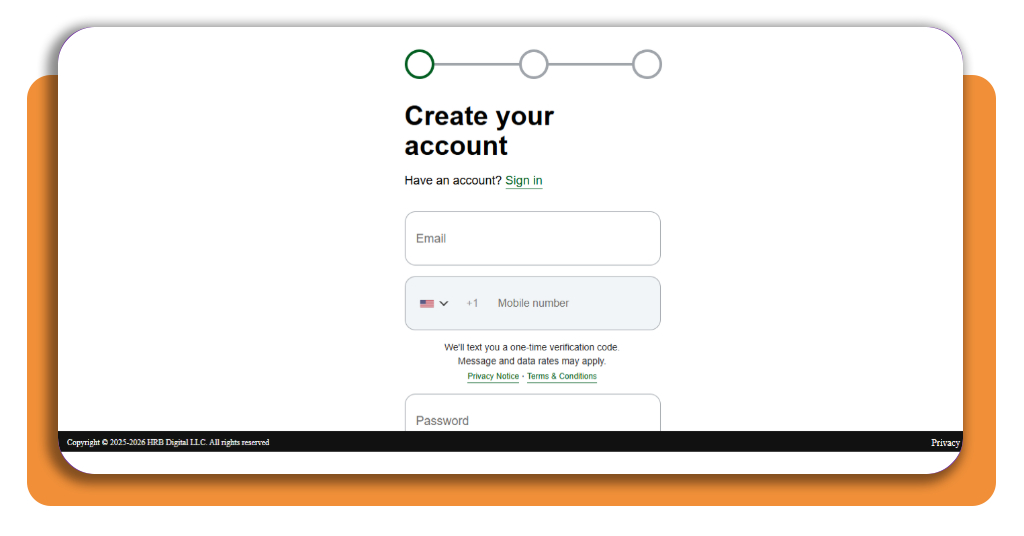
Step 2: create an account or log in
Create an H&R Block (Android | iOS) account if you’re a new user, or log in if you’ve used the service before.
Your account lets you save your progress and return to your tax preparation later.
H&R Block (Android | iOS) also allows eligible users to import information from previous returns, which can reduce the amount of information you need to enter manually.
Step 4: gather and upload your tax documents
Before completing the return, collect the documents you’ll need.
These may include your W-2, 1099 forms, previous federal tax return, bank statements, mortgage information, and other records depending on your circumstances.
H&R Block (Android | iOS) recommends keeping relevant financial and tax documents available while completing the online process.
You may also be able to photograph or upload documents instead of manually entering all the information.
Step 5: answer the tax questions
Follow the guided questions about your income, filing status, dependents, expenses, deductions, and credits.
The software uses your answers to help determine which forms and tax provisions may apply to your return.
This is where carefully entering your information matters. A tax refund maximizer can help surface potential deductions or credits, but it cannot replace accurate information from the taxpayer.
Step 6: review available deductions and credits
Go through the deductions and credits presented during the filing process.
Depending on your situation, these may include the Earned Income Tax Credit, Child Tax Credit, education-related credits, charitable contributions, or other eligible deductions and credits.
Don’t claim a deduction or credit simply because it could increase your refund. Make sure you meet the applicable eligibility requirements and have supporting documentation when required.
Step 7: review your estimated refund
Before submitting the return, review the estimated refund or amount owed.
Check your income, withholding, deductions, credits, and personal information for errors. If something doesn’t look right, go back through the relevant section before filing.
Step 8: choose how to receive your refund
If you’re eligible for a refund, H&R Block (Android | iOS) offers options such as direct deposit or receiving a paper check.
The company also offers other refund-related payment options, including Refund Transfer, subject to applicable fees and terms.
Direct deposit can send the refund directly to a checking or savings account.
Step 9: e-file your return
After reviewing everything, submit your federal return electronically through the platform.
H&R Block (Android | iOS) states that completed returns can be electronically filed directly with the IRS, which can provide faster processing compared with paper filing. State returns can also be e-filed when applicable.
Top tax preparation software
H&R Block (Android | iOS) is one option for preparing and filing taxes online, but taxpayers can compare several services before choosing one.
When comparing tax preparation software, look at the types of tax situations supported, pricing, available forms, customer support, professional review options, and whether the service supports both federal and state filing.
It’s also important to distinguish between a tool that estimates a refund and a service that actually prepares and files your tax return.
If you’re comparing ways to maximize your refund, resources such as this TurboTax guide to hidden ways to boost your tax refund can provide additional information about deductions and credits to consider.
Remember that no software can guarantee a specific refund amount. Your result depends on the information in your tax return and the tax rules applicable to your circumstances.
Best high-yield savings accounts
Once your refund arrives, putting the money into an appropriate savings account can be one option for managing it.
High-yield savings accounts may offer interest rates that are higher than those available from some traditional savings accounts, although rates can change and account terms vary.
Before opening an account, compare the annual percentage yield, minimum balance requirements, monthly fees, withdrawal policies, and other conditions.
If you receive a large refund, you might also consider using part of it to build an emergency fund, pay down high-interest debt, or cover planned expenses.
The best use of a refund depends on your financial situation and goals.
4.7/5
Make the Most of Your Tax Refund
A tax refund maximizer can make the tax-filing process easier by guiding you through questions and helping identify deductions and credits that may apply to your situation.
H&R Block (Android | iOS) provides both online filing and a mobile app, so you can choose between preparing your return through the website or working from your phone.
The important part is to provide accurate information, review your return carefully, and claim only the deductions and credits you’re eligible for.
If you’re looking for more financial resources, you can also explore this Insiderbits guide to settling IRS debt.
A tax refund maximizer can help you organize the process, but your final refund is determined by your individual tax circumstances and the information reported on your return.