
Somewhere between the desk job, the long commute, and the years of accumulated tension, your posture took a hit. And now it shows in the ache that lingers after sitting, in the stiffness that greets you every morning, in the way your body never quite feels right. To improve posture, you need to go deeper than stretches, and Posture by M&M is the app that makes that possible.
Insiderbits put this guide together for anyone who is done accepting discomfort as a fact of life. Here you will find a full breakdown of the app, how to navigate it fully, tips for building better habits, and what real improvement actually looks like over time. What comes next is information your body has been waiting a long time to receive, so keep reading.
Related: Posture apps: combat remote work back pain
Posture by M&M: the best posture app
Posture by M&M (Android | iOS) is a mobile app that puts the anatomy of your own body directly in your hands, so you stop wondering what is going on and start seeing it.
It brings together 3D visuals, biomechanics breakdowns, and corrective exercises in one place, giving you a complete picture of what your muscles and joints are doing at any moment.
If you want to improve posture with real anatomical knowledge guiding every decision, this app takes a complicated subject and makes it truly accessible without dumbing anything down.

4.9/5
Features available in the app
- 3D postural analysis library: explore common postural faults like kyphosis, lordosis, and forward head posture with detailed 3D visuals that show what drives each pattern;
- Corrective exercise library: access targeted exercises built around your specific needs, with clear instructions designed to strengthen weak areas and release tight ones;
- Biomechanics module: learn how your joints, muscles, and nervous system coordinate to hold you upright, with visuals that make complex mechanics easy to follow;
- Theory tab: dive into the anatomy behind postural patterns, understanding the muscular relationships and movement principles that explain why your body holds tension.
See your muscles and joints in 3D
To improve posture, you first need to stop guessing which muscles are pulling your body out of alignment and start studying them. That is what this feature does.
The 3D model inside the app lets you rotate, zoom, and explore the human body in a way that no textbook diagram ever could. It genuinely changes how you read your own body.
Once you can see which muscles are overactive and which are barely firing, what felt abstract before starts feeling like something concrete you can work on and track over time.
A learning tool built for real body awareness
Body awareness is not something you are born with. It is something you build over time, and this app gives you the tools and the visual language to build it deliberately.
The people who use it to improve posture are not just following a routine. They are learning to read their own bodies the same way a professional would during an assessment.
That shift in perspective, from passive discomfort to active knowledge, is what the app is really offering underneath all the 3D visuals and corrective exercise libraries it puts at your fingertips.

Step-by-step: how to install and use the app on your mobile phone
Posture by M&M (Android | iOS) does not drop you into a generic experience the second you open it. The setup starts pulling relevant information together for you immediately.
Before you even reach the main screen, the app already knows what brought you there, and everything it asks is designed to help you improve posture in a way that fits your body.
What waits on the other side is a full library of 3D anatomy, movement breakdowns, and corrective exercises organized in a way that makes exploring your body feel interesting.
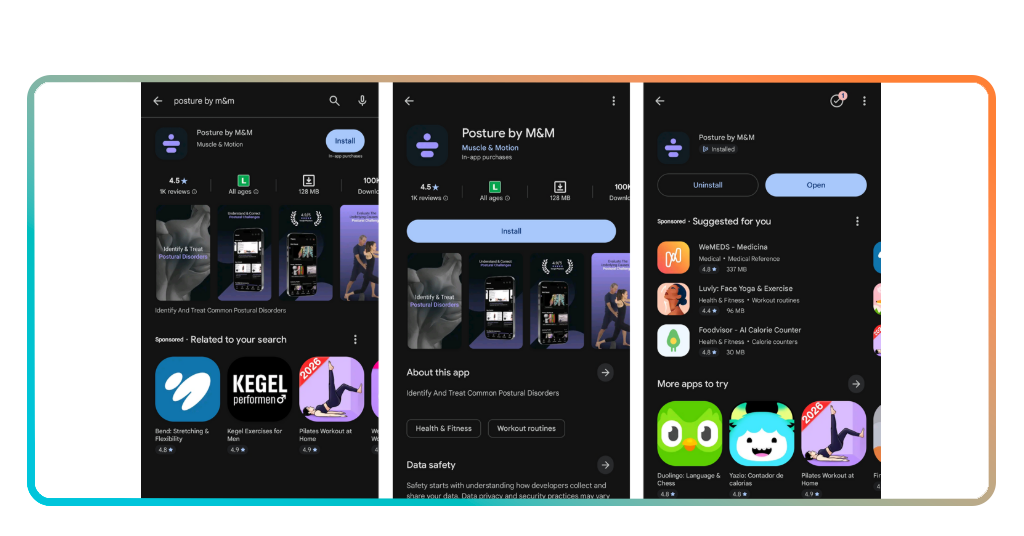
Step 1: download the app on your phone
The app is available on both iOS and Android, so finding it in your app store takes seconds. Search the name, hit download, and you are already halfway there.
The app is free to download, which means you can get it on your phone without committing to anything. A portion of the content is also accessible without a subscription.
If you decide the full library is worth it after exploring the free content, upgrading to a subscription unlocks everything the app has to offer for $15.00 a month.
Step 2: create your account and set your goals
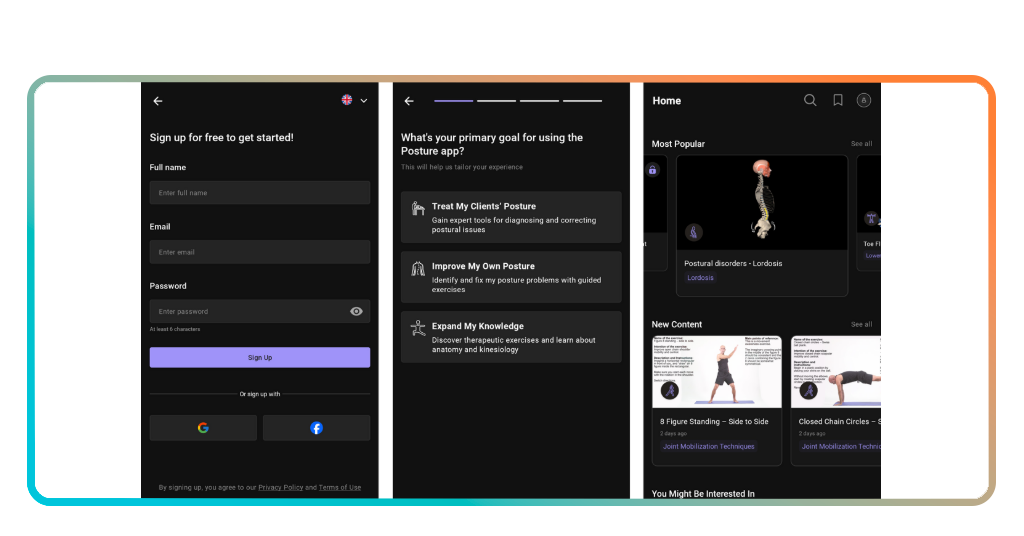
You can sign up with an email address or link your Google or Facebook account if you want to skip the form altogether and get inside the app a little faster.
After signing in, the app will ask you a few questions to improve posture outcomes for your situation, covering your goals, your areas of interest, and your reason for downloading it.
Those answers shape how the app presents content to you, so taking a moment to answer them honestly makes the experience more relevant and useful.
Step 3: explore posture analysis and exercises
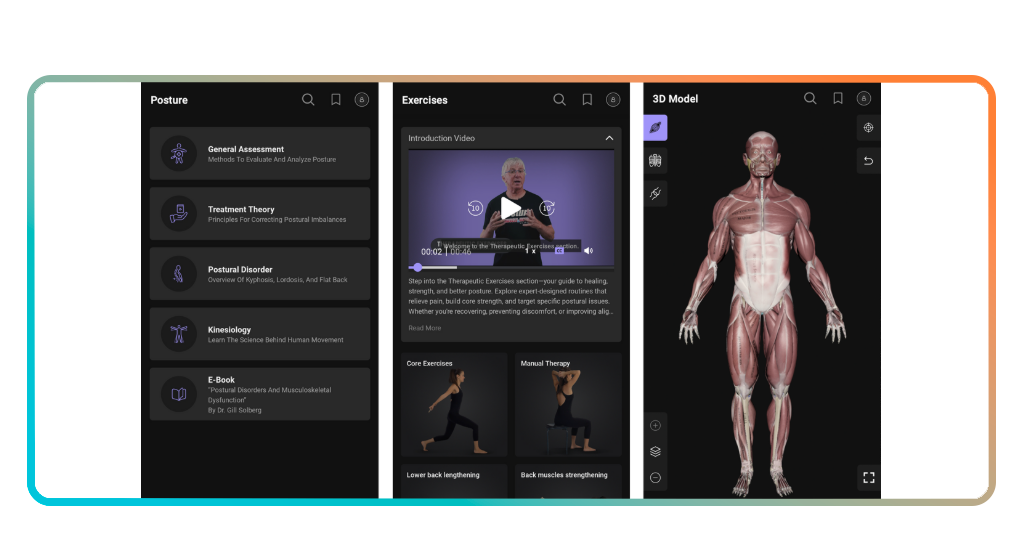
The main tab to start with is the posture section, where you will find detailed breakdowns of common patterns, each one explained through 3D visuals that show the muscles involved.
The exercises tab gives you a library of movements targeting specific issues, and you can use the 3D model to improve posture by seeing exactly which muscles each movement targets.
The theory tab ties everything together, giving you the anatomical context behind what you are seeing and doing, so the exercises you follow are grounded in something you can apply.
Related: Free Posture Test: Get Your Posture Scan Result in 60 Seconds
Tips to improve your posture in everyday life
Your posture is not just something that happens at the gym or during a physiotherapy session. It is shaped by every small habit you carry through the day without noticing.
The way you sit at your desk, hold your phone, or stand in line all adds up over time and leaves a mark on how your body holds itself together.
Small adjustments to your routine can do a lot for your body, and knowing which ones actually improve posture makes the difference between real change and just going through the motions.
Be mindful of your screen height and distance
Your screen position has more influence over your neck and shoulders than almost anything else in your day, and most people have never once stopped to check if theirs is right.
When your screen sits too low, your head tilts forward to compensate, and that forward tilt puts a significant load on the muscles and joints running down the back of your neck.
A simple fix is bringing your screen up to eye level, whether that means adjusting your monitor, propping up your laptop, or holding your phone a little higher than feels natural at first.
Strengthen your core for better spinal support
The muscles that keep your spine upright are not just in your back. Your core, including the muscles around your abdomen, plays a huge role in how you hold yourself to improve posture.
When those muscles are weak, your spine compensates by shifting load to areas that were never built to carry it long term, which is where a lot of chronic back pain originates.
You do not need a complex training program to address this. Consistent, targeted core work a few times a week gives your spine the support it has probably been missing for a while.
Move and stretch regularly throughout the day
Staying in one position for too long is one of the most overlooked contributors to postural problems, and it does not take hours of stillness for your body to start feeling the effects.
Even short breaks where you stand up, walk around, or roll your shoulders can interrupt the tension that builds when your muscles hold the same position for extended stretches of time.
Building that movement into your day consistently, combined with the anatomical knowledge the app gives you, is one of the most practical ways to improve posture.
Benefits of using the app to learn about good posture
Most posture advice stops at the surface. It tells you to sit up straight or roll your shoulders back without ever explaining what is happening underneath that instruction.
Posture by M&M (Android | iOS) takes a different approach by giving you the anatomical context behind every pattern, fault, and correction, so what you learn connects to what your body feels.
That connection between knowledge and physical awareness is what makes the app so useful, and it is exactly what helps you improve posture in a way that holds up beyond the first week.
4.9/5
Spot and correct postural faults faster
Recognizing a postural fault without any visual reference is hard. Your body has been holding certain patterns for so long that they feel normal, even when they are quietly causing damage.
The 3D library inside the app puts a name and a visual to what you are feeling, so you stop second guessing yourself and start working on the actual source of the problem.
That kind of targeted awareness speeds up the correction process significantly because you are no longer throwing generic exercises at a problem you have not properly identified or located.
Build a deeper understanding of body alignment
Body alignment involves how your joints stack, how your muscles share load, and how your nervous system keeps everything functioning without one area compensating for another.
Using the app to improve posture means building a mental map of your own body that tells you why certain areas feel tight and what is driving that tension.
That map changes how you move and how you respond to discomfort, because you are no longer guessing at causes and hoping the right stretch eventually makes things better.
Turn posture knowledge into real movement results
There is a real gap between knowing something and feeling it change in your body, and that gap is where most posture improvement attempts fall apart before gaining any traction.
The app links what you see in the 3D visuals directly to corrective exercises, so you can improve posture with a clear anatomical reason behind every movement you practice.
Over time that connection adds up, and the results show up not just in how you look in the mirror but in how your body feels from the inside.
Related: Zen lifestyle: free yoga app to relax and stretch at home
It’s time to take your posture seriously
Posture by M&M gives you something most apps never bother offering, which is a real look at what your body is doing and why it has been hurting for so long.
This Insiderbits guide was written to help you improve posture with the kind of information that truly makes sense and sticks with you well beyond the first read.
Browse more on Insiderbits and you will find articles covering everything from body health to movement habits that make a difference in how you feel every single day.