The idea of playing Resident Evil on mobile sounds almost too good to be true for fans who spend years waiting for official smartphone versions of their favorite survival horror games. New releases generate excitement, but that only lasts until players discover that major console titles rarely receive dedicated mobile ports, leaving them searching for alternative ways to continue their adventures away from the television or gaming desk.
Fortunately, modern streaming technology changed that reality considerably, and now players can use PS Remote Play to stream compatible games directly from a console or PC to a smartphone. With a stable internet connection and the proper setup, it becomes possible to enjoy major releases, including future entries in the Resident Evil franchise, from basically anywhere while maintaining access to the same save files and progression available on the primary gaming platform.

3.4/5
Resident Evil on mobile? It’s possible
The great news is: playing Resident Evil on mobile is absolutely possible today.
Well, of course it is not in the way most players initially imagine when searching for a traditional smartphone version of the game.
Still, the truth is that players can stream games directly from a console or PC to a smartphone through applications such as PS Remote Play (iOS/Android).
This approach essentially turns a phone into a portable display connected to the gaming system, allowing users to access installed games, save files, and account progress remotely.
For players interested in future releases, like Resident Evil Requiem, game streaming provides a way to enjoy the experience on a mobile device.
When it comes to the quality of the experience, it depends on internet stability and the hardware being used.
However, modern Wi-Fi networks and 5G connections can deliver surprisingly smooth gameplay.
The biggest surprise is discovering that the game continues running on the original platform.
All while the phone simply receives the video stream and sends controller commands back to the console or PC in real time.
PS Remote Play
Step-by-step: how to play Resident Evil requiem on your phone
Playing Resident Evil on mobile depends on streaming the game from your PlayStation console through PS Remote Play.
Check the guide below and step everything up correctly:
Step 1: install PS Remote Play
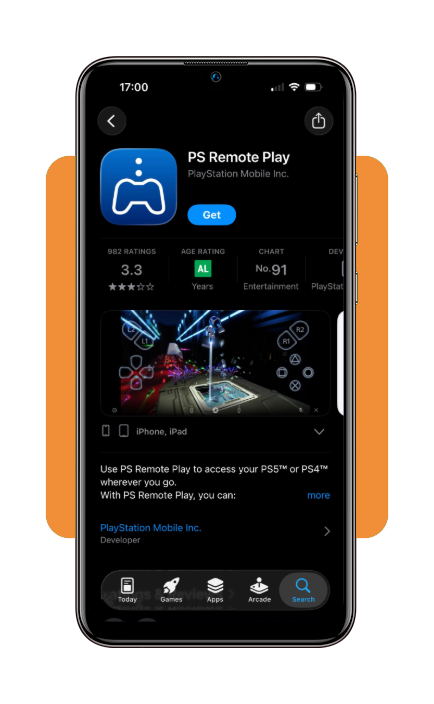
Firstly, download PS Remote Play on the App Store or Google Play Store and sign in with the same PlayStation account used on your console.
- 10 Best Apps For Live Streaming Anything
- 10 Best Dating Apps to Find Real Love
- 10 Best Drawing and Painting Apps For Kids
Step 2: prepare your PlayStation console
After installing, turn on Remote Play in the console settings and keep the system connected to a stable Wi-Fi network or wired internet connection.
Step 3: connect your phone to the console
Open the app, select your console, and wait while the phone connects to your PlayStation through your account.
Step 4: pair a controller
Connect a compatible controller to your phone through Bluetooth so survival horror gameplay feels smoother than touchscreen panic mode.
Step 5: launch Resident Evil Requiem
Then, start the game from your console library once it’s available and play through your phone while the console streams the session in real time.
Step 6: Adjust streaming settings
Also, if the connection feels unstable, try lower video quality slightly, since smoother gameplay matters more than perfect image sharpness.
Tips for better streaming and gameplay
A good streaming setup can make the difference between a smooth survival horror experience and a frustrating session filled with lag and connection interruptions.
In order to get good quality when playing Resident Evil on mobile, use a strong Wi-Fi connection. This is the most important factor.
Whenever possible, connect the console through a wired Ethernet connection while keeping the phone on a fast and stable Wi-Fi network.
Using a compatible controller instead of touchscreen controls can also improve accuracy during combat sequences and puzzle-solving sections common throughout the RE series.
If gameplay feels inconsistent, lowering the streaming resolution or frame-rate settings may create a more responsive experience.
Also, closing unnecessary apps running in the background can help free system resources and reduce interruptions caused by competing network activity.
Lastly, players who plan to stream outside their homes should also test their mobile data connection beforehand.
That is important since a stable 5G connection generally delivers better results than weaker cellular networks.
Other console games you could stream on your phone
Once players discover how well game streaming works, many realize that Resident Evil on mobile is only one of countless console experiences that can be enjoyed on a smartphone.
There are a lot of popular PlayStation titles that you can stream on your phone through PS Remote Play (iOS/Android).
That goes from God of War Ragnarök to Final Fantasy VII Rebirth. They both can be streamed through PS Remote Play using the same setup required for Resident Evil.
Also, for racing fans there’s Gran Turismo 7, while RPG enthusiasts can spend hours exploring massive worlds without needing direct access to a television.
Additionally, players with gaming PCs can stream titles from Steam and open access to thousands of additional games that would normally remain tied to a desktop setup.
The experience works well for slower-paced genres, story-driven adventures, strategy titles, and exploration-focused experiences that don’t demand split-second competitive reactions.
As you can see, the biggest advantage is flexibility, since a smartphone can be a portable extension of a library without requiring to purchase the same game again.
3.4/5
Playing Resident Evil beyond the console
The idea of playing Resident Evil on mobile no longer depends on waiting for an official smartphone version.
PS Remote Play (iOS/Android) makes the process surprisingly accessible, so fans continue their adventures while traveling or whenever access to a television is limited.
A stable internet connection, a compatible controller, and a properly configured console can improve the experience, creating gameplay that feels closer to native play than expect.
Remote play opens the door to a larger mobile gaming experience, turning a smartphone into a portable gateway to some of the biggest titles available on consoles.
Related: Can you play GTA V on mobile? We have the answer!
Enjoyed this article? Save Insiderbits to your favorites and discover the most useful tech tips.