
Working out at home sounds great until the living room feels like a trap and the same four walls drain every bit of motivation you had. A VR fitness app changes the entire equation, dropping you into worlds where sprinting, boxing, and lifting happen inside immersive environments that actually make you want to come back. The sessions adapt to your fitness level, your heart rate, and your pace, so nothing feels out of reach.
XRWorkout takes that idea further, blending full-body functional movement with virtual environments that keep every session fresh and challenging. This Idées reçues guide walks you through the app’s features, the workouts available, how pricing works, and how to stay on track long-term. Keep reading, and learn how to turn a VR headset into one of the most effective fitness tools in your arsenal.
En rapport : Fitness Gamification: Apps That Turn Workouts Into Adventures

4.5/5
XRWorkout: best VR fitness app
XRWorkout (Android | iOS) is a VR workout platform built around functional full-body movement, putting you inside immersive environments where every session challenges your endurance.
It runs on Meta Quest headsets and pairs with a companion app on your phone, giving you control over your training without ever picking up a controller.
This VR fitness app tracks your heart rate, adjusts difficulty on the fly, and supports multiplayer, making it a solid tool that goes well past what a standard gym routine offers.
Available features
- Controller-free movement: the app reads your body movements without controllers, so your hands stay free, and every exercise flows with a natural range of motion;
- Heart rate biofeedback: it connects to your heart rate monitor and adjusts workout intensity in real time, keeping you inside the ideal training zone throughout each session;
- Multiplayer and challenges: train alongside friends or compete globally through shared challenges and leaderboards, turning solo workouts into a connected experience;
- Custom environments: build and share your own virtual workout worlds, or explore existing ones, giving every session a completely different visual backdrop to train inside.
Train across immersive virtual worlds
The app drops you into environments where the scenery shifts constantly, from open landscapes to arenas, so your brain stays as engaged as your body during each session.
Picking a new world changes how a session feels and keeps your attention locked in without needing any extra motivation to push through the full workout.
Built for all fitness levels
Scaling every session to where you are is central to how XRWorkout works. This VR fitness app adjusts load, intensity, and exercise complexity as your fitness grows, with no ceiling in sight.
Beginners get a solid entry point with manageable sessions, while athletes push into high-intensity circuits that blend weights and demand serious output from start to finish.
Best workouts using XRWorkout
XRWorkout isn’t a one-trick platform. It covers sprinting, boxing, squatting, lifting, and balance work, all inside virtual environments that make each training style feel different from the last.
The variety does something a gym setup struggles with. It keeps your body guessing and your sessions unpredictable enough that skipping a workout stops feeling like the easier option.
Each training style inside this VR fitness app pulls something different out of you physically, and once you try a few, you’ll find the ones that click with how you like to move.
Full-body circuits for calorie burning
XRWorkout’s circuits string together sprinting, jumping, and boxing into sequences where your heart rate climbs fast, and your whole body stays involved from the first rep to the last.
There are no long rest breaks cutting the session short here. The controller-free setup means your arms, legs, and core all contribute, so the output you get reflects real full-body effort.
Strength sessions with dynamic weight exercises
XRWorkout pairs resistance exercises with movement-based sequences, so your muscles work harder and adapt to loads that a bodyweight routine alone won’t produce.
The app reads where you are physically and pushes the difficulty forward as your strength builds so you’re never coasting through a session your body outgrew weeks ago.
Balance and stability foot tracking drills
Most workout programs treat balance as an afterthought. This VR fitness app turns it into a full training discipline that challenges your stability from angles you won’t find on a gym floor.
The drills hit the smaller muscle groups in your feet and ankles that rarely get direct attention, and over time, that work shows up in every other movement you do.
En rapport : Home Workout App : Transformez votre parcours de remise en forme
Step-by-step: how to lose weight using XRWorkout
Losing weight with XRWorkout (Android | iOS) comes down to showing up consistently and letting the app do the heavy lifting in terms of structuring your effort and progression over time.
The setup process for this VR fitness app is quick, and once everything’s connected, you’re looking at full-body sessions that burn real calories inside environments that keep you focused.
Your Meta Quest headset and your phone work together here, so getting both linked correctly from the start means your workouts run without interruption every single time you strap in.
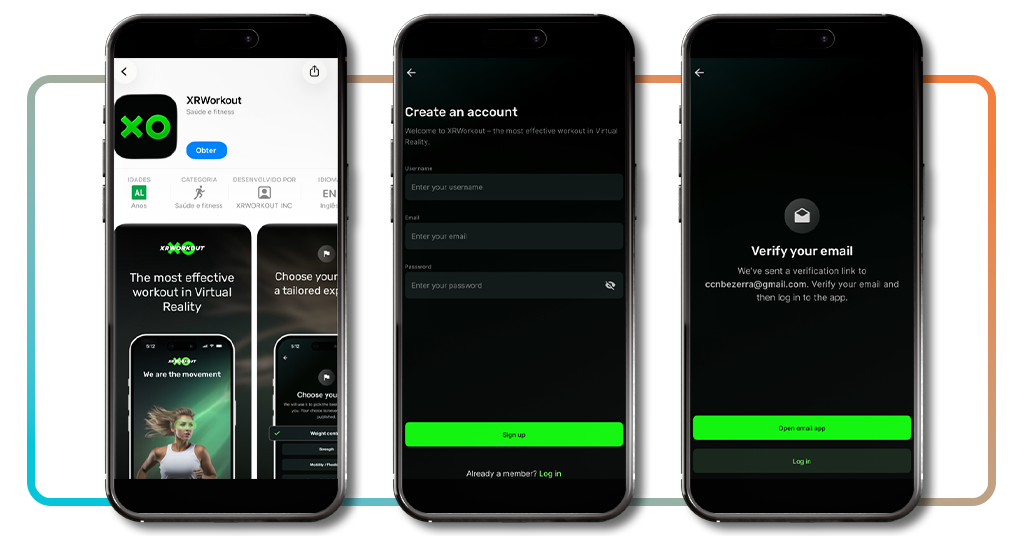
Step 1: download the app and create an account
Grab XRWorkout from the App Store ou Google Play, open it up, and tap ‘Sign Up’. You’ll enter a username, email, and password, then verify your email before logging in.
After your account’s confirmed, the app walks you through a quick setup covering your fitness goals and preferences, so your first session already reflects what you’re training for.
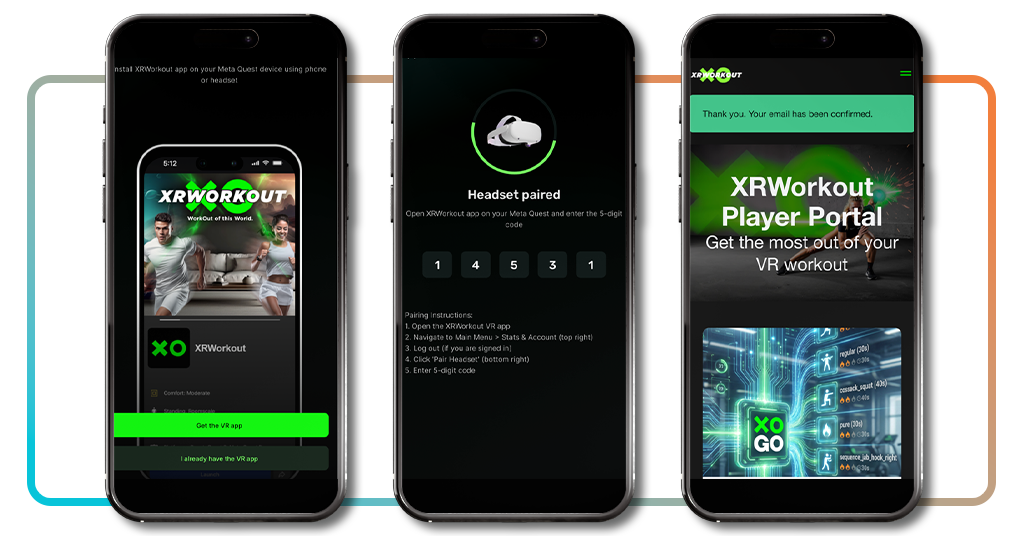
Step 2: pair your Meta Quest headset
In the app, you’ll find a pairing screen with a five-digit code. Open XRWorkout on your headset, navigate to ‘Stats and Account’, tap ‘Pair Headset’, and enter that code to link both devices.
Once paired, your phone and headset stay connected, so your training data, progress, and settings sync automatically without needing to repeat the process every time you work out.
Step 3: pick your workout and move
Strapping into a VR fitness app for the first time and actually moving through a full session is where everything clicks into place and the results start adding up over time.
XRWorkout gives you a full menu of workouts to choose from. Pick one that fits your energy level, step into the environment, and let the session pull you through the full routine.
Do I need to pay to train through the app?
XRWorkout runs on a freemium model, meaning you can download it and start training without spending anything, though the free tier does come with some limits you should know about.
The paid plans open up a lot more of the platform, from unlimited workout time to exclusive environments and private multiplayer, so the experience scales considerably once you upgrade.
Figuring out which plan fits your situation is easier once you see exactly what each tier includes, and this VR fitness app makes the options clear enough to decide without overthinking it.
Free access versus premium plans
The Starter plan costs nothing and gives you 8 minutes of training per day, access to 3 environments, and public multiplayer, which is a reasonable way to test the platform.
Pro membership runs $ 9.99 a month or $ 69.99 a year, both with a 14-day free trial. There’s also a Lifetime Pro option at $ 94.99 if you’re ready to commit long-term.
What the paid tier unlocks for you
Pro removes the daily time cap, giving you unlimited workouts alongside access to every movement in the app, the full music catalogue, exclusive environments, and custom creations.
Private multiplayer is also a Pro feature, so if training with a specific group of people matters to you, that alone gives you a solid reason to consider upgrading from the free plan.
Getting value from the free version
The Starter plan makes sense if you’re new to VR training and want to see how your body responds before putting money into a subscription. Eight minutes is pretty reasonable.
The free tier of a VR fitness app like XRWorkout still gives you real workouts, public multiplayer, and enough variety to know if the platform fits your training style long-term.
En rapport : Comprendre et utiliser Strava : Votre tracker de fitness
Tips for staying consistent with VR workouts
Consistency is the part most fitness plans get wrong, and VR training is no different. Showing up regularly matters a lot more than going all-out once and disappearing for two weeks.
XRWorkout (Android | iOS) gives you enough variety to keep sessions fresh, but the tools only work if you build habits around them and treat your training schedule like any other commitment.
Staying consistent inside a VR fitness app comes down to a few practical decisions that have nothing to do with willpower and everything to do with how you structure your routine.
Set a fixed schedule each week
Picking specific days and times for your XRWorkout sessions removes the daily negotiation with yourself about whether you feel like training, which is where most people lose the battle.
Treat those slots the same way you’d treat a meeting or an appointment. Once the headset goes on at the same time each week, the habit builds itself without much effort.
Track progress through the Player Portal
XRWorkout’s Player Portal gives you a clear view of your training history, so you can see exactly how your output, endurance, and session frequency have shifted over time.
Watching those numbers move in the right direction is its own motivation. It turns abstract effort into something concrete you can point to, which makes it harder to justify skipping a session.
Join multiplayer sessions for accountability
Training alongside other people changes how hard you push, and using a VR fitness app with live multiplayer like XRWorkout means that social pull is built directly into every session you join.
When someone else is in the same virtual space working through the same circuit, slowing down or quitting early stops feeling like an option, and your output reflects that every time.
4.5/5
Real results from a virtual training world
XRWorkout turns a headset into a full training setup that adapts to you, challenges you, and keeps the experience fresh enough that skipping starts to feel like the worst option.
Le présent Idées reçues guide showed you how this VR fitness app covers everything from strength work to balance drills, and multiplayer sessions that make every workout worth strapping in for.
Stay exploring Idées reçues for more articles on VR fitness and fitness apps that help you train harder, move better, and actually enjoy the process of getting in shape.