

Somewhere out on the water right now, thousands of ships are moving cargo, passengers, and supplies across every ocean on the planet. Most people have no idea what’s sailing past their coastline on any given day, and for a long time there was no easy way to find out. MarineTraffic is a ship tracking app that turns something once reserved for port professionals into a free tool anyone can pull up in seconds.
Le présent Idées reçues guide covers everything the app has to offer, from tapping a vessel to see its full journey history to following entire fleets across open oceans. It’s the kind of tool that hooks you the first time a ship icon moves across your screen and you realize you’re watching it happen live, anywhere in the world. Keep reading and learn how to turn your phone into a vessel-tracking machine.
En rapport : Turn Your Phone Into a Real-Time Emergency Broadcast Tool
Most reliable Ship tracking app
MarineTraffic (Android | iOS) has built a reputation over years of real-world use by professionals who can’t afford to work with outdated or unreliable vessel data.
It pulls live AIS data from a global network of receivers, updating ship positions in real time across every major route. This ship tracking app is trusted by port authorities worldwide.
It covers everything from small coastal vessels to massive cargo ships, all displayed on a map that’s easy to read and navigate on any mobile device.

4.8/5
Features available in the MarineTraffic app
- Live vessel positions: see every ship’s location updated in real time on an interactive global map, covering coastal waters and major international shipping lanes;
- Voyage history and details: pull up any vessel’s full trip record, including its origin, destination, current speed and the route it’s taken to get there;
- Fleet monitoring tools: group vessels you follow into custom fleets and keep tabs on multiple ships at once without jumping between individual searches constantly;
- Weather and wind overlays: layer live weather conditions directly onto the map to see how wind and sea conditions line up with active vessel movements nearby.
Track any vessel with a single tap
This ship tracking app makes it incredibly easy to go from a blank map to a full vessel profile in one second, no searching through menus or filling out forms required.
Tap any ship icon, and the app pulls up everything attached to that vessel: its name, flag, type, speed, where it’s coming from, and where it’s headed next.
It’s the kind of feature that turns a casual look at the map into a full deep dive, and once you’ve done it once, you’ll want to tap every ship you see.
Free access with no account needed
Open the app and the map loads immediately with vessels already moving across it. No registration wall, no email required, and no setup process standing between you and live ship data.
For anyone who wants to explore the ship tracking app without any strings attached, the free version covers a solid range of features tied to vessels near your location.
Creating an account unlocks the ability to save favorite vessels and build personal fleets, which is worth doing once you find yourself coming back to the same ships regularly.
Step-by-step: how to monitor ships with the MarineTraffic app
MarineTraffic (Android | iOS) takes almost no time to set up, and the whole process from download to live vessel tracking wraps up in under a minute on any phone.
The setup is about as easy as it can get, and this ship tracking app doesn’t ask much from you before putting a live map of the world’s vessels in your hands.
Follow along and you’ll have ships moving across your screen before you know it, with full vessel details just one tap away from the moment the app opens.
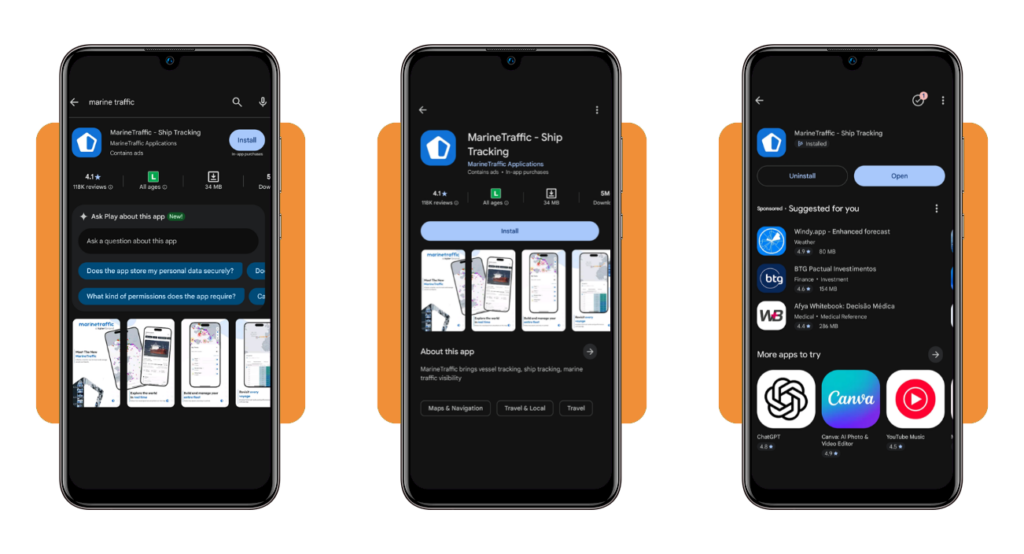
Step 1: download the MarineTraffic app on your phone
Access the App Store or Google Play, search for “MarineTraffic – Ship Tracking”, and hit download. The app is free and takes up minimal space on your device.
Once it’s installed, open it, and you’re looking at a live map immediately. No account setup, no permission hoops to jump through before the vessels start appearing on screen.
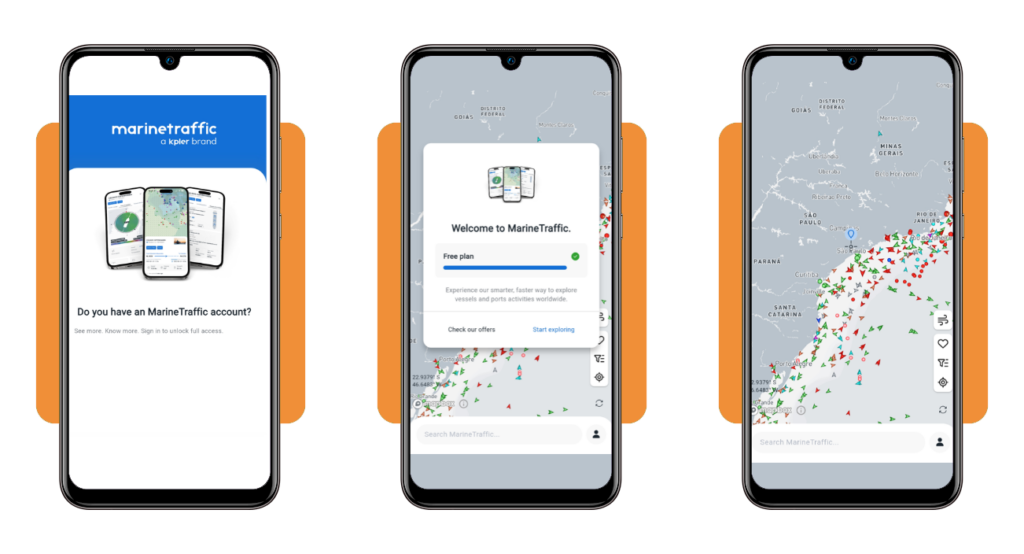
If you do want to create an account, the option is right there on the home screen. It takes about a minute and unlocks the ability to save vessels and build fleets.
Step 2: open the app and explore nearby vessels
The map loads with vessel icons already scattered across it, each one representing a real ship moving in real time somewhere in the world near your location.
Zoom in and out to see how many ships are in your area. This ship tracking app centers the initial view around your location, so coastal users will see the most activity right away.
Use the weather and wind overlays to add another layer of context to what you’re seeing. It turns a simple map view into something far more informative and engaging.
Step 3: tap a ship to see its full details
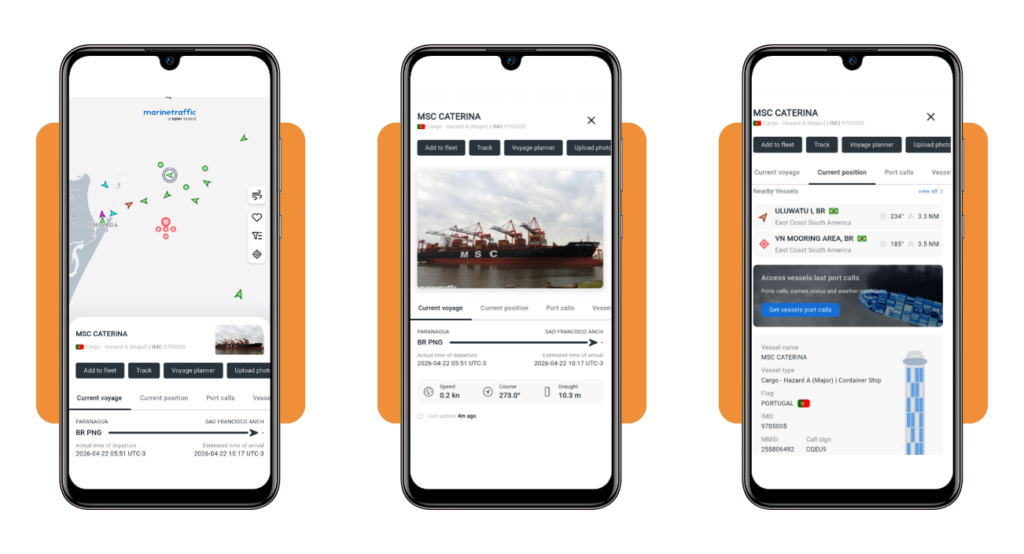
Pick any vessel on the map and tap it once. A panel slides up with the ship’s name, flag, type, current speed and the destination it’s headed toward.
Scroll through the ship tracking app to see vessel profile and you’ll find photos of the ship, its full voyage history and the exact route it’s taken to reach its current position.
If it’s a vessel worth following, add it to your favorites from the same panel. It saves you from having to hunt for it on the map every time you check in.
En rapport : See Real-Time Air Traffic With This Flight Tracker App
Tips for better signal and efficient tracking
MarineTraffic (Android | iOS) does a lot of the heavy lifting on its own, but a few small adjustments to how you use it make a noticeable difference in what you get out of it.
Not every feature is obvious at first glance, and this ship tracking app has enough going on under the hood to reward anyone who takes a little time to dig in.
The more you explore it, the more useful it gets, and some of the best parts of the experience come from features that don’t announce themselves on the main screen.
Switch to Satellite AIS for open ocean coverage
Terrestrial AIS receivers only reach so far, and once a vessel moves past coastal waters, it drops off the map entirely if you’re relying on ground-based coverage alone.
Satellite AIS picks up where land-based receivers stop, pulling vessel signals directly from orbit so you can follow ships crossing the Atlantic, Pacific or any stretch of open water.
Upgrading to the Mobile Pro plan is what unlocks this feature, and for anyone tracking vessels that spend time far from shore, it’s the single most valuable addition to the app.
Save your favorite vessels for faster access
Instead of scanning the map every time you want to check on a specific ship, saving it to your favorites means it’s always one tap away from the home screen.
You’ll need a free account to use this feature, but this ship tracking app makes the whole process quick, and the payoff is immediate once you’ve got a few vessels saved.
Build out a personal fleet from your saved vessels, and you can monitor all of them from a single view, which is a real time-saver when you’re following multiple ships.
Enable weather layers for smarter voyage monitoring
The weather overlay in MarineTraffic isn’t just a nice extra; it adds real context to what you’re seeing when vessels are navigating through rough or changing conditions on the water.
Turn on the wind layer and you’ll see how conditions line up with active ship routes, giving you a much clearer picture of what a vessel is dealing with out at sea.
Combining vessel positions with weather data is what makes this ship tracking app useful beyond location checks, turning it into a tool for following voyages with full awareness.
Who uses the MarineTraffic app
From people whose jobs depend on knowing where vessels are to those who just spotted a ship from the beach and got hooked, MarineTraffic draws in a surprisingly wide crowd.
What makes this ship tracking app stand out is how well it serves different kinds of users without making them feel like they’re using a watered-down version of something built for someone else.
Port workers, anxious families, and weekend explorers all open the same app and find something really useful waiting for them, each for completely different reasons.
Maritime professionals and port authorities
Port authorities and shipping companies rely on accurate vessel data to keep operations running, and MarineTraffic gives them a mobile option that holds up in real environments.
Fleet managers use it to monitor multiple vessels at once, cross-referencing positions with schedules and weather conditions to stay on top of any situation developing out at sea.
People working in logistics, customs, or port operations having live vessel data on a phone rather than being tied to a desktop system changes how quickly they can respond to things.
Families tracking loved ones at sea
When someone you care about is working on a vessel, the distance hits differently. Knowing the ship is moving and on track does more for your peace of mind than any phone call.
MarineTraffic lets families follow a specific vessel by name, and this ship tracking app updates its position often enough that you’re never left wondering where it was hours ago.
With the ship tracking app’s favorites feature, you can save the vessel and check in whenever you want without having to search for it from scratch every single time.
Shipping enthusiasts and curious explorers
Not everyone using MarineTraffic has a professional reason for it. Plenty of people download it after spotting a massive cargo ship from the shore and wanting to know more about it.
That passing interest turns into something you can act on once the ship tracking app pulls up the vessel’s name, origin, cargo type, and full route history in a couple of taps.
Hours can disappear watching vessels queue up, dock, and depart around the world’s busiest ports, with every ship on the map hiding a story worth looking into at least once.
En rapport : NOAA Weather Unofficial: Your Personal Weather Station
4.8/5
Your window to the world’s waterways
MarineTraffic takes something that once lived behind expensive professional systems and puts it in your pocket, free to use and ready the second you open it on your phone.
Le présent Idées reçues guide covered everything the ship tracking app brings to the table, from live vessel positions and voyage history to satellite coverage that follows ships across open oceans.
Keep browsing Idées reçues for more reviews on tracking tools and apps that put real-time data right where you need it, with no expertise required to get you started.




