You love classic games, but the thought of getting five different consoles to play your favorite titles is exhausting, not to mention expensive. This game emulator app takes care of that issue.
GB4 Retro Games squeezes NES, SNES, and GBA classics into one addictive little app, and Idées reçues built this guide to show you how it works so you can start playing right away.
En rapport : Emploi de testeur de jeux vidéo : gagnez plus de 1 TP 6 T 20 par heure en testant des jeux

4.6/5
What’s the best game emulator app?
GB4 Retro Games (Android | iOS) puts a mini console on your phone, loaded with pixelated adventures from the past, giving your old favorites a fresh place to live again on screen.
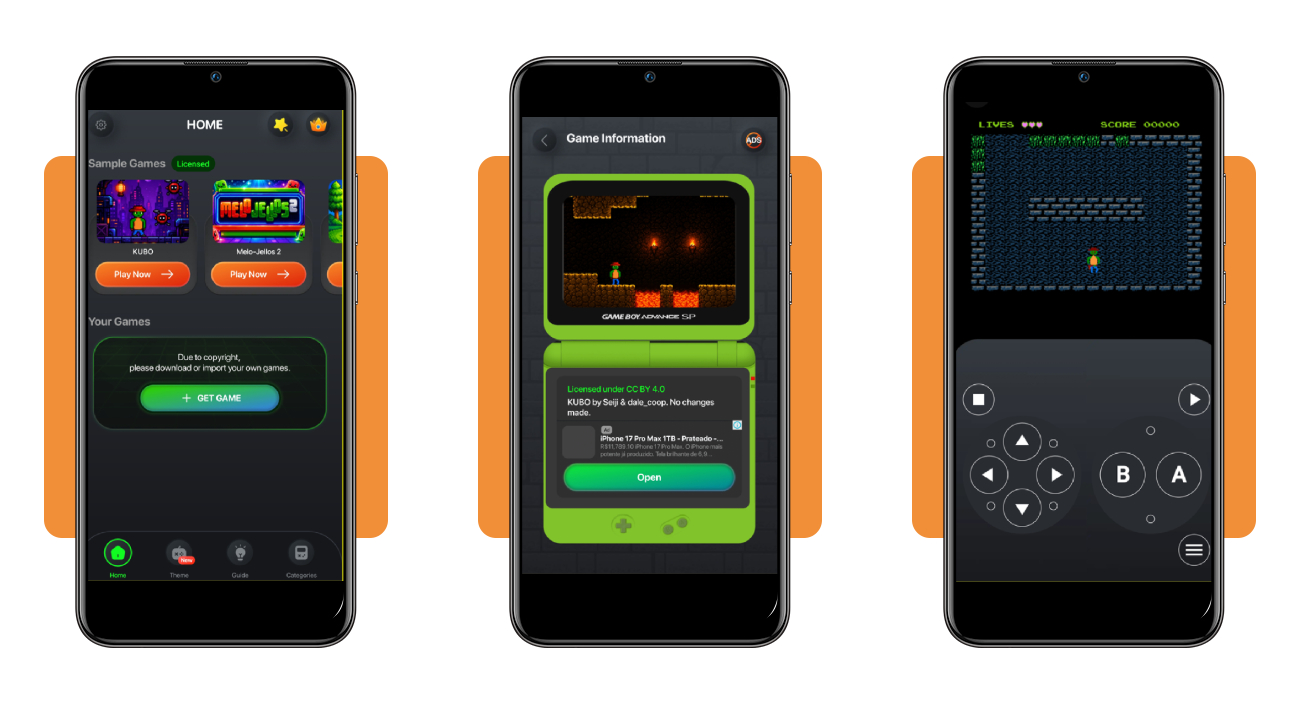
Sample titles like KUBO and Melo-Jellos 2 sit ready to play the moment you open this game emulator app, letting you try them for free before adding your own library.
With cover art, sound effects, and smooth controls, GB4 Retro Games makes each session feel like flipping through a treasured mixtape stacked with unforgettable childhood game memories.
Features available in the GB4 Retro Games app
- Favorites and search: mark favorite titles instantly and search through your library fast, skipping past games you barely touch instead of scrolling for ages;
- Sample game library: dive into a handful of licensed titles included from the start, giving you something fun to play without downloading anything beforehand;
- Import your own games: add extra titles beyond the samples by importing files directly, expanding your library well past what ships with the app;
- Regular library updates: refresh your entire collection anytime through a simple update button, keeping new titles and fixes available without needing a separate download.
Multiple consoles packed into one app
Booting up a Zelda title on Game Boy Color one minute and then switching to Street Fighter II Turbo on Super Nintendo the next takes literally only a couple taps.
A few games already sit organized under ‘All Games’ on the home screen, split by console, so hunting through folders for each system never becomes part of your routine.
Custom themes for every kind of player
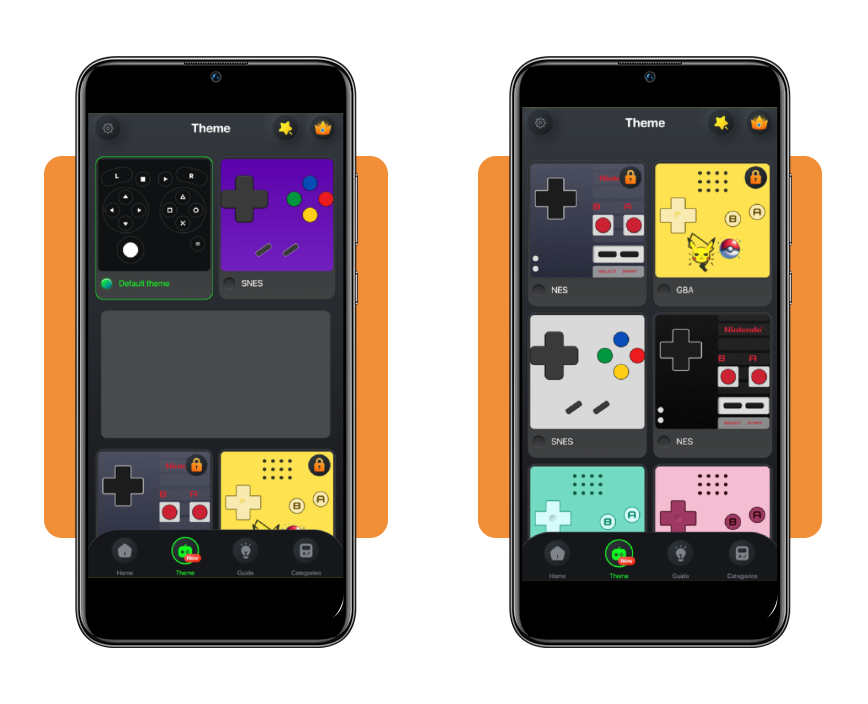
Purple SNES pads are right next to a plain black default skin, giving you options that range from bold color choices to something closer to the original hardware itself.
A crown icon near the top of this game emulator app marks premium extras, hinting at a paid tier for players who want more customization than the free skins currently sitting unlocked.
A built-in guide for beginners
Tapping into the ‘Guide’ tab pulls up simple instructions covering game downloads, file imports, and Game Center Support, keeping every explanation grouped in one convenient place.
Three separate guides break that information apart instead of dumping everything into one long wall of text, making each topic easier to find and follow through.
En rapport : Retro game hub: the top app to play classic games on your phone
How to play classic games using the app: step-by-step
Playing games with GB4 Retro Games (Android | iOS) on your phone takes less effort than digging through a closet full of old cartridges and dusty console wires nobody wants to untangle.
The setup process is quick, and this game emulator app walks new players through each part of it without demanding external apps or software to get things running.
Each screen keeps things simple, offering a user-friendly interface with a minimalistic touch that will take you from the download to your first gaming adventure in minutes.
Étape 1 : téléchargez l’application sur votre appareil
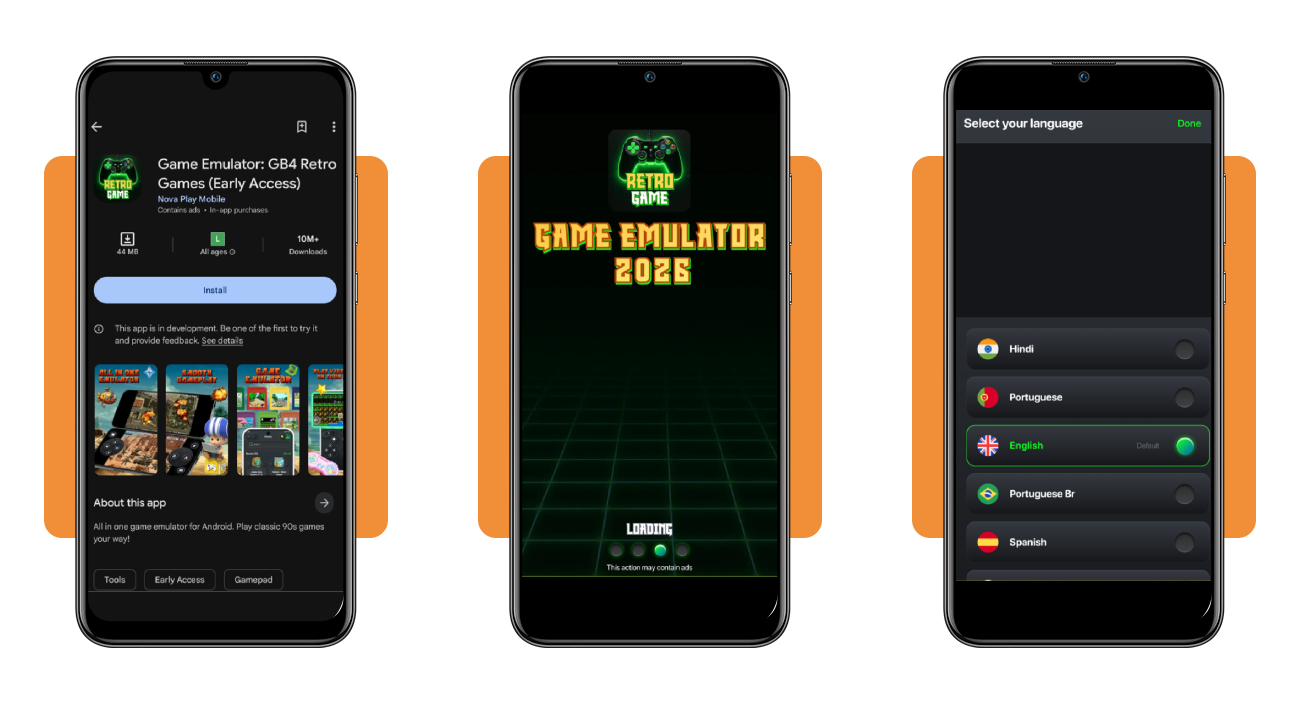
On your phone, go to the App Store ou Google Play and search for ‘GB4 Retro Games’, tapping on it to install once you spot the correct green and black controller icon.
Installation finishes within seconds on most stable connections, and the app opens into a quick language selection screen the moment you tap the icon for the first time.
Step 2: pick a console theme you like
Tap into the ‘Theme’ tab located in the bottom menu and browse through skins ranging from a plain black default to bright, playful colors made for casual players.
Locked options like the Pikachu-themed yellow skin sit reserved for premium unlocks, but plenty of free designs still cover nearly every console style you could ever want.
Step 3: import or add your own games
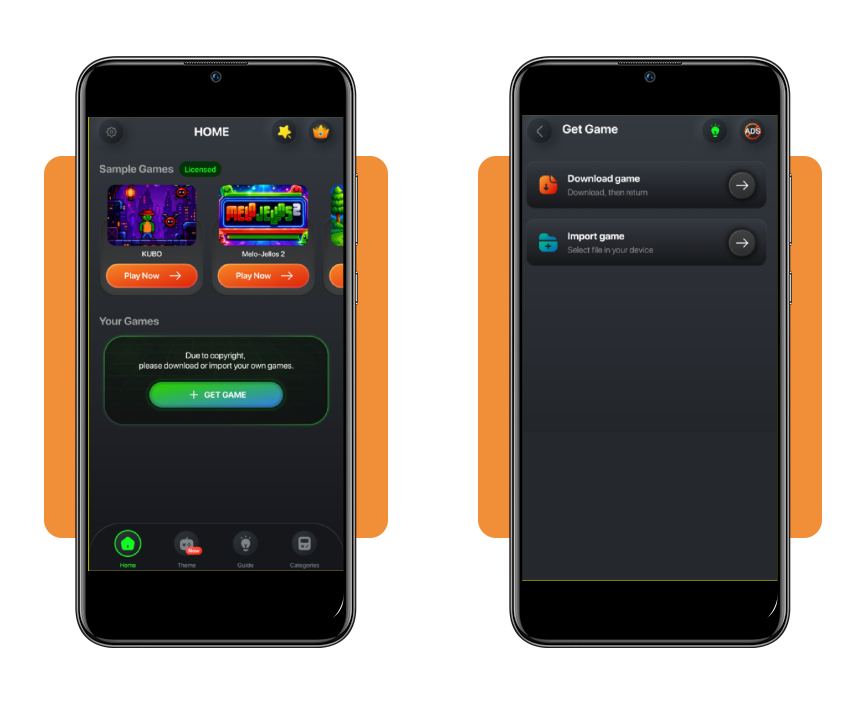
Tap the ‘+ Get Game’ button on the home screen whenever you want to load a file from storage, adding titles beyond the handful of samples this game emulator app includes.
Nothing gets preloaded outside those licensed samples, so building a fuller library depends on files you download or already have saved somewhere on your device.
Step 4: select a sample title to start playing
Navigate to the ‘Sample Games’ section and tap ‘Play Now’ beside a title like KUBO or Melo-Jellos 2 to load that classic pixelated adventure onto the screen.
On-screen controls sit below the game action, featuring a D-pad on one side and buttons like A and B positioned within comfortable reach of both your thumbs.
Best games to play using the emulator
The sample titles in GB4 Retro Games (Android | iOS) give you a taste of classic gameplay before diving into a personal library, each one representing a different console style.
Every game brings its own visual flavor, from neon-colored puzzle screens to pixelated platformers, giving your fingers plenty of variety once this game emulator app finishes loading.
Trying each sample first helps you get comfortable with the controls, so switching between consoles later feels familiar instead of like relearning everything from scratch.
Mega Mountain
Two tiny characters stand across a brick wall in this platformer, hinting at obstacles built from stacked blocks and tight jumps waiting further into the level.
Bold blue skies and simple brick textures give the whole thing a retro puzzle platformer feel, reminiscent of classic console games built around careful timing and precision.
Melo-Jellos 2
Bouncing jelly monsters fill the screen in bright green, red, and blue tones, framed by a glowing neon border that makes the entire screen pop instantly.
Everything about the presentation leans arcade style, suggesting fast-paced action built around matching, dodging, or chasing these colorful jelly characters across increasingly tricky stages.
KUBO
A small character in a red hat navigates a cave filled with lava pits and flickering torches, giving this platformer a moody, adventurous atmosphere from the start.
Licensed under Creative Commons, KUBO stands out as one of the sample titles built specifically for this game emulator app, crediting creators Seiji and dale_coop directly.
NESert Golfing
A golfer lines up a shot beside a single flag planted on open green grass, framed by a starry night sky and a few trees nearby.
Simple visuals keep the focus on gameplay itself, suggesting a relaxed golfing experience built around clean shots rather than flashy graphics or course designs.
En rapport : Application de jeux Flash : jouez à de nombreux jeux Flash classiques sur votre téléphone
4.6/5
Bringing yesterday’s games back to life
GB4 Retro Games (Android | iOS) gives you a simple way to load classic titles onto your phone, packing multiple consoles and sample games into one tidy little app.
Ce guide par Idées reçues shows you everything worth knowing about this game emulator app, including theme choices, importing files, and which sample titles stand out most.
Browse Idées reçues and learn more ways to explore mobile gaming, with fresh guides covering emulators, hidden gems, and other apps worth adding to your phone.