Pet photos often capture expressions so dramatic, funny, or downright chaotic that they practically beg to be turned into something more than a simple picture, especially when your pet seems to deliver reactions that match your mood better than any emoji on the keyboard.
iOS picked up on this universal truth and built a feature that transforms those unforgettable moments into custom stickers that behave like expressive miniatures of your pet inside chats.
The Live Stickers app brings a playful twist to conversations because it elevates your pet’s personality into something you can send with a tap, which feels charming in a way that standard emojis never manage to replicate. Now, creating Pet Emoji from your gallery becomes a quick creative ritual that adds color, humor, and a bit of daily joy to every message you send. Below, you will learn how to make texting adorable — your pet deserves their own emoji!
- Pet Age Calculator: Discover Your Pet’s Real Age Today
- Pet Bingo : Une façon amusante d'apprendre les mathématiques à la maison
- Pet health insurance: affordable coverage for your pets
Create Pet Emoji Using Your Favorite Photos
Creating pet emoji through your pictures is not hard at all. Since iOS detects subjects automatically, it means your pet can easily be the center of attention even if the background is messy.
The system outlines the shape cleanly and lifts the subject from the photo with a level of precision that surprises anyone who has tried editing apps in the past.
Then, the extracted image becomes a sticker that captures your pet’s expression with all its charm, whether they look noble, sleepy, or deeply confused about why you’re pointing a camera at them again.
The Photos app supports various reactions so every emoji feels unique and ready for daily conversations.
These emojis work effortlessly across messages, adding personality to chats with the same energy that pets bring to real life, and turning everyday texting into something more expressive and entertaining.
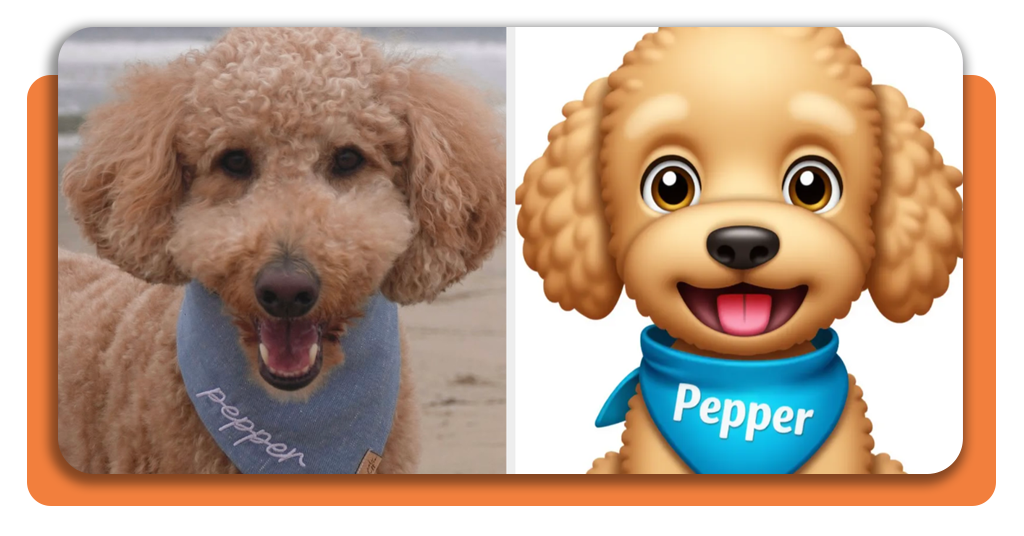
Step-by-Step: Turn Your Pet Into a Custom Sticker
Follow this quick guide below to give your furry friend their own emoji — straight from your photo gallery.
- You probably have the Photos app on your iOS device, but in case you deleted the app, go straight to the App Store and download it;
- Then, open the app and pick a pet picture where the face appears clear enough for iOS to recognize, since clean outlines help the system isolate the subject accurately;
- Press and hold your pet within the image until the glow animation appears, which signals that iOS successfully identified the shape and is ready to lift it from the background;
- Now, you can create a live sticker from the highlighted cutout and adjust small details to match the style you want, selecting options that enhance the expression without modifying the original charm;
- Save the result to your sticker library and check how it behaves inside Messages, placing it over texts or reactions to see which expressions fit your personality;
- Repeat the process with different photos whenever your pet surprises you with a new pose that deserves its own pet emoji, building a small collection that grows organically over time.

Features That Bring Personality to Every Emoji
The Photos app extracts fine details such as fur edges and unique markings that make each pet recognizable even in tiny sticker format, helping the pet emoji retain personality without losing clarity.
Moreover, live sticker effects add depth and bounce to the emoji, giving reactions a more animated behavior that stands out when placed over messages, and these subtle movements make conversations feel lively and spontaneous.
iOS stores the stickers across devices signed in with the same Apple ID, which keeps your collection synced whenever you switch phones or use multiple Apple products.
The sticker drawer inside Messages organizes everything neatly so your creations stay accessible during quick conversations.
Where to Access Live Sticker Tools
The Live Stickers feature is available directly inside the Photos app on devices running the latest iOS update, making it easy to try without any additional downloads.
You can access the same tools through the keyboard in Messages, which keeps the emojis one tap away.
Updates expand the sticker options frequently, adding smoother animations and improved edge detection for even cleaner results.
The tool integrates seamlessly with other iOS features such as shared albums, photo edits, and iMessage apps, offering a complete environment for organizing and personalizing images.
iOS Resource to Create Pet Emoji From Your Photos in Minutes – Conclusion
Turning pet photos into custom pet emojis adds a playful spark to conversations, especially when your pet’s expressions say more than any text could manage alone.
iOS makes the process surprisingly smooth with tools that detect subjects, refine details, and deliver stickers that look polished without any technical effort from the user.
Anyone who enjoys sharing moments with pets will find the feature delightful. If you want to put your furry friend in the spotlight, this is the perfect moment to create pet emojis in seconds with your iPhone photos and make your chats even more adorable.
En rapport : Create Images With Snapchat AI Lens: Step-by-Step
Aimé cet article ? Enregistrez le Idées reçues favoris pour retrouver les derniers outils, les astuces de technologie créative et les innovations en matière de retouche photo.