

Many avid readers are currently dealing with a very real kind of chaos known as collector’s anxiety. It hits when your bookshelf starts looking like a personality trait, but you still have no idea what you actually own. A book tracker app has quietly become the survival tool for anyone who’s ever stood in a bookstore, holding a book like, “Wait… do I already have this? Did I read it? Did I just romanticize reading it?”
These apps turn your phone into a lightning-fast scanner for your entire reading life. One quick scan and your physical shelves start living digitally: neat, searchable, and always with you. It’s like giving your book collection a brain upgrade. And in a world where everything is already competing for your attention, keeping your intellectual life organized is a power move. At Idées reçues, finding tools that make everyday chaos feel sorted is our thing.
- Book Clubs Going Viral: The Trend That’s Redefining Reading
- 5 Best Apps For Book Lovers
- Audible App: Your Portal to Audio Book Bliss
Why use a book tracker app?
A book tracker app is basically your reading brain… but better organized and way less forgetful.
Instead of losing track of what you’ve read or buying the same book twice (we’ve all been there), you get a full overview of your reading universe.
Everything lives in one place: your past reads, your current book, and that dangerously long “want to read” list.
It also adds a layer of intentionality to your reading habits. You can set goals, track progress, and actually see how much you’re reading over time. Suddenly, finishing a book feels like leveling up.
Features available in the Goodreads app
Goodreads, available for iOS et Android, is basically the social network for readers, but without the chaos of regular social media.

4.7/5
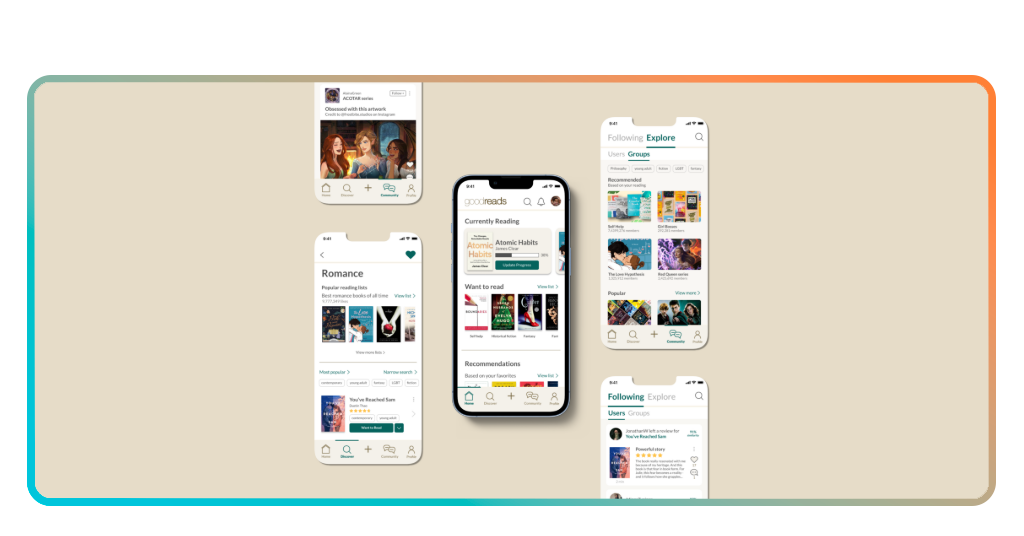
One of its standout features is scanning book covers. You just point your camera, and boom: reviews, ratings, and the option to save it straight to your “Want to Read” shelf. No typing, no guessing.
The app also gives you personalized recommendations based on your taste, so it feels like your algorithm actually gets you for once. You can explore genres, trending books, and even see what your friends are reading.
Tracking is where it really shines. You can:
- Rate and review books;
- Update your reading progress;
- Organize shelves like “read” or “want to read”;
- Join the Reading Challenge (hello, motivation boost).
And yes, it’s social. You can share opinions, send recommendations, and spiral into reviews with other readers who are just as invested as you are.
Step-by-step: how to scan your books using the app
Building a digital library might sound time-consuming, but a book tracker app simplifies the process into a few quick steps.
Step 1: download and create your account
Install the app on your iOS ou Android, and set up your profile. This will serve as the base for your digital library.
Step 2: access the scan feature
Use the built-in barcode scanner to capture the ISBN on the back of your book.
Step 3: add the book to your library
Once scanned, the app automatically identifies the title and allows you to categorize it.
Step 4: organize into shelves
Place the book into categories like “read” or “want to read,” or create custom shelves.
Step 5: repeat and expand your collection
Continue scanning your books to build a complete digital version of your library.
Tips for better library management
First rule: update your app like it’s part of your routine. Finished a book? Log it. Bought a new one? Scan it immediately.
Second: get creative with shelves. You can organize by mood, genre, or even chaotic categories like “books that emotionally destroyed me”.
Reading challenges are also a game changer. Setting a yearly goal adds just enough pressure to keep you consistent without killing the vibe.
Quoting the 95 Percent Group, consistent reading habits contribute to improved comprehension and cognitive development, reinforcing the value of maintaining an organized reading routine.
How to keep improving your digital library
Your library should evolve with you. As your taste changes, your shelves should too.
Clean up your lists once in a while. Remove books you’re no longer interested in and highlight the ones you’re actually excited about.
Use the app to discover new reads instead of doomscrolling. Recommendations and friend activity can lead you to books you wouldn’t have found otherwise.
If you want to go deeper into organizing your digital life, this guide on Insiderbits Media Organizer is a solid next step.
For broader organization strategies, this guide on Insiderbits Media Organizer explores ways to manage different types of content efficiently.
The goal is not just to track books, but to create a system that supports your reading journey.
The quiet power of knowing your collection
Maintaining a digital record with a book tracker app is basically giving your brain a well-deserved break.
Rather than trying to remember every title, author, and random plot twist, you offload all that mental clutter into one clean system.
That’s what psychologists call cognitive offloading, but in real life it just feels like… peace. And that pile of unread books staring at you?
Way less intimidating when it’s neatly organized in your app. Suddenly, it doesn’t feel like a chaotic guilt stack anymore; it feels like a curated reading list waiting for its moment.
On the practical side, a book tracker app is also saving you money. No more accidentally buying the same book twice in different covers because it “looked new”.
It happens more than people admit. Plus, if you’re the kind of reader who treats books like collectibles, having everything cataloged digitally is actually smart.
In worst-case scenarios like losing your collection, you’ve got a cloud-backed record of what you owned.
4.7/5
Turning pages into a system
Goodreads takes something messy and makes it feel intentional. It’s free, easy to use, and packed with features that actually make reading more engaging.
At the end of the day, a book tracker app is not just about organization. It’s about making your reading life feel like something you’re actively building, not just trying to keep up with.
And honestly? That’s a much better story to be part of.




