Ever brought home a gorgeous fern and watched it crisp up after one forgotten watering? A plant care app can end that cycle with timely reminders that turn every pot into a showpiece.
This guide by Insiderbits introduces Planta, a smart schedule maker for watering and fertilizing your collection. Read on and see how to fill your garden with magazine-worthy greenery.

4.8/5
Which is the best plant care app?
Planta (Android | iOS) stores 40 million plants in its database and uses a camera scanner to name any leaf, flower, or herb you point it at, then lists its basic growing needs.
Once the scanner names your plant, this plant care app builds a custom calendar for misting, pruning, repotting, and cleaning that adapts to your pot material, room light, and species.
The app tracks seeds and cuttings from the first sprout with a Premium plan, lets you add custom tasks the schedule skips, and links you with a community that answers any questions.
Key features within Planta
- Light meter: check how much sun a corner receives before you bring a plant home, and place the pot where the leaves won’t scorch or stretch;
- Toxicity labels: plant pages list whether leaves are safe around pets and children, helping you screen arrivals before a curious cat or toddler takes a bite;
- Care share: invite a trusted friend or relative into your schedule and watch completed tasks appear in real time, keeping your plants covered while you travel;
- Snooze and skip: delay any reminder when the soil still feels damp, and the plant avoids an extra pour that could drown its fragile root ball.
Plant care that adapts to your weather
When a heat wave rolls in, the plant care app adjusts your watering dates and sends a warning before frost or scorching afternoons reach your potted herbs and garden beds.
Rain waters outdoor pots for you, and Planta (Android | iOS) logs the downpour as a finished task. When you relocate, update “Location” in “Settings” to receive the right alerts.
Rescue sick plants before it’s too late
Yellow leaves, brown spots, and sudden pests signal trouble, and Dr. Planta analyzes the symptoms. The AI maps a treatment plan using years of botanical data and your plant’s profile.
When the AI can’t crack a tough case, the plant experts at Planta (Android | iOS) step in, and Premium members can email photos or questions for personal advice on tricky plant problems.
Step-by-step: how to enable automated care alerts for plants
A calendar reminder can’t tell a thirsty peace lily from a drought-loving snake plant. Planta (Android | iOS) tracks both schedules and nudges you when either plant needs water or food.
The setup works like a short, friendly multiple-choice quiz where you tap answers about your home and plants, and the app converts those answers into a personal care schedule.
Whether you own a lone cactus or fifty pots, this plant care app handles the scheduling math and leaves the remembering to your phone, freeing you to enjoy the foliage.
Step 1: download the app and sign up
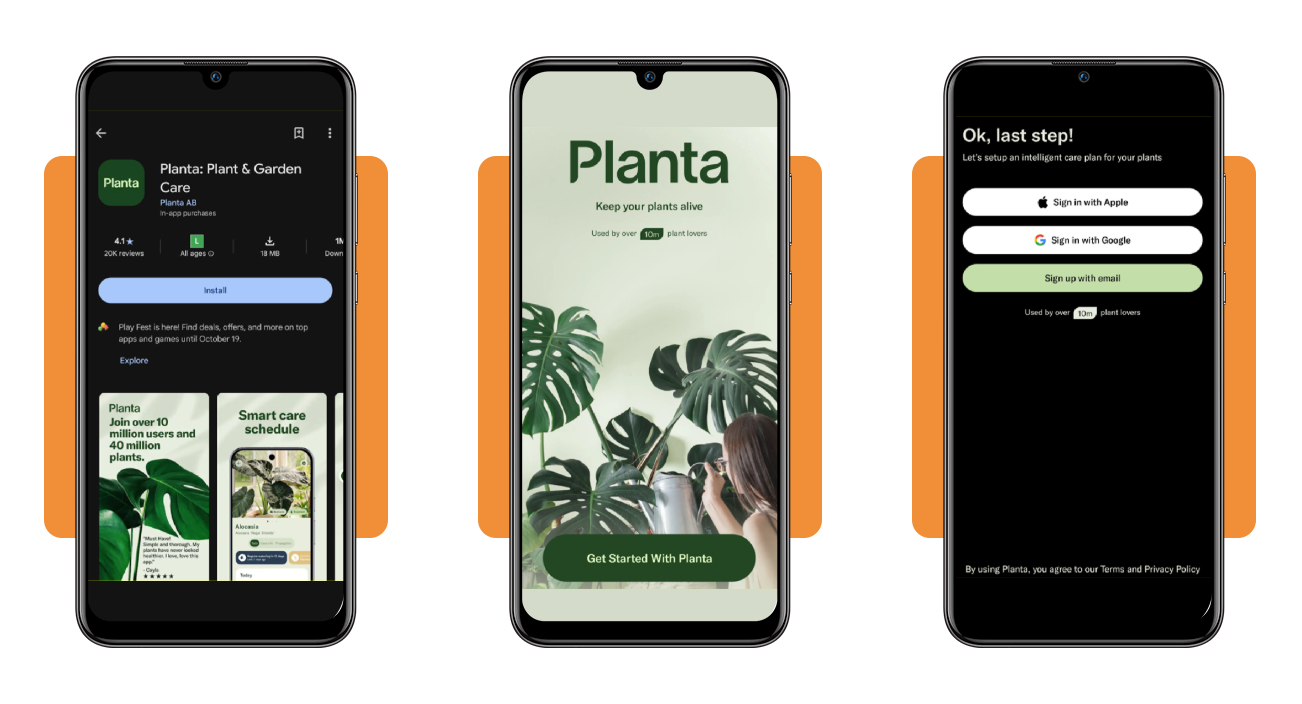
You can grab Planta from Google Play on Android or from the App Store on iOS, then tap “Install” or “Get” and wait for the free download to finish before you open the app.
Tap “Get Started With Planta” to begin the setup, answer the opening questions, then pick Apple, Google, or email when the account screen appears near the end of the process.
Step 2: set your goals and share your location
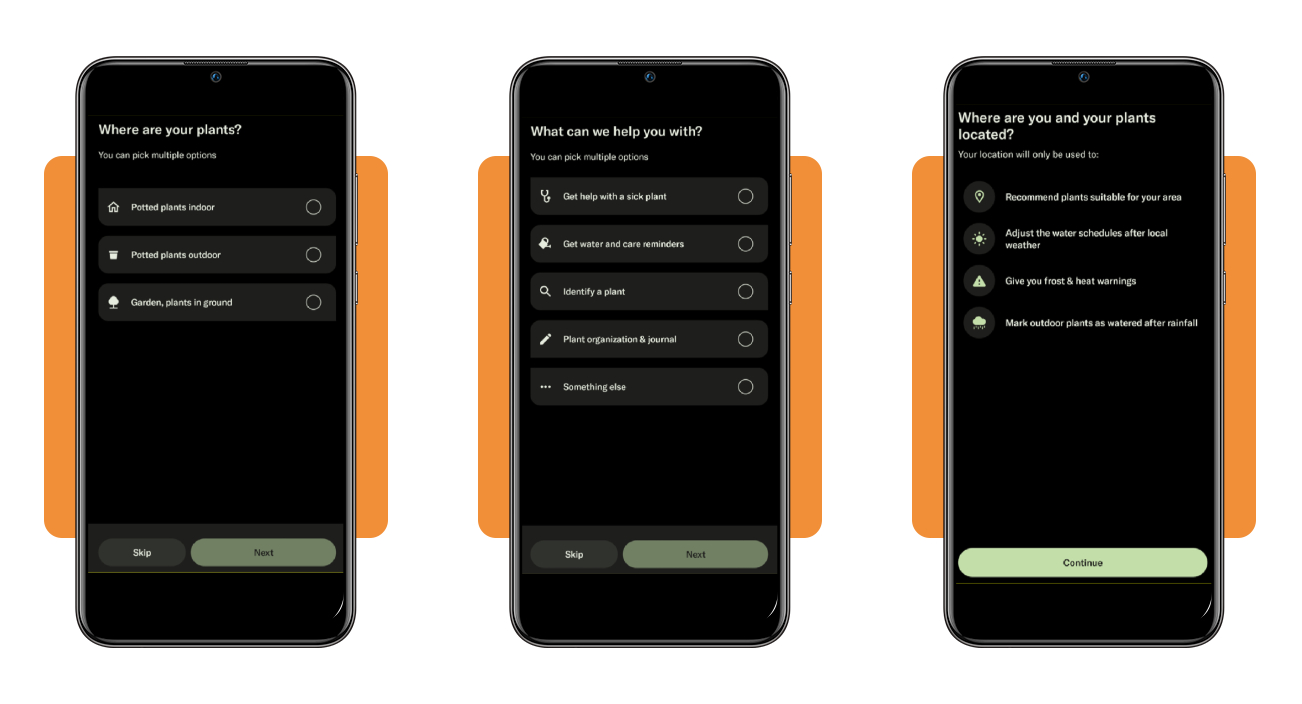
Select indoor pots, outdoor pots, and garden beds as needed, then tick water and care reminders along with any other goals when the app asks what you need help with.
Choose the interest and skill levels that fit your routine, then tap “Continue” on the location screen and let the plant care app read where your plants live and grow.
Step 3: add your plant and create its site
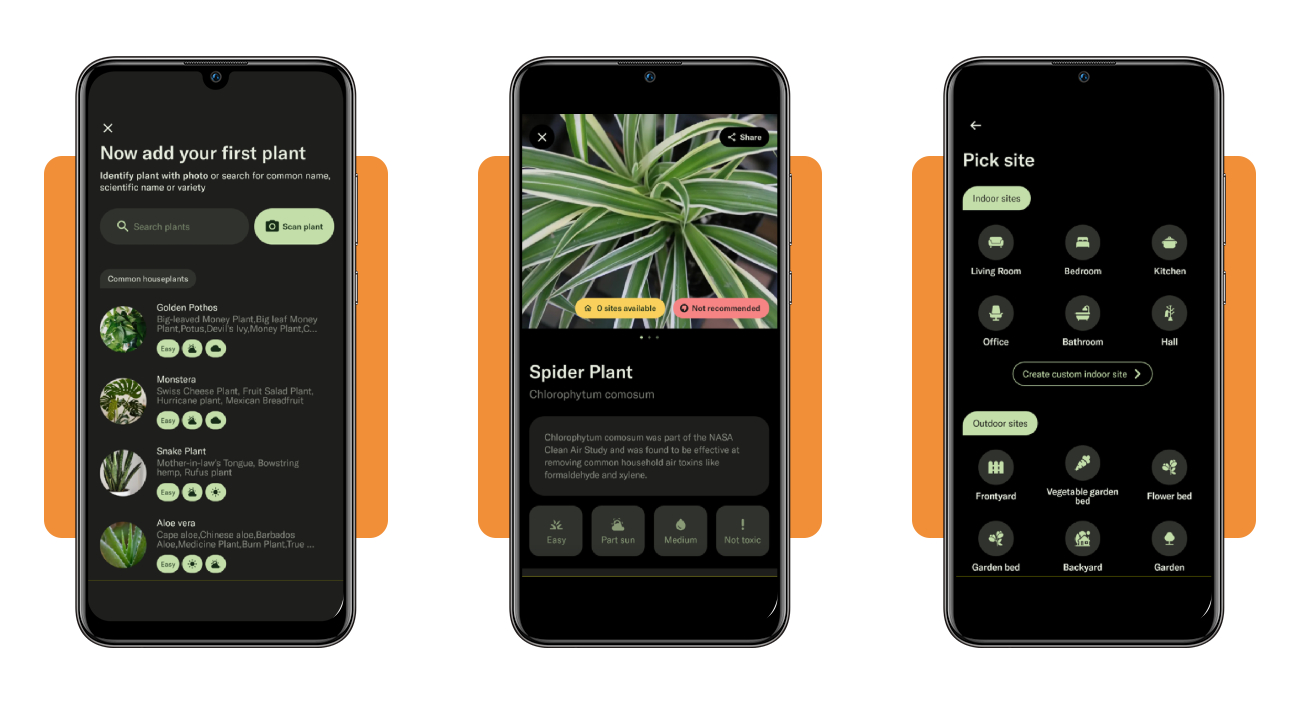
Type your plant’s common or scientific name in the search bar, or tap “Scan plant” to identify it with a photo, then tap “Add plant” and select “A mature plant” if that’s the case.
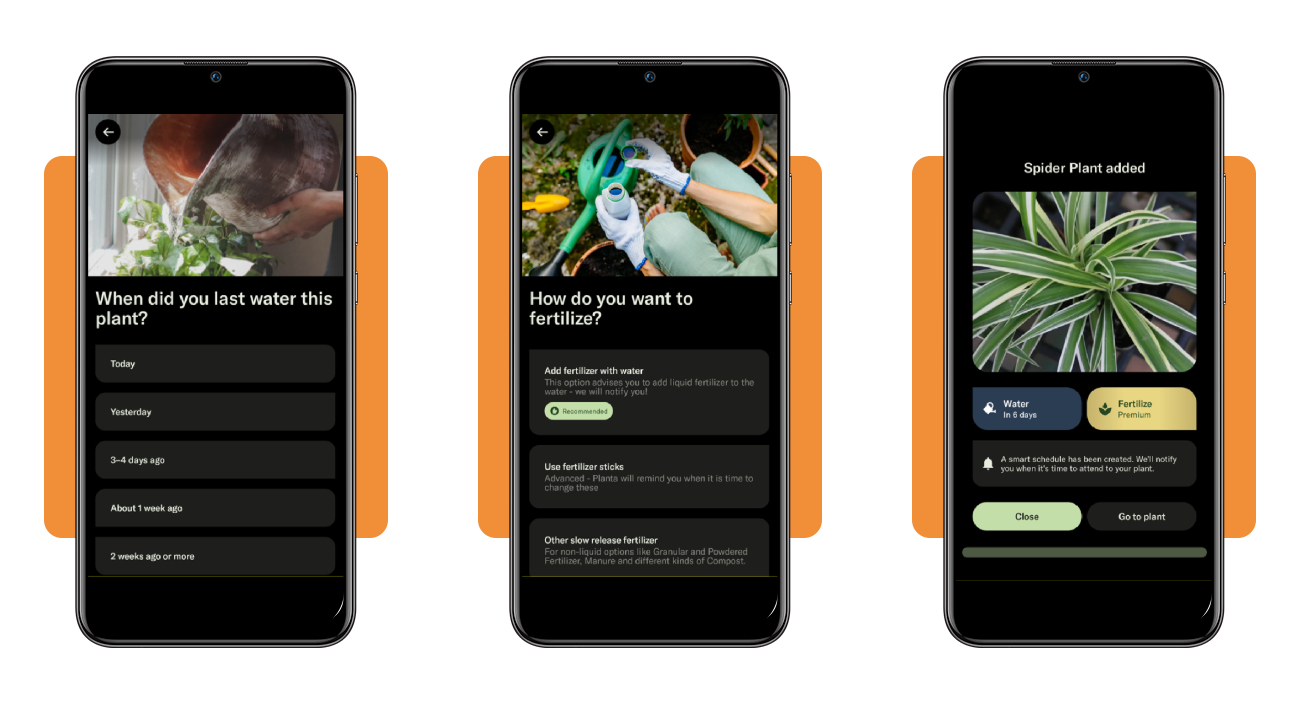
Next, tap “Create a new site”, pick a room or garden spot, set the light level, and choose pot or ground, then answer the repotting, pot material, and last watering questions.
Step 4: pick fertilizer and confirm your schedule
Pick “Add fertilizer with water” for the recommended liquid routine, or choose fertilizer sticks or another slow-release option, and skip “Don’t remind me” unless you never feed your plants.
Tap “Go to plant” to review your upcoming tasks and find your first watering date. Fertilizer reminders stay locked until you upgrade to Premium, while watering alerts work without it.
Essential apps for tending to your garden
A garden asks for more than watering alerts, and pairing this plant care app with a few specialist tools covers the jobs its schedule leaves open across your garden beds.
The apps in this roundup cover the surprises that show up once your plants leave the windowsill and meet garden soil, shifting weather, and whatever else wanders through the yard.
Install the ones that match your yard, test them on a couple of plants, and keep any that earn a spot on your phone’s home screen beside your watering alerts.
Spot toxic plants and weeds with PictureThis
PictureThis (Android | iOS) identifies plants from a quick photo against a database of more than 400,000 species, names weeds, and warns you when a plant is toxic to kids, cats, or dogs.
Frame a leaf or flower in good light and capture it to read the name and toxicity warning, or scan a damaged leaf to receive a diagnosis for the problem.
Identify bugs and mushrooms with LeafSnap
LeafSnap (Android | iOS) identifies plants, mushrooms, insects, and weeds from a photo, diagnoses problems on leaves, and keeps a journal of your finds along with care reminders.
Point the camera at a bug or mushroom, tap “capture”, and read the match, then add a reminder for the fix as a custom task in this plant care app.
Plan and plant your garden with Seed to Spoon
Seed to Spoon (Android | iOS) is a visual garden planner that builds a planting calendar around your ZIP code and includes more than 150 growing guides for all the crops you choose.
Drag crops onto a grid that mirrors your beds, check the calendar for your planting dates, and ask Growbot, the built-in assistant, whenever a new growing question comes up.
How to track plant growth progress
A growing plant changes slowly enough that you’ll miss a week of progress, and a written record shows whether the care routine you built works for your pots and beds.
Keep a notebook or spreadsheet within reach, and let the plant care app hold your care history, giving you a record of what your plants received and how they responded.
Stalled growth, shrinking leaves, and stems that stretch toward a window all show up in your growth records long before they become obvious by eye, giving you time to adjust.
Measure height and width on a set day
Grab a ruler or tape measure, hold it at soil level, and record the height to the tallest tip, then measure the widest spread from one edge to the other.
Write both numbers in your notebook along with the count of new leaves or buds, and repeat the routine on the same weekday you chose to keep the comparisons fair.
Photograph your plants from the same angle
Stand in the same spot, hold your phone at the same height, and frame the plant against the same plain background, letting growth be the only change between the shots.
Upload the photo as a progress update in the plant care app, then scroll through the growing timeline to watch new leaves unfurl, stems climb, and buds swell into flowers.
Log harvest results to plan next season
After a harvest, write down the picking date, the weight or count, and the flavor, plus any pests, heat waves, or storms that hit the plant during the growing season.
Compare those notes when you order seeds, then move high performers to the best garden beds, drop varieties that disappointed you, and shift sowing dates by a week or two.
4.8/5
Hand your watering schedule to your phone
Planta (Android | iOS) keeps track of when your plants need water, misting, pruning, or a fresh pot, and that frees you to enjoy your green space without checking a calendar.
In this article, Insiderbits showed you how to use this plant care app, find garden helpers worth keeping, and track growth with notes and photos that show progress.
Keep reading Insiderbits for plant and garden care articles that help you rescue droopy plants, plan next season’s harvests, and enjoy weekends in a yard you’re proud of.