
Plants have a way of softening a home, making everything more lively and brighter. If you’re thinking of adding more green to your space, having a plant identifier app is a great way to start.
PictureThis lets you snap a photo and identify a plant in seconds, offering care tips, including whether it’s safe around pets. Keep reading this Insiderwissen guide and learn all about it.
Verwandt: KI-Gartengestaltungs-App: Gestalte jetzt kostenlos deinen Traumgarten

4.5/5
Which is the best plant identifier app?
PictureThis (Android | iOS) names the plant in front of you, revealing its common name, scientific name, light needs, watering schedule, soil preferences, and toxicity rating.
Homeowners with pets get an added layer of protection, as this plant identifier app flags toxic species by name and warns you before trouble starts inside your home.
With over 400,000 species in its library and a 98% accuracy rate, PictureThis (Android | iOS) handles rare finds and common houseplants without missing a single detail along the way.
Features available in the PictureThis app
- Toxic plant warnings: the ‘Basic Info’ tab lists toxicity to people and pets, marking each species safe or unsafe for kids and other household members;
- Personalized care plans: the ‘Care’ tab lists watering frequency, fertilizer schedule, pruning season, and repotting season based on that exact species, size, and age;
- Weed identification: the ‘Weed ID’ feature scans a sprout in your yard, names the species, and explains removal methods before it spreads through your garden beds;
- Expert consultation: the app connects you with licensed botanists around the clock for questions about pests, diseases, sunlight, or anything else your garden faces.
Snap and identify plants instantly
Center the leaf, flower, or bark inside the frame, following the ‘Snap Tips’ guide, and the camera returns a species match along with several close alternatives to check.
The recognition engine inside this plant identifier app studied millions of photos from real gardens, letting it separate species with identical leaves and mark the correct one with detail.
Diagnose sick plants within seconds
Choose ‘Whole plant’, ‘Leaves’, or ‘Stems’ inside the ‘Diagnose’ tab, then photograph the trouble spot so the app narrows down pests, disease, or watering issues behind that damage.
Each diagnosis links to a treatment plan, plus tools like the ‘Water Calculator’ and ‘Light Meter’, so you can correct the cause with the right water or light amount.
Track your entire plant collection
Every plant you save lands inside ‘My Garden’, complete with its snap history, dated entries, and reminders for watering, fertilizing, and repotting that specific plant right on schedule.
This plant identifier app builds a wishlist beside your saved plants, matching future purchases to the light, space, and care level already suited to your home.
Verwandt: Take better care of your plants: download this garden care app
Step-by-step: how to identify any plant instantly
Naming a plant used to mean flipping through thick field guides or asking a neighbor, hoping they recognized the leaf shape or the flower color you saw outside.
PictureThis (Android | iOS) replaces that search process now, matching your photo against a library of species and handing back a name within a couple of taps.
Grab any phone or tablet with a working camera, and this plant identifier app walks you through the same short process gardeners use to name a mystery plant.
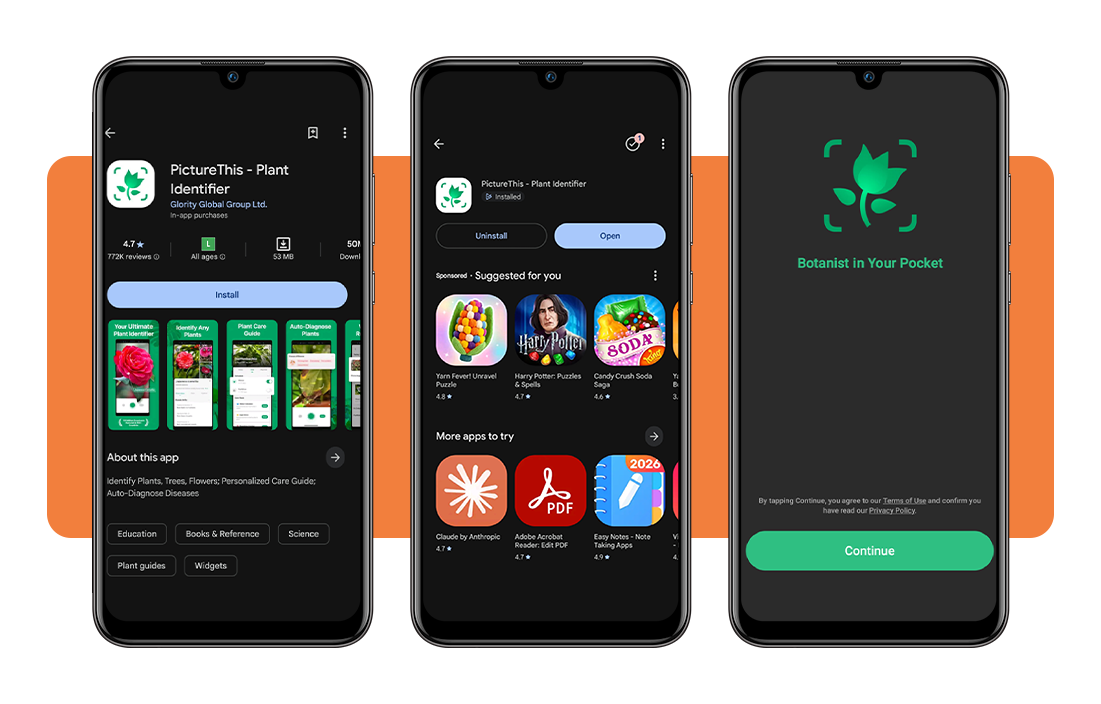
Schritt 1: Laden Sie die App auf Ihr Gerät herunter
Search ‘PictureThis’ inside the App-Store oder Google Play, tap the correct listing among the results, and confirm the install to add it to your phone or tablet.
The download takes up a small amount of storage space on most devices, and the app opens directly to a welcome screen once the installation finishes downloading completely.
Step 2: allow camera access and permissions
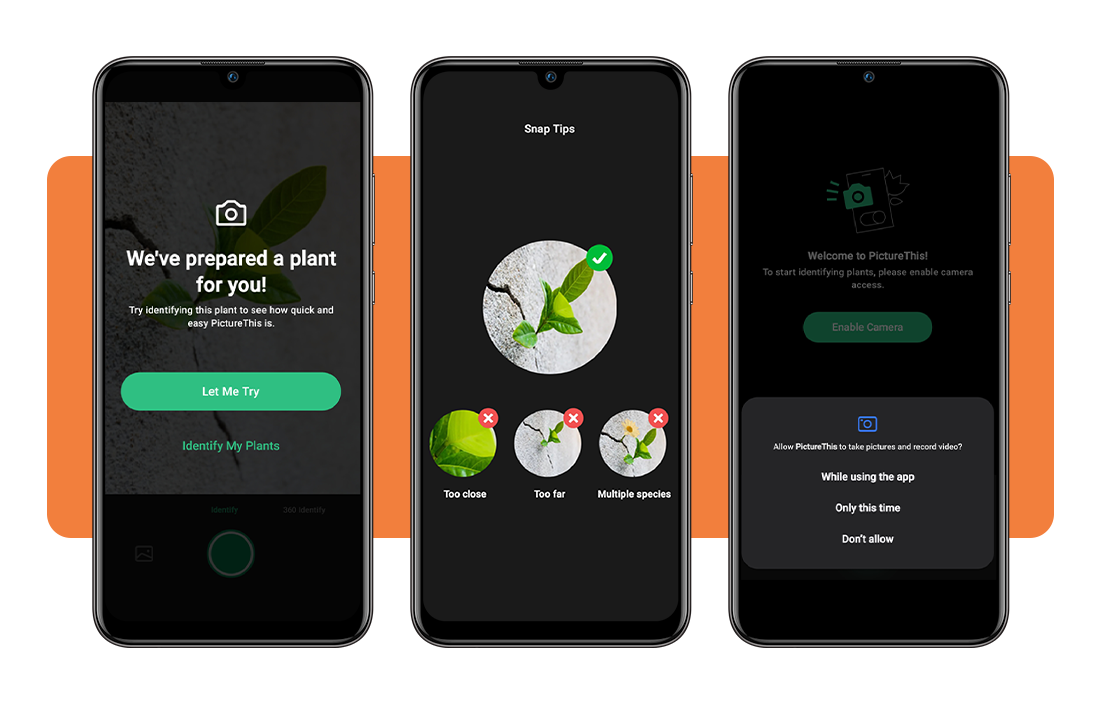
PictureThis needs full access to your camera to scan leaves, flowers, bark, and plant stems, so a permission prompt appears the first time you open the app itself.
Tap ‘While using the app’ on that exact prompt, and your phone grants camera access for every future scan without asking you that same question a second time.
Step 3: snap or upload a plant photo
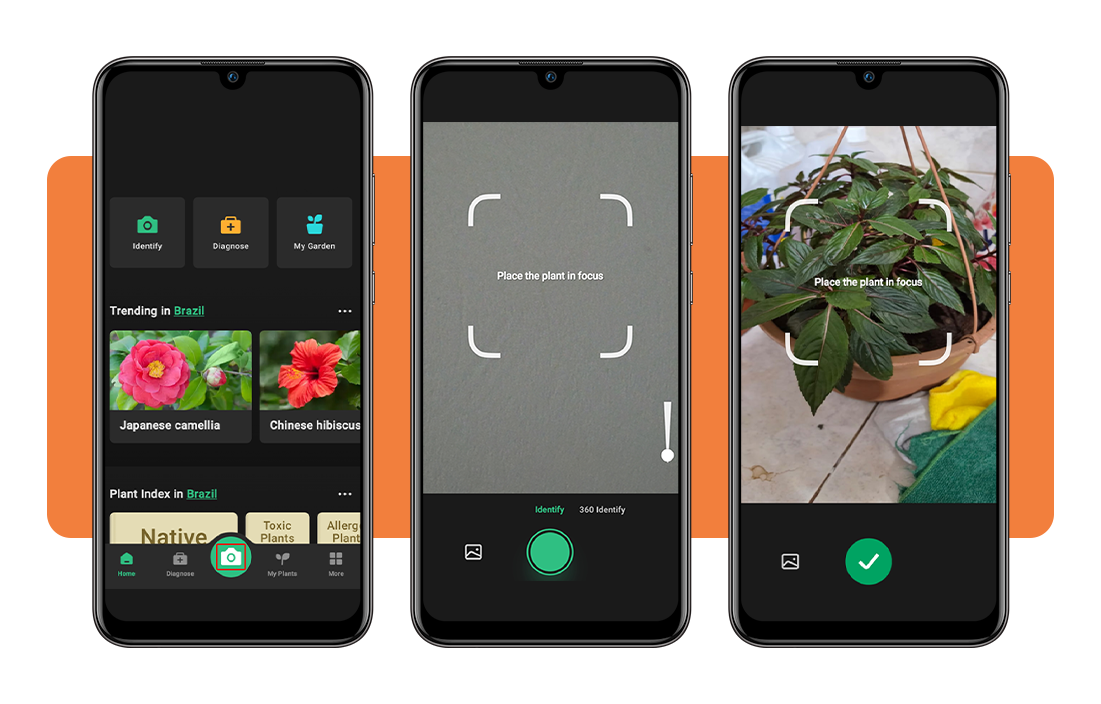
Frame the plant inside the guide brackets shown on screen, hold your phone steady, and tap the shutter button to capture one clear, well-lit photo of it.
If you want to use an older picture instead of a new photo, this plant identifier app also pulls images straight from your camera roll, so a fresh shot stays completely optional.
Step 4: review results and save your plant
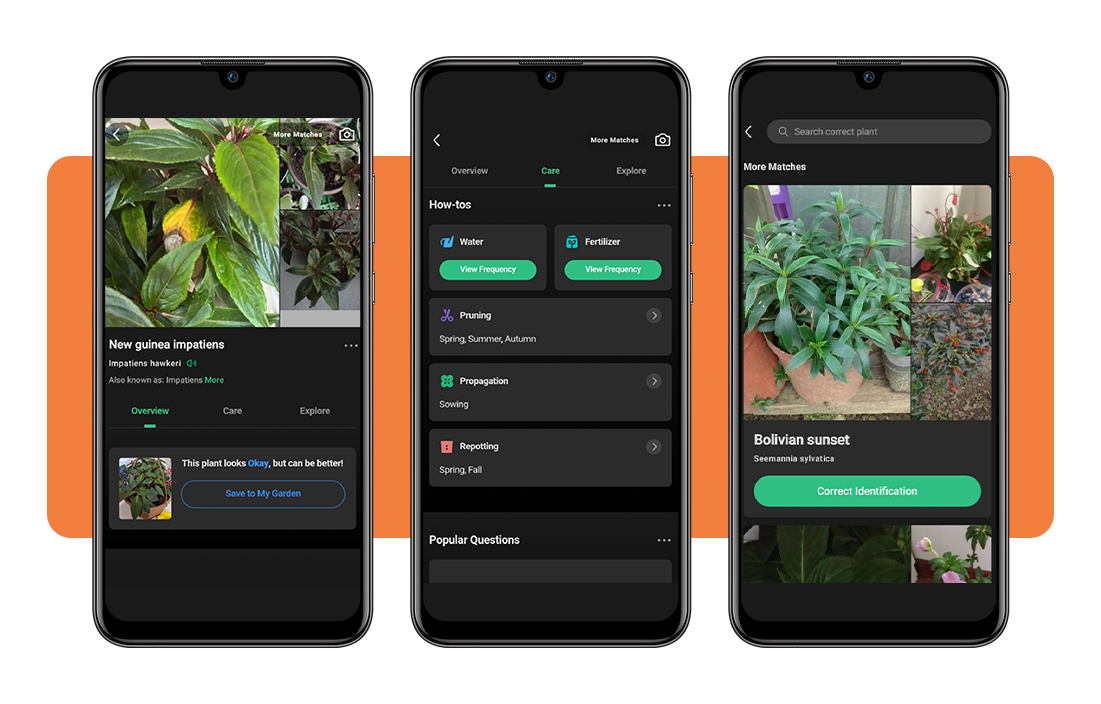
The results screen names your plant alongside its full care details, plus a helpful ‘More Matches’ list you can browse in case the first result looks slightly off.
Tap ‘Save To My Garden’ to keep that plant inside your profile, where its watering, light, and feeding reminders stay logged and ready for you to check later.
Top gardening tips for your home
Overwatering causes more houseplant deaths than pests, disease, and neglect combined, as soaked roots lose access to oxygen and begin rotting before visible symptoms appear.
Correct identification controls plenty of that damage, and this plant identifier app names each species while listing its water, light, and soil needs.
A few small adjustments to watering, sunlight, pot placement, and pest checks separate plants that limp along from plants that fill out an entire room within one season.
Water according to each plant’s needs
Succulents and cacti store water inside their thick, fleshy leaves, so any soil that stays dry between waterings keeps their roots from rotting inside a crowded, damp pot.
Ferns and tropical leafy plants pull moisture from humid air, so their soil needs a steady, damp feel rather than a full soak or a long dry stretch.
Give your plants enough sunlight
South-facing windows pour in direct sun for several hours each day, which suits succulents, herbs, and citrus trees far better than a shaded corner of any room.
If you’re struggling to judge your window’s brightness on your own, this plant identifier app compares your space against each species’ sunlight needs and suggests a better spot for it.
Rotate pots for even growth
Plants lean and stretch toward whichever direction light hits them the hardest, leaving one side bushy and full while the other stays bare within a few short weeks.
Turn each pot a quarter turn every week or two, and stems fill out evenly on every side instead of always curving toward a single window or lamp.
Keep pests away with regular checks
Aphids, spider mites, and mealybugs hide along the stems and underneath curled leaves, spreading between nearby pots before you notice a single visible sign of any real damage.
Snap a photo of anything suspicious crawling across a leaf, and this plant identifier app names the pest, then lays out a treatment plan before it spreads further.
Verwandt: Scan your backyard: the app that tells you what to plant
4.5/5
Your garden’s new best friend
A flower that once had you stumped now gets a name, a care routine, and some peace of mind, all thanks to PictureThis and your phone camera.
Dieser Leitfaden von Insiderwissen explained how the plant identifier app names your plants, checks their health, and helps them grow stronger with less trial and error.
Stay with Insiderwissen and learn more ways to keep your garden happy, from picking the right pots to spotting trouble before it spreads through your home.