A check engine light flashing on your dashboard brings instant worry, and rarely an explanation. Having a reliable OBD2 diagnostic app on your phone can save you from a lot of trouble.
In diesem Leitfaden, Insiderwissen reviews the Car Scanner ELM OBD2 app so you can learn how to read trouble codes and match live sensor data to real problems. Keep reading for more.
Verwandt: Best Auto Mechanic Apps for Your Car

4.8/5
How does the OBD2 diagnostic app work?
Car Scanner ELM OBD2 (Android | iOS) connects your phone to your car’s onboard computer, pulling live engine data directly via a small adapter plugged into the diagnostic port.
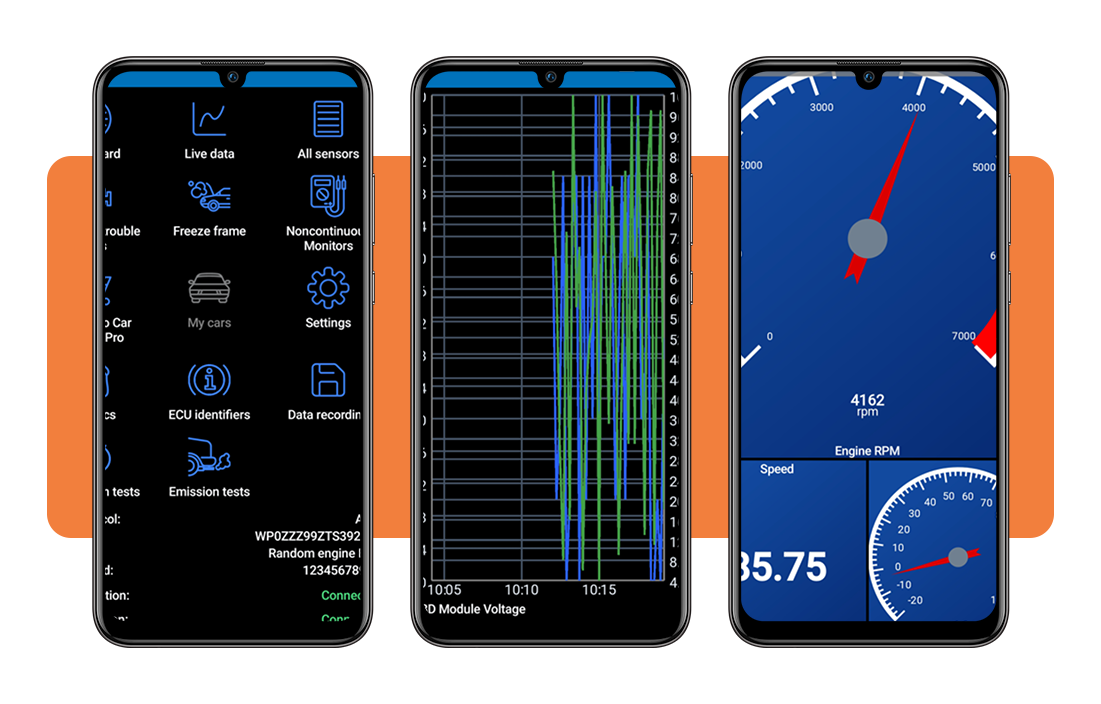
Drivers can build custom dashboards with gauges and charts, choosing which sensors appear on screen while driving, idling, or parked overnight in a home garage.
Beyond gauges, this OBD2 diagnostic app also reads stored trouble codes and freeze frame data, giving you plain, useful descriptions instead of cryptic code numbers alone.
In der App verfügbare Funktionen
- Extended PID support: unlocks manufacturer-specific data points that standard scanners overlook, giving you access to sensors most competing apps never display;
- Mode 06 test results: reveals detailed ECU self-monitoring data that pinpoints failing components early, before they trigger a full-blown check engine light;
- HUD windshield projection: projects speed, RPM, and other readings onto the windshield, letting you keep your eyes on the road while checking live data;
- Vehicle coding options: unlocks settings on supported VAG and Toyota models, activating features like drive mode profiles that manufacturers keep locked.
The adapter talks to your ECU
Once plugged into the diagnostic port, the ELM327 adapter opens a Bluetooth or Wi-Fi connection between the phone and the car’s electronic control unit almost instantly.
The car’s computer answers every request the app sends, streaming live info for temperature, pressure, voltage, and engine speed straight back through that same wireless connection.
Turning raw data into readings
Raw signals coming off the ECU mean little on their own, so this OBD2 diagnostic app converts them into numbers you can recognize, like miles per hour.
Every code and sensor reading pairs with a plain description from a built-in database, so you can connect each number to a real mechanical problem.
Step-by-step: how to scan engine codes using an OBD2 app
You don’t need a mechanic’s bay to figure out why that warning light stays lit on your dashboard for days on end without any real reason.
Connecting your adapter and reading trouble codes with Car Scanner ELM OBD2 (Android | iOS) takes only a few short minutes once your phone and car are paired together.
Every reading this OBD2 diagnostic app pulls from your engine gets translated into a plain description, so you always know which part needs your attention first.
Schritt 1: Laden Sie die App auf Ihr Gerät herunter
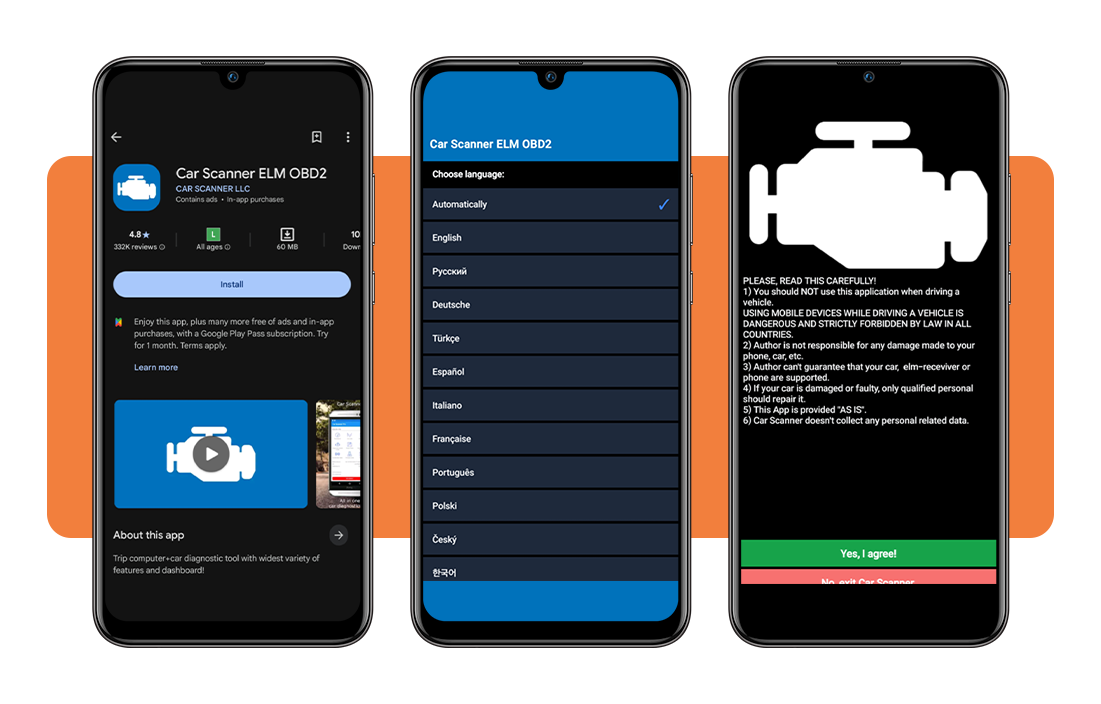
Unlock your device, open up the Google Play Store or the Apple App Store on your phone, and search for ‘Car Scanner ELM OBD2’ to download the app for free.
Once the installation ends, you’ll open the app to pick a language and accept a short driving safety notice before landing on its main screen, ready for setup.
Step 2: connect your adapter and car profile
Plug the ELM327 adapter into the diagnostic port tucked under your steering column, then grant Bluetooth or Wi-Fi permissions so your phone can find it nearby.
Select your car’s exact brand and model from the list inside the app, since choosing the right profile unlocks extra sensors built specifically for your vehicle.
Step 3: read codes and explore the dashboard
Tap ‘Diagnostic Trouble Codes’ to pull up any stored fault on your car, then check ‘Freeze Frame’ data to see conditions logged when that code was saved.
Switch over to ‘Live Data’ or the ‘Dashboard’ tab, where this OBD2 diagnostic app displays real-time readings for RPM, speed, and coolant temperature.
Verwandt: Auto Loan Refinance: Check If You Qualify for a Lower Rate Today
Tips for app compatibility with your vehicle
Not every car speaks the same digital language, and mismatched adapters or outdated profiles can leave your dashboard blank instead of full of readings.
Most vehicles built after 2000 support the OBD2 standard, though older models from the mid to late 1990s sometimes carry partial or limited support instead.
Das Beste daraus machen OBD2 diagnostic app means matching your adapter, connection type, and car profile to what your specific vehicle can actually handle.
Check your car’s OBD2 support
Look near your steering column or under the dashboard for a 16-pin trapezoid-shaped port, since that physical connector confirms OBD2 compatibility right away.
Cars built before 1996 in the US often lack this port entirely, so checking your owner’s manual first saves you from buying an adapter that won’t pair.
Pick the right adapter type
Wi-Fi adapters pair instantly with most phones, while Bluetooth versions need manual pairing through your device settings before Car Scanner can detect them properly.
Bluetooth LE, also called Bluetooth 4.0, works differently from classic Bluetooth, so double-check which version your adapter supports before assuming either one will connect.
Update your car brand profile
Manufacturers roll out new modules and firmware changes yearly, so an outdated brand profile inside the app can miss sensors your newer vehicle actually supports.
Checking for profile updates inside the settings menu every few months keeps this OBD2 diagnostic app current, especially if you drive a recent model with frequent firmware revisions.
Basic mechanic tools for working on your car at home
A cluttered garage full of random tools rarely helps you fix anything, but a handful of reliable basics covers most repairs drivers face.
Small maintenance jobs, from checking tire pressure to swapping a battery, rarely require a full workshop, just a few dependable tools kept within reach.
Building a small home toolkit around this OBD2 diagnostic app and a few hand tools saves you repeated trips to a shop for issues you’re fully capable of handling yourself.
A reliable OBD2 adapter
An ELM327 adapter plugged into your car’s diagnostic port gives you instant access to trouble codes, live sensor data, and engine performance details.
Cheap clone versions sometimes struggle with stable connections, so sticking to recommended brands like OBDLink or Veepeak saves you frustration down the road.
A basic wrench and socket set
A metric socket set handles the vast majority of bolts on modern vehicles, covering everything from battery terminals to brake caliper bolts with ease.
Pair that set with this OBD2 diagnostic app, and you can confirm a fix worked by watching live sensor values change after each adjustment.
A tire pressure gauge and jack
Checking tire pressure monthly with a simple gauge keeps handling predictable and stretches tread life, especially before long trips or seasonal temperature swings.
A compact hydraulic jack lets you rotate tires or inspect brakes at home, cutting out routine trips to a shop for basic seasonal upkeep.
Verwandt: Kostenlose Online-Mechanikerzertifizierung: Jetzt online anmelden
4.8/5
The mechanic in your glovebox
Car Scanner ELM OBD2 turns that mystery warning light into something you can actually understand, using nothing more than a small adapter and your phone.
Diese Insiderwissen guide walked you through setting up this OBD2 diagnostic app, connecting your car, and reading trouble codes in plain, everyday terms.
Make sure to read other Insiderwissen articles if you’d like more picks on apps that make owning and maintaining a car a little less of a headache.