
There are plenty of entry-level opportunities where employers focus more on practical skills, making these jobs possible for people with no degree.
Still, finding a remote position can seem difficult when many job listings appear to require a college degree or previous office experience.

4.5/5
Which is the best remote job search app for no degree positions?
For people looking for remote positions with no degree, FlexJobs (iOS/Android) can be enough because it focuses specifically on remote and flexible types of employment.
The FlexJobs app (iOS/Android) lets users filter opportunities by career level, job category, schedule, and other criteria.
This way, it gets easier to find entry-level positions that don’t emphasize formal education.
Another major advantage is that FlexJobs (iOS/Android) says its team manually reviews job listings and employers before they are published.
This becomes really useful when searching for remote work, where misleading or fraudulent listings can be a concern.
Moreover, within the app, users can filter their job search by categories, like entry-level remote jobs, data entry, customer service, writing, virtual assistance, and sales.
It is worth mentioning that FlexJobs (iOS/Android) does require a membership for full access to its job database and application features.
Still, the app itself is free to download and offers limited access before subscribing.
Overall, for someone without a degree, the key is to use filters for entry-level positions and focus on roles where your skills or willingness to learn matter more than formal education.
Features available in the FlexJobs: Remote Job Search
The FlexJobs app (iOS/Android) is built around remote and flexible employment, making it useful for anyone searching for no degree positions from home.
You can search by job title or keyword and narrow the results using different filters such as career level, job category, schedule, and location.
Another useful feature is the ability to save jobs and searches.
With that, once you find a search that matches your preferences, you can save it and receive push or email notifications when new positions are added.
Moreover, it is possible to mark jobs as applied, keep personal notes about specific positions, and access your saved jobs and application history from the platform.
FlexJobs (iOS/Android) also says that its team hand-screens job listings and verifies employers.
This type of concern is relevant nowadays since searching for remote work has some fraudulent job advertisements.
One thing to keep in mind is that full access requires a paid FlexJobs membership.
As we mentioned above, the app is free to download, but subscribers get access to the complete job database and application features.
Step-by-step: how to filter for work-from-home jobs with no experience
Filtering jobs by category is an important step to get you a position related to your profile. Check the guide below and learn more about it:
Step 1: open FlexJobs and start a job search
Download FlexJobs on the App-Store oder Play Store. You can also access it on the official website.
After that, you will need to choose what kind of remote work you are looking for. It can be fully remote, hybrid, or both.
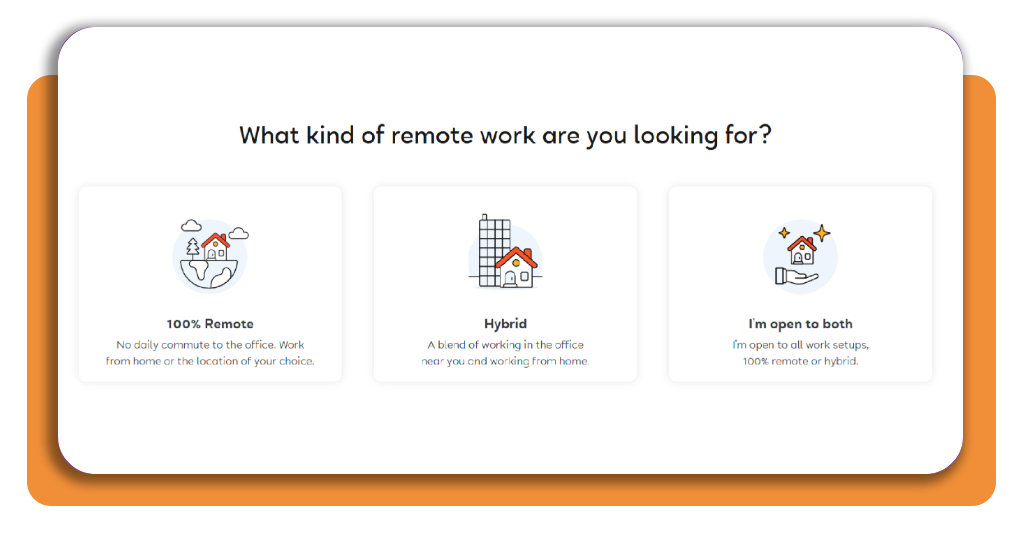
Step 2: choose the remote work level
After choosing 100% remote. Click on ‘Next’, in the bottom right of the page. Then, you will need to choose if you’re looking for career progression or any job.
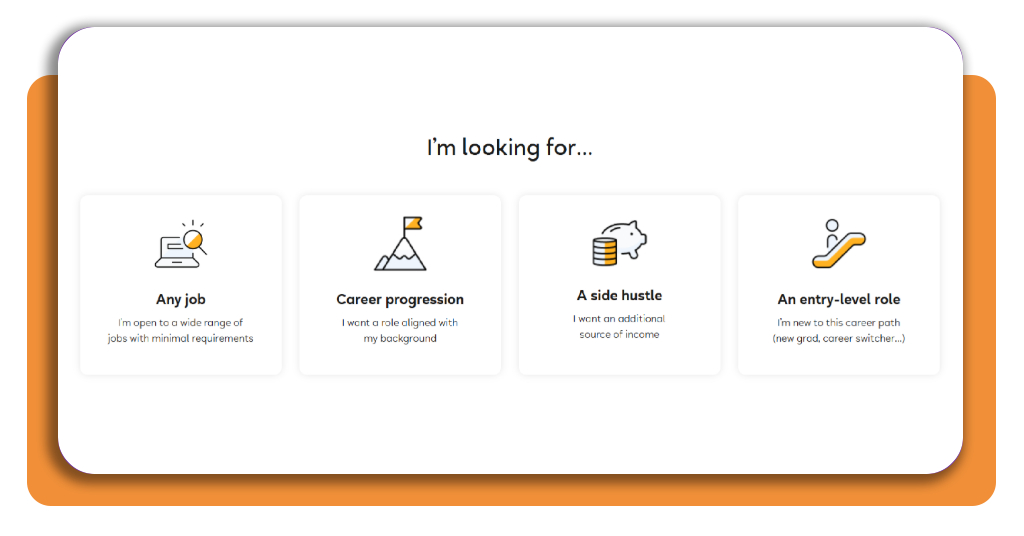
Step 3: upload your resume
Now, you will need to answer a few questions about how much you are looking to earn and where you are going to work from.
Then, you’ll need to upload your resume and select up to 5 job categories.
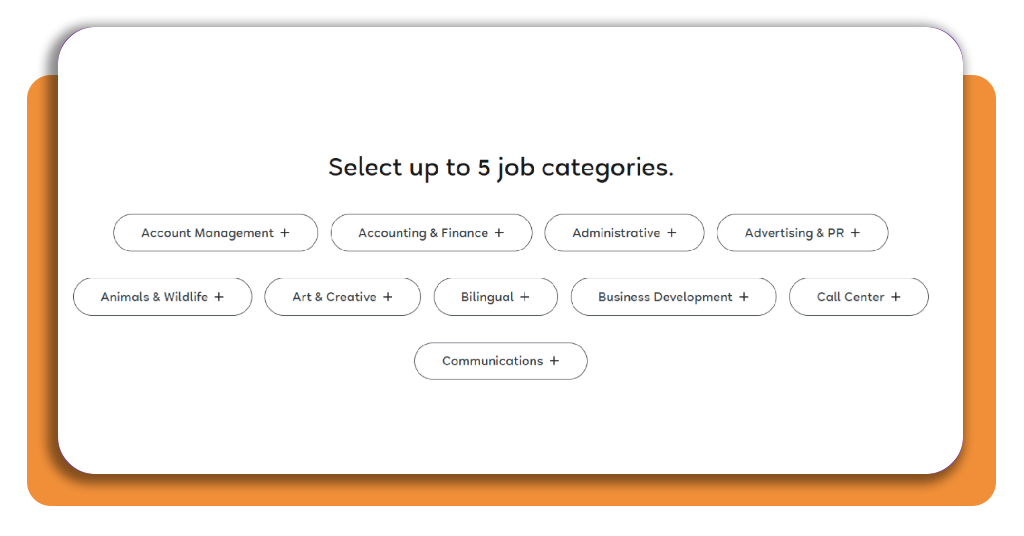
Step 4: create your account
Before reaching the account creation page, you need to provide information about career level and study level.
Then, enter your email and create a password to log in.
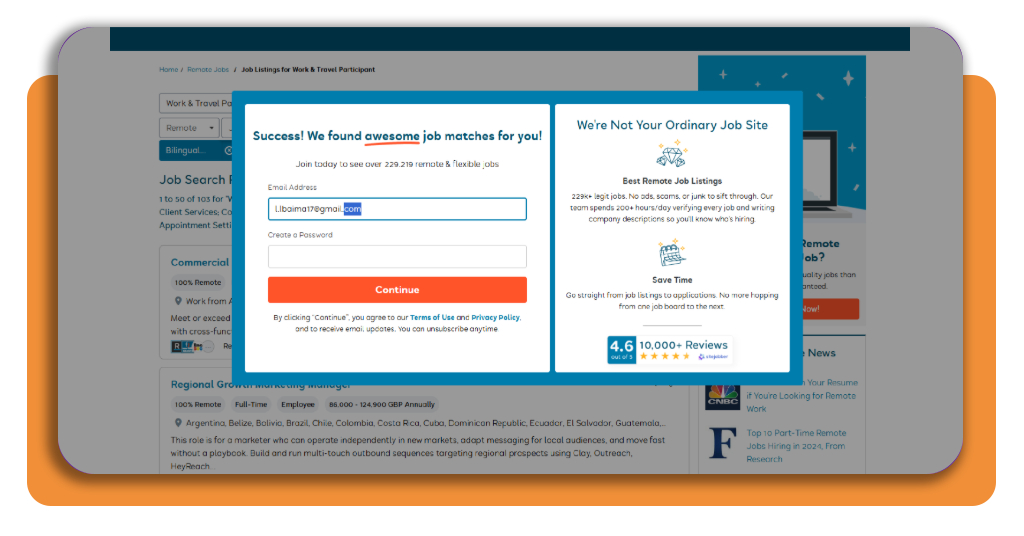
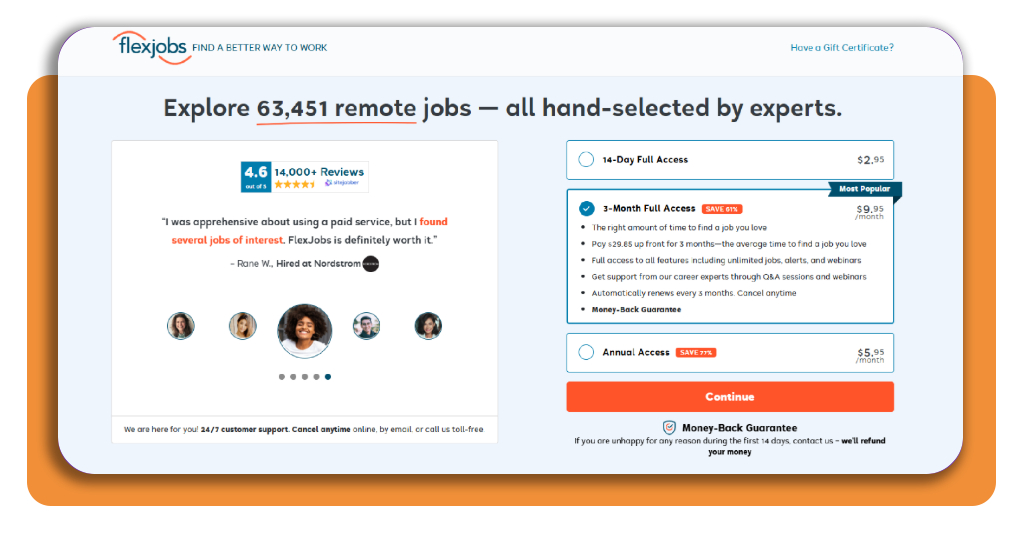
Step 6: choose your plan
After creating your account, FlexJobs will display 3 plans for you to choose from and continue looking for jobs. Read carefully, and choose the one that fits you the most.
Best affordable online certifications
Insiderwissen is highlighting in this article how to find remote job opportunities even with no degree.
Still, if you don’t have one or much professional experience, an affordable online certificate can be a way to demonstrate specific skills while applying for remote jobs.
Nowadays, it is possible to find many free courses, while others cost considerably less than traditional college programs.
For someone starting from scratch, a useful option is Google Karriere-Zertifikate, where you can find digital marketing certificates and basic IT courses.
The best choice depends on the type of remote position you want.
For example, a customer-service certificate makes more sense for support roles, while an IT certificate can be more relevant for technical help-desk positions.
Also, knowing a second language can help you get a remote job with no degree. If you’re interested, it is worth checking how to find translation jobs.
For instance, the platform Indeed notes that online certifications help develop skills, strengthen a resume, and improve job prospects.
Nonetheless, you must check if the credential is actually relevant to the jobs you’re applying for.
Ultimately, even though a certificate by itself does not replace experience, it can show employers that you’ve developed specific skills and taken the initiative to learn them.
If your budget is limited, start with free courses and certificates before paying for a larger program.
There are numerous free online certifications, including programs from government organizations, making it possible to strengthen your resume without a large expense.
Essential home office apps for remote workers
The right apps can make working from home much easier by keeping communication, files, tasks, and meetings organized in one place.
For someone starting a remote job, you don’t need dozens of tools. A small set covering the most important tasks is usually enough.
Google-Treffen
For communication, Google Meet (iOS/Android) is a famous and practical choice for messaging, meetings, and collaboration.
Trello
For organizing tasks, Trello (iOS/Android) can help you keep track of assignments, deadlines, and projects.
Google Drive
Google Drive (iOS/Android) is also another essential app because it provides online file storage and real-time document collaboration.
Keeping important work files in the cloud also reduces the risk of losing them if your computer has a hardware problem.
4.5/5
Start building your remote career today
Finding no degree remote jobs is possible today, even if you don’t have previous office experience.
Throughout the article, we showed how FlexJobs (iOS/Android) makes the search more focused by filtering for remote positions, checking education requirements, and saving relevant searches.
You can also strengthen your chances by developing specific skills through affordable online certifications and becoming familiar with essential remote-work tools.
With the right preparation and a consistent application strategy, working from home can become a realistic next step even without a degree or traditional office background.
Hat Ihnen dieser Artikel gefallen? Speichern Insiderwissen to your favorites and discover the most useful tech tips.