
Paying a large amount of money for an overhyped game only to watch its price crash days later stings. Having a solid game deals app on your phone makes sure that never happens again.
GGDeals gathers live prices from every major digital store and pings you the moment a title gets cheaper. This Insiderwissen guide explains every feature so you never overpay again. Read on!
Verwandt: Turn Your Gaming Sessions Into Cash Starting Today

Which is the best game deals app?
GGDeals (Android) pulls together pricing information from Xbox, Steam, Epic Games, and GOG, giving you a single screen where every discount sits side by side for easy comparison.
Beyond price checks, this game deals app tracks price history for every popular title out there, showing whether a discount beats past sales or just repeats an old number.
Notifications land on your phone the moment a followed title drops in price, letting you jump on limited sales before stock runs low or the discount window shuts for the day.
Features available in the GGDeals app
- Price tracking: every supported store gets scanned for updates, pulling live prices for thousands of titles so you see the exact cost on screen;
- Deal alerts: following a game sends a notification to your phone the second its price drops below the number you set as a target;
- Price history: charts show past discounts for each title, revealing whether a current sale matches the lowest price that specific game has ever reached;
- Wishlist tracking: saving titles you want keeps them organized in a list, letting you compare prices across stores without repeating the same search.
Track prices across every major store
Checking four different websites just to figure out where the title you want costs less takes way too much time, especially when discounts change without any warning at all.
The game deals app replaces all that clicking, showing live prices side by side and updating automatically so the number on your screen always matches what the store charges.
Set alerts for your wishlist games
Saving a title to your wishlist means you stop checking store pages manually, since the app watches that price for you and reports back the moment it changes.
Notifications arrive through your phone regardless of whether the app is open or closed, putting you in position to buy the moment a wishlisted price drops for real.
Compare regions for even lower prices
Game prices shift depending on the region linked to a particular store account, and some countries see listings sitting far below what shows up in the United States.
Switching your account region inside the store lets this game deals app pull in those lower local prices, showing you a version of the same game for less.
Verwandt: In-Game-Ausgaben von Kindern stoppen: Sperren Sie Spieleinkäufe mit dieser App
Step-by-step: how to find the cheapest deals available right now
Finding the lowest price for a game used to mean bouncing between real stores, squinting at numbers, and hoping you didn’t miss a better deal somewhere else.
GGDeals (Android) condenses that process into a handful of taps once you set up this game deals app on your phone and let it do the searching for you.
Setting everything up takes only a few minutes, and once your first game gets added, checking prices turns into something you do without even thinking twice about it.
Schritt 1: Laden Sie die App auf Ihr Gerät herunter
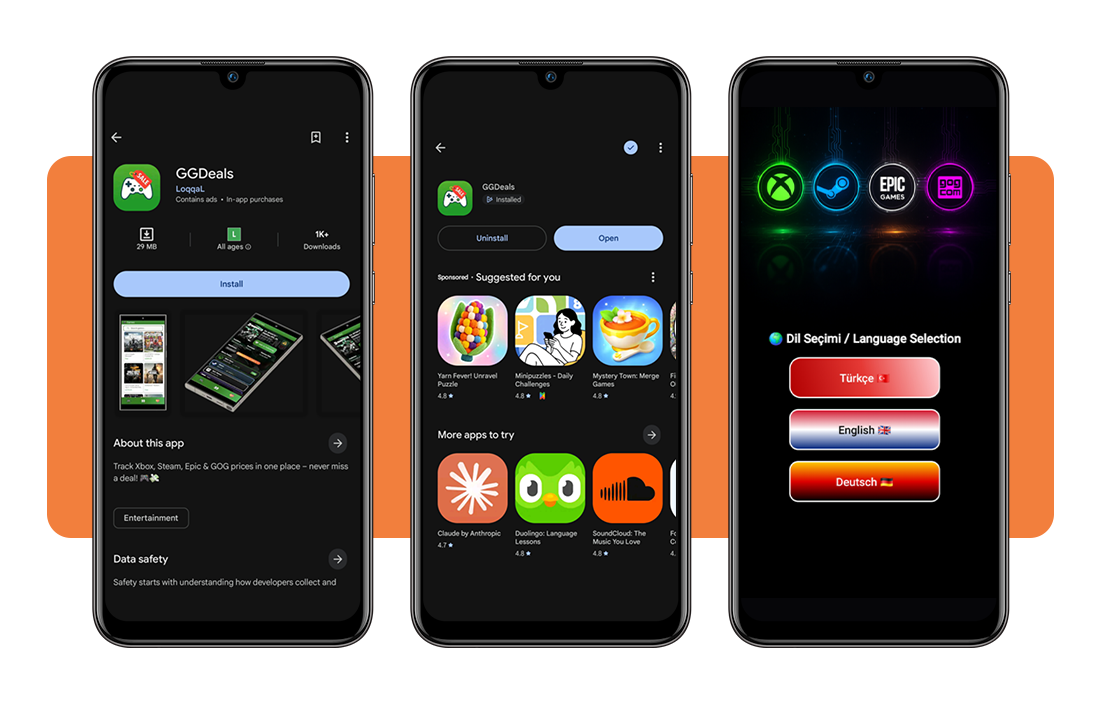
First, you have to open the Play Store and type ‘GGDeals’ into the search bar, then look for the option developed by LoqqaL; the icon is green with a game controller and a sale tag on it.
Tap ‘Install’, wait a few seconds for the download to finish, then open the app and pick your preferred language before the home screen loads up completely.
Step 2: search for the game you want
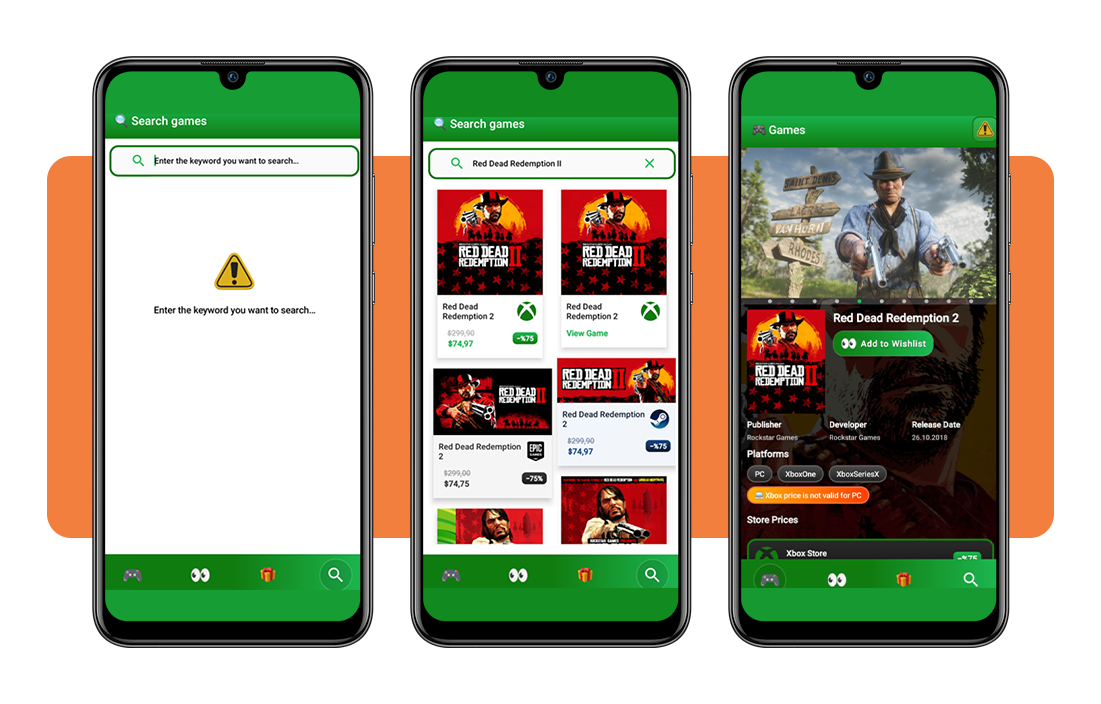
Once the app opens, tap the search icon at the bottom of the screen and type in the title you’re hoping to buy or already have your eye on.
Results populate almost instantly, and selecting the correct match pulls up a dedicated page built entirely around that one game inside this game deals app.
Step 3: compare prices across all four stores
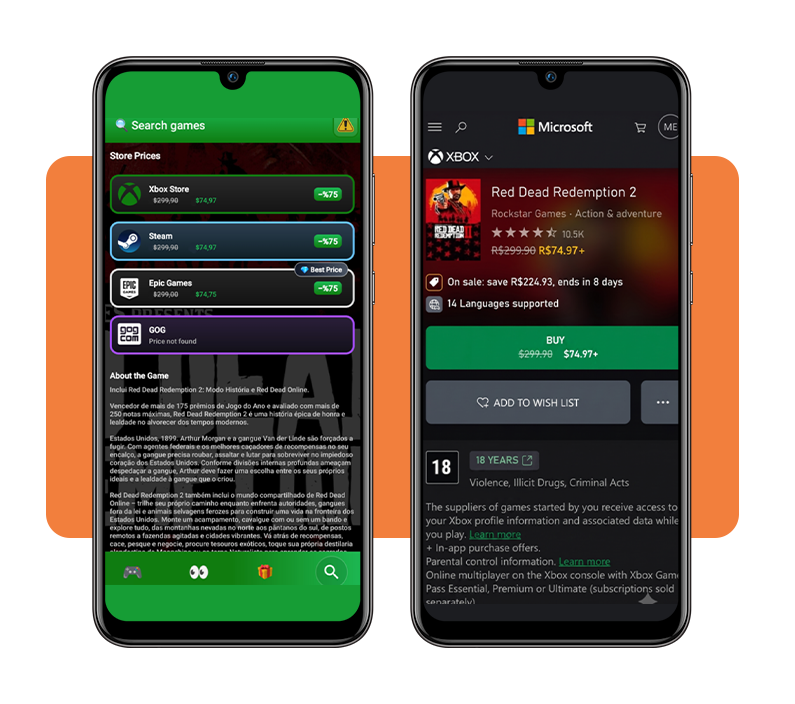
That game page lists every store price stacked in order, with the cheapest option marked clearly so you never have to scroll around hunting for the best number.
When you decide which store you’re going to purchase the game in, all you have to do is tap their name and the app redirects you to the official website.
Step 4: follow the game to get alerts
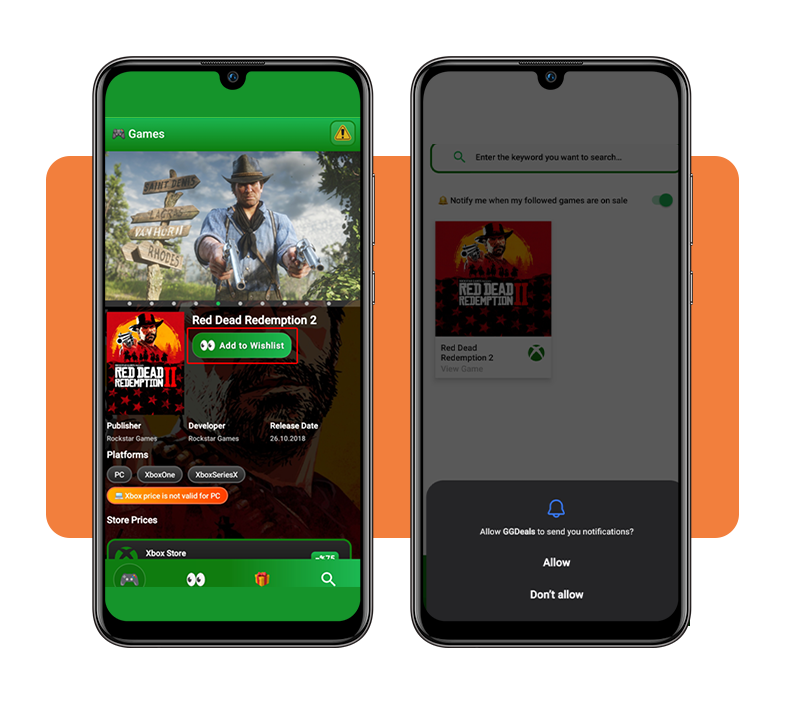
Tap ‘Add to wishlist’ near the top of the game page to start following it, and this game deals app begins tracking every price change from that point forward.
Turn on notifications when prompted, and you’ll get pinged the instant that title drops in price, whether that happens tomorrow or three months from now.
Other ways to find cheaper games
Price tracking through an app covers most situations, but a few other tricks help you stretch your budget even further when hunting for your next favorite title.
Some of these methods work alongside the app you’ve already set up, while others require checking outside sources or waiting for specific windows to open.
Combining a few of these approaches with this game deals app builds a habit that keeps your game library growing without draining your wallet every single month.
Wait for seasonal store sales
Steam, Xbox, and Epic Games all run massive sales during predictable windows throughout the year, with winter holidays and summer months typically bringing the steepest discounts.
Marking these dates on your calendar helps you plan bigger purchases around them, and waiting even a few weeks can shave a significant chunk off the original price.
Bundle games through key resellers
Websites wie Humble Bundle und Fanatical package several games together for one flat price, sometimes costing less than buying just one of those titles individually.
These bundles rotate on a regular schedule and sometimes mix older classics with recent releases, giving you access to titles you might’ve otherwise skipped entirely.
Follow developer social media pages
Smaller studios often announce flash sales or limited discounts directly through their social accounts before that information ever shows up anywhere else online.
Some developers also share exclusive discount codes with their followers, giving you a shot at pricing that beats whatever the standard store listing shows.
Buy games in cheaper regions
Switching your store account to a region with a weaker currency sometimes unlocks prices far below what shows up under your default location settings.
Argentina and Turkey, for instance, show Steam prices dramatically lower than the United States, though changing your region does require a valid payment method from that country.
Verwandt: Schutz für dein Spielkonto: Stoppe Spiel-Hacker mit dieser App
The final boss of game deal hunting
GGDeals takes the annoying guesswork out of buying games, showing you exactly where each title costs less and alerting you the moment a price finally drops.
In diesem Leitfaden, Insiderwissen explained to you how a game deals app pulls prices from every major store, tracks history, and sends alerts straight to your phone.
Keep exploring our Insiderwissen articles and learn more ways to save on your favorite hobby, from other money-saving apps to tips on scoring better deals overall.