
Boredom creeps into long commutes, waiting rooms, and quiet evenings when nothing feels appealing enough to bother. An offline flash games app may be the cure, packing fun for free.
In this article, Insiderwissen reviews the Offline Games’ comprehensive library, easy setup, and top picks for solo or two-player fun, plus tips for relaxing while you play. Keep reading!
Verwandt: Die wichtigsten Handyspiele, die die Branche im Jahr 2025 revolutionieren werden

4.8/5
What is the best flash games app?
Offline Games (Android | iOS) packs over 20 minigames onto your phone, letting you dive into puzzles, card games, and arcade classics the moment boredom strikes, with or without Wi-Fi.
Every game loads instantly without downloads or updates slowing things down, so a spare five minutes turns into a real round instead of an annoying loading screen wait.
Longtime fans of browser-era gaming will feel at home, and this flash games app revives titles you grew up playing, rebuilt for touchscreens and offline play.
Features available in the flash games player
- Custom settings menu: volume, music, dark mode, and frame rate all adjust inside one clean panel, letting you shape the app around your preferences;
- Built-in hint system: gives you a nudge whenever a puzzle stalls, helping you solve tricky levels without losing steam halfway through a session;
- Adjustable difficulty levels: lets you pick easy rounds for a relaxed session or push into ultra-hard modes when you want a real challenge;
- Two-player showdowns: puts you against AI opponents in checkers, pool, and tic-tac-toe, testing your skills right wherever you happen to be.
A toy box of mini games
Word games, number puzzles, memory challenges, and strategy titles like chess all sit together in the app, giving you a mix that rarely feels stale, regardless of your mood.
Mancala and sliding puzzles round things out nicely, proving this flash games app reaches beyond the usual suspects to grab genres you might not expect to find offline.
No internet needed to play
Every game inside this app installs directly onto your phone, so nothing ever needs to stream or reload once you open a level, even without a signal nearby.
Long flights, subway rides, and remote cabins all turn into playtime once you load your favorite rounds ahead of time and leave data worries far behind for good.
Step-by-step: how to play classic titles using the app
Getting a round going takes barely a minute once your phone has Offline Games (Android | iOS) installed, and the process remains simple enough for any age group to follow.
No account creation or email sign-up stands between you and your first game, which means you skip straight past the usual setup hurdles most apps demand.
Every classic title inside becomes available the moment you open the collection, and this flash games app never asks for a connection to unlock a single one.
Schritt 1: Laden Sie die App auf Ihr Gerät herunter
Open the App Store or Google Play Store on your phone, search for ‘Offline Games – No Wifi Games’, and install it, letting the download finish over Wi-Fi or mobile data in under a minute.
Once installed, the icon sits on your home screen ready to open, and no further setup or account creation is needed before you can choose the first game you’ll play.
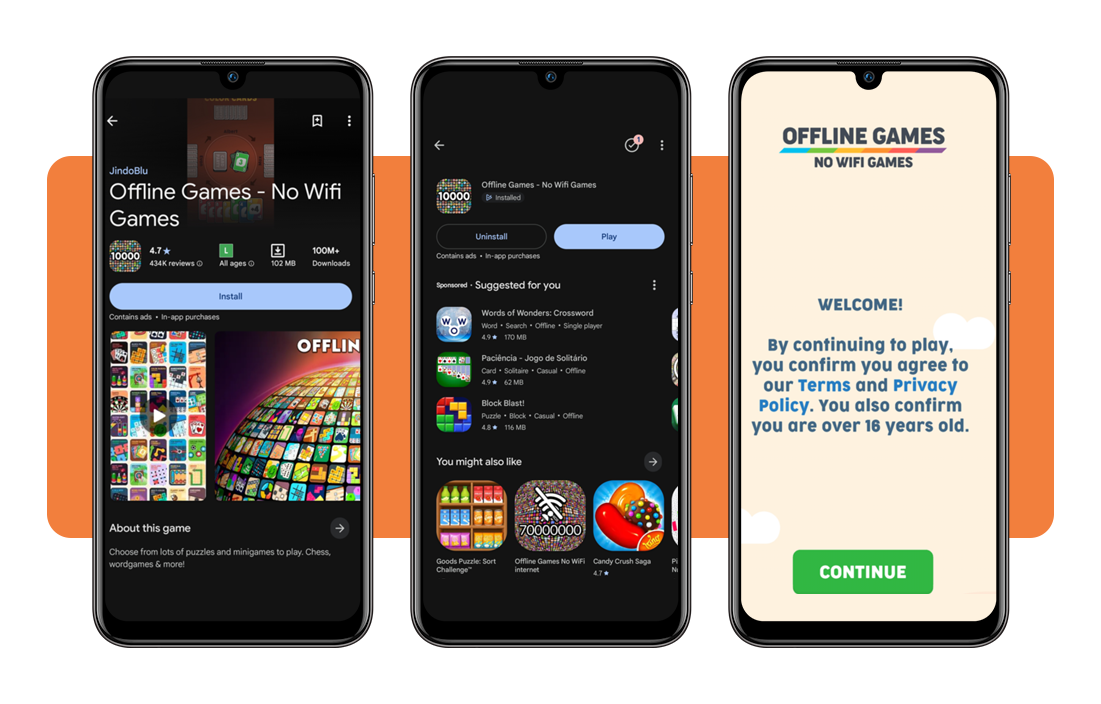
Step 2: pick a game from the collection
Scrolling through the home screen reveals categories ranging from puzzles to card games, letting you browse by mood rather than hunting through endless unrelated menus first.
Each tile shows a small preview image, so choosing between Snake, Color Blocks, or Escape on this flash games app takes seconds rather than long minutes of guessing.
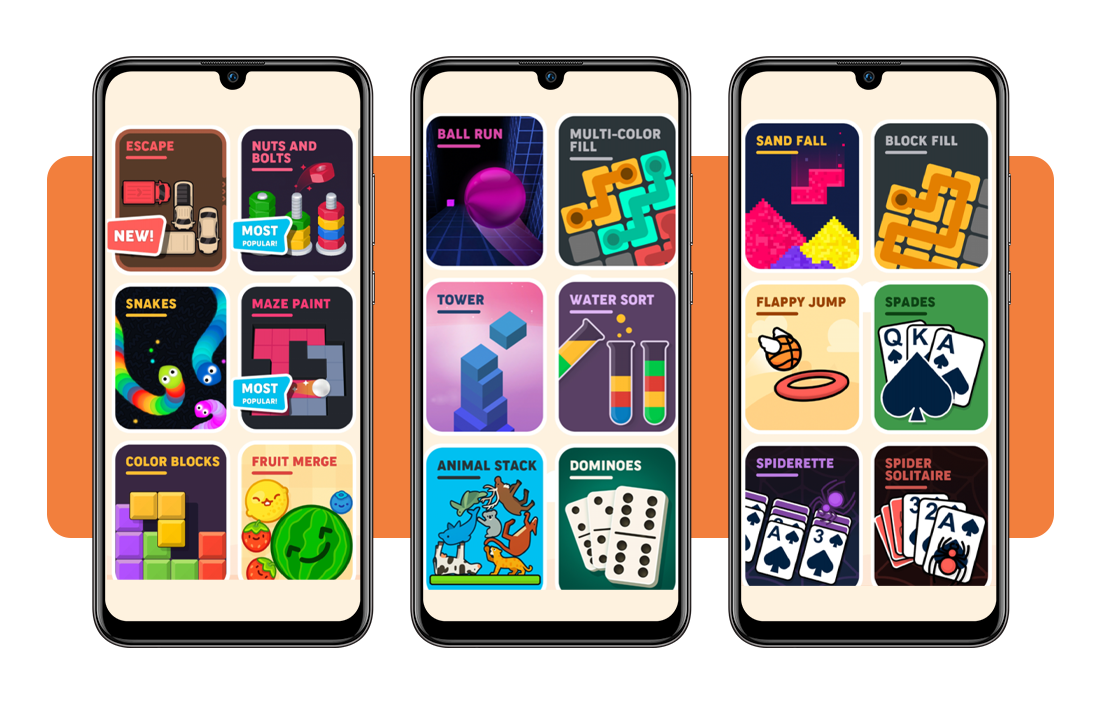
Step 3: tap play and start the round
Selecting a difficulty level appears before most games begin, letting you ease into easier rounds or dive straight into a tougher challenge from the start.
A single tap on the play button drops you into the action immediately, with hints and undo options standing by whenever a level gets tricky.
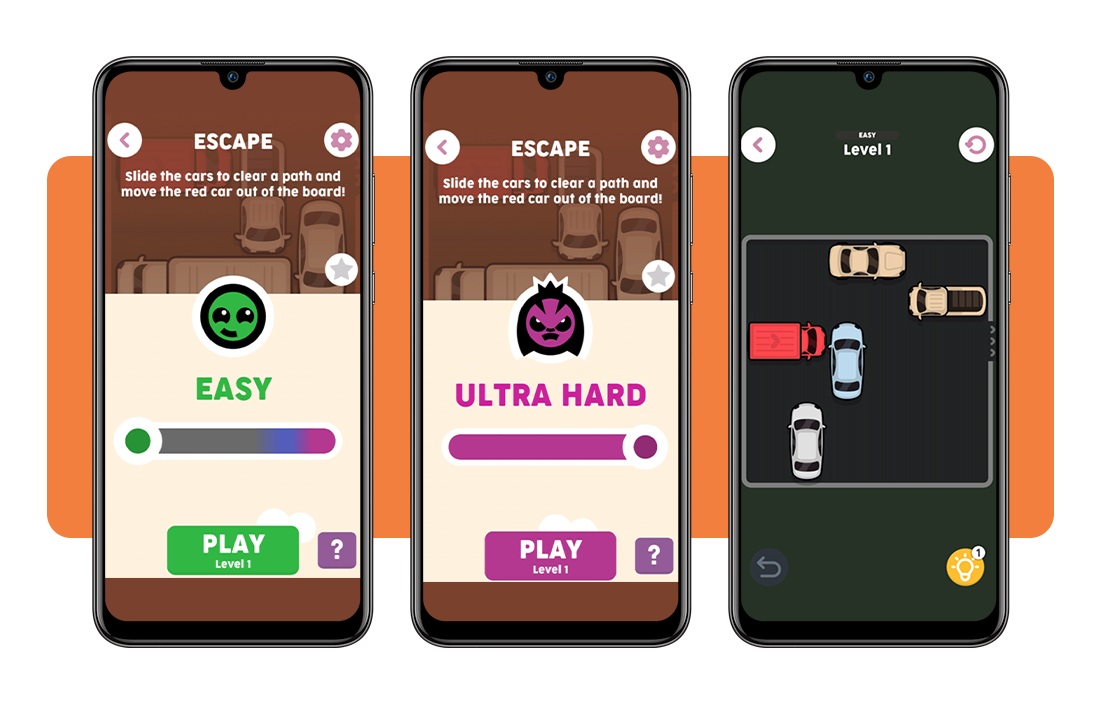
Verwandt: Retro game hub: the top app to play classic games on your phone
Best games available on the app
Dozens of titles sit inside this collection, spanning genres that range from quiet solo puzzles to competitive matches against a sharp AI opponent.
Picking a favorite becomes tricky once you realize how many directions this flash games app pulls you, from nostalgic card decks to fresh takes on old arcade staples.
Whether you crave a five-minute distraction or a longer session that tests your strategy, something inside this library fits the mood you bring to it.
Puzzle picks for quick brain teasers
Sliding block puzzles, Sudoku, and 2048 sit ready for moments when your brain wants a workout without demanding a long attention span from you.
Water Sort and Maze Paint add color-based challenges into the mix, giving you fresh mechanics beyond the usual number grids and letter tiles you expect.
Card and board classics reimagined
Spider Solitaire, Spades, and Dominoes bring familiar rules into a touchscreen format, letting you shuffle and deal without needing a physical deck nearby.
Chess and chess puzzles round out the board game side, giving you room to plan several moves against a patient digital opponent.
Head-to-head duels against AI
Facing off against a computer opponent inside this flash games app turns Checkers, Pool, and Tic Tac Toe into genuine tests of your patience and planning.
Every match adapts to the pace you set, so early wins never feel handed to you, and later rounds push you to think several moves ahead carefully.
Tips for playing and relaxing at the same time
Gaming works best as a break rather than a distraction that eats your whole afternoon, so pacing yourself keeps the fun feeling light and enjoyable throughout.
Small habits shape how relaxing a session feels, and adjusting a few settings before you start changes the entire experience into something calmer and more pleasant.
This flash games app suits a calmer approach nicely, letting you unwind between rounds instead of chasing high scores until your eyes grow tired and strained.
Take short breaks between rounds
Stepping away for a minute or two between matches keeps your mind fresh and stops any single puzzle from turning into a frustrating, drawn-out grind.
Stretching your legs or glancing away from the screen gives your eyes a proper rest, making the next round feel new rather than repetitive or tiring.
Play in airplane mode anytime
Switching your phone to airplane mode removes notifications and distractions, letting you focus fully on a puzzle without interruptions pulling your attention elsewhere every few minutes.
This flash games app runs fully offline, so flights, subway rides, and spots with no signal never stop you from having a genuinely relaxing session.
Set a comfortable difficulty level
Choosing an easier setting when you want to unwind keeps frustration low, saving the tougher modes for days when you crave a real mental workout instead.
Adjusting difficulty on the fly means every session matches your energy that day, whether you want a calm distraction or a puzzle that demands more focus.
Verwandt: Best cozy games to play on your phone for instant relaxation
4.8/5
Your pocket arcade is ready to play
Offline Games proves that a phone full of minigames can turn any dull stretch of time into something worth looking forward to instead.
In diesem Insiderwissen guide, we showed you how this flash games app fills your phone with classic puzzles, card games, and quick challenges you can open anytime.
Explore other Insiderwissen articles to find more offline gaming picks, hidden gems, and simple tricks for keeping yourself entertained wherever your day takes you.