
A public birth record can name your great-grandmother’s hometown, her parents, and the exact day she arrived in the country, which are details your family may have lost track of years ago.
If curiosity or an actual need is on your mind, the FamilySearch app can put the pieces of your past back together, and this Insiderwissen guide explains how you can do it. Keep reading!
Verwandt: FamilySearch Tree – Discover Your Surname Origin With This App

4.3/5
Best free app to find public birth records
FamilySearch Tree (Android | iOS) is a genealogy app built by FamilySearch International that lets you build your own family tree while browsing historical records tied to real ancestors.
You can add relatives directly inside the app, and once you enter someone who has passed, FamilySearch Tree searches its database for a matching public birth record instantly.
Beyond names and dates, the app connects you with photos, personal stories, and audio recordings that other relatives have uploaded, turning a simple search into a fuller portrait.
Features available in the FamilySearch app
- Collaborative editing: you and other relatives can view, add, and edit ancestor profiles together, sharing fresh details and correcting mistakes as the tree grows;
- Heritage maps: the app plots key events from your ancestors’ lives onto interactive maps, showing where they were born, married, and laid to rest;
- Record hints: the app scans historical documents in the background and suggests possible matches for each ancestor, letting you confirm or reject every hint;
- In-app messaging: you can message other researchers through the app, compare notes, and coordinate research on shared ancestors without leaving the platform.
Access billions of free records
The app connects you directly to a massive digital archive, covering countries and centuries far beyond what you’d ever find inside any single local courthouse or library.
You’ll come across old census sheets, immigration lists, and parish registers alongside a public birth record for relatives whose stories never made it into your family’s oral history.
Completely free with no paywall
You won’t hit a paywall or a hidden subscription fee while building your tree or searching records, because FamilySearch (Android | iOS) runs as a nonprofit funded by its parent organization.
Every feature stays open to you from day one, so you can dig through records, build branches, and message other researchers without ever entering any payment information anywhere.
Step-by-step: how to search and locate public birth records online
Locating a relative inside FamilySearch Tree (Android | iOS) is simple, and the same process applies whether you’re just starting or expanding an existing tree with new names.
Search fields let you narrow results by name, place, and birth year, and pairing those details together often turns up a public birth record within seconds of searching.
The search tool also lets you filter by collection or record type, which helps you skip past unrelated hits and focus on documents tied to your family line.
Step 1: download the app and create an account
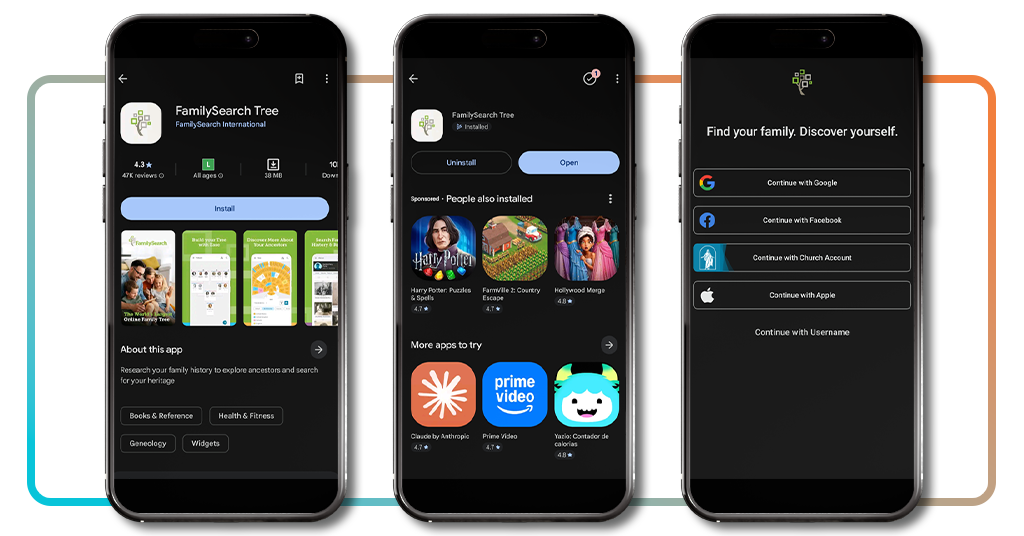
Search for ‘FamilySearch Tree’ on Google Play or the App-Store, install it, and open it up to find several sign-in options waiting for you on the welcome screen.
Pick whichever login method suits you best, then fill in your own name and gender to start building the very first branch of your brand new family tree.
Step 2: search using a name and birth year
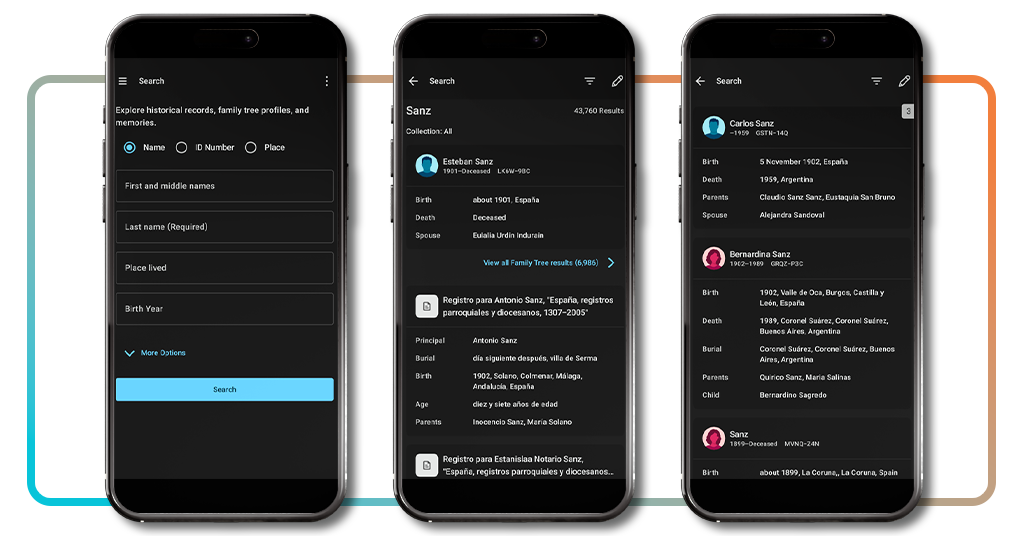
Once you create a profile, tap into the search tool and enter a first name, last name, and a rough birth year for the relative you want to find.
Narrowing results this way helps surface a matching public birth record faster, especially when fairly common last names would otherwise bury the person you’re really trying to locate.
Step 3: compare and confirm the matching record
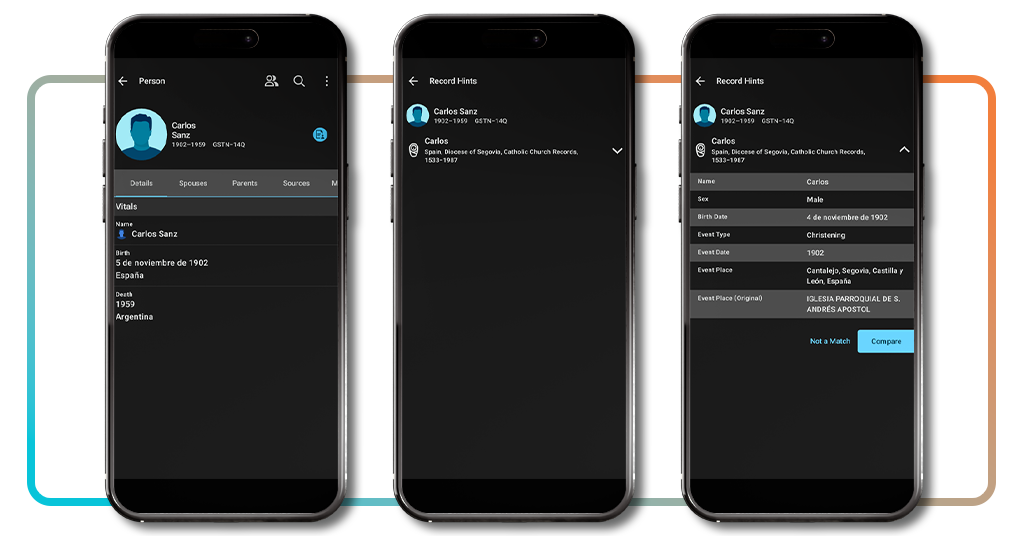
Open any search result that looks like a possible match and compare its listed details, including parents, spouse, and birthplace, against what your own family records currently show.
Tap ‘Compare’ if everything lines up, then confirm the match to attach that record permanently to your tree, or select ‘Not a match’ and keep searching elsewhere instead.
Verwandt: Trace your family story and discover your surname origin today
Other types of documents available in the genealogy app
Your family tree holds more than birth details, and FamilySearch Tree pulls in several other document types that fill out the fuller picture of who your relatives really were.
Death, marriage, and church records each carry unique details, like burial locations, spouse names, and parish towns, that birth certificates alone never fully manage to capture or preserve.
Pairing these documents with a public birth record builds out entire branches of your tree, connecting parents, siblings, and spouses across generations you never even knew existed.
Death records that reveal final chapters
A death record usually lists the date, location, and cause of passing, giving you deeper insight into how your relative spent the final chapter of their life.
These records also mention burial sites and surviving family members, helping you track down old cemeteries worth visiting along with distant relatives you never realized you had.
Marriage records connect entire family lines
A marriage record ties two separate family names together permanently, listing witnesses, locations, and dates that lead you toward an entirely new branch of unexpected relatives.
These documents name parents on both sides of the couple, giving you two entire family lines to explore at once instead of following just one branch alone.
Church and christening records
Church registers stretch back centuries further than modern civil records, capturing baptisms and christenings from small parishes that kept logs long before governments ever got involved.
You can spot a public birth record hiding inside these much older entries, given that local parish priests recorded births and baptisms together within one single shared logbook.
How to request an official certified birth certificate
Building a family tree inside an app feels great, but sometimes you need something official, a certified copy that carries real legal weight for passports, jobs, or benefits.
Each state and territory runs its own vital records office, meaning ordering rules, prices, and wait times differ quite a bit depending on where your birth took place.
Knowing the city and county tied to your birth speeds up the entire process, and requesting your public birth record becomes far simpler once you gather those details.
Requesting records for US-born citizens
If you were born somewhere inside the United States, start by directly contacting the vital records office in the state or territory where your birth was originally recorded.
That office can tell you precisely how to order a certified copy online, through the mail, or in person, along with current pricing and typical processing times involved.
Getting a consular report from abroad
US citizens born outside the country typically receive a Consular Report of Birth Abroad once their parents report the birth to a local embassy or nearby consulate office.
This document works just like a standard birth certificate for passports, school enrollment, and other official needs, and you can request a replacement through the State Department itself.
Replacing records after losing your ID
Losing every single form of identification makes requesting a birth certificate much trickier, but most vital records offices offer alternate ways to confirm precisely who you really are.
A sworn statement or a notarized letter from a parent named on your public birth record often works as valid proof when standard identification remains unavailable to you.
Verwandt: Check how exposed your personal info really is and avoid identity theft risk
Best identity theft protection to secure your data
Building out your family tree online means entering real names, birth years, and hometowns, which are personal details that could land you at greater risk if a data breach strikes.
Identity thieves actively target this kind of information, piecing together names and dates to open new accounts or file fraudulent claims using pieces of your family’s own history.
Locking down a few key accounts protects you well after finding a public birth record for a relative, keeping your own personal information out of the wrong hands.
Aura
Aura bundles identity monitoring with credit tracking, a VPN, antivirus protection, a password manager, and an online data removal tool into one single monthly subscription plan for you.
Every adult member gets access to a million-dollar insurance policy covering eligible losses, plus round-the-clock support from fraud specialists based in the US.
LifeLock
LifeLock offers three tiers of protection, scaling from basic credit alerts up to full financial monitoring, home title tracking, and broader reimbursement for stolen funds and identity theft.
Higher tiers add a virtual advisor and automatic data broker removal, useful protection once your name shows up next to a public birth record inside search results.
IDShield
IDShield pairs continuous credit and dark web monitoring with licensed private investigators, giving you a dedicated expert to handle recovery personally if identity theft ever happens to you.
Its PrivacyCheck feature locates your personal details sitting across data broker sites, letting you decide which listings to remove before scammers or telemarketers ever find them first.
4.3/5
Your ancestors are waiting to be found
FamilySearch Tree (Android | iOS) puts decades of family history inside your pocket, letting you build a tree, dig up old records, and finally connect names you’ve heard in stories to faces you never met.
Dieser Leitfaden von Insiderwissen explained how to search for a public birth record, browse other historical documents, and protect your own personal information from identity theft.
Weiter stöbern Insiderwissen and learn more ways to trace your ancestors, explore old family branches, and feel closer to relatives who came generations before you did.