
Spending more time choosing a movie than actually watching one is a common frustration for many people. Now that we have different streaming platforms where endless catalogs create hesitation and make simple decisions feel unnecessarily complex, this is happening even more, and that’s why some people need a movie recommendation app to move past indecision and quickly start watching something that matches their taste.
Without a movie recommendation app, that pattern keeps leading to wasted time and a sense that nothing seems worth watching, even when thousands of options are available. Below, you will see that the problem is not the lack of content but the absence of direction. Insiderbits will show you how the Likewise app (iOS/Android) changes this dynamic by translating your preferences into clear suggestions that remove doubts and make the experience feel intentional again.
- Application to watch free movies and series on your phone
- Best free movies on Amazon Prime: watch without paying a dime
- Dialogue Booster: Hear Movie Voices Clearly Without Subtitles
Tired of scrolling? Try this movie recommendation app
When endless browsing starts to feel more exhausting than entertaining, using a movie recommendation app changes how decisions are made.
With Likewise (iOS/Android), you stop this overwhelming navigation through catalogs by receiving suggestions that are already aligned with your preferences and viewing habits.
The app works by combining user input with behavioral patterns, so you can refine recommendations and present options that feel relevant.
This type of feature, that we are going to explore in detail below, is what reduces the problems that usually come from scrolling without direction.
Another important aspect is how it connects recommendations with availability, since it shows where each movie can be streamed.
When it comes to this aspect, it removes the extra step of searching across platforms and makes the transition from choosing to watching almost immediate.
All of this creates a more intentional experience, where instead of reacting to what appears on screen, you engage with content that already fits what you are in the mood to watch.

4.7/5
Features available in Likewise app
Understanding what makes Likewise (iOS/Android) effective starts with how it transforms scattered preferences into cohesive suggestions that feel intentional.
With that, the app interprets your past choices and continuously refines what it shows instead of presenting generic lists.
One of its most practical capabilities that stands out is personalized recommendation feeds.
This feature is the one that makes the system adjust suggestions based on ratings, saved items, and interaction history, which gradually improves accuracy as you keep using the app.
Another relevant feature is the integration with streaming availability that allows users to see exactly where a movie is playing without needing to search across multiple platforms.
The app also includes community-driven reviews and curated lists.
Those community aspects are responsible for adding a human layer to the algorithm and help surface titles that might not appear through automated suggestions alone.
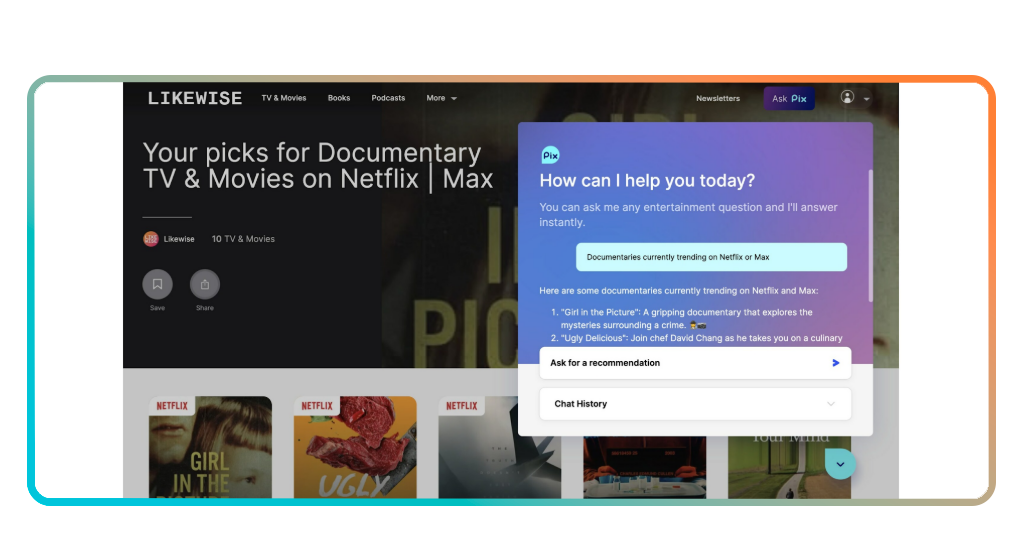
Step-by-step: how to find your next film using Likewise
Check the tutorial below to use this movie recommendation app, and then you will see that finding a movie through Likewise is much easier:
Step 1: download the Likewise App
Firstly, you need to download the movie recommendation app. To do it, search for Likewise: Entertainment Picks on the App Store or Play Store.
Step 2: set your preferences
Once installed, create your profile, choose a few genres or favorite titles, and rate some movies you already know so the app can begin mapping your interests with more precision.
Step 3: explore the recommendation feed
Browse the personalized suggestions that Likewise generates, paying attention to recurring patterns in the recommendations.
Step 4: check where the movie is streaming
Finally open the title page and confirm its streaming availability so you can see where the film is currently available before making your decision.
Step 5: save, rate, and refine
And lastly, add interesting titles to your watchlist, rate what you have seen, and keep interacting with the app so future recommendations reflect your taste more closely.
Tips for getting better movie suggestions
In order to get more accurate results from a movie recommendation app, it depends on how clearly your preferences are communicated.
That plays a major hole because the system improves its suggestions as it gathers more signals about what you actually enjoy watching. With that, rating movies consistently becomes central to the process.
And then, each interaction will help Likewise (iOS/Android) to understand patterns in your taste and adjust future recommendations with greater precision.
In addition, saving titles to your watchlist strengthens the system’s interpretation of interests, especially when those choices reflect what you are genuinely considering watching.
Lastly, revisiting the app regularly and engaging with new suggestions keeps the recommendation cycle active, refining the results of what you wanna watch.
4.7/5
Choosing what to watch as an easy process
As we saw throughout the article, spending less time searching and more time actually watching can be a natural outcome with a movie recommendation app.
Once you have Likewise (iOS/Android), the app starts guiding your decisions, and the process shifts from uncertainty to ensuring that suggestions reflect what you truly enjoy.
And then, what once felt like an overwhelming list of options turns into an experience where each recommendation carries intention.
Now you can make endless scrolling go out of your routine! This is the moment to replace it with a smarter approach and let your next movie find you with far less effort.
Related: Free movies streaming: watch 1,000+ films on these free apps today
Enjoyed this article? Save Insiderbits to your favorites and discover the most useful tech tips.