City life has a soundtrack, and it rarely lowers the volume. Subway brakes scream, traffic hums nonstop, and café chatter bleeds into work calls and more. The constant background noise fragments attention and raises stress levels over time. For years, relief meant spending hundreds on high-end headphones, as if peace and quiet were premium features.
Now that equation has changed. A free noise canceling app can use your smartphone’s microphone and AI filtering to soften the chaos around you. It won’t mute the world entirely, but it can make calls clearer and music easier on your ears. In a loud city, that small shift feels like reclaiming control.

Which app to use for free noise canceling?
While many apps claim to dampen sound, the Noise Reducer – Audio Enhancer has become a 2026 favorite for its lightweight design for iOS and effective AI processing.
Different from traditional “white noise” apps that just play rain sounds to mask the environment, this tool acts as a digital filter.
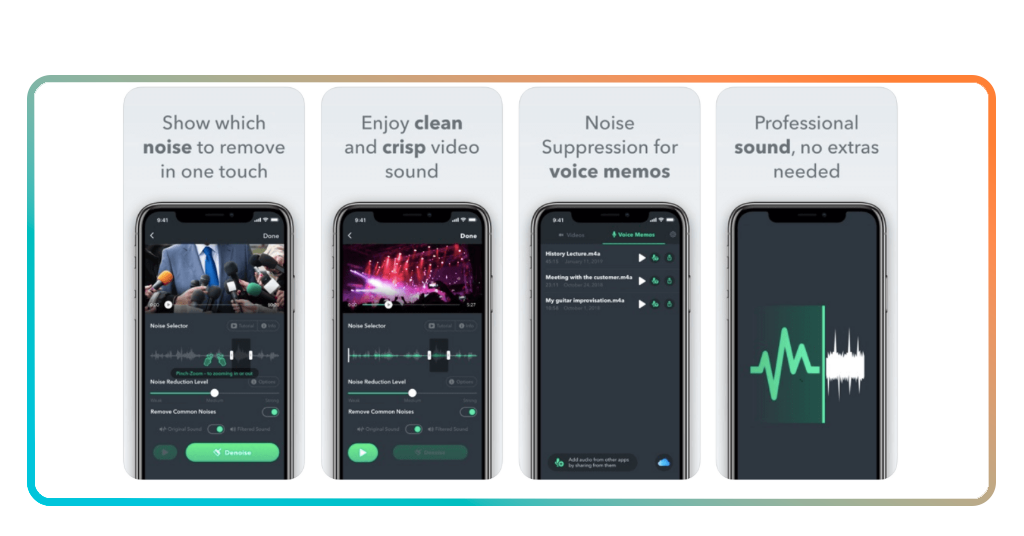
It uses your phone’s microphone to sample the surrounding noise and applies an inverse frequency to “cancel” it out before it reaches your ears.
This technology is particularly effective against “droning” sounds, such as:
- Subway/train hums: deleting the low-frequency rumble of the tracks;
- HVAC systems: removing the constant whir of air conditioners in offices;
- Crowd chatter: smoothing out the sharp peaks of voices in a coffee shop.
For those who want to explore a wider range of software-driven silence, checking out a curated list of the best noise canceling apps can help you find the specific tool for your headphone type.
- 10 Best Apps For Live Streaming Anything
- 10 Best Dating Apps to Find Real Love
- 10 Best Drawing and Painting Apps For Kids
Step-by-step guide to using the app
Maximizing the effectiveness of an AI-driven filter requires more than just hitting “Play.” Follow this guide to optimize your audio environment:
Step 1: download and calibrate
Install the app and grant microphone permissions. Calibration is key—the app needs to “hear” the specific environment you are trying to block.
Step 2: connect your headphones
While it works with most standard pairs, wired or Bluetooth, the fit of your earbuds (passive isolation) will significantly enhance the software’s performance.
Step 3: activate “Noise Reduction” mode
Toggle the primary switch. You will likely see a visual representation of the soundwaves being flattened.
Step 4: balance the volume
The goal isn’t just to make things louder. Use the “Audio Enhancer” feature to boost the clarity of voices or music after the noise has been subtracted. This protects your hearing by allowing you to listen at lower total volumes.
Step 5: test the presets
Many apps offer specific modes for “Commute,” “Office,” or “Windy.” BBC reports on noise pollution shows that specialized AI filters are now being used even in urban planning to help citizens manage stress.
Do I need to pay to use the app?
The short answer is no.
Most top-tier audio utilities in 2026 operate on a “freemium” model.
You can access the core AI noise-canceling features for free, which is usually more than enough for the average daily commuter or student. The “Free” tier typically includes:
- Standard noise cancellation: effective for most ambient urban sounds;
- Voice clarity boost: improving the mid-range frequencies of podcasts and calls;
- Universal compatibility: working with any headphones you already own.
Premium tiers usually only become necessary if you need “High-Definition” lossless processing, an ad-free experience, or advanced recording features for professional audio editing.
For 90% of users, the free version already adds some “magic” upgrade to their existing hardware, instantly reducing ambient noise by up to 30dB.
How to block high-pitched noises: construction, sirens, and screeches
While most free noise canceling apps excel at deleting the low-frequency “drone” of an airplane or bus engine, high-pitched sounds like construction drills, emergency sirens, and clashing metal present a unique challenge.
These sounds are “sharp” and unpredictable, making them harder for basic algorithms to anticipate. However, by 2026, AI-driven software has evolved to handle these frequencies through specific advanced settings.
To effectively silence high-pitched urban chaos, try these specific adjustments within your app:
Enable “Intelligent Adaptive” or “AI Transparency” modes
Standard noise cancellation often struggles with sirens because their frequency is constantly shifting. Look for a setting called Adaptive Audio or Intelligent ANC.
Leading apps use deep learning models—similar to the technology found in AirPods Pro 3—to recognize the specific “signature” of a siren or drill and apply a targeted filter in real-time without distorting your music.
Manual frequency masking (the “myNoise” strategy)
If the AI isn’t catching a specific screech, use an app with a Multi-Band Equalizer like myNoise. High-pitched construction noise usually sits in the $2kHz$ to $8kHz$ range.
By manually lowering the “sliders” for these specific frequencies, you can “carve out” the noise.
- Pro tip: combine this with a “Brown Noise” background layer. Brown noise is deeper and more effective at masking high-pitched intrusions than standard white noise.
Use “Loud Sound Reduction” (iOS specific)
If you are on an iPhone, navigate to Settings > Accessibility > Audio/Visual > Headphone Accommodations. Here, you can find a toggle for Reduce Loud Sounds.
The system-level feature works alongside your free noise canceling app to instantly “cap” the decibel level of sudden high-pitched noises like sirens or honking, protecting your ears from the “shock” of the sound.
The “Voice Focus” hack for construction
Construction sites often produce a “hissing” or “clanging” sound. Many noise-canceling apps have a Voice Focus or Human Speech mode.
While intended for calls, this mode often prioritizes the frequencies of the human voice ($80Hz$ to $3kHz$) and aggressively filters out anything above that range—effectively muting the high-pitched “mechanical whine” of power tools.
Reclaim your focus today
Silence is not a luxury reserved for the elite.
By downloading a free noise canceling app, you are taking control of your sensory environment.
Stop letting the city dictate your stress levels and start hearing the world on your own terms.