
Sometimes, when dealing with a hazard that is difficult to ignore, people search for a solution, and that can be an electrical safety app. Unfortunately, many homeowners only become aware of wiring problems after warning signs appear, yet by that point the situation may already involve elevated risk, which is why early detection is now such a relevant topic in home safety discussions.
Electrical safety has changed through technology development, and digital tech also shifted the approach inside residential environments as apps connected to smart detection systems allow users to track irregular electrical activity in real time. The electrical safety app that Insiderbits explores below operates within this context, offering a way to monitor electrical signals and guide users through preventive actions that reduce the likelihood of electrical fires.
- Best Apps to Simulate Electrical Installations: A Practical Guide
- Free Electrician Course: Learn, Get Certified & Boost Your Career
- App to Simulate Building Electrical Installations
How to protect your home with an electrical security app
An electrical safety app is useful because it introduces a layer of awareness that traditional home inspections rarely provide on a continuous basis.
With that, instead of relying on occasional visual checks or waiting for visible signs, monitoring systems track subtle electrical variations that can signal underlying problems.
The Ting app (iOS/Android) system works by analyzing electrical signals within a home’s wiring network, identifying anomalies, damaged insulation, or early-stage faults.

These signals are common to appear long before a problem becomes visible, and the use of an electrical safety app gives homeowners time to act before conditions escalate.
Another advantage involves the ability to receive alerts when unusual electrical behavior occurs.
In summary, monitoring electrical networks is relevant in older homes, where aging wiring systems may not meet safety expectations and issues persist without obvious symptoms.
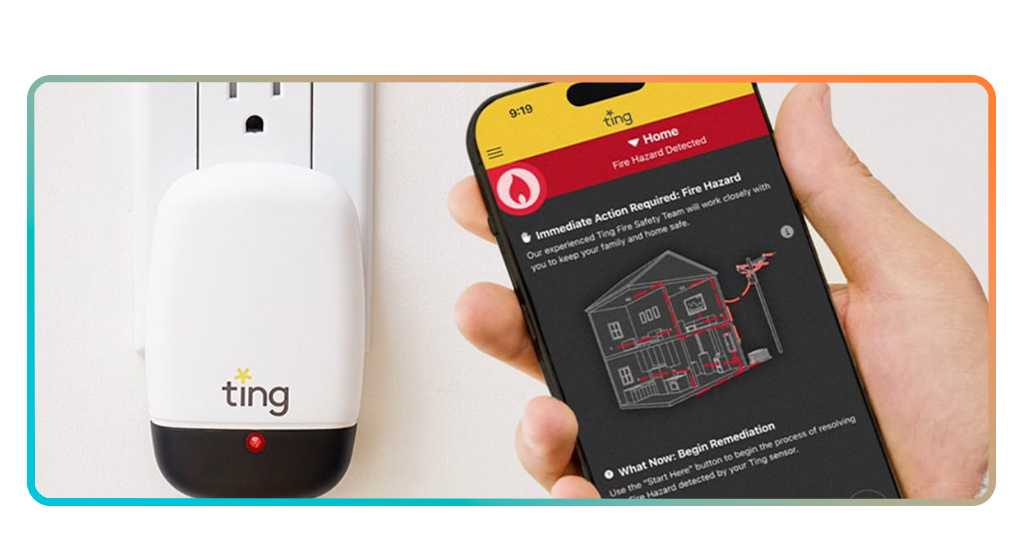
Step-by-step: how to perform a home inspection using Ting
A home safety check feels far more manageable when the process is treated as a guided setup followed by regular monitoring.
Check below to perform a home inspection using this electrical safety app:
- Step 1: firstly, download the Ting app on the App Store or Google Play Store;
- Step 2: after installing, open the app and create your account to begin the setup process;
- Step 3: also activate the Ting sensor according to the instructions provided for your electrical panel;
- Step 4: then, you need to confirm that the device is connected and actively reading your home’s electrical signals;
- Step 5: grant the permissions so the system to run continuously so it can build a baseline of normal electrical activity in your home;
- Step 6: check the dashboard regularly to understand how your system behaves under normal conditions;
- Step 7: after that, beware of any alerts or notifications that indicate irregular electrical patterns or potential risks;
- Step 8: lastly follow the guidance provided in the app if a potential issue is detected, and consider professional inspection if necessary.
Do you need to pay to use Ting?
The short question is: the Ting app (iOS/Android) itself is free to download.
However, its full functionality depends on the use of a dedicated sensor device that connects to the home’s electrical system.
In some cases, Ting is offered through partnerships with home insurance providers.
This partnership can cover the cost of the device and provide access to monitoring services at no additional charge.
For users without access to these partnerships, acquiring the sensor may involve an upfront cost, although the long-term value comes from continuous monitoring.
Features available in the Ting app
The features set inside Ting (iOS/Android) centers around continuous electrical signal analysis, allowing the system to identify patterns that may indicate potential hazards.
With that, you get real-time monitoring providing ongoing visibility into electrical behavior, so users get insight into activity that would otherwise remain unnoticed behind walls and circuits.
In addition, the alert system notifies users when irregularities are detected, helping prioritize attention toward issues that may require professional inspection.
The app also presents data in an accessible format, allowing homeowners to understand potential risks without needing specialized electrical knowledge.
Tips for maintaining electrical safety and app compatibility
When it comes to maintaining electrical safety alongside the use of an electrical safety app, it involves combining digital monitoring with practical household awareness.
While the Ting app (iOS/Android) provides continuous insights, basic safety practices still play an important role in reducing overall risk.
Consequently, it is important to regularly check visible outlets, avoid overloaded circuits, and ensure that appliances operate within safe limits.
All these actions support a more stable electrical environment and improve the effectiveness of detection tools.
Device compatibility also matters, since the accuracy of monitoring depends on proper installation and consistent operation of the sensor.
In order to do that, try to keep the system connected, and ensure that updates are applied when available, which helps maintain reliable performance.
Lastly, some external factors like aging infrastructure or even new electrical installations can influence system readings.
Because of that, periodic review of alerts remains important even when no immediate issues appear.
A smarter way to watch over hidden electrical risks
We all know electrical problems inside a home never announce themselves in a clear way. That’s why homeowners need to protect their property before visible damage appears.
An electrical safety app adds a layer of ongoing awareness to that situation, helping users spot problems earlier and respond with confidence when something is not looking right.
Ting (iOS/Android) is a valuable resource because it moves you closer to prevention, and that added visibility gets even more relevant in older homes.
When those habits listed above are supported by the electrical safety app, homeowners gain a more complete way to think about electrical protection, one that feels less passive and far more prepared.
Related: Best Apps to Simulate Electrical Installations: A Practical Guide
Enjoyed this article? Save Insiderbits to your favorites and discover the most useful tech tips!