
Grocery prices can change considerably between stores, but a supermarket price comparison app makes those differences easier to spot.
Flipp (iOS/Android) brings grocery offers and local promotions, letting you compare what is available around you. That makes shopping easier to plan without checking each supermarket separately.

Which is the best app to compare supermarket prices?
For comparing weekly grocery deals and supermarket price, you can use Flipp (iOS/Android) as a trustable source.
This app gathers all discounts and local promotions in different supermarkets, making it easier to check several retailers before deciding where to shop.
The app is even more practical if you already have a shopping list in mind, so you can search for specific products and compare which participating stores are promoting them.
Flipp (iOS/Android) organizes offers by location as well, so the results stay more relevant to the stores available in your area.
Another advantage is that the app focuses on current promotions, making it better suited to weekly planning and temporary discounts.
Its main limitation is that coverage depends on the retailers and offers available through the platform, so it will not necessarily show every price from every store near you.
And if you want a comparison outside one app, GroceryChop is another option for checking grocery prices and comparing local shopping choices.
Flipp: Shop Grocery Deals
Key features within Flipp
Overall, Flipp (iOS/Android) is built around weekly shopping, bringing digital flyers and current store promotions so you can compare offers before heading out.
The App Store description says it includes weekly ads and supermarket price from more than 2,000 stores.
And its search tool lets you look for a specific product across available flyers, which is really important when you already know what you need and want to see where it is on sale.
Also, it is possible for you to clip deals and add them to a shopping list, then organize that list by retailer.
And you can save favorite stores for faster access to their weekly ads.
Flipp (iOS/Android) also supports digital coupons for participating stores, including offers that can be loaded to linked loyalty cards.
Step-by-step: how to search for grocery discounts
Flipp makes grocery deal hunting easier by putting store flyers, product search, and shopping lists in the same app. Check how to do it:
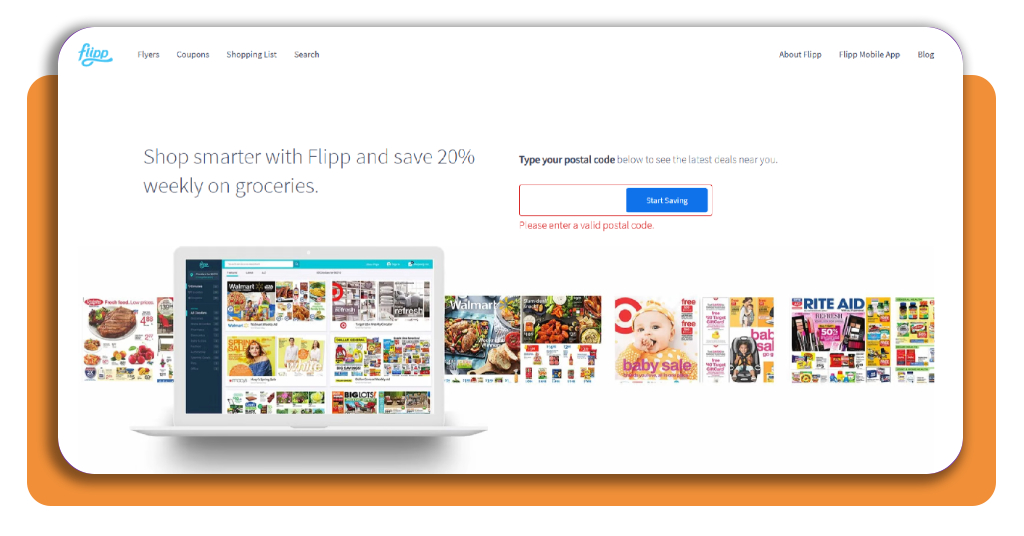
Step 1: set your location
To begin with, open Flipp website or download Flipp app (iOS/Android). Then, confirm your location so it will show offers from participating stores near you.
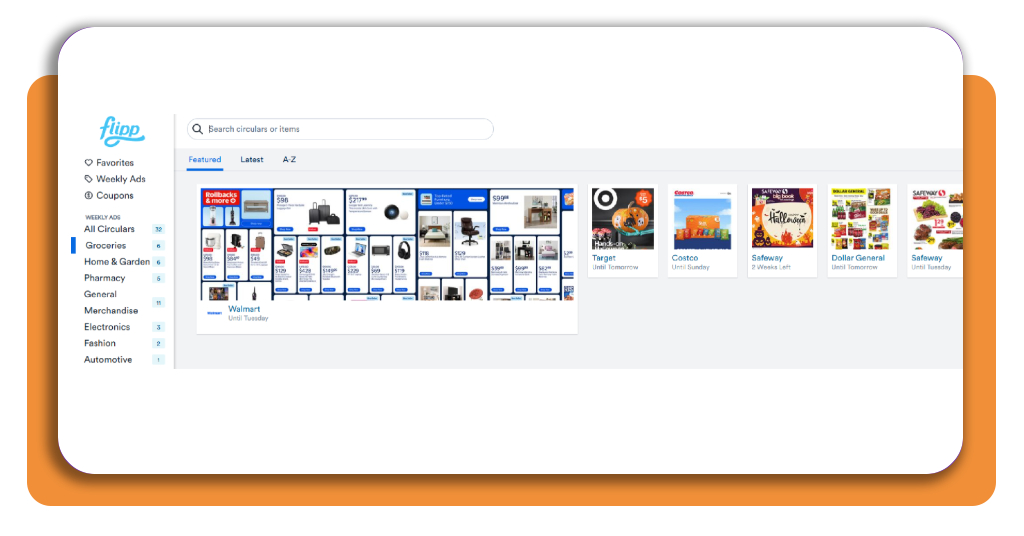
Step 2: search for a product
You can filter the type of shopping you want to do, like pharmacy, general, fashion, pets. In this case, we’ll choose groceries. And you will see some supermarket price available nearby.
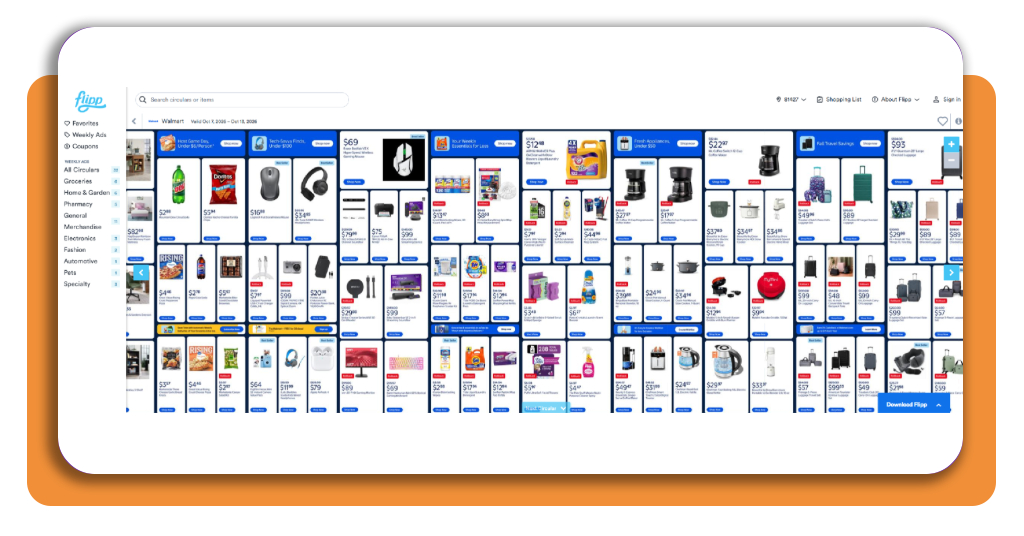
Step 3: compare the available deals
Review the chosen store offering the product and check the advertised price, package size, and promotion period.
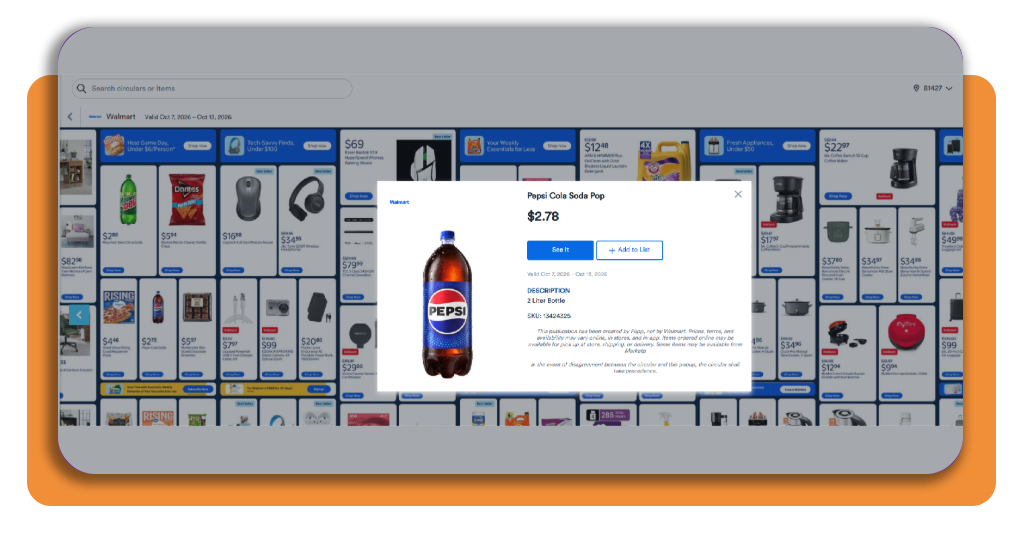
Step 4: save the offers you want
Now all you need to do is clip the deals that fit your shopping plan and add the items to your list.
Top online grocery delivery platforms
Online grocery delivery platforms are useful when convenience matters as much as price.
They let you order groceries from home, compare store availability, supermarket price, and choose between delivery or pickup depending on the service.
Instacart
Instacart (iOS) works with a wide range of grocery retailers and lets you shop from participating stores through the app.
That makes it simple when you want access to several supermarkets without switching between separate apps.
The final cost includes delivery, service, and other order fees, so it is worth checking the total before placing the order. Prices can also differ from what you see in store.
If you want to compare other tools built around grocery savings, our grocery price comparison app Insiderbits guide covers another way to check store prices and weekly offers.
Instacart
Best cashback rewards apps
Alongside, cashback apps add another layer of savings when you already know where you plan to shop.
Some focus on groceries, while others work better for online purchases, gas, or broader retail spending.
Ibotta
Ibotta (iOS) is especially relevant for grocery shopping because it rewards eligible purchases made at participating stores.
It is common for users to activate offers, shop, and then verify purchases through the app.
The platform is a good fit for people who shop for many of the same household items each week, since available offers can line up with regular grocery spending.
Its main drawback is that rewards require more active participation than some other apps, including checking offers and submitting purchase information.
Ibotta: Save & Earn Cash Back
Fetch
Fetch (iOS/Android) takes a simpler approach by rewarding users for scanning receipts from common purchases.
With this app, there’s no need to activate individual offers, which reduces the amount of planning involved.
Then, rewards are earned as points that can be exchanged for gift cards, so the value comes more from convenience than direct cash savings at checkout.
For grocery shoppers, the difference is straightforward:
Ibotta (iOS) is better suited to people who want to plan around specific offers, while Fetch (iOS/Android) works well if you prefer to scan receipts after shopping and keep the process simple.
Fetch: Earn Rewards Every Day
Turn weekly deals into a smarter shopping routine
Comparing supermarket prices works when you use the information previously. Checking weekly offers help you decide which store makes sense for the items already on your list.
Flipp (iOS/Android) is good for that planning stage because it brings flyers, discounts, and local promotions.
Still, the lowest advertised price is not always the best choice once delivery fees, service charges, travel time, or package size enter the comparison.
A simple routine of checking offers, building your list, and comparing a few options before checkout can make grocery spending easier to control from week to week.
Enjoyed this article? Save Insiderbits to your favorites and discover the most useful tech tips.