
Public Wi-Fi can expose your internet traffic to unnecessary risks. A VPN app can encrypt your connection and protect your activity when you’re browsing on unfamiliar networks.
In this Insiderbits guide, we’ll explain how NordVPN (Android | iOS) works, how to secure your connection on public Wi-Fi, and what other privacy tools are worth considering.

4.7/5
Which is the VPN app to browse privately and stay safe on any Wi-Fi network?
NordVPN (Android | iOS) is a VPN service designed to encrypt internet traffic and route it through a VPN server.
This can help protect your connection when you’re using public Wi-Fi at places such as cafés, hotels, airports, and libraries.
A VPN app can also change the IP address visible to websites and other online services. This can make it harder for those services to associate your activity with your usual IP address.
NordVPN (Android | iOS) supports Android and iOS, as well as other platforms. Its current features include multiple VPN protocols, DNS leak protection, an automatic Kill Switch, and a no-logs policy.
It’s important to understand what a VPN does and doesn’t do.
A VPN encrypts your connection between your device and the VPN server, but it isn’t a complete replacement for antivirus software, strong passwords, or careful browsing habits.
Key features within NordVPN
NordVPN (Android | iOS) includes several features designed to add security and privacy to a VPN connection. Its available protocols include NordLynx, OpenVPN, NordWhisper, and IKEv2/IPsec.
The service also includes an automatic Kill Switch. If the VPN connection unexpectedly drops, this feature can block internet traffic so that data isn’t sent through an unprotected connection.
Another feature is DNS leak protection, which helps keep DNS requests inside the VPN connection.
NordVPN (Android | iOS) also offers Threat Protection features designed to help block malicious websites, malware, and trackers.
For users who want additional privacy features, NordVPN (Android | iOS) offers tools such as Dark Web Monitor, Double VPN, split tunneling on supported platforms, and Meshnet.
Step-by-step: how to encrypt your internet traffic and secure public Wi-Fi
Using a VPN app on your phone makes it possible to secure your connection directly from the device you use to browse.
NordVPN (Android | iOS) offers a simple connection process, so you can activate the VPN before using public Wi-Fi.
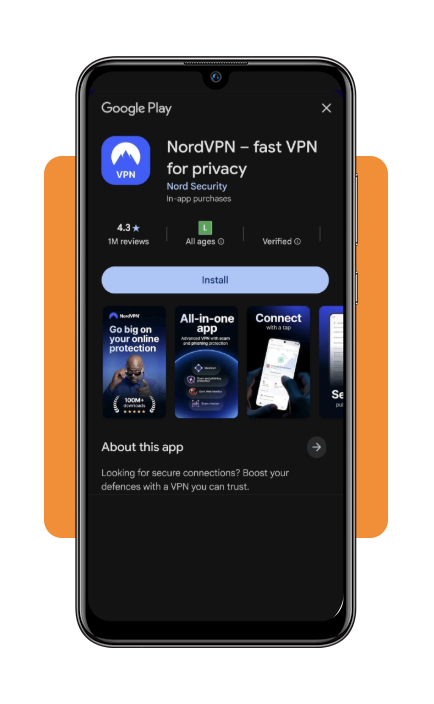
Step 1: download the NordVPN app
Download the official NordVPN app from the Google Play Store or Apple App Store.
You can also manage your NordVPN account through the website, but we’ll use the mobile app for this guide.
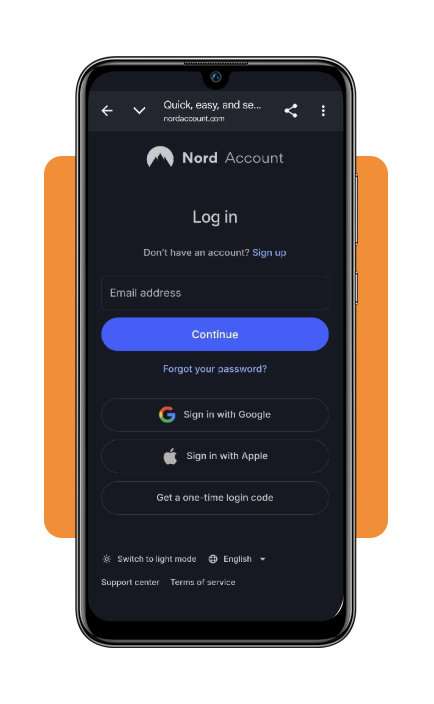
Step 2: open the app and sign in
Open NordVPN (Android | iOS) after installation and sign in with your Nord Account.
If you don’t have an account yet, follow the instructions in the app to create one and select an available subscription plan.
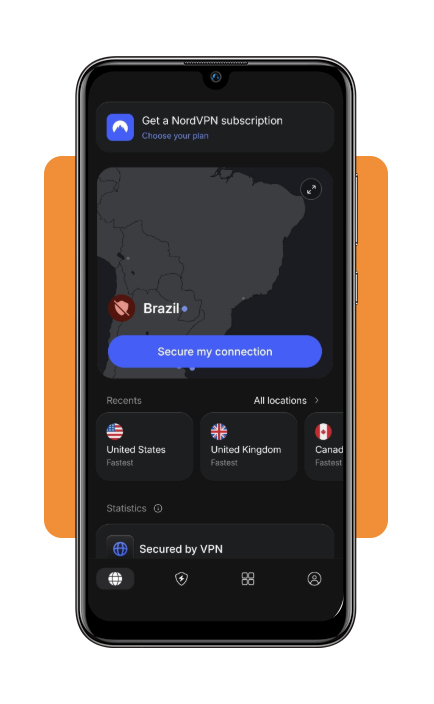
Step 3: tap the ‘Secure my connection’ button
On the main screen, tap the ‘Secure my connection’ button to connect automatically to a recommended VPN server.
The app will establish the connection and show when your device is protected by the VPN.
Step 4: activate the VPN before using public Wi-Fi
Connect to NordVPN (Android | iOS) before browsing on networks in cafés, airports, hotels, or other public locations.
Once the VPN connection is active, your internet traffic is routed through the VPN server rather than directly through the public network.
Step 5: check that you’re connected
Look for the connected status or VPN indicator in the NordVPN app (Android | iOS) and on your device.
If the connection drops, check the app before continuing activities that involve sensitive information, such as online banking or entering account credentials.
Step 6: disconnect when you’re finished
When you no longer need the VPN, open NordVPN (Android | iOS) and tap the disconnect button.
You can reconnect whenever you use an unfamiliar network or want to route your internet traffic through a VPN server.
Top premium VPN services for digital privacy
NordVPN (Android | iOS) isn’t the only service available if you’re looking for a VPN app. Several premium VPN providers offer different combinations of privacy features, server locations, connection speeds, and pricing.
When comparing services, look at the number of supported devices, available protocols, server coverage, logging policies, Kill Switch functionality, and customer support.
ExpressVPN is another established VPN service with apps for mobile devices, computers, and other supported platforms. It focuses on encrypted connections, private browsing, and a broad selection of server locations.
Surfshark offers VPN apps for multiple platforms and includes features such as a Kill Switch, split tunneling on supported devices, and tools designed to block trackers and malicious websites.
Proton VPN is part of the Proton privacy ecosystem and offers features including open-source applications, strong encryption, and Secure Core connections.
It can be an option for users who prioritize transparency and privacy-focused services.
For a broader comparison, you can review this Forbes Advisor guide to the best VPN services. It can help you compare different providers instead of choosing a service based only on price.
You can also consult this Cybernews VPN comparison for additional information about VPN services, features, and privacy considerations.
Remember that VPN performance can vary depending on your location, internet provider, server distance, device, and network conditions. A service that works well for one person may not deliver identical results for another.
Best identity theft protection tools
A VPN can protect your internet connection, but it doesn’t prevent every form of identity theft.
Your personal information can still be exposed through data breaches, compromised accounts, phishing attacks, or companies that already have your information.
For this reason, combining a VPN app with identity protection tools can provide broader coverage.
A VPN can protect your internet connection, but it doesn’t cover every type of identity risk. Identity theft protection services can add monitoring for suspicious activity, exposed personal information, and changes involving your credit or financial accounts.
LifeLock combines identity monitoring with credit protection and cybersecurity features through Norton.
Depending on the plan, it can include monitoring across multiple credit bureaus, dark web monitoring, and identity theft insurance.
Aura combines identity and credit monitoring with additional digital security features. Its plans can include three-bureau credit monitoring, dark web monitoring, and device protection.
Identity Guard focuses on identity monitoring and alerts, with different plan levels offering features such as credit monitoring, financial account monitoring, and protection against exposed personal information.
Surfshark Alert combines identity monitoring with Surfshark’s broader cybersecurity ecosystem. It can monitor for compromised personal information and is available as part of certain Surfshark plans.
Before choosing one, check which types of monitoring are included and whether the service covers the accounts and information you actually want to protect.
You can also learn more about protecting exposed information with this Insiderbits data leak scanner and identity protection guide.
For additional comparisons, the Security.org guide to identity theft protection provides information about different identity protection services and the features they offer.
4.7/5
Browse with greater privacy on public Wi-Fi
Using a VPN app can add an important layer of protection when you’re connected to public Wi-Fi. NordVPN encrypts your internet traffic and provides features such as a Kill Switch, DNS leak protection, and multiple VPN protocols.
Start by setting up your account through the website, then install the appropriate app on your device. Once connected, you can browse through the VPN connection while using public networks.
For stronger overall digital security, combine your VPN with unique passwords, multi-factor authentication, software updates, and identity monitoring.
No single privacy tool can eliminate every online risk, but using several layers can make your everyday browsing more secure.