
The Bible App with Audio by YouVersion seamlessly combines the timeless Word with today’s technology, offering a fresh approach to faith in the digital era.
At Insiderbits, we’ve had the privilege to delve deep into its offerings. Beyond the intuitive design lies an impressive set of features that cater to every believer’s needs.
But how does this app stand out in the sea of spiritual resources? Join us as we take a closer look at what makes the Bible App with Audio so special.
Bible App with Audio: An Overview
The Bible App with Audio by YouVersion elevates your spiritual journey, combining scriptures with modern technology. With it, you can listen to the Word in incomparable clarity.
The app’s interface is more than just functional; it’s pleasing to navigate, offering a modern design. Browsing through chapters or selecting individual verses feels almost effortless.
You can experience over 2,500 versions of the Bible in over 1,750 languages – fostering a sense of inclusion for all users across the globe.
The app also offers reading plans, Daily Devotionals, and a community in which you can share and discuss your faith with like-minded people.
For traditional readers, the visual settings are entirely customizable. Adjust font styles and sizes, highlight your favorite verses, and download them for offline access.
On top of all these incredible features, the ones that truly stand out are the fact that the Bible App with Audio is completely free and contains no ads to disrupt your immersion.
Ultimately, the app is able to gracefully blend age-old wisdom with technology, creating a renewed experience with the sacred text.

4.9/5
Bible App with Audio’s main features
Packed with innovative features, the Bible App with Audio by YouVersion invites you on a journey of faith like no other.
Ready to learn what lies beneath the surface? Let’s dive into the main features that make this app a divine companion for believers:
- High-Quality Audio: Immerse yourself in the divine Word with high-quality audio, whether you’re on the go or seeking a moment of reflection.
- Offline Reading: Delight in the tranquility of selected passages available for offline reading, ensuring your spiritual connection is uninterrupted.
- User-Friendly Interface: Navigate easily through the beautifully designed, intuitive interface, making your journey through the scriptures a heavenly experience.
- Customizable Playlists: Create your own playlists of favorite verses to make sure that inspiration is always just a tap away.
- Daily Scripture Reminders: Set reminders for daily scripture, encouraging a consistent connection with your faith and spiritual growth.
- Shareable Passages: Spread the light by sharing your favorite verses and reflections with friends and family on a built-in community of faith.
- Adjustable Display Settings: Whether you prefer night mode or larger fonts, tailor your reading experience to suit your comfort and environment.
All of these features not only bring the scriptures closer to you but also cultivate a personalized, engaging connection with the Word.
Bible App with Audio benefits
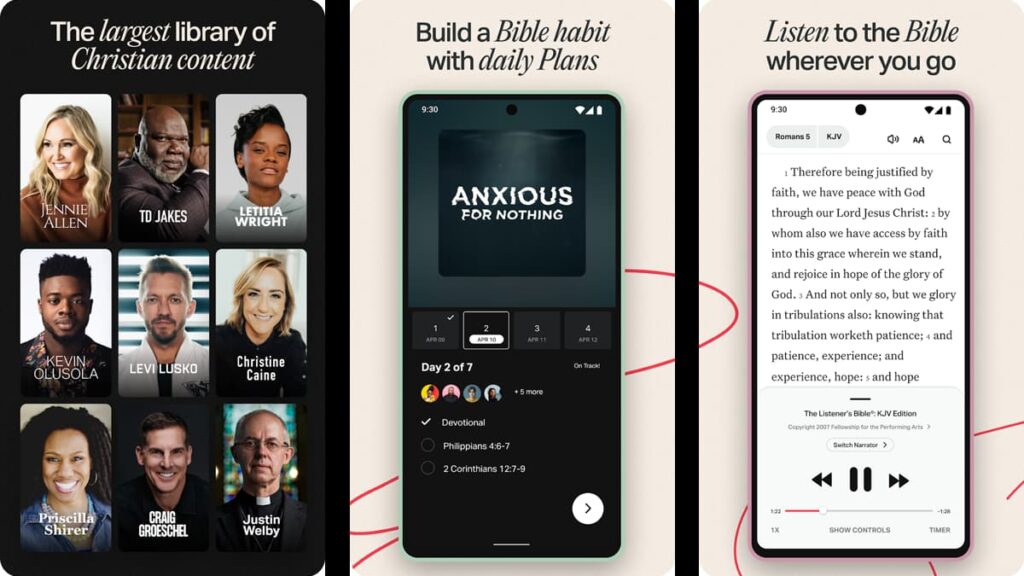
More than just features, the Bible App with Audio by YouVersion offers a transformative spiritual experience with every tap.
So let’s take a closer look at the blessings and personal growth opportunities that await you within the app:
- Spiritual Nourishment: By engaging with scripture daily, you can fuel your spirit and keep you anchored in faith, even during challenging times.
- Mental Peace & Calm: The convenience of audio allows for meditation and reflection, providing mental tranquility and introspection.
- Consistency in Faith Practices: Scheduled scripture reminders can establish a regular routine, helping in discipline and consistent spiritual growth.
- Flexibility & Accessibility: Offline reading ensures you’re never without the Word, giving you spiritual sustenance during travels or in places without the internet.
- Easier Comprehension: Listening while reading can improve understanding, making complex verses more easy to learn and memorable.
- Community Ties: Sharing reflections and favorite verses with friends can promote deeper conversations and shared spiritual journeys.
The potential of the Bible App with Audio by YouVersion is endless. Each interaction is an opportunity to nurture your spirit and understanding, in addition to deepening your individual faith.
Are there any downsides to the Bible App with Audio?
While the app is rich with features, users might find it a bit overwhelming. The quantity of options can complicate the quest for a simple scripture experience.
Another limitation is the selective offline access. If you live in a remote area, you might prefer more extensive content availability without needing an internet connection.
While certain aspects may be seen as setbacks, the app’s capabilities outweigh them, attesting its place as the most popular Bible app across the entire world.
How to download the Bible App with Audio
If you’re ready to unravel the scriptures and let the sacred words resonate with you, beginning your new digital journey is as easy as using the app.
Follow Insiderbits’ simple guide below to download the Bible App with Audio and step into a world of enlightenment and reflection.
Android devices:
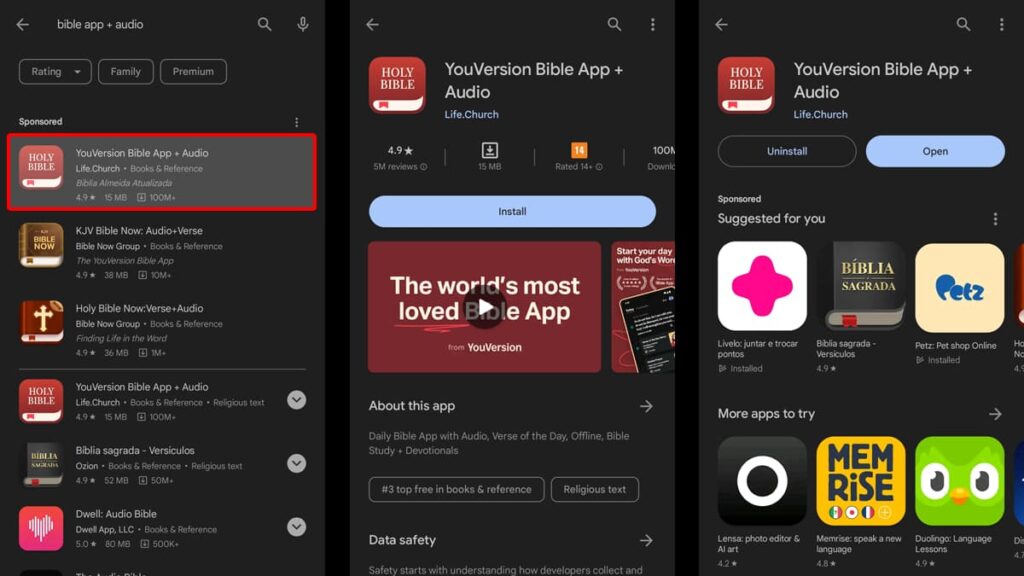
Begin your divine digital journey by unlocking your Android device and tapping on the Google Play Store icon. In the search bar, enter “Bible App with Audio by YouVersion”.
Spot the app in the results, and tap on it to open its information page. Then, once you’re familiar with it, hit the “Install” button.
Watch as the app downloads and automatically installs onto your device. When all is done, tap the “Open” button to launch the app and enjoy your new sacred companion!
iOS devices:
To start your spiritual expedition with the Bible App with Audio by YouVersion on your iOS device, first, you need to head over to the App Store.
In the App Store’s search bar, type “Bible App with Audio” and easily locate it amongst the first options displayed to you. As soon as you find it, tap the “Get” button.
Observe the download and installation progress, and once the app is successfully installed, open it to and immerse yourself in its features.
4.9/5
How to navigate the Bible App with Audio
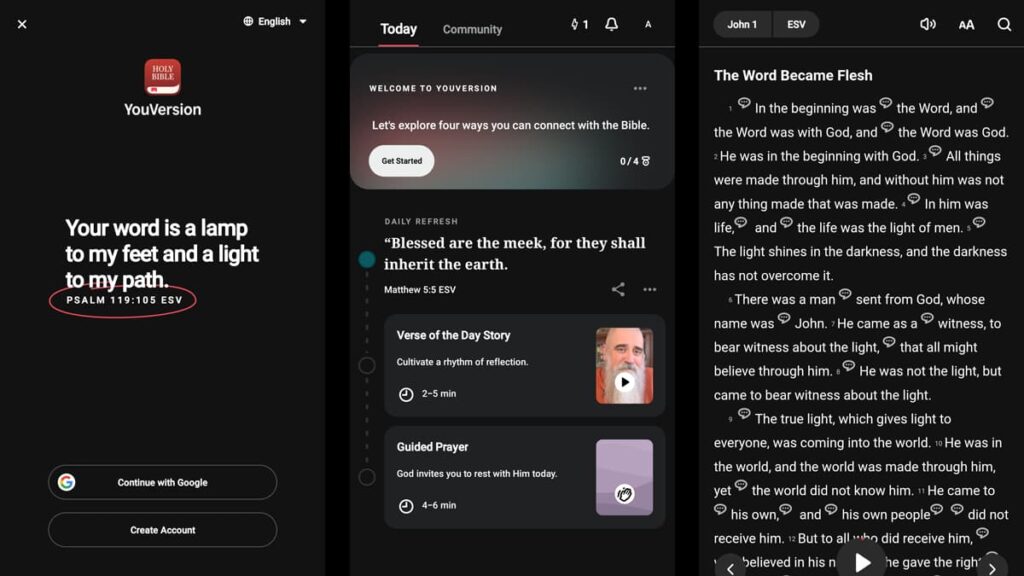
Prepare to start a new and transformative passage through scripture with the Bible App with Audio by YouVersion.
In this comprehensive guide, we will lead you step-by-step through the app’s navigation, disclosing its many features designed to improve your spiritual life:
Step One: Welcome Screen and Setup
As you launch the app on your device, you’ll be greeted with a welcome screen. During this initial stage, you’ll have to create an account or use your Google credentials.
After creating an account or logging in using Google, you need to read the app’s Terms of Service. Toggle the button below informing you to read them and tap “Continue”.
Step Two: Daily Verses and Categories
On the home screen, you’ll see a Daily Refresh function, introducing you to the Verse of the Day and Guided Prayer. You can tap on them to read or listen in full.
At the bottom of your screen, you’ll notice a menu with different categories. These categories offer diverse ways to engage with scripture and customize your experience.
Step Two: Exploring the App
To find specific verses or passages, use the “Discover” tab at the bottom of your screen. If you’d like to start with audio, tap the “Bible” tab and press the “Play” button.
On the “Plan” tab, you can find specific Daily Plans to suit your spiritual state. You can also save them and track your progress as you finish each one.
The “More” section is where you can access and customize your profile. Make sure to explore this part so you can make the app truly yours.
Unlocking Spiritual Insights with the Bible App with Audio
As we finish our voyage through the Bible App with Audio, your spiritual odyssey can now begin. Explore, reflect, and grow with this powerful tool at your fingertips.
With seamless navigation, daily verses, and customizable playlists, hearing the Word of God has never been so accessible and enriching.
At Insiderbits, we’re always striving to bring articles that empower your digital experiences. From tech wonders to life’s treasures, we offer plenty of interesting pieces for curious minds.
So make sure to join our expedition of discovery and keep exploring with us. There’s a world of knowledge waiting for you just a click away!