
Do you know those movie nights at home that sometimes come with an unexpected frustration? Yes, we’re talking about when the soundtrack roars through action scenes while dialogue fades into the background. Those moments are annoying, and that’s why streaming users search for a dialogue booster solution after realizing that modern films are mixed with dramatic sound contrasts that television speakers struggle to reproduce accurately.
This issue appears normally in streaming platforms where cinematic audio mixes designed for theaters reach living rooms without adjustment. However, Amazon Prime Video itself has features that analyze the soundtrack and raise the presence of human voices so dialogue remains understandable even during intense scenes, offering a simple way to enjoy movies without relying on subtitles.
- Volume Booster app: Make your phone’s volume much louder
- How To Get a Smartphone Volume Boost
- How to Customize the Volume Button on Android
What is Amazon Prime’s Dialogue Booster?
The dialogue booster is a feature on Amazon Prime Video (iOS/Android) that analyzes how streaming audio works inside modern films and series.

4.8/5
This way, it’s not needed for anyone to increase the entire soundtrack volume. The technology identifies the frequency range associated with human speech and amplifies it.
And the best part is this is all done slightly within the overall audio mix.
As you can see, this method differs from traditional volume controls, which raise music, explosions, background sounds, and dialogue altogether.
By doing it the traditional way, it makes loud scenes even louder while voices remain difficult to distinguish.
On the other hand, the dialogue booster works more intelligently, so speech stands out without drastically altering the balance of the soundtrack.
You’ll see in detail in the tutorial below, but inside Amazon Prime Video, the feature appears as an audio setting that viewers can activate directly during playback.
The system then adjusts the sound profile dynamically, and that’s what keeps voices clearer even when the scene transitions between quiet conversation and loud cinematic effects.
In addition, different intensity levels are available. Therefore, users can apply subtle speech enhancement or dialogue booster emphasis depending on the audio environment or the device used for streaming.
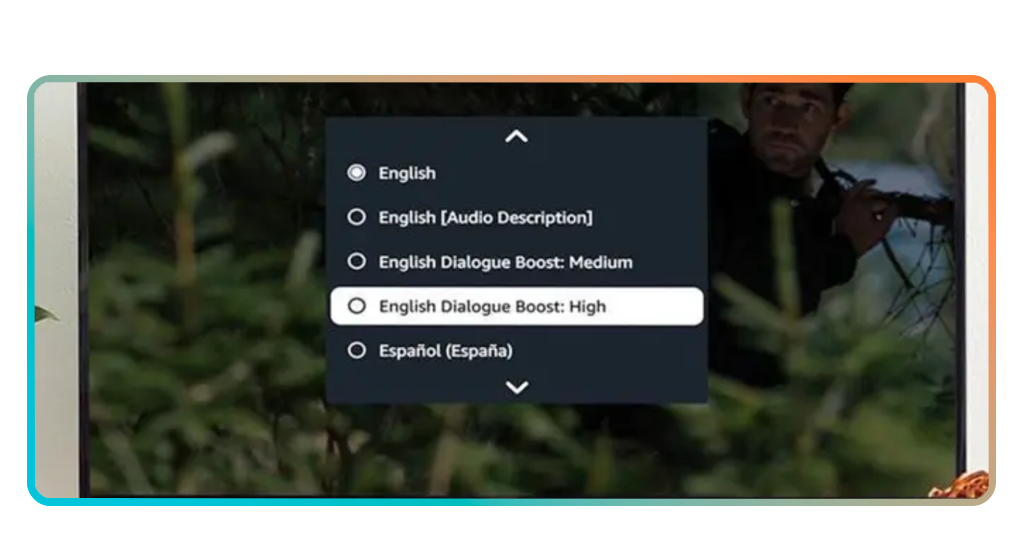
Step by step: How to use Amazon’s volume booster app
Activating the dialogue booster feature requires only a few adjustments inside the streaming playback menu.
Check below how the process works across smart TVs, mobile devices, and browsers:
- Step 1: first of all, download the Amazon Prime Video on the Play Store or the App Store, or access it on your browser at Prime Video, if you prefer;
- Step 2: now, open the Amazon Prime Video app and start playing the movie or episode where dialogue sounds difficult to hear;
- Step 3: in this moment of the film, pause it and open the playback settings menu that appears on the screen;
- Step 4: all you need to do now is locate the audio settings section where language tracks and sound options are displayed;
- Step 5: select the dialogue booster option and choose the enhancement level that improves voice clarity;
- Step 6: lastly, resume playback and adjust the setting again if necessary until the dialogue becomes comfortable to hear.
4.8/5
Why movie dialogue can sound muffled
The reason viewers search for a dialogue booster lies in the way modern films are mixed for theatrical environments instead of ordinary home setups.
That happens because movie studios usually prepare soundtracks for large cinemas equipped with multiple speakers.
And those speakers separate dialogue, music, ambient noise, and special effects across different audio channels with far more precision than a standard television can reproduce.
In that setting, spoken lines travel through a dedicated center speaker.
Meanwhile, the background score and action-heavy effects spread across side and rear channels to create a wider and more immersive sound field.
Once the same mix reaches a television, laptop, tablet, or phone, that original balance can shift noticeably, making voices sound softer while louder elements dominate the scene.
Another factor involves the dynamic range used in cinematic sound design, and this contrast can feel impressive in a theater, but it creates frustration at home.
It is important to mention that room acoustics also play a role, since speaker placement and low-quality built-in drivers can reduce speech definition even more during complex scenes.
Still, streaming platforms increasingly address this issue through software-based audio processing that raises speech frequencies and gives dialogue more presence.

Clearer dialogue without turning the volume up
Speech brightness is one of the most discussed audio challenges among streaming audiences.
Even more now as modern films continue to rely on dramatic sound design that prioritizes cinematic impact over simple home listening.
Thankfully, the dialogue booster available on Prime Video (iOS/Android) illustrates how streaming platforms now use intelligent audio processing to rebalance voices within complex soundtracks.
And you’ve just learned with Insiderbits that exploring the settings available inside streaming services can reveal useful features that improve your experience.
Related: Increase the Volume: Android vs. iOS – The Ultimate Guide
Enjoyed this article? Save Insiderbits to your favorites and discover the most useful tech tips!