
Life has a tendency to turn into a chaotic schedule of to-dos, deadlines, messages, and half-finished coffee cups. The human brain can only juggle so much before it starts dropping balls or forgetting them entirely. For anyone drowning in tasks or tempted to live on sticky notes, a true AI personal assistant may be the difference between chaos and clarity.
Enter Motion: a tool designed to handle your calendar, prioritize your workload, and automatically build a weekly plan for you. Instead of deciding what to do next, you let the AI order your tasks, manage your time slots and keep you focused on results. For busy professionals, students, creatives or anyone with a life that refuses to pause, Motion offers a way out of overwhelm.
- AI Personal Finance Assistants: Manage Your Money Smarter in 2025
- AI Personal Stylists: Redefining Fashion Choices
- AI-Powered Travel Assistants: Your Personal Guide to Smarter Trips
How AI turns chaos into a clear weekly schedule
The core appeal of an AI personal assistant like Motion lies in automation coupled with real-time adjustments.
According to Motion’s own documentation, the app reads through your tasks and calendar commitments and generates a dynamic schedule that adapts as new items come up.
Rather than manually dragging events around or procrastinating until next Monday, Motion claims you can let the algorithm decide what to do and when.
That means no more guessing which task to tackle next, no more calendar overload, and fewer evenings lost wondering if you forgot something important.
The result is a week planned in a few seconds, with priorities already ranked and time slots assigned. For many, it replaces the mental load of planning with the ease of execution.

4.2/5
Best AI personal assistant apps for tasks, work, and life balance
Motion is not the only player in the AI personal assistant field, but it’s among the most visible thanks to its ambition: integrate tasks, calendars and smart scheduling in one place.
The advantage is obvious when compared with running multiple apps: a calendar here, a to-do list there, reminders everywhere and still ending the week with “I forgot to do that”.
Among tools that attempt this integration, Motion stands out because:
- It synchronizes automatically with your calendar and task list to avoid duplication or conflicts;
- It rearranges your schedule dynamically if events change or new tasks emerge;
- It helps prevent overbooking or burnout by balancing workload and free time;
- It reduces decision fatigue by deciding the “when” for you, letting you focus on execution;
- It supports multi-device access, including Android and iOS, so you always carry your plan with you.
Even if it doesn’t guarantee perfect productivity, Motion simplifies one of the hardest parts: deciding what to do next, a task most people under-estimate.
4.2/5
Tips to stay focused and reduce decision fatigue
Using an AI assistant doesn’t replace discipline, but it buys you mental clarity. If you want to get the most of Motion (or any similar tool), consider these strategies:
- Keep your task list up-to-date with realistic estimates and deadlines;
- Resist the urge to overload a single day — let the AI balance your schedule;
- Use buffer times for unexpected tasks or downtime, rather than squeezing everything;
- Review your plan daily to catch what changed and avoid surprises;
- Treat the generated schedule as a guideline, not a rigid prison — allow flexibility when needed.
This kind of routine helps your brain trust the tool and frees up energy for creativity, rest or what really matters to you.
User-reported pros and cons of Motion as an AI personal assistant
Before anyone crowns Motion the savior of modern productivity, it’s worth looking at how real users describe living with an AI personal assistant that reorganizes their week on autopilot.
These impressions appear often enough across public reviews and forums (App Store, Google Play, Reddit, Product Hunt) to form a clear picture of what people actually experience.
What users say Motion gets right
It cuts through decision fatigue. Many users admit they lose hours just figuring out where to begin. Motion removes that daily paralysis by sorting priorities for them.
People describe it as the first tool that doesn’t ask what they want to do—it simply tells them.
It reschedules everything without drama. One of the most consistently praised features is real-time reshuffling.
When a meeting runs late or a task explodes into something bigger, Motion rewrites the day instantly. No dragging, dropping, or emotional breakdown required.
It merges calendars and tasks into one ecosystem. People call out how seamlessly Motion integrates tasks, deadlines, events and focus blocks. There’s no juggling between apps, no double-entry, no mental gymnastics.
It’s a secret weapon for meeting-heavy professionals. Freelancers, consultants and managers often say Motion is the only thing keeping their workdays from imploding. The AI actively protects deep work blocks and places them where they’ll actually stick.
Where Motion still frustrates users
Time estimates can be wildly off. Several users complain the AI compresses multi-hour deliverables into tiny slots. It’s smart, but not psychic, and users often need to correct those optimistic durations manually.
Overscheduling can feel suffocating. Some people say the interface looks like a high-stakes Tetris match. When the entire day becomes a wall-to-wall grid, the structure that’s supposed to help can start to feel claustrophobic.
The mobile app isn’t as stable as the web version. Crashes, freezes and slow loading pop up frequently in reviews—mostly on older Android devices, but not exclusively. The core product works better on desktop.
The price gets side-eyed a lot. The subscription is a major sticking point. Users repeatedly mention that while the concept is brilliant, the cost pushes it out of reach or fails to compete with cheaper alternatives offering partial automation.
There’s a learning curve that catches people off guard. The automation is powerful, but not plug-and-play. Some users say that if settings aren’t tuned correctly, Motion tries to schedule everything they’ve ever thought about doing and then schedules it again.
The overall sentiment
Taken together, user feedback paints Motion as a high-impact assistant for people drowning in commitments, juggling multiple calendars or craving structure they can’t maintain on their own.
When it works, it genuinely reduces mental overload. When it doesn’t, it can feel like an overzealous manager micromanaging your day down to the minute.
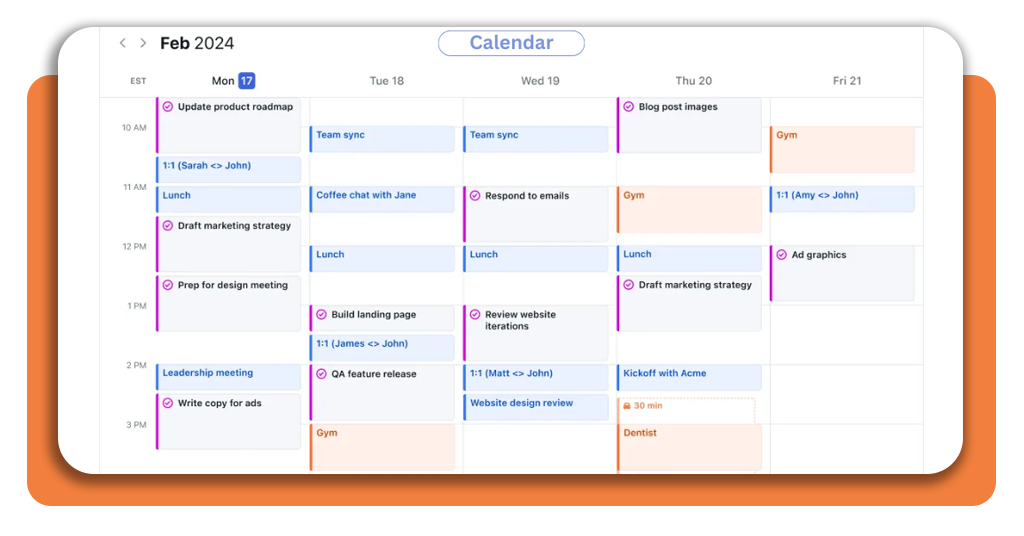
Start planning your week automatically with free ai tools
Are you tired of mental clutter, missed deadlines or the constant stress of trying to remember everything? An AI personal assistant might be worth a shot.
Motion offers a trial path that lets you see if automated scheduling fits your rhythm. For many, it means less chaos, fewer late nights and a clearer view of what’s ahead.
Auto-plan your week. Let AI schedule everything for you.
And if you’re curious about how today’s most advanced AI models are built and why they’re suddenly everywhere, take a look at Insiderbits’ deep dive into Mistral AI.




