
The difference between a breathtaking shot and a blown opportunity is usually about 15 minutes. The same goes for a sunrise hike that ends in daylight or one that ends in darkness, a meditation session with soft morning light, or one spent squinting at a harsh midday sun. Natural light rewards those who show up prepared, and a sunrise tracker app makes that possible.
Lumy pulls together sun and moon data, activity modes, and seven-day weather forecasts into one app that fits every kind of outdoor routine. This Insiderbits guide covers what Lumy brings to the table, how to set it up, and how to turn every golden hour into something worth leaving the house for. The sky’s been putting on a show every single day, and it’s time to get a front row seat.
Correlato: Strumento alba-tramonto: svela i segreti della perfetta tempistica della luce

Lumy: sunrise tracker app
Lumy (iOS) is an app that tracks the sun and moon so you can plan your outdoor life around natural light. It pulls together solar events, lunar cycles, and weather data in one place.
This sunrise tracker app gives you a full picture of what the sky’s doing at any point in the day. Golden hour, blue hour, twilight, moon phases—it’s all mapped out and ready to use.
The interface is clean, the data is accurate, and the whole thing is built to fit real outdoor routines. Lumy isn’t a widget with sun times. It’s a full planning tool for people who live outside.
Features available in the Lumy app
- Sun and moon tracking: the app delivers solar and lunar data, including sunrise, sunset, golden hour, moon phases, and twilight times, all calculated on your device;
- Seven-day weather forecasts: plan your outdoor sessions with a full week of weather data, so a surprise overcast morning never catches you off guard again;
- Custom reminders: set repeatable notifications tied to specific solar events, like golden hour or first light, so the timing always works around your schedule;
- Multi-device support: the app runs across iPhone, iPad, Apple Watch, Apple TV, and HomePod under a single purchase, giving your whole setup access to the same data.
Activity modes for every outdoor lifestyle
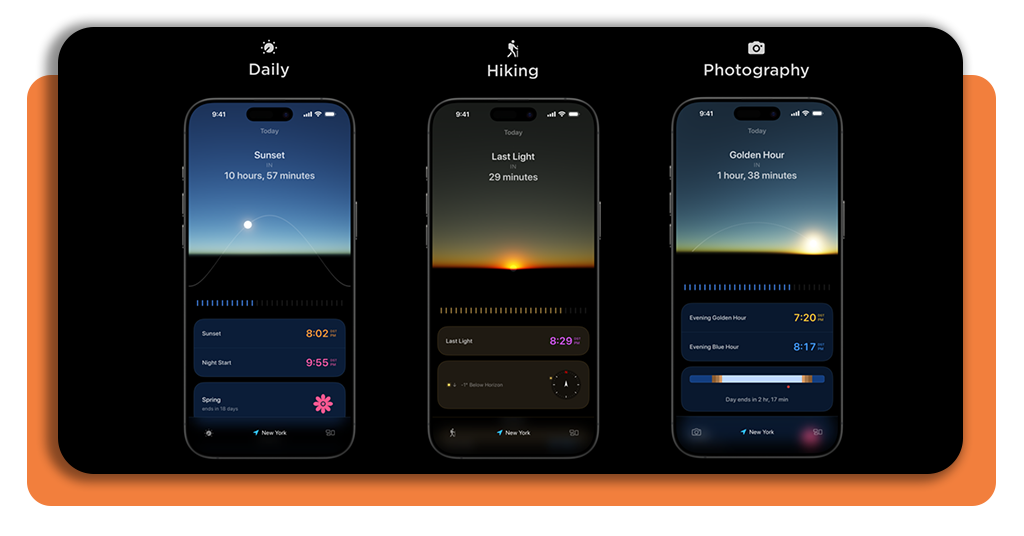
This sunrise tracker app goes beyond raw data by letting you switch between dedicated activity modes. Daily, Photography, Hiking, and Mindfulness each reshape what the app shows you.
Every mode filters the interface down to what really counts for that activity. You stop scrolling past information that doesn’t apply and spend more time focused on what does.
The switch between modes takes seconds, and the app responds immediately. It’s the kind of feature that makes Lumy feel personal rather than like a one-size-fits-all tool.
Privacy first sun and moon data
Lumy calculates every piece of sun and moon data directly on your device. Nothing gets sent to a server, no account is needed, and your location never leaves your phone.
The only exception is weather forecasts, which is the one feature in this sunrise tracker app that requires an internet connection. Everything else runs completely offline, all the time.
That offline approach means the app is just as useful in a remote hiking trail as it is in the city. No signal needed, no delays, just accurate data whenever you open it.

Step-by-step: how to check solar times using Lumy
Checking solar times with Lumy (iOS) takes no time to figure out. The app is laid out in a way that puts the information you need front and center without any digging.
You’ll find everything from sunrise to last light organized clearly inside the app. The data updates based on your location, so what you see always reflects where you are.
Getting set up takes a few minutes, and then Lumy runs itself from there. Once it’s configured, this sunrise tracker app fits into your routine with no effort at all.
Step 1: download the app on your phone
Unlock your phone, access the App Store, and search for ‘Lumy’. It’s a single purchase that unlocks access across all your Apple devices, so you only need to buy it once.
Once it’s downloaded, open it up and give it a second to load. The interface greets you with a live sky view that already reflects the current time of day.
Lumy will ask for location access during setup. Approving it is what allows the app to pull accurate solar data wherever you happen to be at any given time.
Step 2: set your location and pick a mode
Lumy uses your location to calculate solar times, so the first thing to confirm is that location access is turned on. You can check this in your iPhone’s privacy settings anytime.
Once your location is set, this sunrise tracker app prompts you to pick an activity mode. Choose the one that fits what you’re planning, whether it’s Daily, Photography, Hiking, or Mindfulness.
Your mode selection shapes what data the app surfaces first. It’s worth spending a moment picking the one that matches your routine so the app feels relevant from the start.
Step 3: check your solar times for the day
With your location confirmed and your mode selected, Lumy lays out your solar times for the day in a clean, visual timeline. Golden hour, sunset, twilight, it’s all there.
Tap on any event to get more details about it. This sunrise tracker app breaks down each solar moment with supporting data like wind speed, cloud cover, and visibility for that time.
You can also use the time travel slider to scan through the day and see how the light shifts hour by hour. It’s one of the most useful tools inside the app.
Correlato: Recensione dell'app meteo Transparent Clock: Uno strumento indispensabile per previsioni affidabili
How to get the most out of your solar time
Lumy hands you a full picture of the day’s light before it even starts. The real value shows up when you use that picture to build your time around it.
Solar events are predictable, which means you can map your week around golden hour, plan a shoot around blue hour, or time a walk around the best light of the afternoon.
The features inside this sunrise tracker app go further than just telling you when the sun rises. They give you the tools to turn that information into something you’ll follow through on.
Set reminders before golden hour starts
The window for perfect outdoor light is shorter than it seems. By the time you grab your gear and head out, the moment you were aiming for has already shifted into something else entirely.
Lumy lets you set custom notifications tied to any solar event you care about. Set a reminder to fire 30 minutes ahead, and you’ll have enough time to get to where you want to be.
The reminders repeat on whatever schedule works for you. Set it once, and the app takes it from there, nudging you at the right moment without you having to think about it again.
Plan outdoor activities days in advance
Lumy’s seven-day weather forecast sits alongside your solar data in the same view. That pairing makes it easy to find a day where the conditions and the light line up the way you want.
Tap into any future date, and the sunrise tracker app lays out the full breakdown for that day. You can see first light, last light, moon phase, and cloud cover without switching screens.
That level of detail makes committing to a plan easier. You’re not piecing together information from separate apps. Lumy keeps it all in one place, so the decision is right in front of you.
Let your mood guide your sunlight breaks
Lumy connects with iOS’s ‘State of Mind’, pulling in mood data from your Health app to shape what it suggests. It’s a thoughtful link between how you’re feeling and when you step outside.
When your mood entries point to a rough day, this sunrise tracker app shows a suggestion timed to whatever the sky is doing at that moment. It’s subtle, but it actually works in practice.
Tying a wellness nudge to real light data gives it a lot more weight than a standard notification ever could. Lumy makes stepping outside feel like a response to your day, not just a reminder.
Correlato: App MyRadar: Rimanere al passo con il tempo con avvisi in tempo reale
Turn every sunrise into a planned adventure
Lumy takes something that’s been happening outside your window every single day and finally makes it work for you. The sun’s schedule is now yours.
In this guide by Insiderbits, we covered how this sunrise tracker app tracks solar events, plans your outdoor routine, and keeps your data completely private while doing so.
Continua a esplorare Insiderbits, and you’ll find honest, hands-on reviews of apps worth having on your phone. The one that changes how you use your time might be just one article away.