Neighborhood awareness has gone fully digital. Instead of relying on word-of-mouth or the classic ‘did you hear sirens too?’ moment, many people now use apps for incident and crime alerts to get real-time updates on what’s happening nearby. It’s part neighborhood watch, part live news feed, and occasionally a source of mild overreaction at 2 a.m.
Rather than waiting for evening broadcasts or decoding vague social media posts, users now get instant notifications when something happens in their area. These systems created a fast-growing network of safety-conscious users who track incident and crime alerts as they unfold, turning local awareness into a live, mobile experience that’s efficient… and sometimes a little intense. Read this and more on Insiderbits.

4.7/5
What is the best app to receive incident and crime alerts?
When you’re trying to stay aware in a fast-moving city, finding reliable incident and crime alerts without spiraling into constant anxiety can be tricky.
Among the many safety apps out there, Citizen stands out as one of the most widely used platforms for real-time updates on what’s happening nearby.
It pulls in public safety data and emergency reports, so instead of guessing what sirens down the block might mean, users get direct, location-based incident and crime alerts as situations unfold.
The idea is simple: replace rumor-heavy neighborhood chatter with verified updates, so you can stay informed without relying on fragmented or outdated information circulating online.
If you prefer to examine broader communication strategies or want to test an audio-only alternative to stay in the loop, exploring our specialized guide on the best free police scanner app real-time alerts will help you optimize your personal safety setup.
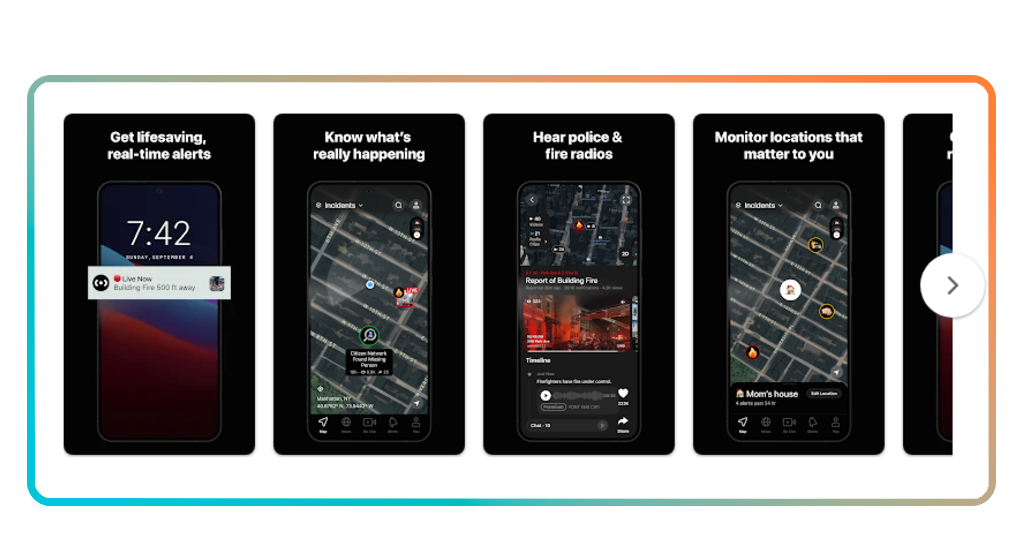
Features available in the Citizen app
Citizen, available for iOS e Android, goes beyond standard incident and crime alerts, coming with a more immersive look at what’s happening in real time.
Users can access live video reports shared by nearby witnesses, which adds a fast-moving, ground-level perspective to neighborhood safety updates.
The app also overlays active 911 dispatch feeds onto an interactive map, giving users a clearer sense of where incidents are unfolding.
For those who want extra support, there’s also a premium 24/7 monitoring option that can share your location with safety agents if you feel unsafe while moving through the city.
If you want to dig into how it works in detail, the official Citizen Safety Home Page explains its reporting system and privacy framework. From there, you can download the app directly on your device.
Step-by-step: how to receive real-time local alerts using Citizen
Before diving into the setup, it helps to understand that Citizen is designed to turn local safety updates into instant notifications on your phone, based on your location.
Step 1: download and sign in
Install the Citizen app on your iOS o Android, and create an account using your phone number or email. Allow location access so the app can detect relevant nearby activity.
Step 2: set your alert preferences
Choose the types of notifications you want to receive, such as emergencies, incidents, or safety updates. You can adjust how sensitive or frequent alerts should be.
Step 3: enable real-time notifications
Turn on push notifications so you get instant updates as events happen near your area, instead of checking the app manually.
Safety tips to protect your home and family
Digital incident and crime alerts are great for staying informed, but they work best when paired with some old-fashioned, real-world awareness.
Think of it as a two-layer system: your phone keeps you updated, while your environment helps prevent problems in the first place.
Start with the basics—good lighting, secure doors and windows, and a bit of neighborhood awareness. A well-lit entrance and a quick hello to neighbors still go a long way in discouraging unwanted activity.
For more community-focused strategies, resources on how to be a good neighbor can help you build a safer, more connected street where everyone looks out for each other.
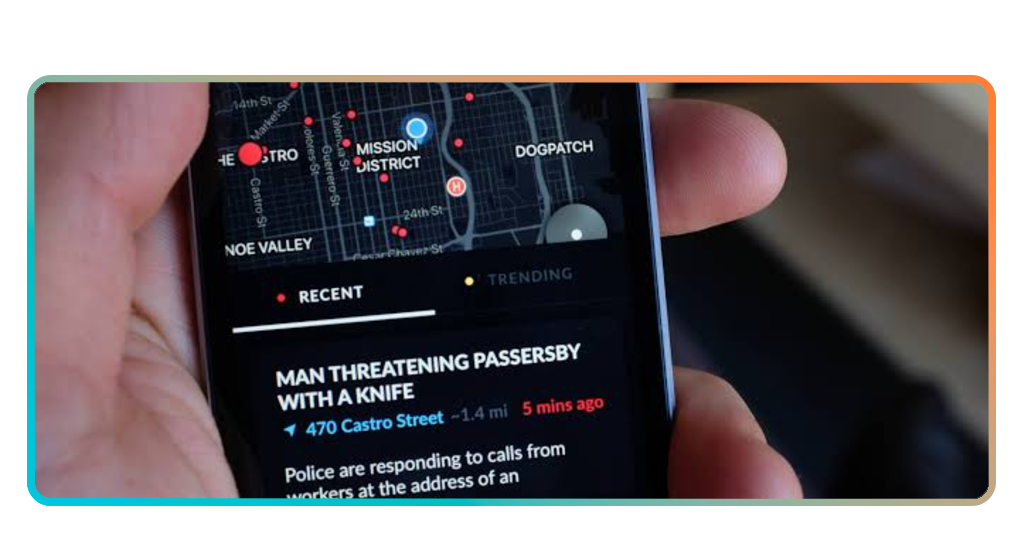
Inexpensive security devices to install at home
Modern incident and crime alerts are useful, but pairing them with simple physical security upgrades can significantly improve your home’s protection without expensive monitoring contracts.
In many cases, a few affordable tools and a bit of setup time are enough to strengthen your home’s baseline security in under an hour.
A practical residential setup usually includes a mix of visibility, deterrence, and early warning measures, such as:
- Smart Video doorbells: these devices act as a continuous visual shield, letting you speak directly with delivery drivers and monitor packages from your desk;
- Motion-activated LED floodlights: flooding dark entryways with bright, sudden light is the single most effective way to discourage midnight trespassers;
- Wireless contact sensors: installing these tiny magnetic sensors on ground-floor windows triggers instant sirens if a frame is opened without your permission;
- Visible security signs: never underestimate the psychological impact of a simple, brightly colored security decal placed near your mailbox.
4.7/5
Stay informed without the stress
Staying on top of incident and crime alerts has become a kind of modern survival skill in busy cities.
Old channels like word-of-mouth or delayed reports often leave people guessing, while digital tools now deliver faster, clearer updates about what’s happening nearby.
When you combine these alerts with simple real-world habits—basic awareness, good communication with neighbors, and a bit of home preparedness—you get a more balanced sense of control.
Instead of reacting to rumors or distant sirens, you’re working with timely information right in your pocket, which makes urban life feel a little less chaotic and a lot more manageable.