There was a time when hearing sirens outside meant waiting hours to find out what actually happened. Today, an emergency alert app can deliver updates in real time, turning your phone into a local news desk that travels in your pocket. Whether it’s a traffic incident, severe weather warning, or public safety event, these apps help you stay informed without relying on the evening broadcast.
Instead of scrolling through rumors on social media or piecing together clues from neighborhood groups, many people now use an emergency alert app to get verified information as events unfold. Millions of users have embraced these tools as a faster, more practical way to track nearby emergencies, helping families stay one step ahead when unexpected situations arise. Read this and more on Insiderbits.

4.8/5
Which is the best emergency alert app?
If your goal is to stay informed about emergencies happening nearby, choosing the right emergency alert app can make a real difference.
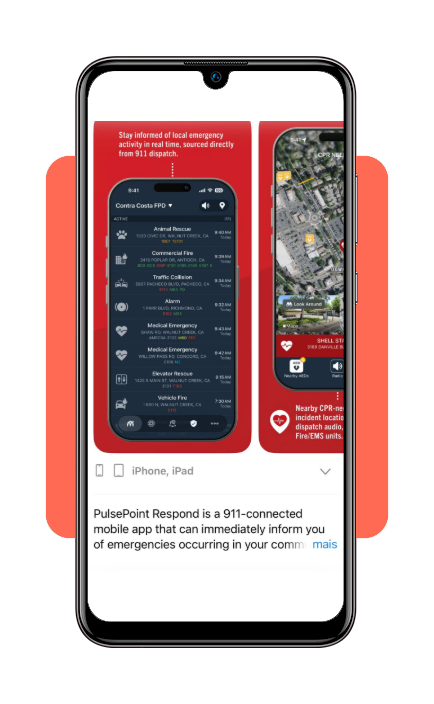
Among the available options, PulsePoint Respond, available for Android e iOS, stands out for its direct connection to local emergency dispatch systems.
In participating communities, the app provides real-time information about medical emergencies, fire responses, and other public safety incidents as they are reported.
What makes PulsePoint different is its focus on live emergency response activity rather than just weather alerts or general notifications. Instead of wondering why sirens are racing down the street, users can often see verified information directly from local dispatch feeds.
For those interested in expanding their safety toolkit, our guide to the best free police scanner apps with real-time alerts explores additional ways to stay connected to local events and public safety communications.
To analyze their exact technological partnerships, volunteer registries, and operational scope across different states, you can visit the official PulsePoint Organization Homepage.
Features available in the PulsePoint Respond
PulsePoint is one of its most notable features is a crowdsourced emergency response system that can notify nearby CPR-trained volunteers when someone experiences a sudden cardiac arrest in a public location.
And that is because it gets help to the scene before professional responders arrive.
The app displays the locations of nearby Automated External Defibrillators (AEDs), helping bystanders act quickly during critical moments.
Trusted by more than 4,000 fire and EMS agencies across North America, PulsePoint delivers real-time emergency notifications, often within 60 seconds of a dispatch call.
Today, the platform helps keep more than 1 million active users connected to local emergency information and potentially life-saving alerts.
Step-by-step: how to receive local alerts online
Getting started with an emergency alert app only takes a few minutes. Once set up, you’ll receive real-time updates about emergencies, fire responses, and public safety incidents happening near your location.
Step 1: download PulsePoint and enable location access
Install the app on your iOS o Android and allow location permissions so it can connect you with alerts relevant to your area and nearby communities.
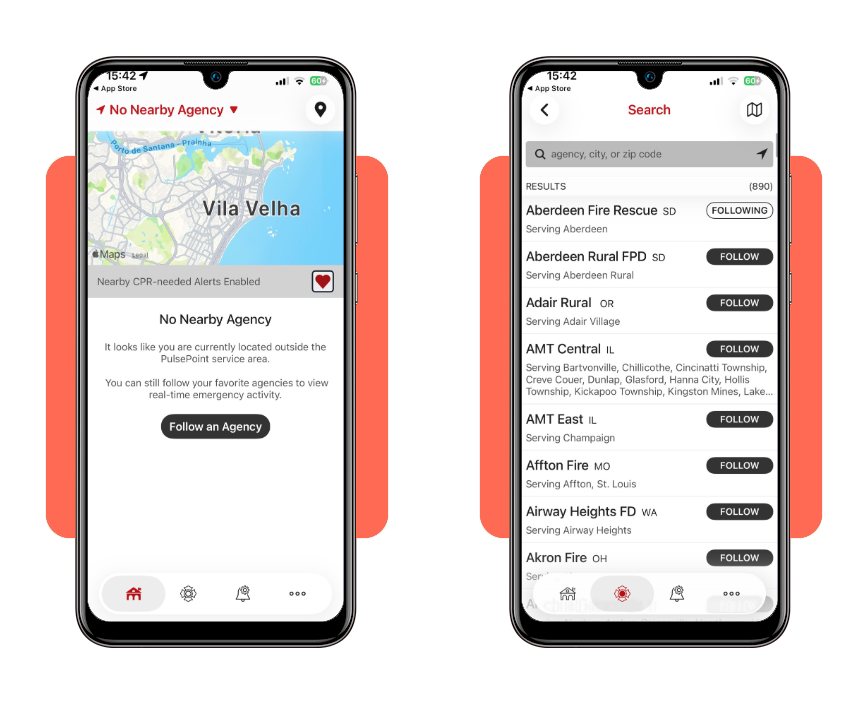
Step 2: follow your local agencies
Search for and select your local fire, EMS, or public safety agencies. This customizes your feed and ensures you’re seeing alerts that matter most to you.
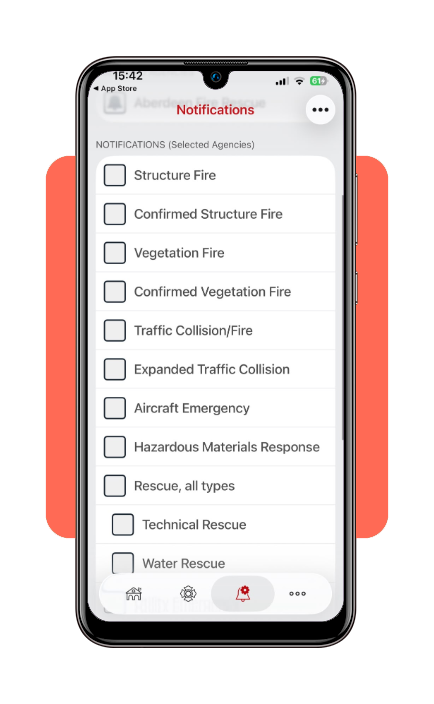
Step 3: turn on real-time notifications
Enable push notifications to receive instant updates when emergency incidents, major responses, or community alerts are dispatched nearby.
Top home security systems for real-time protection
An emergency alert app is great for keeping you informed about what’s happening outside, but real protection starts at the front door.
That’s where modern home security systems step in, turning a regular house into a more responsive, layered defense setup.
Today’s smart security kits often include motion-activated floodlights, door and window sensors, and HD video doorbells that let you see who’s there in real time.
Many also come with monitoring services that can verify threats through live video and alert authorities in as little as 30 seconds after a breach is detected, adding a fast-reacting physical layer to your digital awareness.
Affordable home insurance plans for natural disaster coverage
Pairing an emergency alert app with the right home insurance plan creates a more complete safety net—one that covers both what happens in real time and what comes after the storm passes.
While alerts help you respond quickly during hurricanes, floods, or wildfires, insurance is what helps you recover financially once the situation stabilizes.
When comparing policies, it’s worth looking beyond the monthly premium. Strong coverage should include natural disaster protection and ‘loss of use’ benefits, which can help pay for temporary housing if your home becomes unlivable.
It’s also smart to review your deductible each year, since that number can heavily influence what you actually pay out of pocket when disaster strikes.
Essential safety equipment to keep in your house
Even the best emergency alert app can only do so much if the power goes out or cell towers go down. In major disasters, digital alerts may stop working entirely, which is why having basic physical safety gear at home is still essential.
A solid home emergency kit should cover the basics, like:
- Smoke detectors on every floor (tested every 6 months);
- Fire extinguishers placed in high-risk areas like the kitchen or garage;
- A fully stocked first-aid kit with bandages, burn care, and essential medications.
It’s also smart to keep a hand-crank weather radio on hand so you can still receive NOAA emergency broadcasts even when mobile networks fail.
4.8/5
Staying informed and in control
Using an emergency alert app like PulsePoint has become part of how many people stay aware of what’s happening around their homes.
Cities move fast, and relying on delayed updates or word-of-mouth often adds more confusion than clarity when something is unfolding nearby.
With real-time alerts, you can cut through the noise and see what’s actually happening instead of guessing.
Set your local preferences, connect to nearby dispatch feeds, and you get a clearer, calmer picture of your neighborhood—without constantly wondering what that siren in the distance might mean.