Misplacing your Social Security card can throw off your entire week, but learning how to check your SSN on mobile through a secure government account solves the problem in minutes.
In this Insiderbits guide, we’ll walk you through every step for viewing your SSN online through legitimate, government sources and what you need to do to create a secure account. Read on!
Correlato: Modifiche alla previdenza sociale: ecco come saranno le tue nuove prestazioni
Where can you check your digital SSN on a mobile device?
Hunting for a lost Social Security card or sitting on hold with an agency wastes an afternoon you didn’t plan to lose, and your phone already holds a far better option.
The Social Security Administration built one official account where checking your SSN on mobile feels closer to glancing at a weather app than filling out forms.
Your phone browser pulls up everything you need without extra apps crowding your home screen, turning something that once felt like a hassle into a quick, painless task.
Government-grade ID verification via Login.gov and ID.me
The Social Security Administration doesn’t open your account to just anyone, and that protection comes from a partnership with Login.gov and ID.me, both trusted across federal agencies.
Your tax records and veteran benefits already rely on that same identity verification standard, and now your Social Security number is folded into that same trusted system.
A secure alternative to physical cards
A plastic card sitting in a drawer or wallet carries more risk than you think, given how easily it gets lost, stolen, or damaged beyond recognition over time.
Your digital account removes that vulnerability entirely, storing your number behind layers of verification instead of a single piece of paper anyone could grab from your mail or belongings.
Access it straight from your browser
Plenty of government services push you toward downloading separate apps, but your Social Security account skips that entirely and lives inside whatever browser your phone already runs.
That setup keeps your phone lighter while giving you an easy way to check your SSN on mobile without hunting through app stores or managing another login somewhere.
Step-by-step: how to view your active SSN online
Finding your Social Security number once meant flipping through stacks of old paperwork or calling an office and sitting on hold to confirm your identity with a stranger.
The process looks different now, and pulling up your number takes only a handful of minutes once you know which website to open and which login fits you.
Walking through each part of this process shows you how simple checking your SSN on mobile becomes once you set up your account from home.
Step 1: access the official website
Open your phone’s browser and head to the official Social Security Administration sito web, the one platform built to verify, manage, and update your account information securely.
Double-check the web address before entering any details, since fake sites sometimes imitate government pages to trick you into handing over sensitive personal information elsewhere.
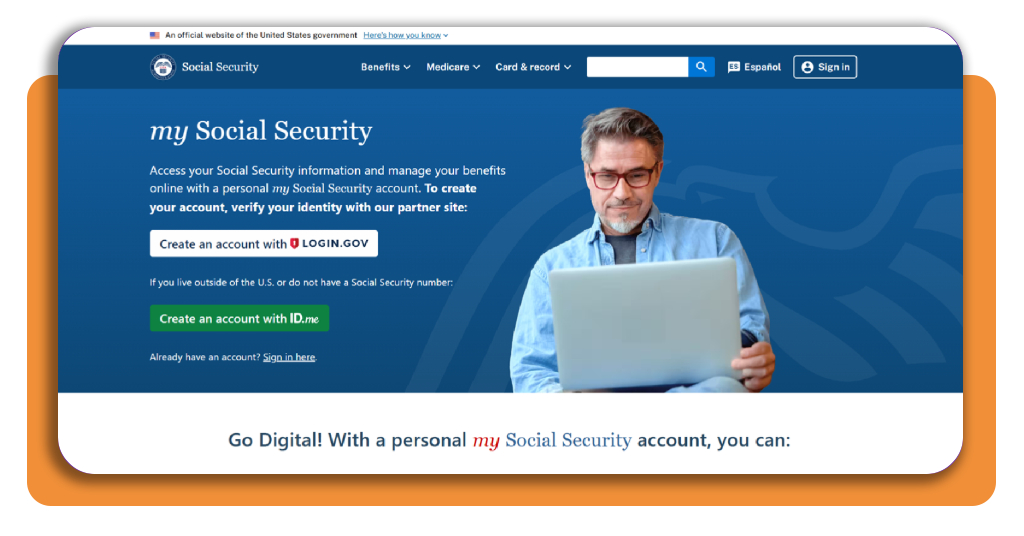
Step 2: choose Login.gov or ID.me
On the sign-in page, pick between two verification partners approved by the Social Security Administration, Login.gov and ID.me, each offering a slightly different path to your account.
Login.gov works if you live in the United States and already have a Social Security number. ID.me is designed for people without an SSN or who live outside the country.
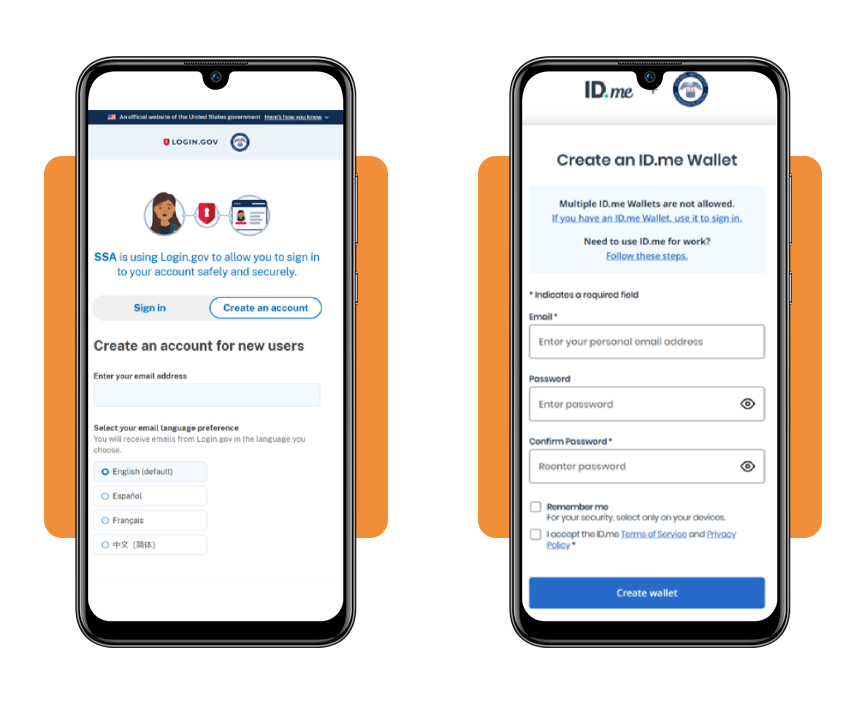
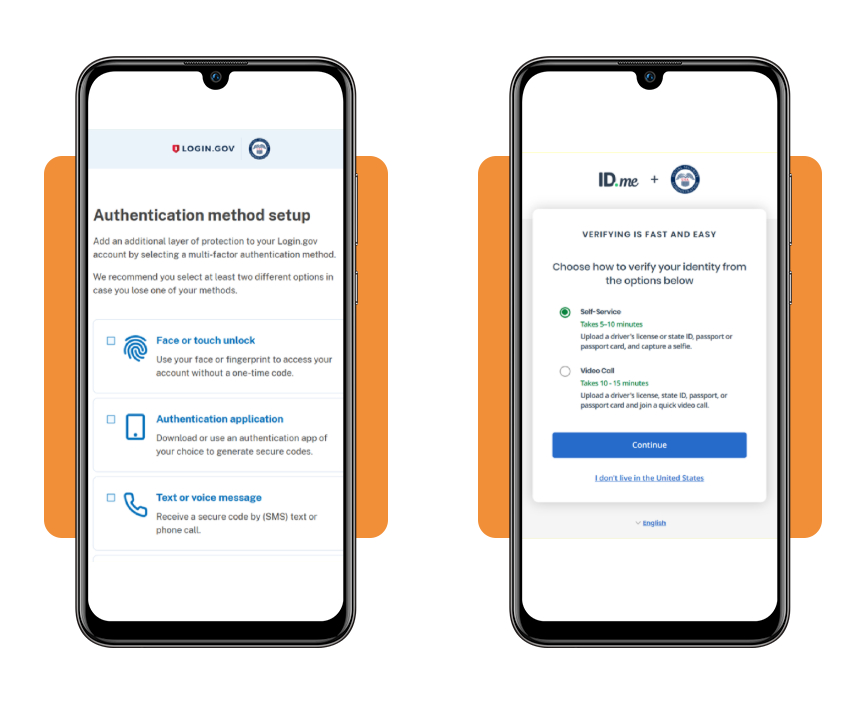
Step 3: verify your identity and sign in
Upload a photo of your driver’s license or passport, then take a quick selfie so the system can match your face against the document you just submitted.
Once your identity clears review, sign in and pull up your account to view your SSN on mobile within seconds, skipping the office visit you used to dread.
Correlato: Come scaricare gratuitamente il vostro SSN in formato PDF?
What Social Security card mobile is and what it covers
Your Social Security card is more important than most documents tucked inside your wallet, and losing track of it throws a real wrench into jobs, loans, and paperwork.
The Social Security Administration rolled out a simple way to check your SSN on mobile, giving you a backup number you can pull up when, or if, your card goes missing.
This feature works through the very same account you already use for benefits and earnings records, folding your number into one system built specifically around confirming your identity.
Social Security Card mobile eligibility & how it works
Nearly every account holder qualifies for this feature once their identity is confirmed through Login.gov or ID.me, with no extra application or separate approval process required afterward.
The feature sits inside your account dashboard, waiting for you to open it whenever you need your number for a job application, loan paperwork, or a school enrollment.
A digital backup to your card
Think of this feature as a spare key you keep tucked away safely, ready the moment your original card gets lost, damaged, or stolen out of your wallet.
Instead of scrambling to remember your number or digging through old tax forms, you open your account and check your SSN on mobile within a couple of taps.
Reduces need for mailed replacements
Before the website, ordering a replacement card meant waiting several weeks for the mail to arrive, hoping the envelope wouldn’t get lost or stolen somewhere along the way.
Your digital account skips that waiting period entirely, giving you immediate access to your number the moment you need it for paperwork, job applications, or any official identification.
Safe protocols to request a replacement physical card
A damaged or missing card doesn’t mean your number stops working, but you’ll still want a fresh physical copy for certain employers, banks, schools, or various government offices.
Your account walks you through requesting that replacement without a single trip to an office, letting you handle everything the same way you check your SSN on mobile.
Knowing which specific request fits your particular situation is essential, whether your card got damaged inside your wallet, disappeared during a move, or fell into someone else’s hands.
Replace a lost or damaged card
The Social Security Administration keeps this request simple on purpose, letting you fill out a form and submit proof of identity without visiting a crowded local office nearby.
Your account handles this entire request in one sitting, cutting out the mailed forms and long office visits that made this process feel far more complicated years ago.
Report a stolen number immediately
A stolen number puts you at real risk for identity theft, and reporting it right away limits how much damage someone can cause with your personal financial information.
Reporting the theft matters just as much as knowing how to check your SSN on mobile, and both actions work together to keep your identity safe from harm.
Correct errors in your personal record
Your file with the Social Security Administration sometimes holds outdated details, such as an old address, a recent name change from marriage, or a typo nobody ever noticed.
Correcting these errors keeps your record fully aligned with the rest of your personal paperwork, avoiding mismatches that could slow down benefits, loans, or important background checks.
Correlato: Is Your SSN Compromised? Try This Free Dark Web Scan App
Your SSN, verified and ready
The Social Security Card mobile takes something that once felt stressful and turns it into a quick task you handle from your couch, car, or kitchen table.
Questa guida di Insiderbits explained how to check your SSN on mobile, covering account setup, identity verification, and what to do when your card goes missing.
If practicality is what you’re after, keep reading Insiderbits and discover how to handle daily tasks through apps and websites built to save you time and keep your information secure.