
Recovering access to a Google Account brings questions, but there’s a simple way to move forward. With a few guided actions, you’re back where you need to be.
Official recovery tools help confirm it’s really you, using steps built for security. Keep your info ready and stay focused as you follow each instruction carefully.
This guide by Insiderbits is here to walk you through the process from start to finish. Follow along and secure your Gmail, Drive, and Android data today.
Correlato: Unlock Google AI Pro for free as a student today!
Where to access Google’s recovery page
Sometimes the issue isn’t the password itself, but knowing where to begin. Google created a dedicated recovery page that handles exactly this kind of access problem.
There’s no need to trust unofficial links or guess your way through it. The official page is built to support secure recovery without distractions or unnecessary steps.
When a Google Account locks you out, having the correct link ready makes a real difference. It’s the first step toward getting things back on track.
Why the official link matters for your security
Using the correct page protects your info and avoids shady traps. Scammers build lookalikes, and one wrong click could give them access to your entire digital life.
The official Google recovery site uses secure protocols, direct login paths, and never asks for unrelated info like banking or identification outside of account verification options.
Trust starts with the link you use. Going straight to the source means no surprises, no fake warnings, and no risk of hijacking during recovery steps.
Common fake pages and how to identify them
Fake pages targeting your Google Account often mimic the official look, but subtle flaws give them away. Strange domains, typos, or odd requests are common red flags.
Legitimate recovery pages won’t ask for payment details, personal ID numbers, or pressure you to act fast. Anything that feels unusual is worth a second look.
Pause before you enter information. That brief moment of caution could prevent the loss of everything tied to your account, from messages to photos and stored data.
Direct shortcuts to Google’s recovery tools
The easiest way to reach the right recovery page is by typing “Google account recovery” in the search bar and clicking only links from google.com.
Better yet, save the recovery link in your bookmarks or notes app. That way, you’re never scrambling to find it in a moment of stress.
Keeping direct access nearby helps avoid scams and saves time. It’s the fastest, safest way to reconnect with your Google Account without second-guessing what’s real.
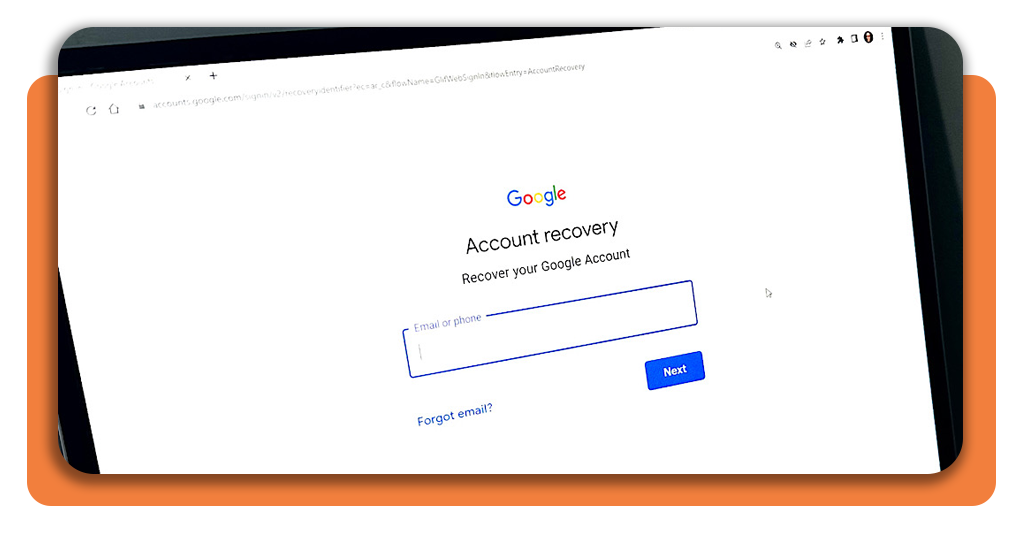
How to recover Google account in a few simple steps
Getting locked out can disrupt more than just your inbox. It affects everything linked to your account, from calendar events to saved documents and app access.
Google built a recovery system designed to help real users in real situations. It responds to different scenarios without making the process feel technical or confusing.
With the right information ready, you’ll recover your Google account safely in just a few steps. It’s designed to guide you back without wasting your time.
What Google checks before starting the process
Google doesn’t guess who’s asking. Before anything, the system checks signals like location, device, and past activity to confirm you’re actually the right person requesting access.
The goal is to stop intrusions, even when someone has your email. Small details like Wi-Fi networks or device type help verify it’s not a random hacker.
You’ll also be asked to use a backup method, like a secondary email or phone, to prove ownership before changing anything or unlocking account access.
Information you should have ready beforehand
It becomes much easier to regain access when you already have certain details in mind, especially when the process asks for proof tied to your Google Account.
- Last password you remember: even a single older password supports identity checks and helps Google recognize consistent login patterns across your previous sessions;
- Backup email or phone number: recovery codes and confirmation links are usually sent there, making it essential to keep these options current and easily accessible;
- When you created the account: a general idea of the month or year helps Google compare your timeline with stored internal records during verification.
What happens if you don’t remember your details
Forgetting details like your last password or when the account was created doesn’t mean access is gone. It might just take a bit more time to recover.
Google adjusts the process based on what you still have linked. You could receive a notification, get a text code, or answer questions about past activity.
If things don’t match right away, the system may pause or suggest alternatives. Just keep going with care to prove the Google Account really belongs to you.
Correlato: Discover Hidden Google Tricks That Actually Save You Time
Step-by-step: verify your identity and reset password
Recovery starts by confirming ownership. Google asks a few specific questions to make sure your activity matches what’s expected from someone who previously accessed the account.
You’ll choose a verification method, enter the code, and continue step by step. Each part helps confirm it’s really you without adding unnecessary complications.
To move forward securely, stay focused and patient. It’s important to follow the official steps to restore access to your Google account without skipping or second-guessing anything.
Step 1: select the recovery option you prefer to confirm it’s you
Google gives you a few ways to prove you’re the one requesting access again. You can choose the one that makes sense for you.
Some users pick text messages, others prefer email or push notifications. What matters is using a method already linked to your account during earlier login setups.
Picking a familiar recovery option helps speed up the process. It also lowers the chance of getting stuck or needing to repeat steps unnecessarily.
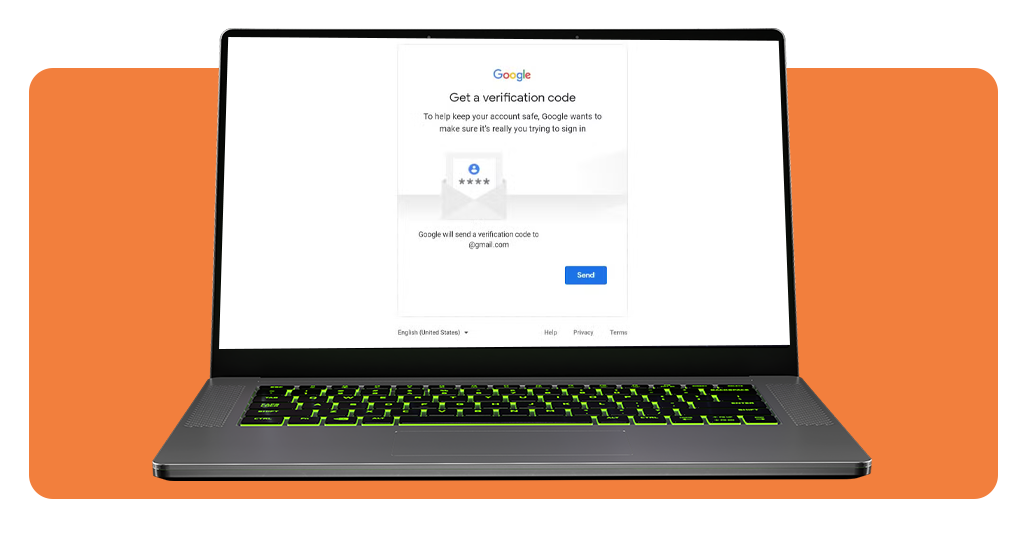
Step 2: enter the code Google sends to your email or phone
After selecting a recovery method, you’ll receive a numeric code from Google. It usually arrives within seconds, depending on your connection and chosen delivery route.
Typing the exact code is crucial! No spaces, no errors. This one-time password confirms you have access to the trusted backup tied to the account.
This simple verification step proves you’re the rightful user trying to regain access to your Google Account without giving away any sensitive details in the process.
Step 3: create a new password and finalize the recovery
Once your identity is confirmed, it’s time to reset your password. Choose something strong but memorable, with no repeats from past passwords or obvious guesses like “123456”.
Google will guide you through creating a secure password that meets all requirements. Use a mix of characters, and avoid names, birthdates, or common phrases.
After updating your login, you’ll regain full access to emails, apps, and everything else tied to your Google Account without starting over from scratch.
Tips to keep your account secure afterwards
Getting access back feels like progress, but keeping everything protected is what really matters. A few simple habits help reduce the chance of future access issues.
Built-in tools allow you to monitor sign-ins, receive alerts, and catch anything suspicious early. Using them regularly adds an extra layer of protection without much effort.
You don’t need expert knowledge or complicated steps. Just stay consistent with basic safety checks to make sure your account stays protected from unwanted activity.
Turn on 2-Step Verification the right way
Adding 2-Step Verification to your Google Account strengthens your login security immediately. Even if someone guesses your password, they won’t get far without a second layer of approval.
You can choose between codes sent to your phone, prompts on your device, or using an authenticator app. Pick what feels secure and convenient for you.
Once active, this feature works quietly in the background, blocking suspicious logins and alerting you when someone tries to access your account from unknown locations.
Update your recovery phone and email regularly
Recovery info is your safety net. If something ever goes wrong, Google relies on your backup phone or email to confirm identity and send verification codes fast.
Many people forget to update recovery details after changing numbers or email providers. That small oversight can create huge problems during a Google Account recovery process.
Taking two minutes every few months to double-check that info keeps everything current, and keeps you connected to all the tools that protect your access.
Review recent activity to detect anything suspicious early
It’s a good idea to occasionally check what devices are signed in and where. You can do this easily in your account’s security settings anytime you want.
Google highlights anything that looks odd, like a new login in a country you’ve never visited. These red flags are easy to miss without checking regularly.
Even small changes can signal trouble. Keeping an eye on these alerts gives you time to respond before someone else gets full control of your Google Account.
Correlato: Check if Google deleted links – take action now
Keep your account safe going forward
Getting locked out doesn’t mean staying locked out. With official tools and a few simple steps, recovery is possible without stress or guesswork dragging the process down.
This was a guide by Insiderbits made to help you regain access and understand the steps tied to your Google Account without confusion, risk, or wasted time along the way.
Curious about more ways to make digital tools work better for you? Keep reading Insiderbits for practical tips, useful tricks, and smarter ways to manage online services daily.