If you’ve ever felt your GPS sounds more like a tired robot than a travel companion, it’s time for a change. Waze, the community-driven navigation app loved by millions, lets you swap that monotone voice for something far more entertaining. From celebrity cameos to user-generated packs, voices on Waze can completely transform your driving experience.
Whether you’re stuck in traffic or cruising down the highway, the right GPS voice can set the mood. Imagine Morgan Freeman guiding you through rush hour or a pirate cheering you on every turn. Waze voice changes are about personality as much as functionality. And if this seems too good to be true, don’t worry, it is totally free.
- Waze – The App to Find the Best Routes
- Come inserire gratuitamente la voce di vostro figlio su Waze
- Make Navigation Fun with Waze Voice Recording
Change voices on Waze for free
Switching between voices on Waze is as simple as updating your playlist, only faster. The app’s developers made it intuitive, allowing users to explore dozens of voice options without touching a cent.
Here’s how to do it:
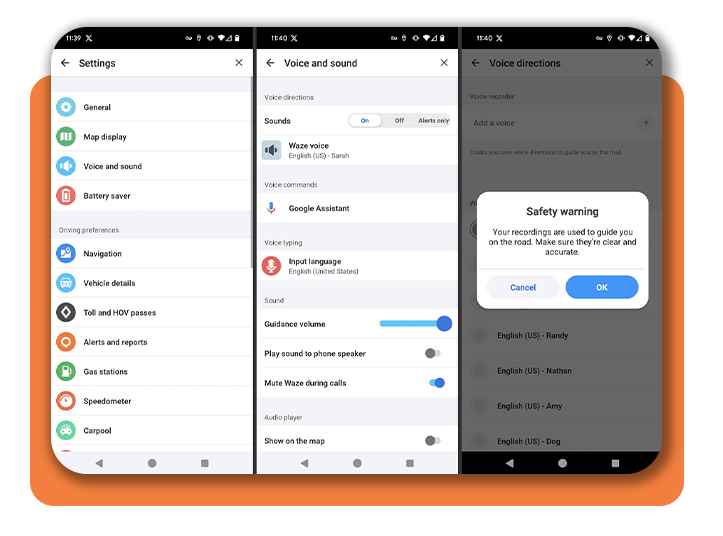
- Aprire la sezione Waze app (Android | iOS) on your device;
- Rubinetto "My Waze”, then hit the gear icon to open Settings;
- Selezionare Voice & sound;
- Tap Waze voice to see all available options;
- Choose your favorite voice, and it’s instantly applied.
There are no hidden fees or complicated downloads. And if you want to learn more about Waze’s features, check out Google’s official support page for detailed guidance.

4.8/5
Step-by-step: how to customize your GPS voice
Once you’ve explored the standard voice library, you might want something more personal. Voices on Waze allow custom recordings, so you can literally make your best friend, partner, or even your dog (okay, maybe not the dog) your GPS co-pilot.
To record your own Waze voice:
- Vai a Settings > Voice & sound > Waze voice;
- Tap Add a voice;
- Record each phrase prompted by the app — like “In 500 meters, turn left”;
- Save and apply your custom voice.
For detailed instructions, visit the official Waze help article.
Even if you’re not a Hollywood-caliber recorder, the system guides you through each command to keep your navigation fluid. The only catch is that you’ll need to record all phrases for the app to function seamlessly.
New voices you can try right now
One of the best things about voices on Waze is how often they change. Waze partners with pop culture icons, movie studios, and influencers to release limited-edition voice packs — adding a fresh twist to your daily drives.
Here are a few popular ones you might find:
- Classic English (Jane or Tom): perfect for those who like clarity and simplicity;
- Celebrity packs: from famous actors to themed events, depending on availability;
- Community voices: created by users and shared through fan sites;
- Seasonal specials: Halloween, Christmas, or even sports-themed voices.
You can explore user-uploaded packs at Waze Belgium’s voice collection, which curates fun options from around the world.
Keep an eye on updates. Waze rotates voices frequently, and new themes often drop around holidays or major movie releases.
Where to download Waze
If you somehow haven’t downloaded Waze yet, this is your cue. The app’s popularity comes from its live community updates, real-time traffic alerts, and, of course, its fun personality.
And you can access it across all most common platforms, since it’s available for Android e iOS.
For a deeper dive into similar apps and how they make life easier, check out Uber for Seniors on Insiderbits.
Why changing your Waze voice matters
Sure, it’s a small detail, but that’s exactly why it’s worth it. When you spend hours behind the wheel, every bit of joy counts. A funny, calming, or simply more “you” voice can make the drive less stressful and more engaging.
Beyond the entertainment factor, custom voices also improve accessibilità. Drivers with visual impairments or language preferences can set up voices that are clearer, louder, or more personalized.
So next time your GPS tells you to “turn right”, imagine it doing so with the voice of your favorite actor or your kid giggling through directions. That’s the charm of voices on Waze. They’re practical and playful all at once.
Pro tips for better navigation experience
If you’re looking to get the most out of Waze, try these quick tips:
- Adjust voice volume separately: under “Voice & sound,” you can tweak voice guidance without affecting music volume;
- Avoid interruptions: disable “play as Bluetooth phone call” if you don’t want the voice to cut your playlist;
- Use different voices for different moods: yes, you can switch anytime;
- Sync with your car’s system: many modern vehicles support Waze integration natively;
- Keep the app updated: new voices, features, and bug fixes roll out constantly.
For further customization and troubleshooting, visit Waze Help Center.
Bottom line
Changing voices on Waze is a way to personalize your everyday routine. Whether you’re hunting for humor, calm guidance, or pure novelty, there’s a voice out there that fits your vibe perfectly.
So, go ahead. Change your Waze voice in minutes, free and easy (the best combo). Download Waze and try new voices today.