
Un annuncio di lavoro attira la tua attenzione, la paga è buona, l'orario è comodo, poi arrivi alla frase che blocca tutto: “richiesto diploma di scuola superiore o equivalente”. È un pugno nello stomaco che milioni di adulti conoscono fin troppo bene. Ottenere quel titolo è sempre sembrato qualcosa che richiede anni di lezioni serali e un calendario che non hai. Ma la preparazione al GED ha fatto molta strada e gli strumenti disponibili ora non assomigliano per niente a ciò che potresti immaginare.
GED & Me™ è l'app ufficiale creata dagli stessi ideatori del test GED, che trasforma il tuo telefono in un centro di studio personale, completo di tutoraggio AI, domande di pratica e un percorso di apprendimento costruito attorno al tuo programma. Questo Insiderbits La guida illustra cosa offre l'app e come muovere i primi passi. Continua a leggere e scoprirai come ottenere quel diploma potrebbe rientrare nella tua pausa pranzo.
Correlato: Smetti di procrastinare e inizia a vincere con un piano di studio personalizzato
GED & Io: preparazione al GED tramite telefono cellulare
Un tempo, prepararsi per un esame importante significava trovare un corso, frequentarlo secondo un orario prestabilito e sperare che si adattasse ai propri impegni. Oggi non funziona più così.
GED & Me™ (Android | iOS) mette l'intera esperienza sul tuo telefono e una solida preparazione per il GED ora è qualcosa che puoi integrare in qualsiasi momento tu abbia a disposizione.
L'app è stata creata dallo stesso team che prepara il test GED, quindi tutto ciò.

4.8/5
Risorse disponibili per gli studenti
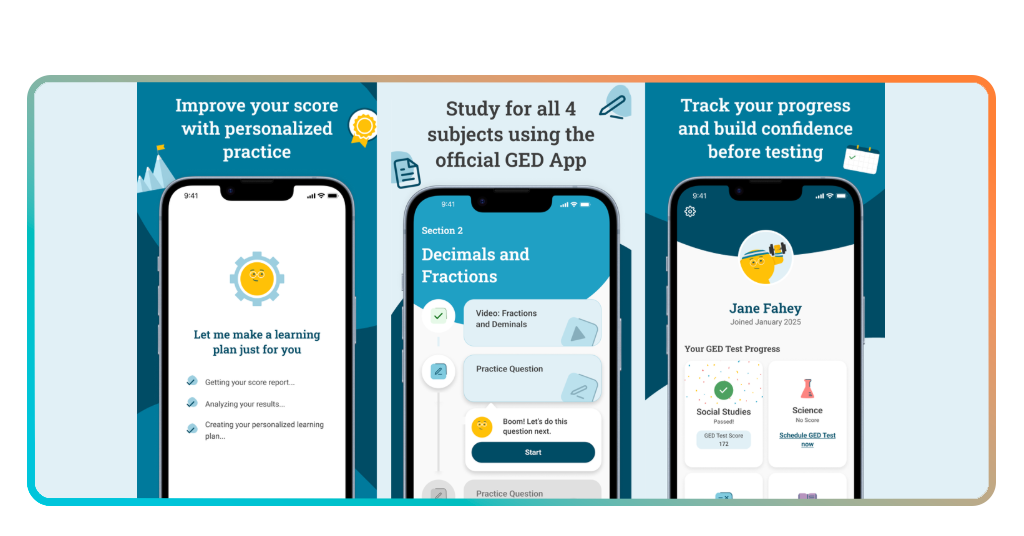
- Percorso di apprendimento personalizzato: l'app crea il tuo piano di studi attorno al tuo punteggio GED Ready, così sai esattamente dove concentrarti e cosa affrontare per prima;
- Tutor di matematica potenziato dall'IA: Syd ti guida nella risoluzione dei problemi passo dopo passo, scomponendo domande complesse di matematica e scienze in oltre 250 lingue;
- Esercizi: l'app propone domande ispirate al test vero e proprio, personalizzate in base al tuo punteggio, in modo che ogni sessione si concentri sui tuoi punti deboli;
- Strumenti per la pianificazione dei test: Puoi prenotare l'esame GED o il test di prova GED Ready® direttamente dall'app e impostare dei promemoria man mano che la data dell'esame si avvicina.
Studia ovunque secondo i tuoi orari
Un buon programma di preparazione al GED per un genitore con tre figli è completamente diverso da quello pensato per chi lavora con turni doppi, e GED & Me™ è stato progettato proprio tenendo conto di questa varietà di situazioni della vita reale.
Sei tu a fissare gli obiettivi, sei tu a decidere quando aprirla e l'app tiene traccia del tempo trascorso, così i tuoi progressi rimangono visibili anche quando gli impegni quotidiani ti impediscono di dedicarti a sessioni più lunghe.
Syd AI ti tiene in carreggiata
Basta toccare “Syd” all’interno dell’app per ottenere subito una spiegazione dettagliata su come risolvere il problema: in questo modo, studiare non sembra più un’attività da svolgere da soli, ma piuttosto una lezione con un tutor.
Syd copre matematica e scienze, con supporto linguistico, artistico e di studi sociali in arrivo, quindi l'aiuto che ricevi all'interno dell'app continuerà a crescere man mano che vai avanti.

Vantaggi della preparazione online per l'esame GED
Stare seduti in un’aula un paio di sere a settimana sembra una buona idea in teoria, ma il piano va a monte nel momento in cui gli orari di lavoro cambiano o tuo figlio si ammala e ha bisogno di te a casa.
In linea Preparazione GED ha cambiato il modo in cui ci si prepara a questo esame, fornendoti strumenti che si adattano alla tua vita invece di costringerti ad adattare la tua vita a loro.
GED & Me™ fa un ulteriore passo avanti, riunendo tutto in un unico posto sul tuo telefono, così le tue sessioni di studio e la programmazione degli esami sono tutte gestite dallo stesso posto.
Completa la tua preparazione più velocemente rispetto ai corsi tradizionali
Un corso di preparazione tradizionale segue il ritmo del gruppo, il che significa che devi dedicare tempo ad argomenti che hai già imparato, in attesa che gli altri ti raggiungano.
L'app elabora il tuo programma sulla base del tuo rapporto sui punteggi personali, così ti concentrerai solo sulle aree in cui devi migliorare, senza dover ripassare argomenti che hai già padroneggiato.
Strumenti gratuiti ideati dagli stessi autori dei test GED
Le persone che hanno creato GED & Me™ sono le stesse che redigono il test, quindi le domande di esercitazione, il percorso di apprendimento e le indicazioni sulle materie riflettono tutti i contenuti dell’esame.
Uno strumento di preparazione al GED affidabile, realizzato dagli stessi autori del test, ti garantisce di lavorare con materiale che rispecchia fedelmente la prova reale, non con un’interpretazione di terze parti dei contenuti del test.
La pratica basata sulla gamification aiuta a sviluppare vere e proprie abitudini di studio
Aprire un'app di studio ogni giorno è molto più facile quando la piattaforma ti offre un motivo per tornare oltre alla semplice credenziale che ti aspetta alla fine dell'intero processo.
GED & Me™ utilizza un'esperienza ludica per trasformare lo studio in un momento di divertimento, ed è proprio la creazione di questo tipo di abitudine a distinguere chi supera l'esame da chi continua a rimandare.
Correlato: Studia più velocemente: trasforma automaticamente gli appunti in schede di ripasso con questa app
Guida passo passo allo studio con l'app ufficiale
Lancio di GED & Me™ (Android | iOS) per la prima volta dà meno l'impressione di trovarsi di fronte a una montagna e più quella di ricevere una mappa, con ogni sezione che ti indica un punto utile.
L'intera esperienza è pensata su misura per la tua situazione specifica, quindi l'app si adatta al tuo punteggio, ai tuoi impegni e ai tuoi obiettivi, invece di proporti un programma generico valido per tutti.
La tua preparazione al GED acquista una struttura ben definita nel momento in cui colleghi il tuo GED.com account, e da quel momento in poi, ogni sessione che completi ti avvicina di un passo al giorno dell'esame.
Passo 1: scarica gratuitamente l'app GED & Me™
GED & Me™ is available on the App Store and Google Play, and you don’t need an account to explore it at first. The app lets you get a feel before you commit to setting anything up officially.
When you’re ready to unlock the full experience, head to GED.com and create your free student account, then log into the app using that same email address to link everything together.
Step 2: set your study goals and learning path
Once you’re logged in, the app pulls from your GED Ready Score Report to build a learning plan that tells you which subjects to focus on and in what order to tackle them.
If you haven’t taken a GED Ready Practice Test yet, that’s a good first move, since your results feed directly into the app and shape the kind of GED prep experience you get from day one.
Step 3: practice daily and track your progress
With your goals set and your learning path in place, the app starts serving up practice questions tailored to your score level, so every session is pointed at the areas you need to focus on.
Syd is available the whole time you’re practicing, so if a question trips you up, you tap on it and get a breakdown of how to work through it without having to leave the app.

What is needed to create a GED & Me account
Setting up GED & Me™ doesn’t ask much from you, and the whole account creation process was built to get you studying as quickly as possible.
The requirements are minimal, and the app was designed so that someone picking it up for the first time can get fully set up and into their first session within a matter of minutes.
What ties the experience together is keeping your GED prep connected to one central account, so your progress, your test schedule, and your study plan all stay in sync automatically.
A free account on GED.com
Vai a GED.com and sign up for a free student account using your email address, and that single account becomes the foundation for everything you’ll do inside GED & Me™.
The account gives you access to your score reports, your test history, and your upcoming test appointments, all of which feed directly into the app to shape your experience inside it.
One email to link app and test appointments
Using the same email address for both your GED.com account and the app is what keeps everything in sync, including your scheduled tests, your reminders, and your notifications.
If you’ve already got a GED account sitting around from a previous attempt, logging into the app with that same email is all it takes to pick up right where you left off.
No prior GED experience required
Jumping into the app without any background is completely fine, and your GED prep journey gets its structure from the learning path the app builds for you once you’re set up.
You don’t need to know which subjects to study first or how the scoring works before you log in, since the app figures all of that out based on your individual situation.
Correlato: Turn PDFs, videos & webpages into study notes with AI
Types of questions to study using the app
The GED test covers 4 subjects, and GED & Me™ makes sure you’re walking into each one having already worked through the kinds of questions you’ll see on the exam.
The practice questions inside the app are pulled from the same subject areas and difficulty levels that show up on the real test, so nothing catches you off guard.
Getting familiar with the question formats across every subject is a core part of solid GED prep, and the app covers everything so you’re not going into any section cold.
Math problems with AI explanations
Math trips up a huge number of GED test takers, and the app tackles that head on by pairing every practice problem with its built-in AI tutor that breaks down solutions step by step.
Instead of staring at a wrong answer and moving on, Syd gives you a full walkthrough of the problem, which helps you absorb the method instead of just memorizing the answer.
Reading comprehension practice
This section tests how well you read, interpret, and write, and the practice questions in the app are designed to sharpen all of those skills before test day.
You’ll work through passages, answer questions about what you read, and build the kind of analytical thinking the exam rewards, all inside an app you can open on your commute home.
Science and social studies subject questions
Science and social studies round out the GED test, and pulling strong scores in those subjects is a big part of what makes your overall GED prep feel complete and well rounded.
The app covers both subjects with practice questions that reflect the real exam format, so by the time you sit down to test, the material feels familiar rather than foreign.
4.8/5
The comeback you have been waiting for
GED & Me™ is the kind of tool that turns a credential you’ve been putting off into something you can realistically tackle, one study session at a time, straight from your phone.
The knowledge you picked up from this GED prep guide by Insiderbits puts you in a position to walk into that test with a clear plan, a free tool, and no more wondering where to begin.
Explore other Insiderbits articles covering learning resources, skill-building tools, and everything in between to keep moving forward on the path you’ve already started walking.