An AI voice prank app feels appealing for a simple reason: most joke apps stop at filters and distorted sounds, and Parrot enters that space with a very direct promise, since its official store descriptions present it as an AI celebrity voice maker designed for funny videos, playful messages, and voice-based social content that can be generated from typed text in a few taps.
That is what makes the app interesting. Parrot (iOS/Android) is not just another voice effect tool meant to add robotic distortion or cartoon noise to a recording. The idea is playful, yet the experience still depends on how well the app handles text input, output speed, and sharing flow, so the article needs to look at the tool with more care than a simple hype-driven description.
- Prank Friends with a Celebrity Fake Call App
- Chatsmock: Whatsapp Prank App con conversazioni false
- 10 Best WhatsApp Sticker Apps to Make Your Chat More Fun
Parrot: the best AI voice prank app
If the goal is to find an app that feels designed for jokes and short clips, Parrot (iOS/Android) makes a strong case.
Its store description is built around the idea of making friends laugh by posting funny stories, and turning typed messages into celebrity-style voice content.
While many voice tools try to do too much at once, Parrot keeps the pitch centered on entertaining output that can travel well across chats and short-form platforms.
And that usually makes an app easier to understand for casual users who want fast results without digging through advanced menus.
The simple process on this AI voice prank app is also a reason why the app stands out.
All you need to do is pick a celebrity, type what the voice should say, then generate the result.
At the same time, the app works best when it is treated as a playful creation app, not as a place for deception that crosses obvious boundaries.
The official copy leans into fun videos, birthdays, and group chats, so the strongest use case remains light entertainment shared in contexts where the joke is part of the experience.

4.6/5
Features available in the Parrot app
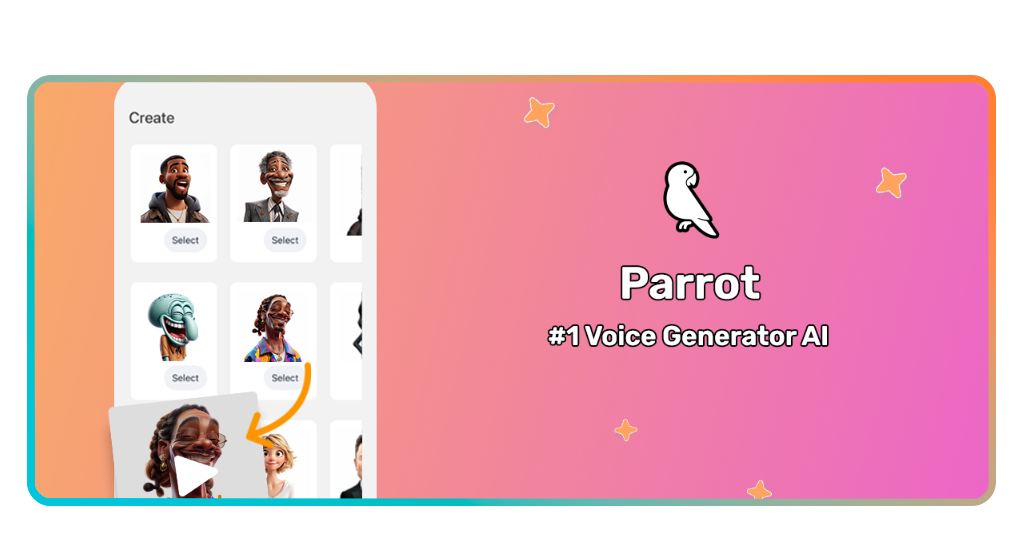
The main attraction is text-based voice generation, so users choose a celebrity voice, type a line, and let the app generate the output.
And since Parrot (iOS/Android) presents itself as an AI voice prank app for funny videos, the app gets closer to meme culture and short-form content creation.
Lastly, everything in the store copy pushes the idea of funny messages, stories, and group-chat content.
With that, anyone looking for a creative prank tool will probably find the app easier to understand than a more technical voice platform aimed at audio professionals.
Step-by-step: how to prank friends with celebrity voices using Parrot
The prank process works best when the joke is short, recognizable, and written with the chosen voice in mind.
Follow this guide to prank your friends with this AI voice prank app:
Step 1: download Parrot
To begin with, download and install the app from the App Store o Google Play and open it from the official listing page.
Step 2: pick a voice
After installing the app, choose the celebrity-style voice you want to use for the prank, using the app’s built-in selection flow described on the store pages.
Step 3: type the message
Then, write a short line that matches the joke, keeping the wording natural so the generated result sounds smoother.
Step 4: generate the clip
Let the app create the voice output and listen once before sharing it.
Step 5: send it in the right context
Lastly go the the funniest part: share the result in a group chat or private message where the prank will read as playful and harmless
Tips for realistic voice generation and safety
A more convincing result usually comes with the script itself. With that, short phrases with common wording tend to sound more natural in AI voice prank apps.
Meanwhile, long sentences packed with slang, awkward punctuation, or abrupt tone shifts can make the output feel artificial even when the underlying voice model is strong.
As with any other type of joke, timing is important, and a prank sent at the right moment in an ongoing conversation will feel sharper than a random clip dropped without context.
That is why the best users of Parrot (iOS/Android) are not always the ones chasing the most extreme output, but the ones who understand how to stage a quick reaction.
Safety matters too. That’s why the official app descriptions frame Parrot around funny videos and group-chat amusement, and that is a useful boundary to keep in mind.
The healthiest way to use the app is to keep the prank transparent in spirit, even if the surprise lasts for a few seconds.
When the result is shared among friends, tied to an obvious joke, and kept away from harmful scenarios, the app feels like a fast entertainment tool with a strong viral edge.
4.6/5
When the joke sounds almost too real
Parrot works well as an AI voice prank app precisely due to its narrow, confident idea of what it wants to be.
It is built around quick celebrity-style generation and funny output, which fits better for casual creators than voice tools that feel overloaded with studio-style features.
And Parrot (iOS/Android) offers a fast route from idea to payoff, and that is exactly what prank content needs when timing and surprise are part of the joke.
For anyone curious about voice-based humor, celebrity-style clips, or new ways to make a group chat react, Parrot is a solid app to test first.
Correlato: Create viral content fast with these AI voice generator tools
Ti è piaciuto questo articolo? Salvalo Insiderbits to your favorites and discover the most useful tech tips.