
Streaming subscriptions keep climbing in price, and paying $15,00 or more a month just to hear the rap sets you actually want feels like a bad deal when half the catalog is missing anyway. There’s a whole generation of hip hop that defined streets, culture, and entire cities, and finding a classic rap radio experience that does it justice without draining your wallet has become a real challenge for fans who know what they’re looking for.
Rap Radio+ puts hundreds of stations in your pocket, covering hip hop, R&B, soul, and more, all completely free and built to keep playing in the background while you handle your day. This Insiderbits guide takes you through everything from downloading the app to the essential tracks every rap fan needs in their rotation. Real rap fans know the classics hit different, so keep reading and get your headphones ready.
Correlato: Le migliori app per ascoltare la radio sul telefono

4.5/5
What’s the best classic rap radio app?
Rap Radio+ (Android | iOS) is a free app that pulls together hip hop, R&B, and soul stations into one place, giving you instant access to the music without any fees attached.
The station variety goes beyond what most free apps bother to offer, with channels ranging from underground rap sets to international broadcasts covering scenes you didn’t even know existed.
If you’ve been hunting for a classic rap radio experience that respects the genre’s full history instead of cherry-picking the easy hits, this app is the one to have on your phone.
Features available in the Rap Radio+ app
- Massive station library: with over 100 channels spanning rap, hip hop, R&B, and soul, there’s always something worth tuning into, no matter your mood;
- Background audio support: the music keeps playing even when your screen goes dark, so you can browse, text, or work without interruptions;
- Completely free access: there are no subscription plans, no hidden fees, and no paywalls standing between you and the stations you want to hear;
- Cross-platform availability: whether you’re on Android or iOS, the app installs and runs without any device-specific hoops to jump through.
Stations covering every rap era and region
Classic rap radio fans know how rare it is to find an app that actually covers the full timeline of the genre without pushing you toward recent chart-toppers only.
The station list pulls from domestic and international sources, so you’ll hear channels from Germany, Hawaii, and beyond sitting right alongside your local urban favorites.
Digging through the lineup feels less like scrolling an algorithm and more like turning a real dial, with each station bringing its own vibe and crowd to the table.
Background audio keeps the music going
Losing your stream the second your screen dims is one of those small situations that can become annoying quickly, especially when you’re in the middle of a great set.
The app is built to keep playing through classic rap radio stations even when your phone locks, which means the music follows you through your commute, workout, or work session.
Adjusting a couple of settings on your device is all it takes to make sure the audio never cuts out, and the app even links you to a FAQ for extra guidance.
Step-by-step: how to stream rap hits using the app
Getting Rap Radio + (Android | iOS) running on your phone takes almost no time at all, and you won’t need an account, a credit card, or any kind of setup process to start listening.
The classic rap radio stations are organized into clear categories right from the home screen, so finding the right channel for your mood doesn’t require any digging or guessing around.
From underground rap to international hip hop broadcasts, the app gives you a direct line to live stations that are actually curated by real DJs who care about the genre.
Step 1: download Rap Radio+ on your device
The app goes by different names depending on your OS, so if you use Android, you can look for ‘Rap Radio Favorites’. iOS users will find the app as ‘Rap Radio+’.
There’s no registration screen waiting for you on the other side, so the moment you finish installing the app, you’re already one tap away from jumping straight into the station list.
Both Android and iOS users can grab it for free, and the file size is light enough that it won’t take up any meaningful space on your device.
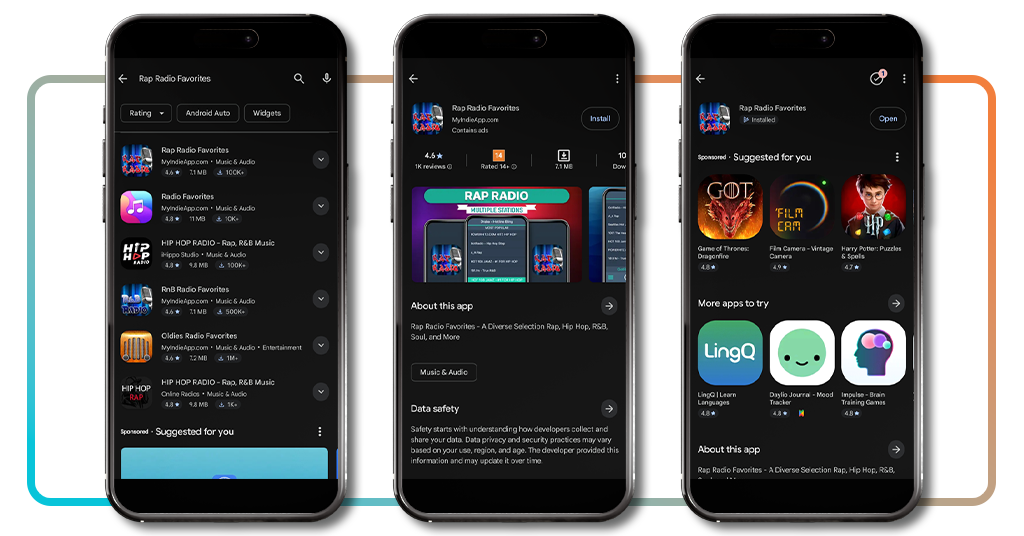
Step 2: browse and pick your station
The home screen lays out the full station lineup in organized sections, with categories like ‘Most Popular’, ‘Rap and Hip Hop’, ‘Rap International’, and ‘Rap Mix’ all visible right away.
As you can see in the screenshots, classic rap radio options show up across every section, from old-school hip hop and classic R&B to German rap and international hip-hop channels.
Tapping any station name starts the stream immediately, and the player at the bottom of the screen shows you the station name and current track so you always know what’s playing.
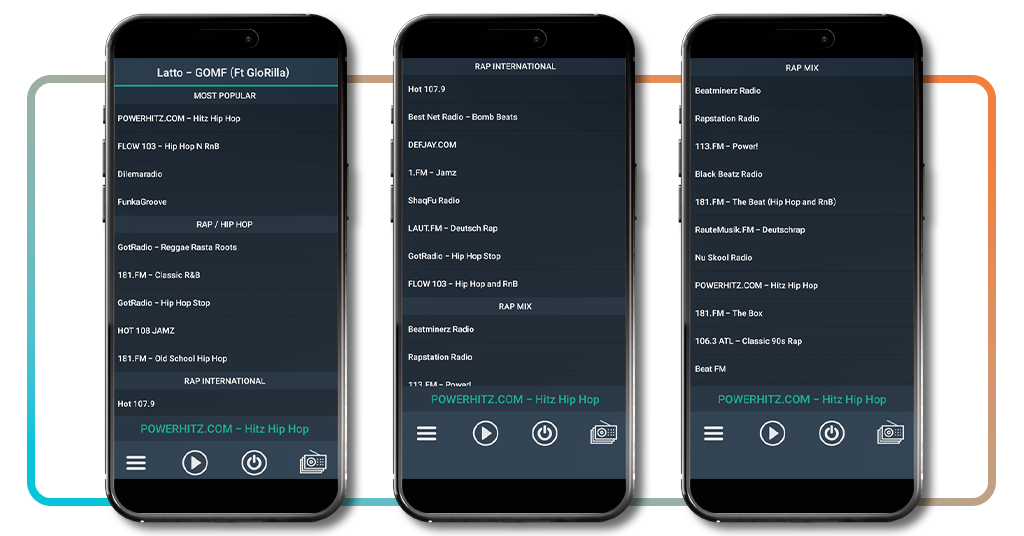
Step 3: sit back and let it play
Once your station is live, the audio keeps running in the background so you can lock your screen, switch apps, or put your phone in your pocket without the music cutting out.
If the stream ever goes quiet, it’s worth checking your wifi settings to make sure the connection stays active when your screen dims, since that’s the most common reason streams drop.
The app links directly to a FAQ page if you run into any device-specific issues, and the fix is almost always a quick tweak in your phone’s power or Wi-Fi settings.
Correlato: Free old music radio: listen to 50s, 60s & 70s hits on mobile
Essential classic rap hits that can’t be missing from your playlist
Some tracks just refuse to age, and the ones that came out of rap’s most defining decades still hit with the same weight they carried the first time you heard them.
Tuning into classic rap radio takes you back to a time when every verse felt like it meant something, and the production behind those records still holds up today.
Whether you grew up with these songs or you’re discovering them now, building a playlist around the genre’s most essential tracks is one of the best things you can do as a fan.
Tracks that defined the golden age of rap
Nas dropping ‘Illmatic’ in 1994 changed what people thought rap could say, and tracks like ‘N.Y. State of Mind’ set a bar that producers and MCs are still reaching for decades later.
The Notorious B.I.G.’s ‘Juicy’ and ‘Big Poppa’ brought a swagger to the genre that made mainstream pay attention, and both records still sound just as fresh as they did in ’94 and ’95.
Wu-Tang Clan’s ‘C.R.E.A.M.’ from ‘Enter the Wu-Tang’ is another one that belongs in any rotation, with a message that landed differently than anything else coming out at the time.
West Coast legends you need to revisit
Tuning into classic rap radio and landing on a Dr. Dre or Snoop Dogg station feels like stepping into a whole different chapter of hip hop history, one that reshaped the entire genre.
‘The Chronic’ gave the world G-funk, and tracks like ‘Nuthin’ But a G Thang’ and ‘Let Me Ride’ built a West Coast identity that rappers are still drawing from today more than 30 years later.
Tupac’s ‘All Eyez on Me’ double album brought rawness and range together in a way that felt unmatched at the time, and records like ‘California Love’ cemented his place permanently.
East Coast anthems still holding up today
Jay-Z’s ‘Reasonable Doubt’ is the kind of debut that makes you wonder how someone came out that polished right from the start, with tracks like ‘Can’t Knock the Hustle’ still turning heads.
Listening to classic rap radio and finding a Biggie or Jay-Z set reminds you how deep the East Coast catalog runs, with records that covered street life without ever losing their edge.
Rakim’s work with Eric B., especially ‘Paid in Full’, rewired how people thought about flow, and that record deserves a permanent spot in any playlist built around the genre’s foundation.
Correlato: Get your old country music app: listen to 1,000s of hits free
4.5/5
Thousands of rap beats all in one place
Rap Radio+ brings together a catalog of stations that covers the genre from every angle, and all it takes is a few taps to go from silence to a live set that fits exactly what you’re feeling.
In questa guida, Insiderbits showed you how classic rap radio puts hundreds of stations in your pocket for free, with a lineup that spans decades, regions, and every corner of hip hop culture.
Stay with Insiderbits for more guides on the best apps to access free music, discover new artists, and keep your playlist stacked without spending a single dollar on subscriptions.
FAQ
Is Rap Radio+ completely free to use?
Yes. There are no subscription plans, no hidden fees, and no paywalls. You can download and use the app without spending anything.
How many stations does Rap Radio+ offer?
The app gives you access to over 100 stations spanning rap, hip hop, R&B, soul, and more, including international broadcasts from countries like Germany and Hawaii.
Does Rap Radio+ work on both Android and iOS?
Yes. The app is available on both platforms. On Android it’s listed as ‘Rap Radio Favorites’, while iOS users can find it as ‘Rap Radio+’.
Can I listen to Rap Radio+ with my screen off?
Yes. The app supports background audio, so the music keeps playing even when your screen locks. You may need to adjust a couple of device settings to ensure uninterrupted playback.
What should I do if the stream drops?
Check your Wi-Fi settings to make sure the connection stays active when your screen dims, as that’s the most common cause of dropped streams. The app also links to a FAQ page for device-specific troubleshooting.