A strange noise or neighborhood alert can leave people wondering what is happening. An emergency scanner app provides access to public safety communications, helping users follow local updates in real time.
While these apps do not replace official emergency channels, they can offer useful context during events like severe weather, accidents, and other public safety situations. Wanna understand how? Read ahead on Insiderbits.

4.2/5
Which is the best free emergency scanner app?
Among the many scanner apps available today, Police Scanner, available for Android e iOS, is one of the better-known options for people who want to listen to public safety broadcasts from their phones.
That is because instead of buying a physical radio scanner and learning how to configure frequencies, users can browse available channels directly through an app.
In everyday use, you choose a location, select a nearby feed, and listen to available broadcasts. And by doing so, users get a way to stay aware during storms, major accidents, community events, or unusual activity nearby.
However, expectations matter. An emergency scanner app does not provide a complete picture of everything happening in a city.
Some agencies no longer use publicly accessible radio channels, while others may have delayed or incomplete feeds. In busy areas, multiple events can happen at once, making conversations difficult to follow without context.
For people interested in local awareness or learning how emergency communications work, it can be a useful tool. For someone expecting instant crime alerts about every incident nearby, it may feel limited.
Features available in the Police Scanner app
The main feature is access to thousands of public radio feeds covering categories such as police, fire departments, EMS, and other emergency services. Users can search by location and save channels they want to revisit.
The location search feature is probably the most useful part of the app.
Instead of manually searching for frequencies, users can simply look for available broadcasts in their city or county. This makes the app much more approachable for beginners.
Another practical feature is background listening.
You can keep a channel playing while using other apps, which can be convenient during weather events or community situations where you want occasional updates without constantly watching the screen.
The app also has limitations. Audio quality depends on the person providing the feed, and some channels may be quiet for long periods. In smaller towns, there may be fewer options available compared with larger metropolitan areas.
Overall, the Police Scanner app (Android | iOS) works best as an informational tool rather than a real-time emergency notification system.
Step-by-step: how to track local crime alerts online
Using an emergency scanner app is relatively simple—and the following steps can help you start monitoring local activity more effectively.
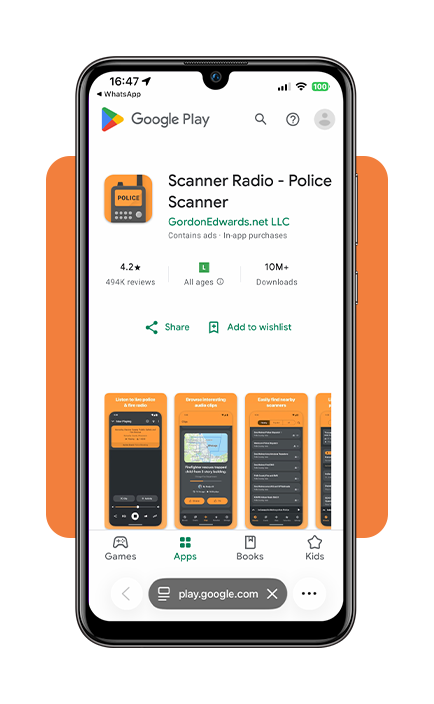
Step 1: download and open the scanner app
Install the Police Scanner app on your Android o iOS, and allow location access if you want recommendations based on your area. Location permissions help the app identify nearby available radio feeds.
Step 2: search for your city or county
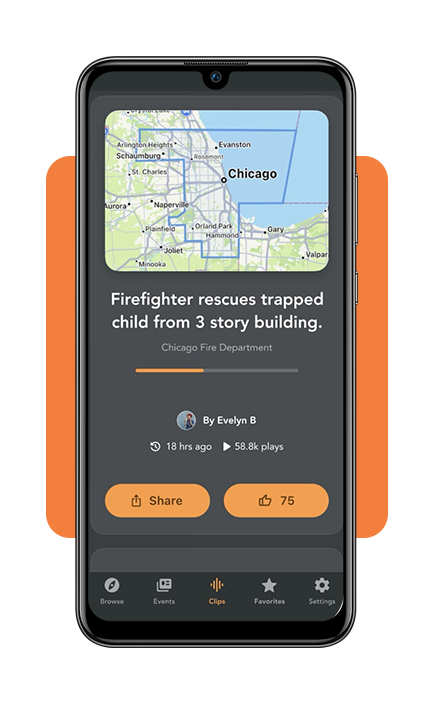
Use the search feature to find police, fire, or EMS channels connected to your region. Larger cities often have multiple feeds, while smaller communities may have fewer available broadcasts.
Step 3: choose emergency channels
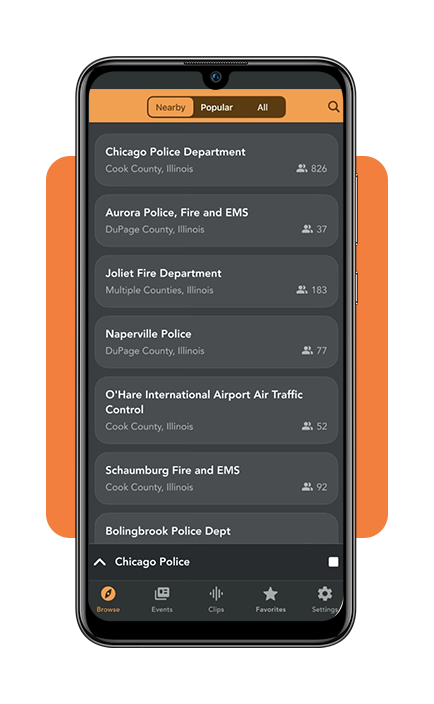
Select channels that match your interests, such as local police activity, fire responses, or emergency medical services. Avoid monitoring too many channels at once, as conversations can quickly become difficult to follow.
And remember…
Scanner broadcasts can provide context, but they should not be considered the only source during emergencies. For urgent situations, always rely on official emergency alerts, local authorities, and public safety announcements.
Top home security systems for real-time family protection
An emergency scanner app can help you understand what is happening around your neighborhood, but it does not actively prevent problems or alert you when something happens inside your home.
For that type of protection, many families turn to dedicated home security systems with cameras, sensors, and mobile notifications.
Ring alarm and ring cameras
Ring is one of the most recognized names in DIY home security. Its systems combine video doorbells, indoor and outdoor cameras, motion sensors, and alarm kits that can be controlled through a smartphone.
One advantage is the large ecosystem of devices, making it easy to add more cameras or sensors later. However, many advanced features require a subscription plan, so the total cost can increase over time.
SimpliSafe Home Security System
SimpliSafe is designed for people who want professional monitoring without a complicated installation process.
Its equipment includes entry sensors, motion detectors, cameras, and alarms that can be installed without professional help.
It is often recommended for renters or homeowners who want flexibility because the system can be moved and adjusted as their needs change.
ADT Home Security
ADT is one of the oldest names in residential security and focuses heavily on professionally monitored protection. Unlike many DIY options, ADT provides trained monitoring agents who can respond when alarms are triggered.
The trade-off is usually a higher cost and longer-term commitment compared with self-installed systems.
Arlo security cameras
Arlo Technologies specializes in wireless security cameras with features such as motion detection, night vision, and mobile alerts.
It can be a good choice for people who mainly want to monitor entrances, outdoor spaces, or specific areas of their home.
The main limitation is that camera-based systems may not provide the same level of protection as a complete alarm setup with door sensors and professional monitoring.
At the end, the right system depends on your home, budget, and how much automation you want. Some people only need a simple camera setup, while others prefer professional monitoring with emergency response features.
Home insurance plans with comprehensive local coverage
An emergency scanner app can help you stay aware of what is happening nearby, but home insurance helps protect you financially when unexpected events affect your property.
State Farm homeowners insurance
State Farm is one of the largest U.S. insurers, offering coverage for home damage, personal belongings, liability, and temporary living expenses.
Allstate homeowners insurance
Allstate offers customizable policies with options like identity theft protection and additional coverage for valuable items. However, homeowners should review policy limits carefully to understand what is included.
USAA homeowners insurance
USAA provides insurance options for military members, veterans, and eligible families. It is often recognized for customer-focused benefits, although eligibility is limited.
Lemonade homeowners insurance
Lemonade offers a fully digital insurance experience, allowing users to manage policies and claims through an app. It may appeal to customers who prefer a simple online process.
When comparing policies, focus on more than price. Check coverage limits, deductibles, personal property protection, liability coverage, and additional living expense benefits.
How to quickly report a local emergency near you
While an emergency scanner app can help people understand what is happening nearby, it should never replace official emergency reporting systems.
In the United States, calling 911 remains the fastest way to report immediate threats involving life, serious injury, fires, or crimes in progress.
When contacting emergency services, provide your location, explain what happened clearly, and follow instructions from the dispatcher.
For non-emergency concerns, many communities offer police or city service numbers that can handle situations that do not require immediate response.
Knowing when to use emergency services and when to use informational tools like scanner apps helps communities stay safer and avoids overwhelming emergency responders.
4.2/5
Information is useful when paired with awareness
An emergency scanner app can turn your smartphone into a window into local public safety activity. At the same time, scanner feeds are only one piece of the puzzle.
They work best alongside official alerts, responsible reporting, and practical safety measures at home.