
Searching for a job online has turned out to be part of everyday adult life, yet the experience often carries an undercurrent of anxiety and complex situations that goes way beyond competition or rejection. Usually, that happens when candidates discover that some listings are carefully crafted traps, designed to look legitimate while quietly collecting personal data or pushing applicants toward financial loss, turning an already stressful process into a risky one.
This reality explains why learning how to spot fake job postings matters as much as preparing a résumé or practicing interview answers. When you understand how fraudulent listings operate, you gain the ability to pause, verify details, and protect yourself before taking action, which is exactly why learning to protect yourself by learning how to recognize fake job postings online makes your entire job search safer and far more confident.

4.5/5
How to Spot Fake Job Postings and Stay Safe
Let’s start from the main part: fake postings usually sell a feeling before they describe a job, and this happens because urgency and flattery push people into quick replies that bypass verification habits.
So, if the description reads like a motivational pitch and avoids concrete duties, the listing deserves scrutiny even when the company name looks familiar.
On the other hand, legitimate employers tend to leave a trail that matches real operations, since their roles connect to real teams, real products, and public activity that can be cross-checked in minutes.
Therefore, when the listing feels detached from anything a company publicly does, the safest move is to pause and verify before you apply.
- ADHD or Autism? Try this Neurodivergent Job Site to find Work
- AI Data Training Jobs: Earn $18-$40/hr Training AI Services
- Auto Mechanic Career Path: Skills, Jobs, and Salaries
Step-by-Step: Check Details Before Applying
This checklist to spot fake jobs works best when you run it every time. Consistency prevents ‘one exception’ decisions that scammers rely on:
- Firstly, open the company page and confirm recent activity, employee presence, and a believable history of posts that match the brand’s tone;
- Then, check the recruiter profile and look for organic connections, role consistency, and employment history that does not read like a blank template;
- Compare the job description with the company’s public work, since mismatched departments or services often reveal copied listings;
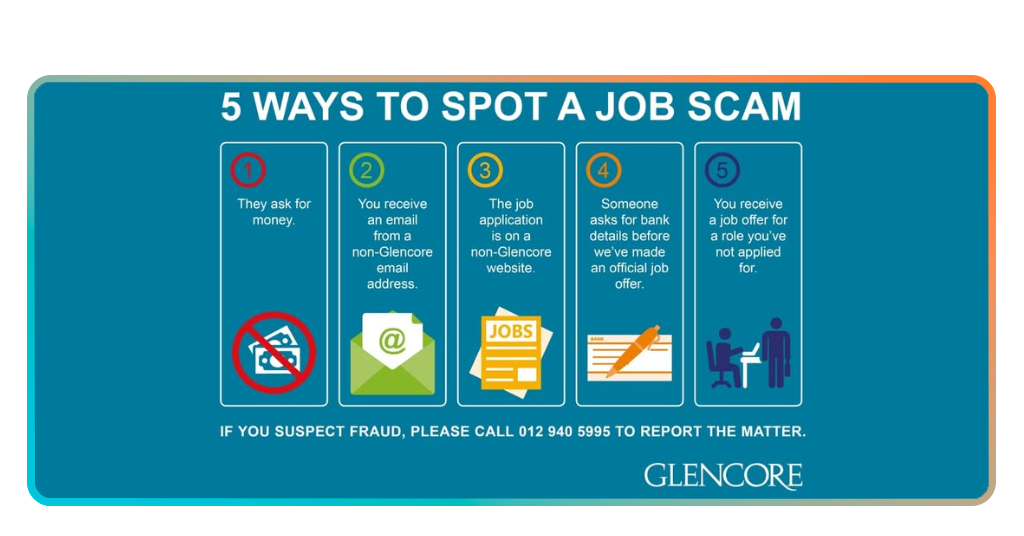
- Another tip is verifying contact methods and treat generic email addresses as a warning sign, especially when the platform messaging is avoided;
- Search the exact job title plus the company name, since duplicated text across unrelated sites often indicates a recycled scam script;
- Save the listing, wait a short moment, then reread it, since emotional pressure fades and contradictions become easier to catch.
Red Flags That Reveal Scams Instantly
The main red flag when we talk about how to spot fake job is money requests. This is the clearest signal, since ‘training fees’ or ‘equipment costs’ are common disguises for a simple theft attempt.
Meanwhile, real employers may reimburse expenses later, yet asking you to pay upfront during early contact is a major warning sign.
In addition, sensitive data requests also appear too early, especially when a ‘quick onboarding form’ asks for documents or banking details before any real interview occurs.
A safer rule is to treat personal data like cash, since once it leaves your hands, control rarely returns.
Safe Platforms to Find Real Opportunities
There are some platforms that show employer identity and signals that make scams harder to sustain.
LinkedIn Job Search (iOS/Android), for instance, helps here because company pages, recruiter profiles, and mutual connections give you context that a bare listing cannot provide.
If you want to stay safe in your job search — follow these simple tips: messaging inside the platform protects you in practical ways, keeping conversations traceable, and it reduces the pressure to trust an unknown email chain.
Also, when a recruiter insists on leaving the platform immediately, that insistence becomes part of the risk assessment, even if the job title looks perfect.
If you want fewer traps and fewer wasted applications, apply only where verification signals are strong, then keep your communication inside those systems as long as possible.
How to Get the Most Out of LinkedIn Job Search
A safer LinkedIn Job Search routine starts with reading the company page before reading the job post, this way, you quickly learn what the organization actually does and how it talks publicly.
That context makes suspicious descriptions feel off sooner, which saves time and prevents careless clicks.
Moreover, saved jobs are useful when you treat them as a comparison set. Scam language repeats, and legitimate roles tend to look more specific across departments. When you compare listings side by side, patterns appear that one isolated posting can hide.
Lastly, if you see a listing that feels wrong, then report it, that action protects other applicants, and it also trains your instincts through deliberate review.
4.5/5
Spot Fake Job: How to Spot Fake Job Postings Online and Stay Safe While Applying – Conclusion
Online job searching no longer revolves only around finding the right opportunity. Understanding this shift helps applicants approach each listing with a clearer mindset and a stronger sense of control.
If you learn to spot fake jobs and apply only to verified listings, your job search stays focused on real opportunities instead of unnecessary risk.
This awareness is now part of a healthier job search routine, where decisions are guided by verification rather than pressure or urgency. With time, you’ll see this mindset turns caution into confidence.
Correlato: Fun jobs that pay well: find your next career move
Enjoyed this article? Save the Insiderbits blog to your favorites for the latest tools, creative tech tips, and photo editing breakthroughs.