Getting your little one to settle at bedtime can feel like a nightly negotiation, filled with stalling and pleas for five more minutes. A bedtime app for kids might be the reset your evenings need.
Moshi steps in with soothing stories, playful characters, and calming sounds made for children, and this Insiderbits guide walks through every feature that makes those nights easier. Read on!
Correlato: Movie Blocker for Kids: Block Explicit Movies With this App

4.7/5
Try this free bedtime app for kids
Moshi (Android | iOS) brings a world of sleepy koalas, chatty pandas, and gentle lullabies onto your phone, ready the moment your child needs help winding down at night.
You’ll find hundreds of stories, songs, and calming sounds packed inside this bedtime app for kids, all sorted by mood, length, and theme for quick browsing each evening.
Every story unfolds through calming narration and soft, gentle visuals designed to relax your child’s mind without overstimulating young eyes right before sleep sets in for the night.
Features available in the Moshi app
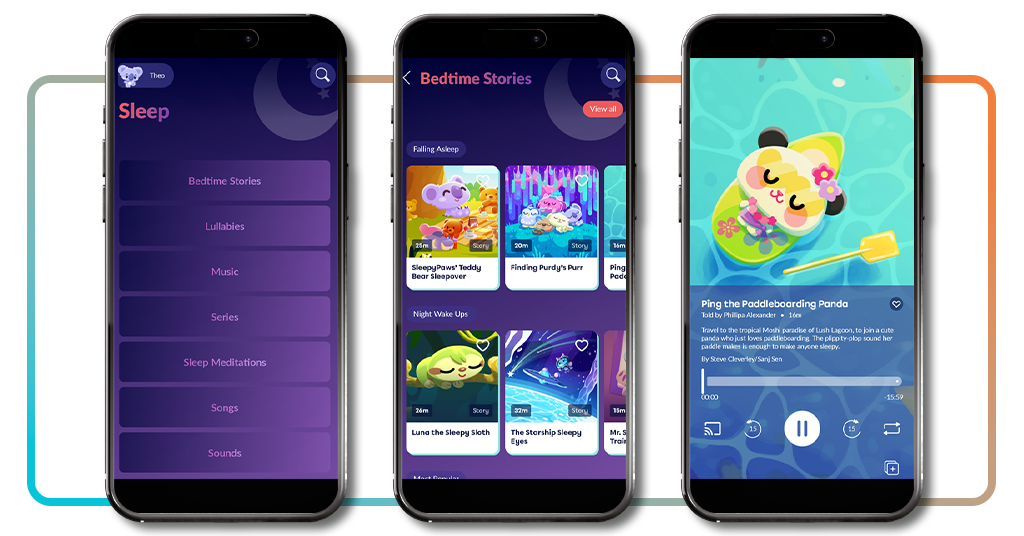
- A packed sleep library: browse bedtime stories, lullabies, music, sleep meditations, and calming sounds sorted into moods like ‘Falling Asleep’ and ‘Night Wake Ups’;
- Offline listening: download any story, lullaby, or sound directly to your device so bedtime never depends on a strong Wi-Fi connection in the house;
- Handy playback controls: skip forward or back fifteen seconds, loop a favorite track on repeat, and save titles to a personal list for later;
- Daytime calm and play: explore the ‘Relax’ and ‘Play’ tabs for breathing exercises, mindfulness activities, and gentle games that build healthy screen time habits.
Personalize a Moshling character companion
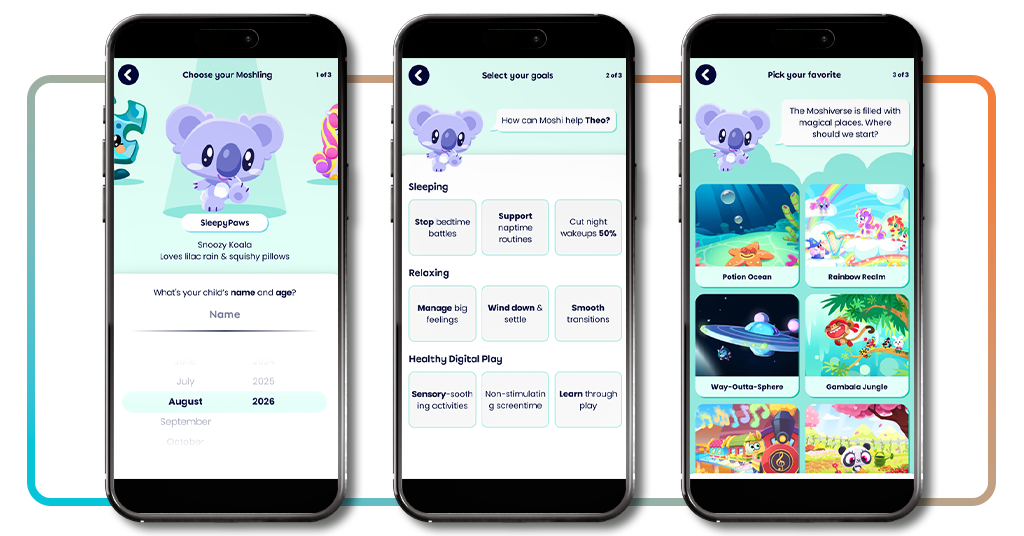
Your child picks a Moshling companion right at setup, choosing from playful characters like SleepyPaws the koala to guide every story and calming activity from here on out.
That same character shows up across the app, greeting your child by name and recommending stories that match their mood, making the experience feel personal and warm.
Pick your child’s favorite Moshiverse world
During setup, your child also gets to choose a favorite Moshiverse world, like ‘Potion Ocean’, ‘Rainbow Realm’, or ‘Gambala Jungle’, each one filled with unique characters and scenery.
This pick shapes the stories and nightly adventures suggested first in this bedtime app for kids, giving your child a genuine sense of ownership from the very beginning.
Try it for free before subscribing
You’ll unlock three full days of Premium access right after finishing setup, giving your family plenty of extra time to explore every story, sound, and game together.
After the trial ends, a subscription runs $ 12.99 a month or $ 79.99 a year, and you can cancel anytime beforehand if the app doesn’t end up being the right fit.
Correlato: Fairy tales app for kids: bedtime stories and interactive games
Step-by-step: how to put kids to sleep in minutes using Moshi
Every parent develops their own bedtime shortcuts over time, but sometimes those tricks stop working, and that’s when finding a new gimmick becomes a necessity.
Moshi (Android | iOS) hands you a clear sequence of taps that turns a phone into a calm, guided experience, and this bedtime app for kids fits right into whatever routine you already run.
None of the setup drags on, so you can move from opening the app to hearing your child settle into bed within roughly five quiet minutes as soon as tonight.
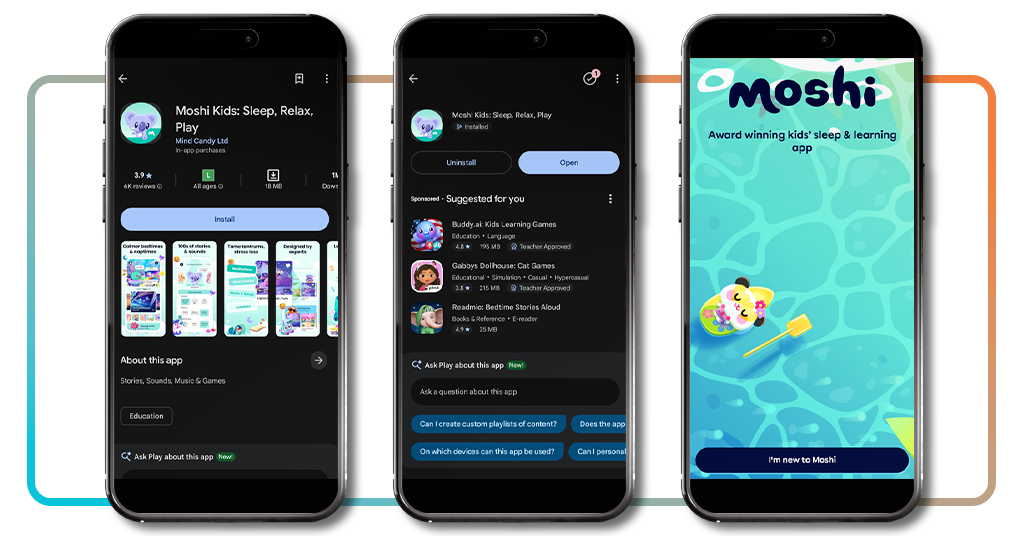
Passo 1: scarica l'app sul tuo dispositivo
Aprire la sezione App Store o Google Play on your phone and search for ‘Moshi’, then tap ‘Install’ or ‘Get’ to bring an entire library of stories and sounds to your device.
Downloading the app is free, and you don’t need to create an account to use it. You’ll get access to a decent chunk of content right away, giving you a solid feel for the app.
Step 2: set up your child’s profile and goals
Open the app and enter your child’s name and age, then choose a Moshling companion like SleepyPaws the koala to guide them through each little activity.
From there, pick specific goals like easing bedtime battles, plus a favorite Moshiverse world, so this bedtime app for kids can tailor its suggestions right away.
Step 3: pick a bedtime story or lullaby
With everything set up, browse the ‘Sleep’ tab for bedtime stories, lullabies, or calming music, and tap any title that catches your child’s attention that particular quiet evening.
Hit play, dim the lights, and let the story or lullaby carry your child from wide awake to peacefully asleep within just a few short minutes.
Tips for better sleep
Good sleep habits rarely come down to one single trick, and small adjustments around bedtime often matter just as much as the story itself.
A few simple changes to your evening routine can work alongside this bedtime app for kids, helping your child settle faster and stay asleep through the night.
None of these adjustments demand a complete overhaul of how your household runs, just a handful of small tweaks that add up to calmer, easier evenings.
Stick to a consistent bedtime routine
Kids tend to settle faster when bedtime follows a familiar pattern, so try keeping bath time, pajamas, and story time in roughly the same order each night.
That predictability signals to your child’s brain that sleep is coming soon, cutting down on the stalling and negotiating that often stretches bedtime out longer than it needs.
Dim the lights before story time
Bright overhead lights can keep your child’s brain alert well past the point where sleep should start, so switch to a lamp or nightlight during wind down.
Pairing dimmer lighting with a calming story from this bedtime app for kids gives your child’s body a stronger, clearer signal that sleep is close by.
Let kids choose their own story
Handing your child the choice between a few stories or lullabies gives them a small sense of control right before bed, which often eases resistance to settling down.
That tiny decision, whether it lands on a koala’s teddy bear sleepover or a starship drifting through space, makes the whole wind down feel less like a rule.
Keep devices away from the bed
Phones and tablets buzzing nearby can pull your child right out of a drowsy state, so charge devices in another room once story time wraps up for the night.
A speaker works well for playing calming sounds or lullabies without a bright screen sitting within reach, keeping the space around the bed calm and distraction-free.
Correlato: AI storytelling app for kids: create magical bedtime tales
4.7/5
Lights out on bedtime battles
Moshi turns those nightly struggles into something your child actually looks forward to, with characters, stories, and sounds built just for winding down together.
In questo articolo, Insiderbits showed you how this bedtime app for kids works, from setting up a Moshling companion to picking the perfect story before lights out.
If you’re looking for more apps made for children, keep reading Insiderbits and learn more ways to make family life easier, with plenty of other guides and reviews designed for little minds.