
Don’t let being a delivery driver turn into a constant battle against the clock, traffic, and your own fuel gauge. The solution isn’t driving faster; it’s driving smarter. In the gig economy, time isn’t just money; it’s the difference between getting home for dinner or being stuck in a dark driveway at 9 PM. Let a professional-grade delivery route app act as your digital co-pilot.
If you’re still manually entering addresses into a basic map app and “winging it” on the sequence of your stops, you aren’t just working hard—you’re losing money. Stop being a victim of bad city planning and start finishing your shifts two hours earlier; it’s time to let AI solve the “traveling salesman” problem that human brains aren’t wired for. Feel like the algorithm could be handling more heavy lifting for you? See more on Insiderbits.

4.7/5
What is the best delivery route app for drivers?
When your paycheck depends on how many packages you drop off before the sun goes down, you need more than just a map—you need an optimization engine.
While there are plenty of generic GPS tools, Spoke Route Planner (formerly known as Circuit) has become the gold standard for over 1 million couriers worldwide.
Available on both iOS e Android, Spoke isn’t just for big logistics companies.
Spoke is there for individual drivers who do Amazon Flex, FedEx, or local grocery runs. In less than a minute, it turns the mess of 100 or more stops into a smooth path.
Features available in the spoke app
- Fast address entry: use voice search, autocomplete, or even upload a manifest to add stops instantly
- AI optimization: the delivery route app calculates the fastest route by accounting for traffic, road closures, and distance
- Proof of delivery: capture signatures and photos directly within the app to protect yourself from “missing package” claims
- Delivery windows: specify “must-deliver” times for specific packages, and the AI will resequence the route to ensure you’re never late
- Multi-GPS integration: use the Spoke interface to plan, then navigate using Google Maps, Waze, or Apple Maps—whatever you prefer
Step-by-step: how to optimize your path using Spoke
Don’t let the “AI-powered” label intimidate you. The app is built for speed, not complexity. Here is how you can cut your shift time down today:
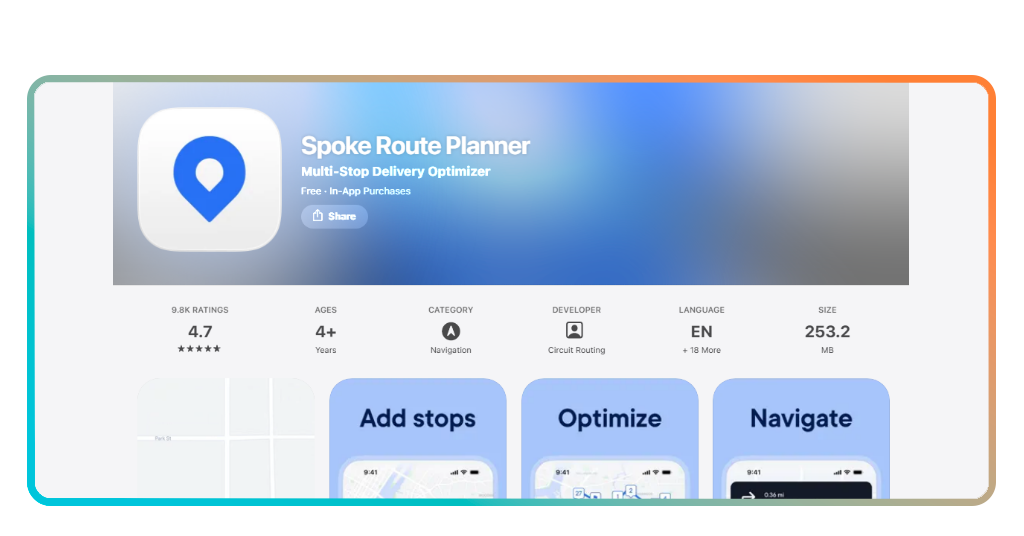
Step 1: input your stops
Open the app on your iOS o Android and tap the “+” button. You can type addresses or use the camera to scan package labels (a massive time-saver).
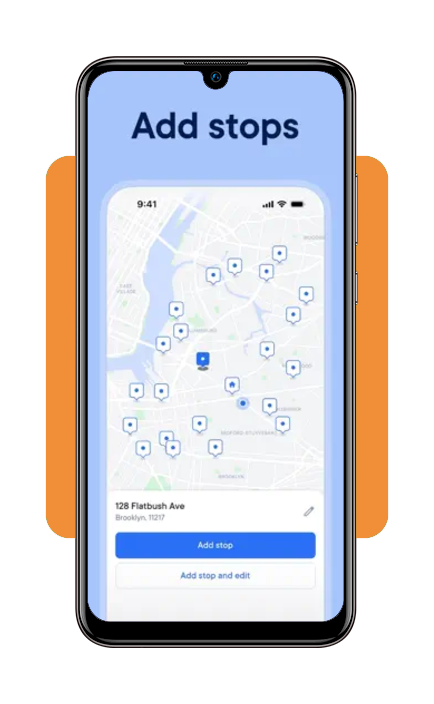
Step 2: add your finish point
Tell the app where you want to end your day—whether that’s back at the warehouse or your own driveway.
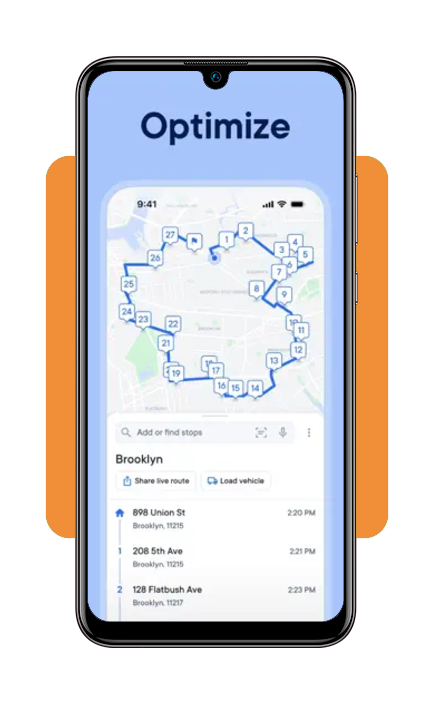
Step 3: hit “optimize”
Watch as the AI reshuffles your list. In about 60 seconds, it will transform a random list into a perfect loop.
Step 4: go
Tap the first stop, and the app will export the coordinates to your favorite navigation tool.
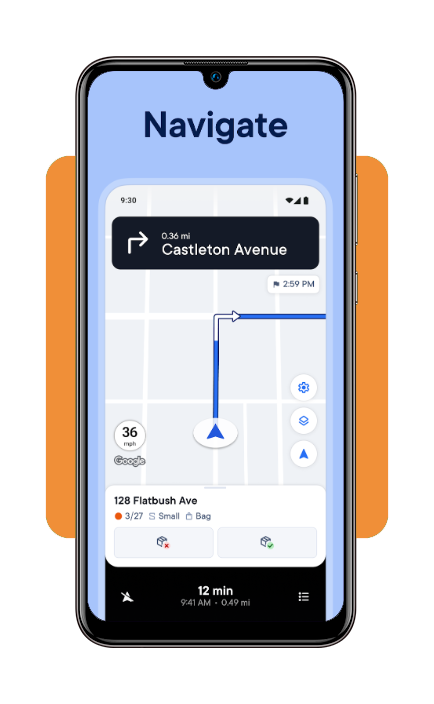
And don’t worry, as you complete each stop, mark it in the app. Spoke automatically prepares the next navigation link so you don’t have to fumble with your phone while parked.
Other ways to optimize your routes and speed
While the delivery route app handles the “where” and “when,” your personal habits handle the “how.” To truly maximize your efficiency, combine the app with these pro-driver strategies:
- Vehicle organization: the best route in the world is useless if you spend five minutes digging for a package at every stop. Organize your vehicle by “zones” that match your optimized route list
- Fuel strategy: stop gas hunting. Use the app to see where your route takes you and plan one fuel stop in a low-traffic area
- Master the “gig” ecosystem: if you are a grocery delivery driver, your efficiency in the store is just as important as your time on the road. Learn the layouts of the stores you visit most
- Leverage tax breaks: beyond efficiency, tracking your mileage is for your tax return. Many drivers find that the cost of a route planner pays for itself tenfold in tax deductions and fuel savings
Limitations of the free version
Let’s be real: quality software costs money to maintain. The free version of Spoke is a great “starter kit,” but it has its boundaries. Usually, the free tier limits you to a certain number of stops per route (typically around 10).
For a casual driver, this is fine, but for a professional courier with a full van, the ceiling is hit quickly.
Price of the Spoke Route Planner subscription
To unlock the ability to optimize 100+ stops, use the package finder, and sync across devices, you’ll need a subscription. In the US, pricing typically follows a monthly or annual model:
- Standard subscription: roughly $20.00 USD per month
- Annual savings: many drivers opt for the annual plan to lower the monthly cost
While $20 a month might sound like another bill, consider the math: If the app saves you just one gallon of gas a week and two hours of time, it has already paid for itself. In the world of gig work, this is an investment, not an expense.
Advantages of using a route planning app
If you are still on the fence, consider the invisible costs of not using an optimizer.
- Lower stress: no more “did I miss a turn?” or “should I have gone to Elm Street first?” The delivery route app makes the decisions, you just drive
- Higher hourly pay: since gig work often pays per drop-off, finishing 2 hours early effectively raises your hourly rate by 20-30%
- Reduced wear and tear: fewer miles driven means fewer oil changes, slower tire wear, and a longer life for your vehicle
- Career longevity: burnout is real. Finishing your shift while the sun is still up makes this a sustainable career rather than a grueling grind.
4.7/5
Drive less, earn more
There are dozens of ways to earn more money as a delivery driver, but none are as immediate as fixing your route. Stop fighting the map and start using it.
Download a delivery route app today, let the AI take the wheel on the planning, and reclaim those two hours for yourself—take care of your back, your car, and your bank account.