
A job posting catches your eye, the pay is good, the schedule works, and then you hit the line that stops everything: “high school diploma or equivalent required”. It’s a punch to the gut that millions of adults know too well. Getting that credential has always felt like something that takes years of night classes and a calendar you don’t have. But GED prep has come a long way, and the tools available now look nothing like what you’d picture.
GED & Me™ is the official app made by the actual GED test creators, and it turns your phone into a personal study hub, complete with AI tutoring, practice questions, and a learning path built around your schedule. This Insiderbits guide breaks down what the app offers and how to take the first step. Keep reading and you’ll find out how getting that diploma could fit into your lunch break.
Correlato: Stop Procrastinating and Start Winning with a Custom Study Plan
GED & Me: GED prep via mobile phone
Studying for a big exam used to mean finding a class, showing up on a fixed schedule, and hoping it fit your life. That’s not how it works anymore.
GED & Me™ (Android | iOS) puts the whole experience on your phone, and solid GED prep is now something you can work into whatever time you have available.
The app was built by the same team that writes the GED test, so everything inside it lines up with what you’ll face on exam day, and nothing is wasted.

4.8/5
Resources available for students
- Personalized learning path: the app builds your study plan around your GED Ready Score, so you know exactly where to focus and what to tackle first;
- AI-powered math tutor: Syd walks you through problem-solving step-by-step, breaking down tricky math and science questions in over 250 languages;
- Practice questions: the app serves up questions modeled after the real test, customized to your score level so every session targets your weak spots;
- Test scheduling tools: you can book your GED test or GED Ready® Practice Test directly from the app and set reminders as your test date approaches.
Study anywhere on your own schedule
A good GED prep routine for a parent of 3 looks completely different from one built for someone clocking double shifts, and GED & Me™ was designed with that kind of real-life variety in mind.
You set the goals, you decide when to open it, and the app tracks your time so your progress stays visible even when life gets in the way of a longer session.
Syd AI keeps you on track
You can tap on “Syd” inside the app, and you get an immediate breakdown of how to solve the problem, which makes studying feel less like a solo effort and more like a tutored session.
Syd covers math and science, with language, arts, and social studies support on the way, so the help you get inside the app will keep growing as you move forward.

Advantages of preparing online for the GED exam
Sitting in a classroom a few nights a week sounds fine in theory, but it falls apart the moment your work schedule shifts or your kid gets sick and needs you home.
In linea GED prep has changed what it looks like to get ready for this test, giving you tools that respond to your life instead of asking your life to respond to them.
GED & Me™ takes that a step further by putting everything in one place on your phone, so your study sessions and your test scheduling all live in the same spot.
Finish your prep faster than traditional classes
A traditional prep class moves at the pace of the group, which means you spend time on subjects you’ve already got down while waiting for everyone else to catch up with you.
The app builds your plan around your personal score report, so you’re only drilling the areas that need work, and you’re not sitting through material you’ve already mastered.
Free tools designed by actual GED test makers
The people who built GED & Me™ are the same ones who write the test, so the practice questions, the learning path, and the subject guidance all reflect what’s on the exam.
A solid GED prep tool built by the test makers themselves means you’re working with material that matches the real thing, not a third-party interpretation of what the test covers.
Gamified practice builds real study habits
Opening a study app every day is a lot easier when the platform gives you a reason to come back beyond just the credential waiting at the end of the whole process.
GED & Me™ uses a gamified experience to make practice feel like playtime, and building that kind of habit is what separates people who pass from people who keep postponing.
Correlato: Study Faster: Turn Notes Into Flashcards Automatically With This App
Step-by-step guide to studying using the official app
Opening GED & Me™ (Android | iOS) for the first time feels less like staring down a mountain and more like getting handed a map, with every section pointing you somewhere useful.
The whole experience is built around your specific situation, so the app responds to your score, your schedule, and your goals instead of handing you a generic one-size-fits-all plan.
Your GED prep gets a real structure the moment you connect your GED.com account, and from that point forward, every session you complete moves you one step closer to test day.
Step 1: download the GED & Me™ app for free
GED & Me™ is available on the App Store and Google Play, and you don’t need an account to explore it at first. The app lets you get a feel before you commit to setting anything up officially.
When you’re ready to unlock the full experience, head to GED.com and create your free student account, then log into the app using that same email address to link everything together.
Step 2: set your study goals and learning path
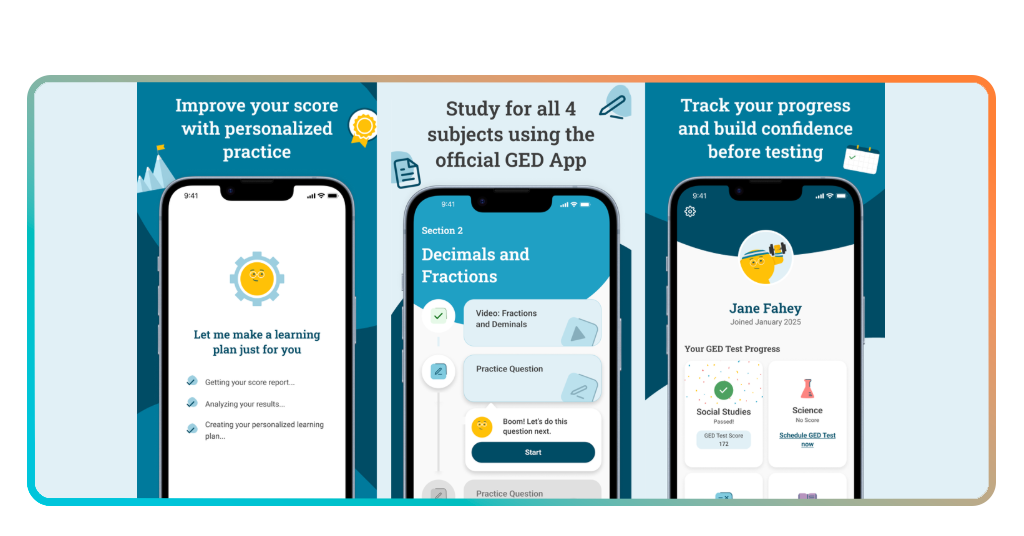
Once you’re logged in, the app pulls from your GED Ready Score Report to build a learning plan that tells you which subjects to focus on and in what order to tackle them.
If you haven’t taken a GED Ready Practice Test yet, that’s a good first move, since your results feed directly into the app and shape the kind of GED prep experience you get from day one.
Step 3: practice daily and track your progress
With your goals set and your learning path in place, the app starts serving up practice questions tailored to your score level, so every session is pointed at the areas you need to focus on.
Syd is available the whole time you’re practicing, so if a question trips you up, you tap on it and get a breakdown of how to work through it without having to leave the app.

What is needed to create a GED & Me account
Setting up GED & Me™ doesn’t ask much from you, and the whole account creation process was built to get you studying as quickly as possible.
The requirements are minimal, and the app was designed so that someone picking it up for the first time can get fully set up and into their first session within a matter of minutes.
What ties the experience together is keeping your GED prep connected to one central account, so your progress, your test schedule, and your study plan all stay in sync automatically.
A free account on GED.com
Vai a GED.com and sign up for a free student account using your email address, and that single account becomes the foundation for everything you’ll do inside GED & Me™.
The account gives you access to your score reports, your test history, and your upcoming test appointments, all of which feed directly into the app to shape your experience inside it.
One email to link app and test appointments
Using the same email address for both your GED.com account and the app is what keeps everything in sync, including your scheduled tests, your reminders, and your notifications.
If you’ve already got a GED account sitting around from a previous attempt, logging into the app with that same email is all it takes to pick up right where you left off.
No prior GED experience required
Jumping into the app without any background is completely fine, and your GED prep journey gets its structure from the learning path the app builds for you once you’re set up.
You don’t need to know which subjects to study first or how the scoring works before you log in, since the app figures all of that out based on your individual situation.
Correlato: Turn PDFs, videos & webpages into study notes with AI
Types of questions to study using the app
The GED test covers 4 subjects, and GED & Me™ makes sure you’re walking into each one having already worked through the kinds of questions you’ll see on the exam.
The practice questions inside the app are pulled from the same subject areas and difficulty levels that show up on the real test, so nothing catches you off guard.
Getting familiar with the question formats across every subject is a core part of solid GED prep, and the app covers everything so you’re not going into any section cold.
Math problems with AI explanations
Math trips up a huge number of GED test takers, and the app tackles that head on by pairing every practice problem with its built-in AI tutor that breaks down solutions step by step.
Instead of staring at a wrong answer and moving on, Syd gives you a full walkthrough of the problem, which helps you absorb the method instead of just memorizing the answer.
Reading comprehension practice
This section tests how well you read, interpret, and write, and the practice questions in the app are designed to sharpen all of those skills before test day.
You’ll work through passages, answer questions about what you read, and build the kind of analytical thinking the exam rewards, all inside an app you can open on your commute home.
Science and social studies subject questions
Science and social studies round out the GED test, and pulling strong scores in those subjects is a big part of what makes your overall GED prep feel complete and well rounded.
The app covers both subjects with practice questions that reflect the real exam format, so by the time you sit down to test, the material feels familiar rather than foreign.
4.8/5
The comeback you have been waiting for
GED & Me™ is the kind of tool that turns a credential you’ve been putting off into something you can realistically tackle, one study session at a time, straight from your phone.
The knowledge you picked up from this GED prep guide by Insiderbits puts you in a position to walk into that test with a clear plan, a free tool, and no more wondering where to begin.
Explore other Insiderbits articles covering learning resources, skill-building tools, and everything in between to keep moving forward on the path you’ve already started walking.