
International calls are really expensive on traditional services. Fortunately, using WhatsApp for international video calls is a good way to communicate face-to-face without high fees.
This is possible because the app works through an internet connection, meaning you can make video calls using Wi-Fi or mobile data instead of your carrier’s international voice service.

4.5/5
Step-by-step to setting up WhatsApp for international video calls
The good news is that setting up an international video call on WhatsApp (iOS/Android) is straightforward because the app uses your internet connection.
This way, you’re not dependent on expensive traditional international phone minutes. Read these simple steps and start making your international calls.
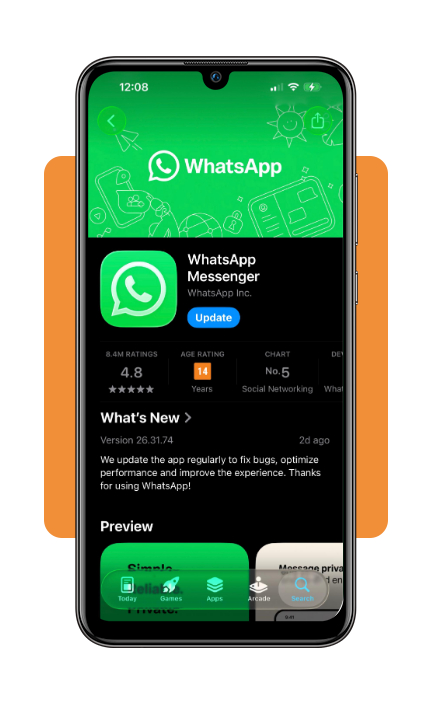
Step 1: download and open WhatsApp
To begin with, download WhatsApp from the App Store ou Google Play, then open the app and register your phone number.
- 10 meilleures applications d'autocollants WhatsApp pour rendre vos discussions plus amusantes
- 15 Ways to Create Fun Status Updates for WhatsApp
- 4 façons d'apprendre l'anglais avec WhatsApp
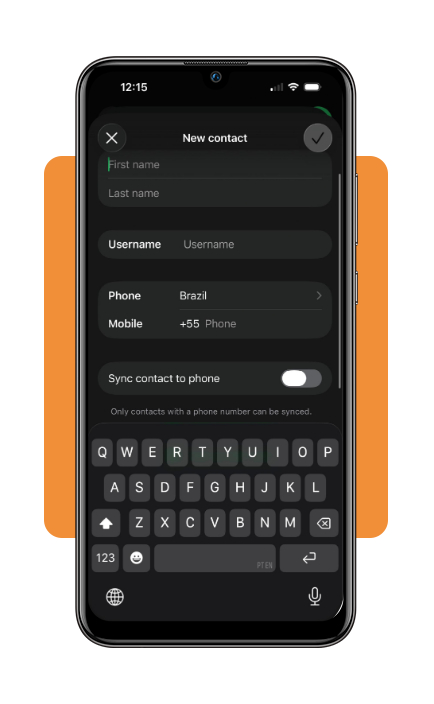
Step 2: save the international contact
Add the person you want to call to your phone’s contacts using the correct international format, including the + symbol, country code, and phone number.
Then, open WhatsApp and confirm that the contact appears in your chat list.
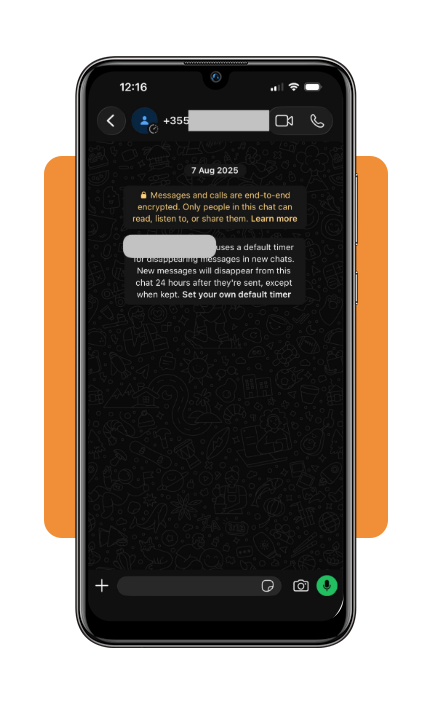
Step 3: open the conversation to start the video call
Find the contact in WhatsApp and open the conversation. Once the conversation is open, just click on the camera button to start the video call.
Top features to save mobile data during connections
Using WhatsApp for international video calls can consume a significant amount of mobile data, even more if you have long conversations.
Still, WhatsApp (iOS/Android) has settings that help you control how much cellular data the app uses.
That type of feature becomes really useful when you’re away from Wi-Fi or have a limited data plan.
You can find it under WhatsApp’s “Settings” > “Storage and Data” menu. When enabled, WhatsApp reduces the amount of mobile data used during calls, but this may affect quality.
Also, in the Settings, you can control how WhatsApp downloads photos, videos, documents, and other media.
All you need to do is choose whether files should download automatically over mobile data or only when you’re connected to Wi-Fi.
Limiting automatic downloads, for example, can prevent your data allowance from being consumed by media you didn’t specifically request.
Another tip is to use Wi-Fi whenever possible for longer international conversations. This is the simplest way to avoid consuming your cellular data.
If Wi-Fi isn’t available, activating WhatsApp’s data-saving call option and limiting automatic media downloads can help you stay within your monthly allowance.
Questions about international calling rates and Wi-Fi
The most common question about WhatsApp international video calls is whether they are actually free.
The answer is no. Using WhatsApp for international video calls doesn’t charge a separate international calling fee, regardless of where the person you’re calling is located.
Instead, the call uses an internet connection, meaning your potential cost comes from mobile data or your internet provider.
You also don’t need both people to be connected to Wi-Fi.
During the call, one person can use Wi-Fi while the other uses 4G or 5G mobile data, as long as both devices have a stable internet connection.
However, we must mention that video calls consume considerably more data than text messages or voice calls, so using Wi-Fi is preferable if your mobile plan has a limited allowance.
Another concern is international roaming. If you’re traveling abroad and use mobile data for a WhatsApp call, your carrier may apply roaming charges depending on your plan.
WhatsApp (iOS/Android) itself doesn’t add a roaming fee, but checking your carrier’s international data policy before making calls can help you avoid an unexpected bill.
Finally, the country you’re calling does not change WhatsApp’s video-call price.
It doesn’t matter if you’re contacting someone nearby or calling a family member on the other side of the world.
In both scenarios, WhatsApp uses the same internet-based system rather than traditional international telephone networks.
Bonus tip: how to get free internet
If you want to use WhatsApp for international video calls without using your mobile data, look for reliable public Wi-Fi networks.
Nowadays, it is getting easier to find them, even more in places like libraries, cafés, airports, hotels, universities, and community centers.
You can also check whether your mobile carrier, internet provider, or local community offers free Wi-Fi hotspots.
For longer WhatsApp (iOS/Android) video calls, a trusted Wi-Fi connection is the best option because it can prevent the call from consuming your cellular data.
Just remember that free Wi-Fi quality can vary, so a weak or crowded network may result in lower video quality or interruptions.
4.5/5
Stay connected without unnecessary costs
Using WhatsApp for international video calls is a simple way to stay in touch with friends and family abroad without relying on traditional international phone services.
As long as both people have an internet connection, you can make video calls regardless of the country you’re contacting.
For the best experience, use a reliable Wi-Fi connection whenever possible. If you need to use mobile data, WhatsApp’s data-saving options can reduce internet consumption.
Whether you’re calling from home or while traveling, with the right connection and settings, staying connected across borders is not complicated or expensive anymore.
Cet article vous a plu ? Enregistrez-le Idées reçues Ajoutez-le à vos favoris et découvrez les astuces technologiques les plus utiles.