
A paper’s due, the deadline’s close, and the sources just aren’t coming together. Hours go into searching across tabs, databases, and library portals, and half of what turns up sits behind a paywall. An academic research app cuts through all of that, putting peer-reviewed studies, journals, and scholarly work from researchers worldwide into one place on your phone, no desktop required, and no subscription to a university library needed.
Academia.edu carries over millions of papers across thousands of topics. It’s free to download, with a premium tier available for readers who want to go deeper. In this Idées reçues guide, we’ll walk you through how to navigate the app, how to pull up papers in a few taps, and a handful of tips to get the most out of your research sessions. Keep reading and discover a tool that makes finding solid academic sources a whole lot less of a chore.
En rapport : Smarter Studying: The Best AI for Students

4.8/5
What’s an academic research app?
An academic research app is a tool that gives you access to scholarly papers, studies, and journals straight from your phone, without hunting across multiple sites.
Academia.edu (Android | iOS) is one of the biggest names in this space. This academic research app connects you with published work across every field, all pulled into a single platform.
It’s built for students, academics, and independent learners. You’ll find everything from niche studies to broad subjects, uploaded directly by the authors and institutions behind them.
Fonctionnalités disponibles dans l'application
- Library saving: grab any paper and store it directly in your in-app library, so it’s ready to read later on your phone or desktop without losing your place;
- Scholar networking: Academia.edu lets you follow researchers, see what they’re publishing, and connect with people working on topics that overlap with your own;
- Profile analytics: keep tabs on who’s viewing your profile and reading your uploaded papers, giving you a real picture of your reach within the academic community;
- Topic search: pull up scholarly research across thousands of subjects in seconds, filtering through a massive pool of uploaded work from researchers all over the world.
Papers from millions of researchers worldwide
This academic research app draws from a pool of over 23 million papers, uploaded by researchers spanning every continent and covering an enormous range of academic disciplines.
What sets it apart is that the content comes directly from the people who wrote it. Authors upload their own work, which means you’re reading papers straight from the source.
That kind of direct access changes how research feels. Instead of chasing citations through library databases, you pull up the full paper and explore related work in one sitting.
Free access with a premium upgrade option
Academia.edu is free to download and use, which already opens up a serious amount of content for anyone who signs up and starts browsing through the platform on their phone.
The premium tier sits at $ 9.99 a month and brings in extras like advanced search tools. If you use this academic research app regularly, that upgrade unlocks a noticeably deeper experience.
For casual readers, the free version covers plenty of ground. For students deep in a research project or academics, keeping up with their field, the paid tier adds tools worth considering.
Step-by-step: how to find papers using Academia
Finding academic papers doesn’t have to take a whole afternoon. Academia.edu (Android | iOS) pulls the search process into your phone, so you’re not jumping between endless resources.
The app works whether you’re chasing a specific citation or just browsing a subject area. Either way, the setup is quick, and the results pull from a massive pool of uploaded research.
Once you’re in, this academic research app keeps everything organized and accessible in one place, from your search history to the papers you’ve saved for later reading sessions.
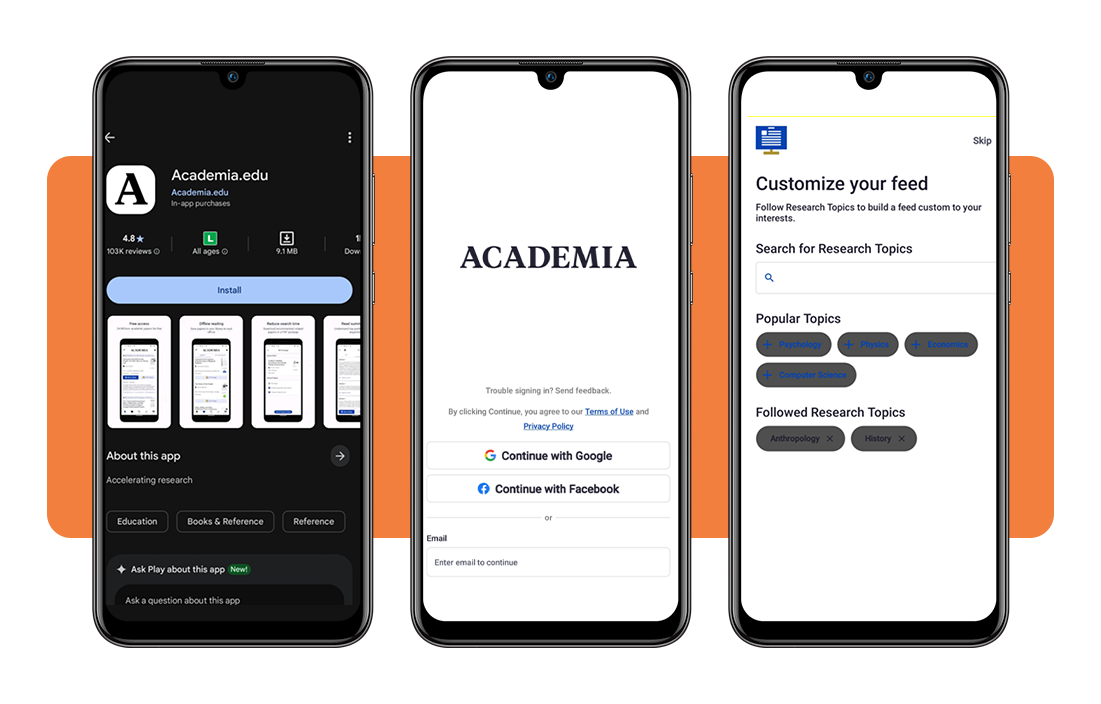
Étape 1 : téléchargez l'application sur votre téléphone
Go to the App Store or Google Play and search for “Academia.edu”. The app is free to download and takes up minimal space, so you’ll be up and running without any issues.
Once installed, create a free account or log in if you already have one. Adding a few subject interests during setup helps the app point you toward relevant papers right from the start.
From there, your homepage populates with research tied to your interests. It’s a solid starting point for exploring what’s available before you jump into a specific search.
Step 2: search for your topic of interest
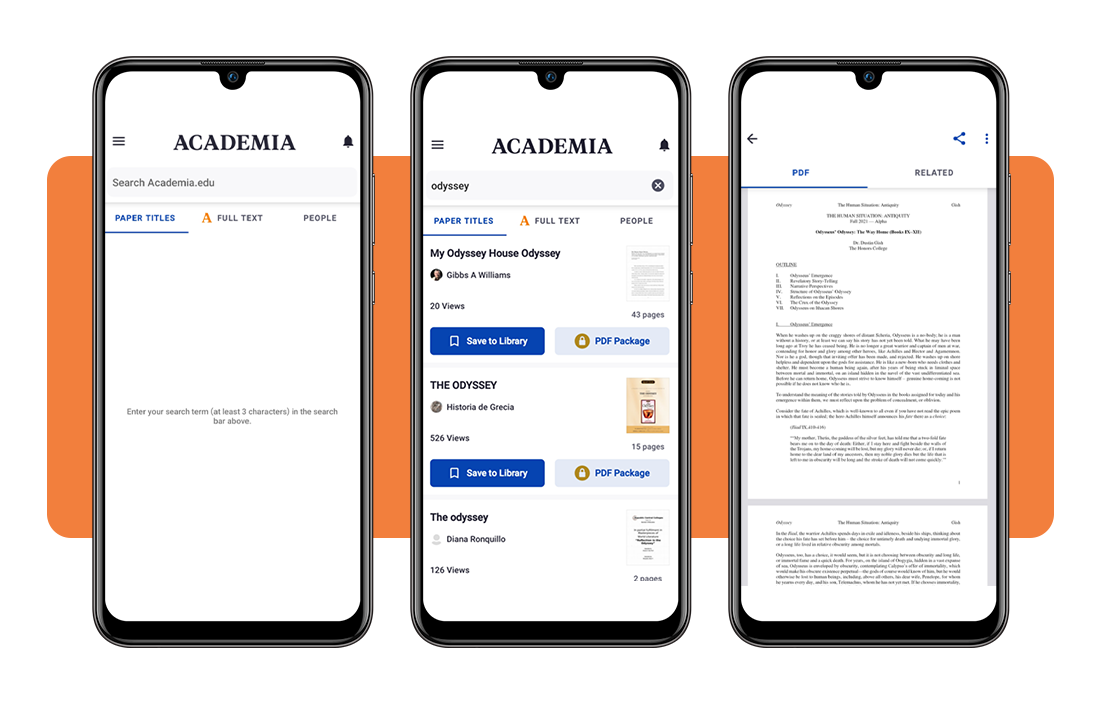
Tap the search bar and type in your topic, an author’s name, or even a specific paper title. The results load up a solid mix of uploaded studies and researcher profiles tied to your query.
Digging into this academic research app is where things get interesting. You’ll filter results by date or subject, so instead of scrolling, you zero in on the work that’s relevant to you.
Clicking on a paper opens up the abstract and author details right away. From there, you decide if it’s worth a full read or if you’ll keep browsing through the results for something that fits better.
Step 3: save papers and read them later
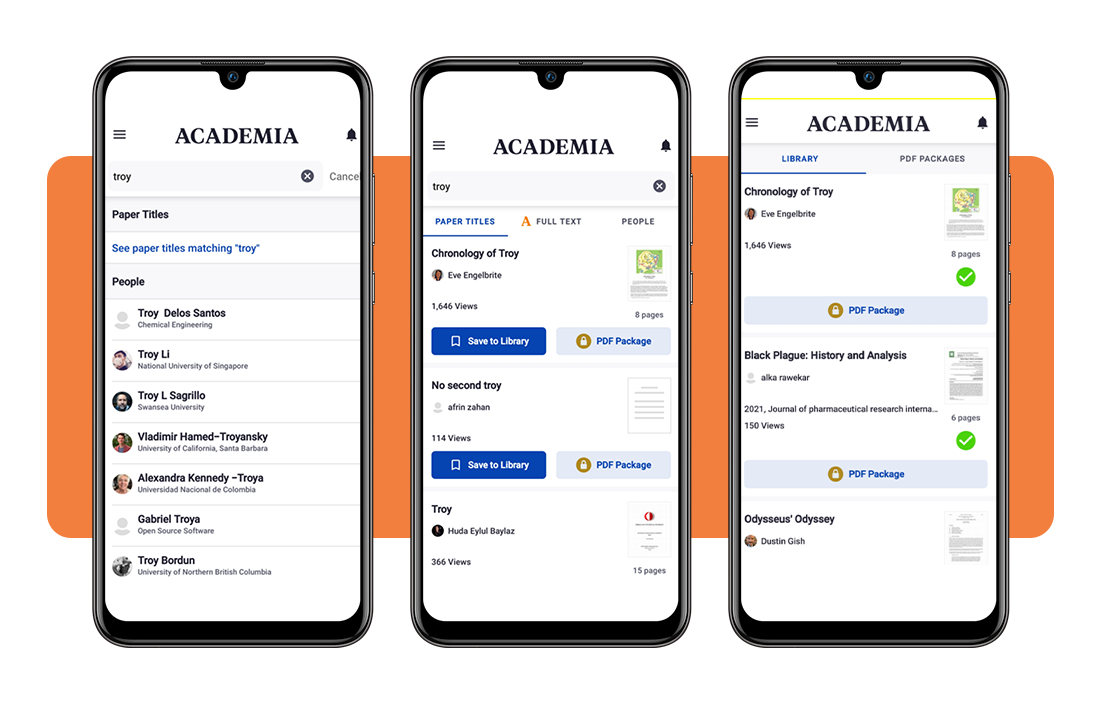
When a paper catches your attention, hit the save button, and it lands straight in your “Library”. That means it’s sitting there waiting for you, accessible on your phone whenever you’re ready.
Your Library keeps everything in one spot, so you’re not losing track of what you found. This academic research app makes it easy to build a focused reading list over time.
Reading inside the app is distraction-free. You go through papers at your own pace, and if you’re on a premium plan, extra tools are available to help you go deeper into the material.
En rapport : Study Faster: Turn Notes Into Flashcards Automatically With This App
Tips for studying and research
Good research habits don’t come from working harder; they come from working with tools that keep your sources organized and your focus intact across multiple study sessions.
En utilisant cette academic research app well goes beyond running a search. The features built into Academia.edu are worth exploring deliberately, so you’re pulling real value out of every session.
These tips cover how to get more out of the app, from keeping your saved papers to building connections with researchers who are active in your subject area.
Build a personal library of saved papers
Every paper you save on the app goes into your library, and that collection grows into something really useful when you treat it as an ongoing reference bank rather than a holding spot.
Organize what you save by topic or project as you go. A cluttered library is harder to work with, so dropping papers into clear categories from the start keeps your research sessions moving.
When you return to a paper, the app picks up where you left off. That continuity adds up over time, especially when you’re working through a topic that requires pulling from several sources.
Connect with scholars in your field
The app lets you follow researchers whose work overlaps with your interests. Keeping tabs on what they publish puts fresh, relevant material in your feed without running a new search.
This academic research app also shows you who’s active in your subject area, so engaging with their profiles opens up a layer of the platform that goes well beyond passive reading.
Building those connections pays off in unexpected ways. A researcher you follow uploads something, it lands in your feed, and you’re reading work you wouldn’t have found otherwise.
Track who engages with your work
If you’ve uploaded papers to Academia.edu, the platform shows you who’s been reading them and visiting your profile, giving you a clear picture of where your work is landing.
Keeping an eye on the analytics of this academic research app helps you understand your audience. A paper drawing consistent readers’ signals which topics resonate.
Engagement data also opens doors. When someone from a relevant institution views your profile, that’s an opportunity to reach out and build a connection around shared interests.
En rapport : Study smarter: this app builds you a study schedule automatically
4.8/5
Find the papers that move your work forward
Academia.edu brings millions of papers to your phone for free, and the premium tier adds tools worth having if research is a regular part of your routine and your studies.
Dans cette Idées reçues guide, we showed what this academic research app delivers, from building a reading library to connecting with researchers who are publishing work in your area of interest.
Browse more Idées reçues for recommendations on study apps that make academic life a little less complicated and a whole lot more productive for students and researchers at every level.