We’ve all been there: scrolling through our Instagram feed, cringing at that one photo with the overused Valencia filter or the 2016 caption that reads like a bad diary entry. The instinct often says “hit delete”. But hold on. What if you could tidy up your profile without saying goodbye to your digital history? This is where the archive posts feature on Instagram saves the day.
The social media version of shoving your old photos into a digital drawer, gone from public view but still there when nostalgia strikes. You can archive posts to reorganize your feed, maintain a curated aesthetic, or take a break from certain memories without losing likes, comments, or engagement. Think of it as spring cleaning for your social life with an undo button.
- Break Free: How to Delete Your Instagram Account
- Disable Instagram map now and stay safe online
- Applications de photographie culinaire : Créer des photos prêtes pour Instagram et Pinterest
How to archive posts easily
The archive posts tool is one of Instagram’s most underrated features. It lets you hide a post from your profile grid while keeping everything intact behind the scenes. That means your likes, comments, and stats stay saved, just invisible to everyone else.
This is ideal for content creators or anyone going through a rebranding phase. You can curate your feed’s look without erasing your history. And when you’re ready, it takes only a few taps to restore any post right where it was.
Selon le Instagram’s official help page, the Archive tool isn’t just for photos and videos, Stories and Lives also have their own dedicated archives, automatically saved once they expire.
So, if you ever regretted not hitting “save story”, chances are it’s already tucked away in your private archive. Use the archive feature and refresh your feed instantly.
Step-by-step: how to use Instagram’s archive tool
Archiving posts takes seconds. Whether you’re using Android ou iOS, the process is identical and satisfying.
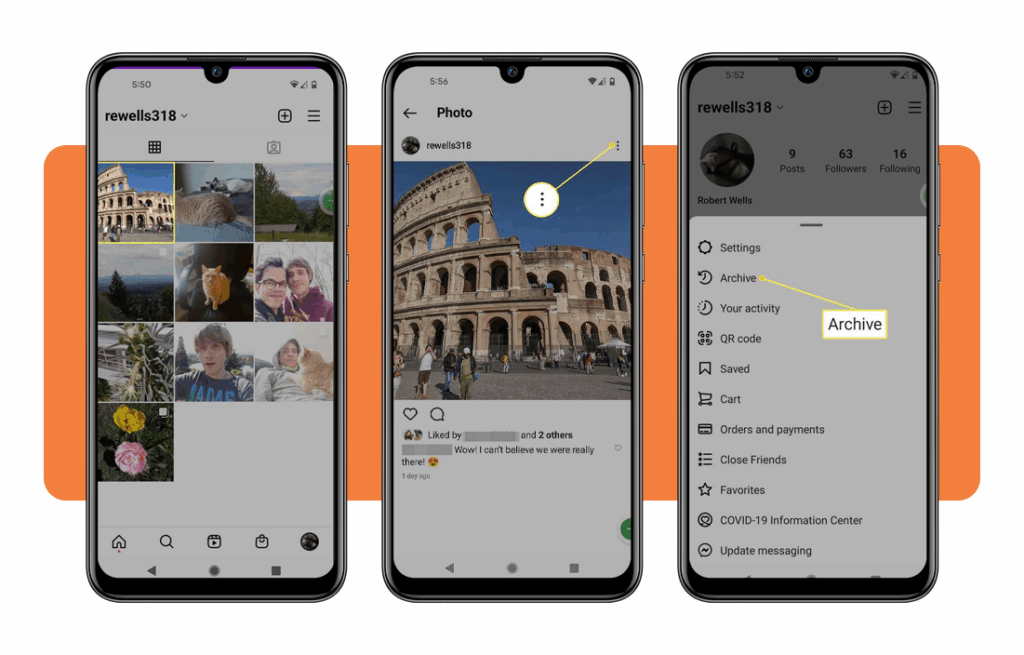
- Open Instagram and head to your profile page;
- Select the post you want to hide;
- Tap the three dots in the top-right corner;
- Choose “Archive” from the menu;
- Done — the post disappears from your feed but stays stored safely in your archive folder.
To revisit or restore an archived post, just:
- Go to your profile page and tap the three-line menu in the top-right corner;
- Tap “Archive”;
- Sélectionner “Posts archive” and find the one you want;
- Tap the post, then select “Show on profile” to bring it back instantly.
And if you’re into keeping your social media organized, you might also like this guide on downloading YouTube videos, because saving your content for later never goes out of style.

4.7/5
Features that help you organize past posts
More than just a place to hide temporarily, the archive posts feature is a clever management tool that allows you to maintain your history while forming your online persona. Here’s why it’s a game-changer:
- Keeps engagement intact, so likes and comments return when you unarchive;
- Enables private reflection, allowing you to revisit older posts without public eyes;
- Perfect for rebranding, giving you a clean slate while preserving your content history;
- Works for Stories and Lives, automatically saving them so nothing disappears for good;
- Allows chronological browsing, meaning you can explore posts by date — great for memory trips.
Instagram’s Archive tool makes it easier to maintain a polished feed without sacrificing authenticity. You can go minimal today, nostalgic tomorrow.
Your posts are just a few taps away. For more details straight from the source, check Instagram’s Archive overview et Story archive FAQ.
Why you should archive instead of delete
Deleting posts might feel like a clean break, but it’s irreversible. Once it’s gone, it’s gone: comments, insights, and all. Archiving, on the other hand, keeps everything intact.
For influencers, small businesses, or anyone building an audience, that’s a big deal. Your engagement data still contributes to analytics, and restoring posts later helps you keep your timeline flexible.
It’s especially useful when experimenting with new aesthetics or removing old promotional content that no longer fits your brand.
And if you’re just tired of that 2018 food pic phase, no judgment. Archiving lets you reset your profile without pretending it never happened.
Where to download Instagram
You can find the Archive feature in the standard Instagram app, there are no add-ons or hidden settings required. Just make sure your app is up to date, as older versions may not support all features.
You can access Instagram via the site officiel, or download it on Google Play et l'App Store. Clean up your profile without deleting your memories.
4.7/5
The bottom line
Archiving is one of those tools everyone overlooks until they need it. No matter if you’re cleaning up your feed, taking a social detox, or just hiding that awkward selfie phase, archive posts let you do it all without regret.
It’s quick, reversible, and keeps your engagement untouched — so your social footprint stays yours to control.
So next time you feel like hitting “delete”, pause for a second. Choose “Archive” instead and give your content the dignity of a second chance.