
Planning a trip with a tight budget usually means juggling tabs, guessing routes, and second-guessing prices. A trip planner app helps skip the annoyances and spot real deals. Skyscanner gives travelers a faster way to plan. It shows cheap flights, places to stay, and rental cars that match exactly what you want without any hidden costs.
This is a guide by Idées reçues built to help you hit the road. Keep reading to learn how this free app turns a limited budget into an organized, affordable, and exciting travel plan.
En rapport : Scan and Store All Travel Documents on Your Phone for Free

4.8/5
Why you should use an app to plan your trip
Coordinating flights, hotels, and transportation by yourself takes time and usually leads to overpaying or missing better options that were hidden a few clicks away.
Instead of enjoying the planning process, you’re chasing scattered details and trying to remember which tab had the flexible rates or which email offered free cancellation.
With a trip planner app, everything gets sorted and streamlined for you. You control the big picture without getting buried in repetitive searches or mismatched options along the way.
Booking mistakes cost you money
A small date error or mismatched location ruins entire trips. Booking something you can’t cancel or change leads to expenses no one wants to cover twice.
Even when it’s refundable, time is wasted fixing the problem and refunds can take days. Travel insurance rarely covers user mistakes or poorly timed double bookings.
An app minimizes those errors by showing availability clearly and breaking down restrictions before you confirm. No guessing, no rushed decisions, and no costly booking regrets later.
Comparing prices is way too messy
When each site shows different prices and formats, you end up second-guessing every deal and wondering if something better is hiding somewhere else without warning.
Trying to calculate the difference between airlines with hidden fees, separate taxes, or unclear luggage policies turns comparing into a stressful task instead of a helpful process.
A trip planner app shows real prices across platforms, airlines, and providers. That clarity helps you understand what you’re booking instead of reacting to vague pricing games.
Finding deals takes serious effort
Good travel deals aren’t always visible, and the ones you do find may be gone by the time you try to book them on another site.
You spend too much time chasing promo codes and limited offers, only to discover they apply to dates, routes, or rooms that don’t fit your situation.
If you use a trip planner app, you’ll find better results faster. It filters options based on what you actually need, and surfaces deals that are relevant.
You waste hours switching sites
Moving between multiple platforms breaks your rhythm and forces you to re-enter the same details over and over just to check a single alternative option.
The more you toggle between tabs, the easier it is to lose track of pricing rules, booking conditions, or changes that might affect your overall schedule.
Travel apps help avoid this loop by organizing everything into one consistent flow. That way, your choices stay connected and your bookings stay easy to manage.

Where to find the best free trip planner app
Skyscanner (Android | iOS) is a trip planner app that helps you find real-time deals on flights, hotels, and car rentals without switching tabs or losing track of travel options.
It compares prices from major airlines, booking platforms, and rental providers in one place. You’ll see accurate availability, filter results instantly, and avoid paying unexpected fees later.
You can also save your favorite options, set alerts for price drops, and return later to complete your bookings without starting the search process all over again.
Skyscanner’s free travel features
Skyscanner offers tools designed to make travel planning simpler, more organized, and fully based on your terms. These standout features cover the full range of your trip:
- Explore Anywhere tool: pick “Everywhere” as a destination and discover low-priced routes based on your budget, starting location, and available departure dates;
- Smart filters for results: choose flight duration, airline, travel class, and number of stops to instantly find better matches without reloading endless pages of results;
- Save and return later: tap the heart icon to keep track of any flight, hotel, or rental that looks interesting and compare them all in one view;
- Flexible date calendar: view a full month of pricing side by side and select cheaper dates with fewer crowds, better connections, or better flight times.
Search everywhere based on your budget
This trip planner app starts with a simple search with dates and city, then shows destinations you can actually afford without making you search endlessly.
The “Everywhere” feature ranks destinations by price in real time. You’ll see exact flight costs, adjust filters easily, and skip the vague estimates common on other booking platforms.
That flexibility helps you find travel options that match your schedule and spending limit while building a plan that feels practical, exciting, and completely tailored to your preferences.
Flights, hotels, and cars in one place
Switching between booking sites makes it harder to keep track of what’s confirmed, what overlaps, and what’s missing from your travel plan completely.
Skyscanner lets you manage every part of your trip from the same place. Compare airlines, hotel details, and rental options without starting from zero every time.
This trip planner app makes coordination easier by keeping flights, stays, and pickup times connected, helping you avoid mistakes caused by disconnected platforms.
No booking fees or surprise charges
Hidden fees turn great travel deals into disappointing expenses. Booking platforms may charge for things like service or processing, even if the provider itself does not.
Skyscanner doesn’t add charges on top of your flight, hotel, or rental. What you see is what you get. No extra checkout fees suddenly showing up later.
Unlike others, this trip planner app stays transparent about costs so you’re never paying more than what’s shown upfront when making a travel decision.
En rapport : 5 Lesser-Known Airline Travel Tricks for a Smooth Flight
Step-by-step guide to planning your trip
Planning with structure helps avoid booking regrets. Instead of scrambling for deals, you’ll know where to begin, what to check, and when to lock things in.
Skyscanner (Android | iOS) simplifies each part of the process. You’ll explore locations, compare real options, and either save them or book everything when the time feels right.
This trip planner app keeps each step connected, so you’re not redoing filters or losing track of saved results between flight searches, hotel browsing, or car bookings.
Step 1: choose your travel dates wisely
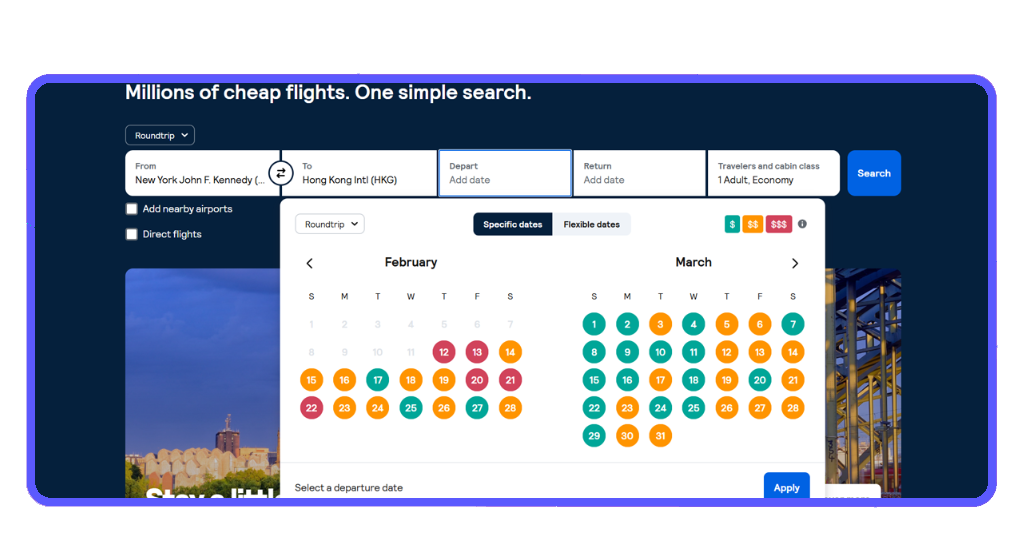
Start with flexible dates, if possible. Use Skyscanner’s calendar view to compare daily prices and spot cheaper flights before choosing a departure and return.
The color-coded calendar makes price shifts easy to follow. It highlights more affordable dates across the entire month, giving you options without constant manual searching.
Even small changes to your departure or return date can lower costs. This feature helps you spot those windows before you commit to anything too expensive or limiting.
Step 2: use “Everywhere” to get inspired
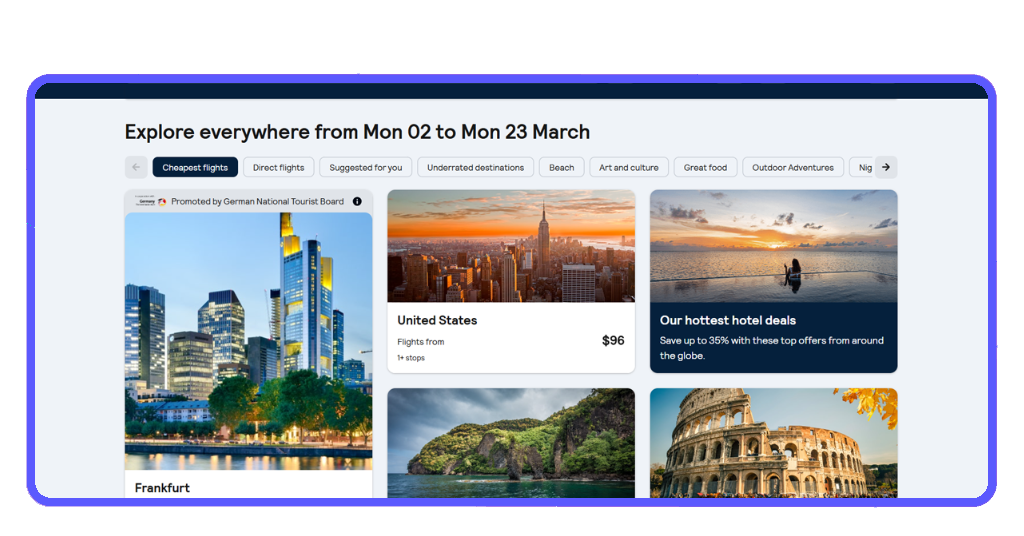
You don’t need a destination to begin. The trip planner app has a feature that shows cities and countries ranked by current price, based on your selected dates and departure airport.
This tool makes exploring fun. You’ll see options across continents, nearby escapes, and surprisingly cheap destinations that match your timing and potential travel window.
Skyscanner makes this possible in one tap, helping you move from indecision to destination with a clear list of affordable places that suit your budget.
Step 3: use filters to match your needs
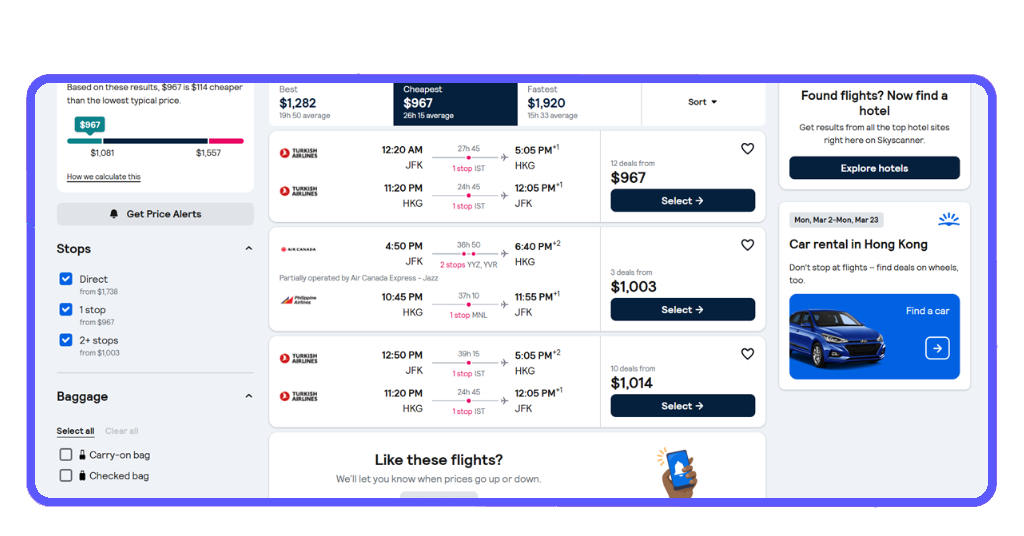
After selecting a destination, use filters to refine results. You can limit flight duration, number of stops, airlines, hotel stars, and rental vehicle preferences.
You’ll also find tabs like “cheapest”, “fastest”, or “best”. This helps you prioritize based on what matters most, be it price, travel time, or quality of connection.
Everything updates live inside the trip planner app, meaning your results stay accurate and tailored as you narrow things down to match what works for your travel style.
Step 4: save options or book instantly
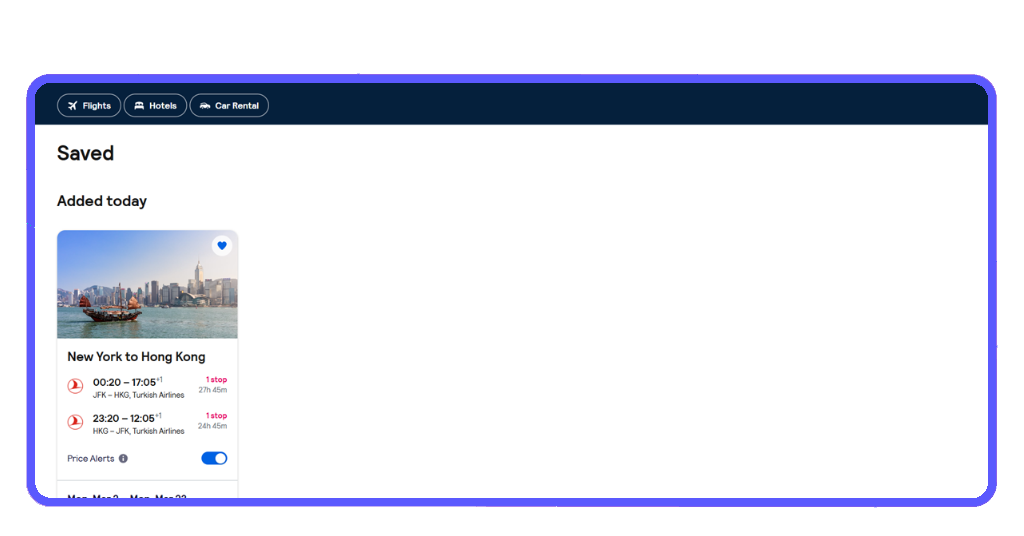
Skyscanner lets you tap the heart icon to save deals. Saved results stay accessible inside the app, so you can revisit and compare before booking.
When ready, select your option and Skyscanner will direct you to the airline or booking provider. You’ll complete the purchase there, and Skyscanner never charges extra.
This flow helps you plan calmly. You’re not rushed into decisions, and every option remains visible until you’re ready to confirm what works for your trip.
4.8/5
Big adventures don’t need big budgets
Skyscanner brings clarity to planning, letting you compare dates, prices, and destinations without unnecessary steps. It gives structure to your search and flexibility to how you book.
Idées reçues built this guide to show how a trip planner app creates order from options. It filters the noise so your focus stays on building your next getaway.
Want more travel help that’s actually useful? Keep exploring Idées reçues for destination ideas, seasonal deals, and practical tips that keep you moving without wasting time.