These new routines with long hours at a desk and constant smartphone use are changing how people hold their bodies throughout the day, and what begins as a slight forward lean while typing or scrolling can gradually shift spinal alignment, placing extra strain on the neck, shoulders, and lower back. Over time, this pattern leads to fatigue in the upper back or the familiar discomfort that appears after extended screen time.
With Posture AI: Correct My Posture (iOS), you get a simple scan through your phone’s camera that can identify potential posture imbalances in under a minute. The process reveals whether your head, neck, shoulders, and hips remain properly aligned, while also providing insights that help improve your posture. Continue reading to see how this posture test works and how small adjustments can support better spinal health throughout your daily routine.
- Posture apps: combat remote work back pain
- Fix your slouch: get a free posture scan from one photo now
- Back Pain? Download This Free App to Scan Your Posture Now
Where to take a posture test?
Today, you can do a posture test without going to a specialized clinic or a physical therapy appointment.
The advances in mobile cameras now allow smartphone apps to evaluate spinal alignment, giving users a way to understand how their body position changes throughout the day.
These tests rely on visual markers like shoulder level and head position to estimate how close your posture is to ergonomic standards.
One of these options is Posture AI: Correct My Posture.

4.7/5
The app uses your phone’s camera to scan your standing posture and analyze the angles formed by the neck, upper back, and hips.
Within seconds, the software generates a posture score and highlights areas where alignment may drift forward or tilt unevenly.
And then, the result provides a quick snapshot of how your spine behaves while standing naturally. Another advantage lies in convenience, since you can run the test at home.
Although a mobile scan doesn’t replace a full assessment from a physical therapist, it offers an accessible first step that increases awareness of posture habits.
This type of assessment has gained popularity among people who work long hours on computers.
That’s because many individuals are developing subtle posture shifts, even more so in the forward head position associated with prolonged screen use.
Features available in the app
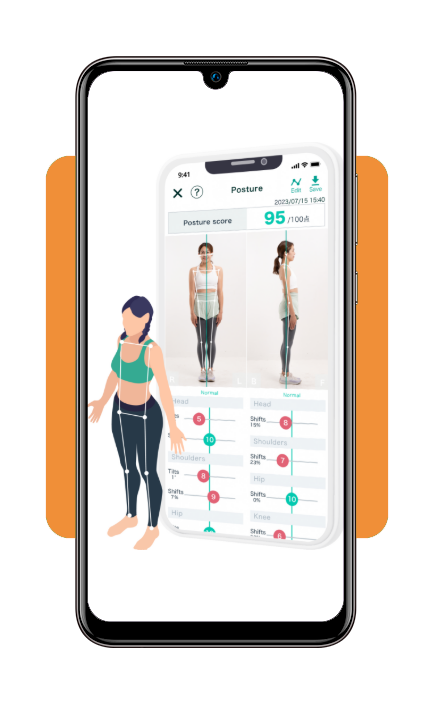
The posture test provided by Posture AI: Correct My Posture relies on camera-based detection and alignment modeling to analyze how the body positions itself during a scan.
With that, once the app captures an image, its system identifies key anatomical reference points such as the head, shoulders, spine line, hips, and knees.
These markers are the ones that allow the software to estimate how closely your posture follows healthy ergonomic alignment.
Another useful capability involves generating a posture score immediately after the scan.
This score summarizes the alignment of different body segments and highlights areas where the head leans forward, shoulders round inward, or the spine curves unevenly.
Additionally, visual overlays on the photo help illustrate these deviations so users can clearly understand what the analysis detected.
That’s not all. The app also provides personalized posture guidance. Based on the posture test scan results, users receive recommendations that target specific alignment issues.
These suggestions may include simple stretching routines and positioning adjustments for desk work, for example.
Lastly, if you repeat the test periodically, it gets easier to monitor improvements and see how adjustments in workspace setup or daily movement affect overall spinal alignment.
Step-by-step: how to perform a spinal assessment using Posture AI
- Étape 1 : firstly, download Posture AI: Correct My Posture from the App Store and open it in a well-lit room with a plain background;
- Étape 2 : after opening it, place your phone on a stable surface at about chest height, or ask someone to hold it steady, keeping the full body in frame;
- Étape 3 : remember you need to stand naturally with your feet hip-width apart, arms relaxed at your sides, and your gaze forward without forcing a “perfect” posture;
- Étape 4 : follow the app’s on-screen prompts to align your body with the guide markers, ensuring your head, shoulders, hips, and knees are visible;
- Étape 5 : run the posture test scan and remain still for a few seconds while the camera captures the posture reference points;
- Étape 6 : now read the posture score and the issue breakdown, paying attention to indicators linked to tech neck, rounded shoulders, or uneven hip level;
- Étape 7 : then, open the recommended correction plan and save the suggested adjustments that match your daily routine;
- Step 8: save the assessment results and set a reminder to repeat the scan weekly, so you can track progress and posture changes.
Tips for better posture at work and at home
As we previously mentioned, when it comes to improving posture, it begins with small adjustments in daily routines.
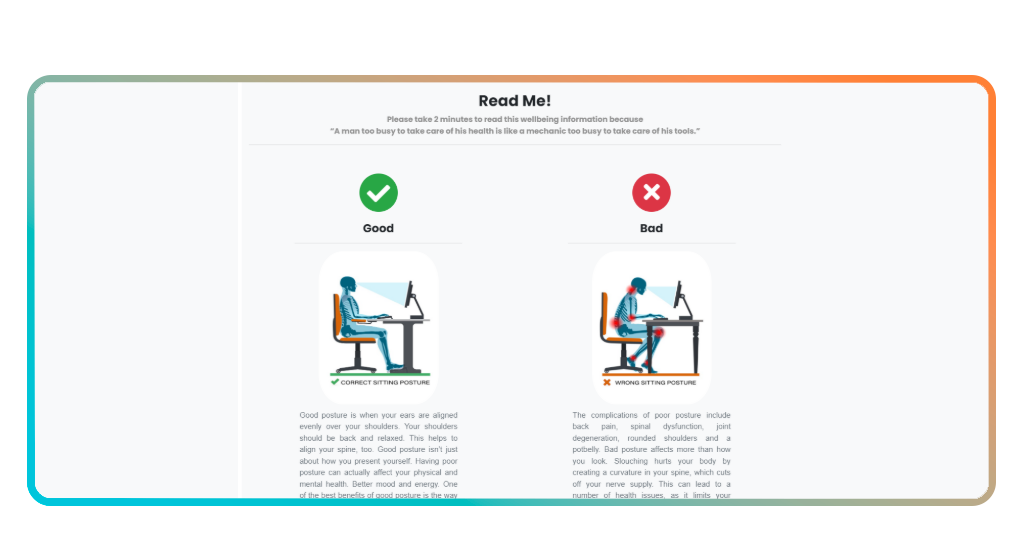
So long periods at a desk and frequent phone use in a poor position can shift the head forward and round the shoulders.
However, a posture test from Posture AI may reveal these patterns, while simple ergonomic changes help reduce strain on the neck and spine throughout the day.
One of the most effective adjustments involves screen height.
For instance, a monitor positioned too low encourages the head to tilt downward for extended periods.
Therefore, raising the screen so the top portion sits near eye level helps keep the neck aligned with the spine, reducing the tension.
Chair support also plays an important role because sitting with the lower back supported encourages a more neutral spinal curve.
If the chair lacks lumbar support, a small cushion or rolled towel placed behind the lower back can help maintain better alignment during long work sessions.
In addition, remaining in the same position for hours places continuous stress on the same muscle groups.
In order to change that, standing up briefly, stretching the shoulders, or walking for a minute every half hour helps relieve stiffness and lets the body reset its natural posture.
Finally, paying attention to smartphone habits can make a surprising difference, as many people lower their heads significantly while texting or scrolling.
So holding the phone closer to eye level reduces the forward tilt of the neck and distributes weight more evenly across the spine.
In summary, these small adjustments can greatly improve posture and reduce everyday discomfort.
4.7/5
Free Posture Test: Get Your Posture Scan Result in 60 Seconds – Conclusion
Neck tension and upper-back fatigue tend to appear when posture problems remain unnoticed for long periods.
A quick posture test offers a way to see how your spine aligns during everyday activities and if subtle shifts in head or shoulder position may contribute to ongoing discomfort.
Au Idées reçues, we usually present useful apps that simplify everyday challenges, including ways to monitor posture and improve physical well-being.
If those patterns are visible, small changes in workspace setup and habits can support a healthier and more comfortable posture in both work and home environments.
En rapport : Posture apps: combat remote work back pain
Enjoyed this article? Save the Insiderbits blog to your favorites for the latest tools, creative tech tips, and photo editing breakthroughs.