Trying to improve your diet with a calorie counter app always starts with good intentions, but usually makes people run into friction if tracking feels repetitive or difficult to maintain. And then, what should be a simple habit can turn into something exhausting when every meal requires manual entry and constant attention, which is usually where most people stop.
That is why Insiderbits will uncover MyFitnessPal (iOS/Android), an app that is getting widely used. The app simplifies the process with features that reduce effort and make logging feel more natural within a daily routine. Gradually, this shift makes consistency more realistic, and this is ultimately what determines if any nutrition plan actually works.
- 5 meilleures applications de comptage de calories et de nutrition pour une vie saine
- Optimize Fat Loss: Top Fitness App for Burning Calories
- Les meilleures applications de régime à planifier dès maintenant
What’s the best calorie counter app?
A nice calorie counter app focuses more on fitting naturally into your routine, since consistency tends to matter more than complexity when it comes to tracking food.
The MyFitnessPal app (iOS/Android) stands out because it combines a large food database with flexible logging methods.
This is responsible for allowing every user to track meals without starting from scratch each time
Moreover, the app supports adaptability by focusing on different dietary goals, whether the focus is weight loss, muscle gain, or simply maintaining a balanced intake.
So MyFitnessPal can be useful across different stages, rather than something that only works for a short period.
As users continue to log meals, the app becomes more personalized, making future entries faster and creating a routine that is more integrated into everyday life.

4.7/5

Features available in the MyFitnessPal app
The features inside MyFitnessPal (iOS/Android) are designed to reduce problems and support long-term tracking without overwhelming the user.
One of the most relevant tools is the extensive food database that lets users find common meals and ingredients quickly instead of entering everything manually.
The app supports barcode scanning and recipe tracking as well, simplifying the whole process of logging packaged foods and home-cooked meals.
Overall, these features work together to make tracking feel less like a task and more like a routine that can be maintained consistently.
Step-by-step: how to track calories using MyFitnessPal
The steps below were designed to track your meals and start having a healthier lifestyle as soon as you start using MyFitnessPal:
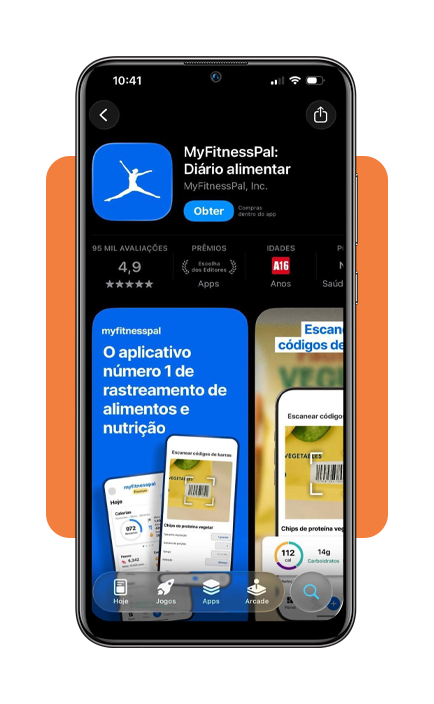
Step 1: download and open the app
Download MyFitnessPal on the App Store or the Play Store, open the app, and then enter your basic information and define your goal so the app can estimate daily calorie needs.
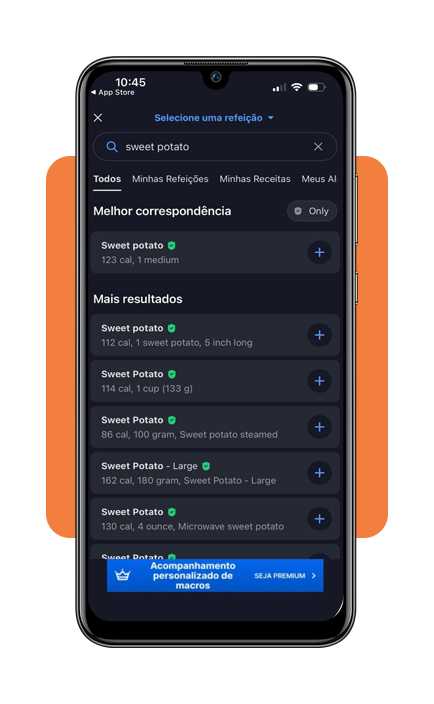
Step 2: log your meals throughout the day
Within the app, search for foods in the database, scan barcodes, or add recipes to record what you eat in each meal.
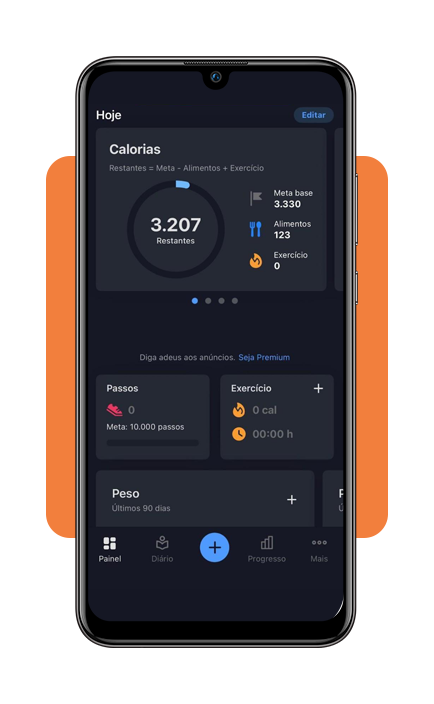
Step 3: review your daily intake
Lastly, check your calorie total and nutrient breakdown to understand how your choices align with your target.
Tips for accurate logging
Using a calorie counter app depends on how reliable your entries are because the quality of the results is tied directly to the quality of the information you record.
Usually, people track consistently for a few days, then feel frustrated when the numbers don’t seem useful.
Most of the time, that happens because meals were logged too late or were forgotten along the way.
That is why timing makes such a difference. Logging meals soon after eating creates better accuracy.
Even small omissions can affect the daily total enough to make progress harder to interpret, especially over time.
Portion awareness also matters more than it seems at first, and a serving can look very different depending on the plate.
That’s why checking measurements more carefully from time to time can improve the quality of future estimates.
When entries become more accurate, the app stops being just a food diary and starts becoming a more useful guide for understanding real eating habits.
How to keep a healthy diet
Maintaining a healthy routine with a calorie counter app works better when the goal is balance instead of strict control.
People often assume healthy eating depends on perfect discipline; still, consistency grows from routines that feel manageable enough to repeat through workdays.
This is where the MyFitnessPal (iOS/Android) gets valuable beyond calorie totals alone.
It can show if meals are keeping you satisfied, if your eating pattern feels too irregular, and if certain choices are making it harder to stay on track.
Ultimately, that mindset creates a more stable relationship with food, where tracking supports better decisions without making the routine feel rigid or exhausting.
4.7/5
When tracking starts supporting better decisions
A calorie counter app is more useful once it starts showing patterns, and that’s usually the point where users begin to understand how daily choices actually connect to their goals.
That added visibility makes decisions easier to manage, making users look at what has been happening more clearly and make more realistic adjustments.
The value of tracking shifts from recording food to building awareness. That is what gives the app lasting value.
En rapport : Fitness Gamification: Apps That Turn Workouts Into Adventures
Enjoyed this article? Save Idées reçues to your favorites and discover the most useful tech tips.