You’ve got your neck craned back, staring at one bright cluster with no name, and the phone’s flashlight is attracting more bugs than answers. A sky guide app solves that mystery at a glance.
With Sky Tonight, you can point your phone up above and get real names for stars, planets, and constellations. This Idées reçues guide unpacks the app, so read on if you love the cosmos.
En rapport : Turn Your Smartphone Into a Powerful Telescope for Free

4.8/5
Which is the best sky guide app?
Sky Tonight (Android | iOS) turns your phone into a window to what’s happening above you at night, showing stars, planets, satellites, and constellations positioned right where they sit.
You can point your camera up in any direction, and this sky guide app draws instant labels over stars, planets, and comets, turning blank stares into knowledge in real time.
From meteor showers to planetary conjunctions, Sky Tonight (Android | iOS) tracks every notable event you won’t want to miss, laying out rise times, visibility windows, and moon phases in advance.
Features available in the Sky Tonight app
- Interactive Sky Map: point your phone at any direction and watch stars, planets, satellites, and comets appear in real time above your exact location;
- Augmented Reality mode: overlay the sky map directly onto your camera view for an immersive way to spot constellations without losing your bearings outdoors;
- Time Machine: rewind or jump forward through the sky to any past or future date and plan your next stargazing session before stepping outside;
- Astronomy calendar: track meteor showers, eclipses, moon phases, and planetary conjunctions throughout your season inside a color-coded calendar built into the app.
Free access and premium perks
You can enjoy almost every feature on Sky Tonight (Android | iOS) completely free, with zero paywalls ever blocking basic identification, search results, or event tracking.
Upgrading unlocks an ad-free experience and lifts item limits across ‘Visible Tonight’, ‘Search’, and the ‘Calendar’, making this sky guide app even simpler to browse.
Built for beginners and experts
You can open the app, tap on the sky map, and start naming stars within seconds, even if you have never once studied astronomy or gone stargazing before.
As your skills grow, other tools open up, including brightness filters, adjustable constellation lines, and a dedicated night mode that protects your eyes during long outdoor sessions.
Offline use for remote stargazing
Your cell signal drops out quickly in remote camping spots and national parks, but Sky Tonight (Android | iOS) keeps working right on your phone even with no service.
That offline reliability makes this sky guide app a solid pick for dark sky camping trips, backcountry hikes, or any remote spot where cell towers stay far away.
En rapport : Daily horoscope online: download this free app for instant insights
Step-by-step: how to see the stars using this app
Opening Sky Tonight (Android | iOS) for the first time takes seconds, and within a minute or two, your phone turns into a live map of everything hanging above your yard.
A few quick permissions unlock the good stuff, letting your location sync with the stars overhead while notifications keep you posted on rare meteor showers and eclipses ahead.
From there, this sky guide app uses your camera to label every star and planet instantly, turning a blank night into a personal constellation tour.
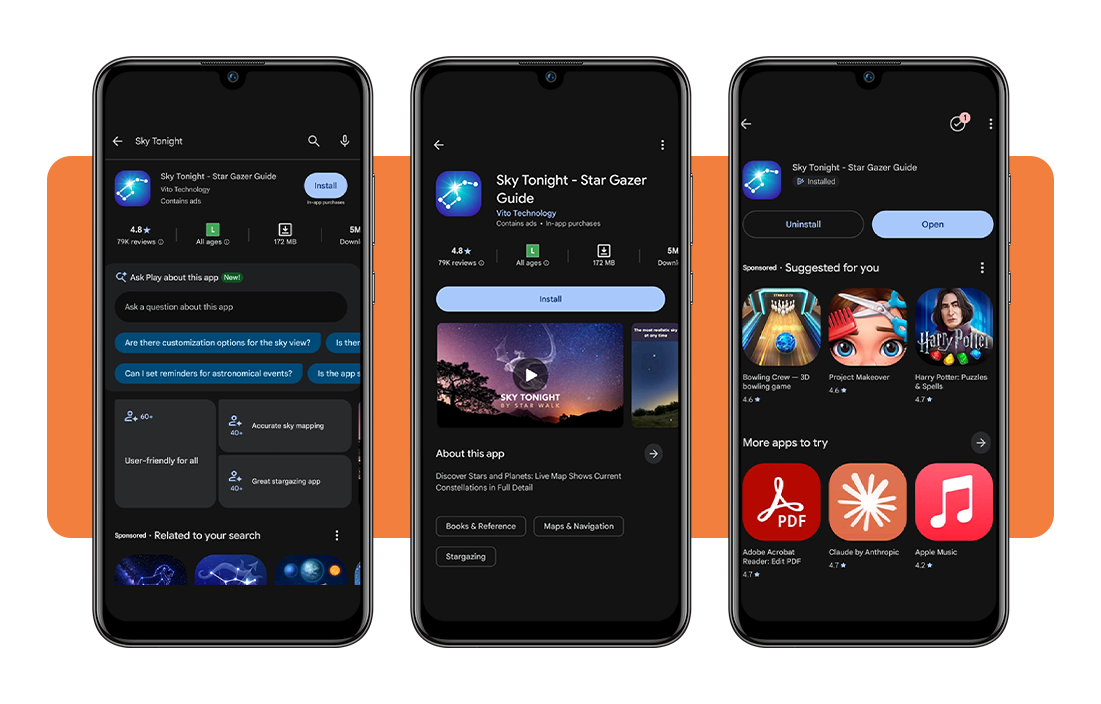
Étape 1 : téléchargez l’application sur votre appareil
Unlock your device and go over to the App Store ou Google Play Store. Next, search for ‘Sky Tonight’ by Vito Technology, then tap ‘Get’ or ‘Install’ to download it on your device.
The app is free, and you don’t have to create an account to use it. Once the download finishes, all you have to do is tap ‘Open’ and allow a few permissions before looking at the night sky.
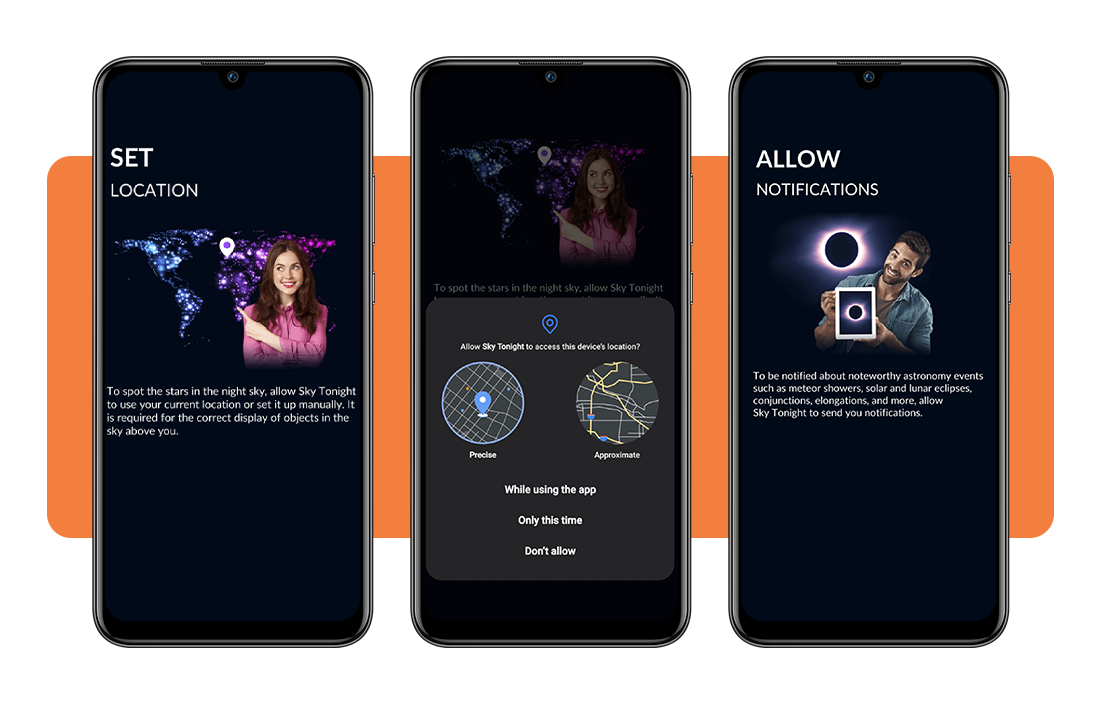
Step 2: allow location and notifications
Once you open it, the app asks for your location, either precise or approximate, so it can plot the stars, planets, and constellations directly above where you stand.
Next comes a notification prompt, and switching it on means shooting star events, solar eclipses, and rare planetary conjunctions all land straight on your phone well in advance.
Step 3: point your device toward the sky
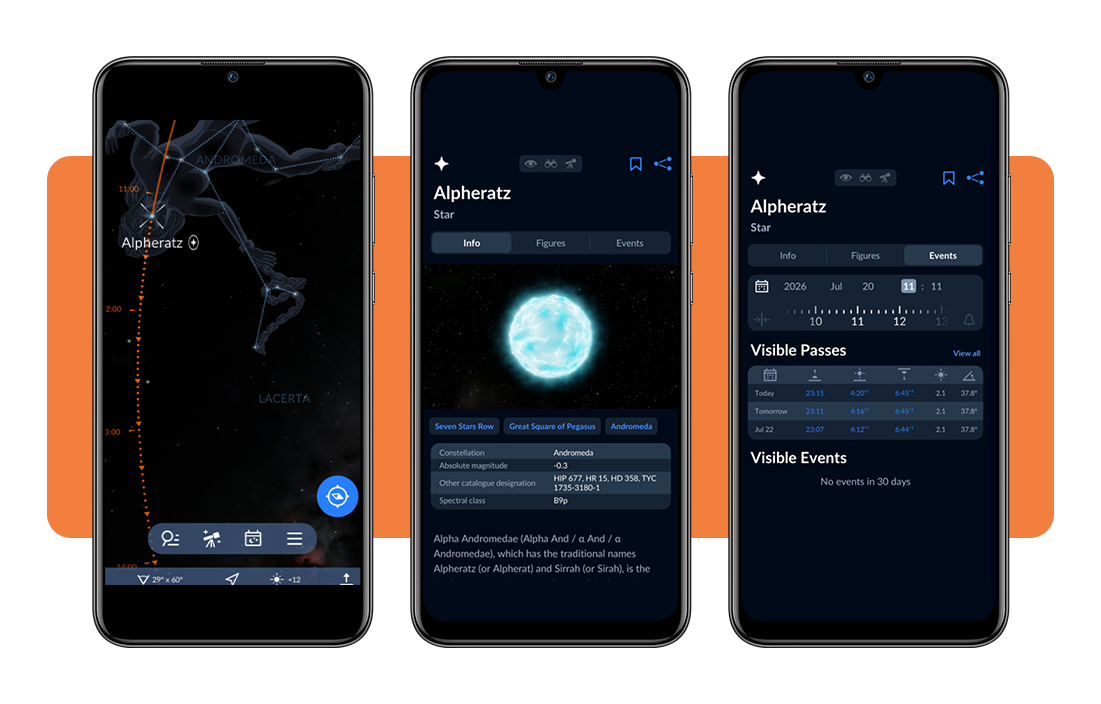
Hold your phone up toward any patch of open sky, and the screen mirrors what sits above you, filling in faint stars invisible to the naked eye alone.
Moving your phone slowly in any direction keeps this sky guide app tracking in real time, so every nearby constellation slides into view the moment you turn around.
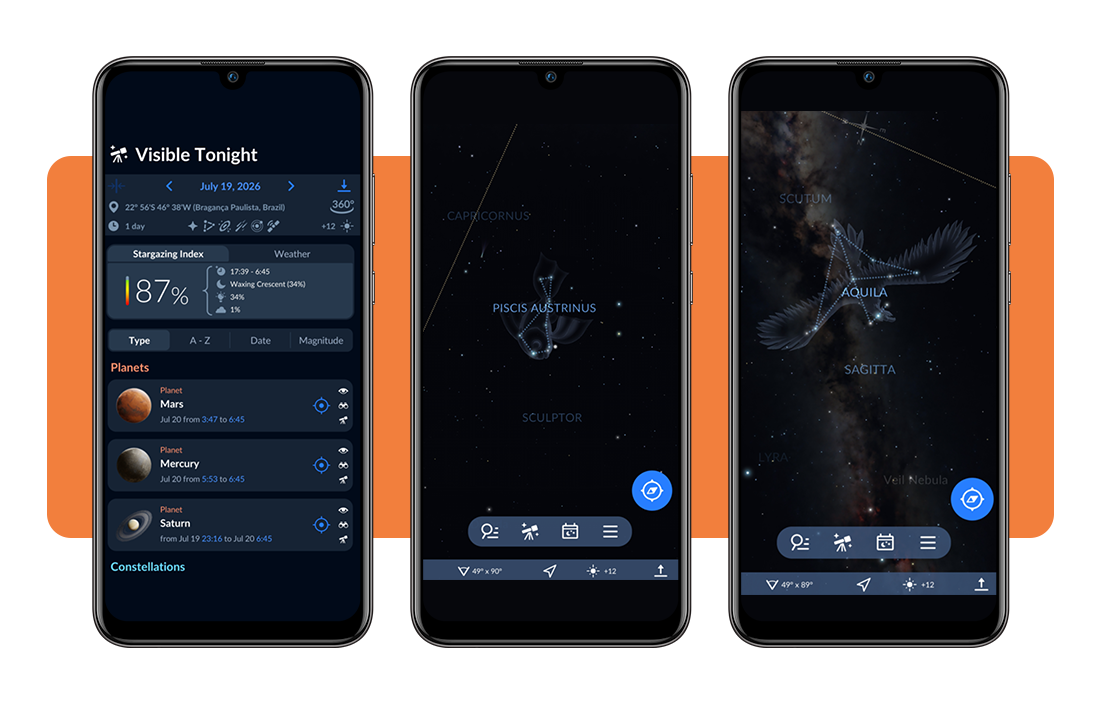
Step 4: explore the interactive sky map
Tap any star or planet on screen, and the app pulls up useful details like its distance, magnitude, and the best time to catch it through a telescope.
Pinch to zoom in close, rotate freely, and swipe through nearby objects, turning a handful of simple taps into a personal tour of everything hovering above your neighborhood.
Constellations to look out for in the app
Scrolling across the night sky with your phone turns familiar shapes into something you can name on sight, and a handful of constellations stand apart from the rest.
Some trace back to ancient myths about water bearers and soaring eagles, while others sit low near the horizon on nights clear enough to bring them into view.
Point your camera anywhere overhead, and this sky guide app tags the shape on the spot, turning distant strangers in the sky into names you’ll remember.
Aquarius, the water bearer, rises
Aquarius carries the myth of a water bearer pouring a jar across the open stars, and the app traces that long stream of dots as one connected shape.
You can catch this zodiac constellation drifting near Capricornus on the Sky Tonight (Android | iOS) app, its faint stars forming a wide, sprawling figure that rewards a little extra hunting.
Piscis Austrinus near the horizon
Piscis Austrinus represents the ancient southern fish, and it sits low near the far horizon during most hours of the night, tucked between Capricornus and little Sculptor.
You will spot it through Fomalhaut, its brightest star, glowing on its own against a mostly empty patch of sky where few other stars ever compete for attention.
Aquila, the eagle in flight
Aquila stretches across the open sky like an eagle caught mid-flight, wings spread wide against the thick band of the Milky Way running straight through its shape.
Altair anchors this whole constellation as its single brightest point, forming one corner of the Summer Triangle alongside two other stars from neighboring constellations nearby in the sky.
Bright stars marking each constellation
Every single constellation leans on a few standout stars to hold its whole shape together, giving your eyes something bright enough to latch onto before tracing the rest.
Spot Fomalhaut or Altair first, and the rest falls into place, as this sky guide app marks each key star before drawing the fainter lines that connect them.
En rapport : AstroBella: Bring the Wisdom of the Stars into Your Everyday Life
4.8/5
Look up and start exploring
Sky Tonight (Android | iOS) turns your phone into a pocket-sized stargazing buddy, ready to answer whatever question pops into your head on any given clear night outside.
Dans ce guide, Idées reçues explained how this sky guide app names stars, planets, and constellations the moment your camera points toward the wide-open night.
Keep reading Idées reçues and learn more ways to enjoy stargazing, from picking a good telescope to catching the next meteor shower streaking above your neighborhood.