
Snapchat has always been about quick fun. On this app you can take selfies with dog ears, goofy face swaps, record short and funny videos, and apply some filters that make your coffee look fancier than it was. Now, like every other technology, the app is stepping into AI territory with the Snapchat AI Lens, and suddenly you can type a short phrase and get an image that looks like it jumped straight out of your imagination.
This new update feels like Snapchat gave users a magic paintbrush powered by artificial intelligence. With all the AI power, users don’t need art skills, fancy tools, or even patience. You can just type “a panda riding a skateboard at sunset”, and a few seconds later, there it is, the exact thing you asked for. For creators and Gen Z users, it’s like having creativity on demand, always ready for the next funny moment or story-worthy idea. This is all playful, and fits perfectly into Snapchat’s culture of sharing and having fun now.
- Snapchat AI Features: How to Maximize Your Snapping Experience
- Guide du débutant sur Snapchat
- Snapchat Privacy Settings: How to Stay Safe While Snapping
Snapchat AI Lens: How to Turn Text Into Images?
Using the Snapchat AI Lens couldn’t be simpler. You open the camera, swipe until you find the Lens, type in a prompt, and after that, you turn your text into images in seconds.
That’s it! As you can see, there’s no hard tutorials, no tech jargon. The hardest part is deciding what weird or fun idea to type first.
The results often surprise you. Sometimes they’re spot-on, other times they’re hilariously off, but that’s part of the charm.
You can try, for example, typing “dragon in a hoodie”, and you might get something that looks like it belongs in a cartoon, or maybe a surprisingly realistic render. Either way, you’ve got content to share.
Moreover, people are using it to brainstorm story ideas, add custom backgrounds, or even create mini memes on the fly. What used to require Photoshop can now happen in a few taps while you’re waiting for your coffee order.
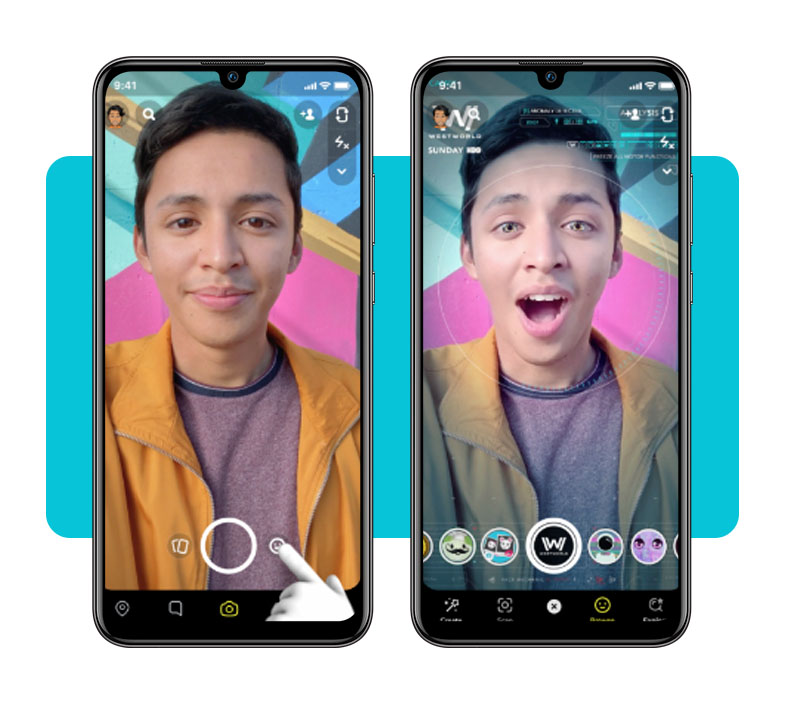
Step-by-Step Guide to Creating Fun Prompts
- First, open Snapchat and swipe through the Lens carousel until you find the AI Lens option;
- After that, tap it, and a text box will pop up asking you to type a prompt;
- Now you need to write anything you like. You can type prompts such as “a pizza castle” or “a futuristic city floating above the ocean”, which work just fine;
- Then hit Generate and wait a few seconds for the image to appear;
- Not happy with the result? Adjust the prompt, add details, change the style, or go completely random. Often the wildest prompts make the funniest images;
- Once you like what you see, choose how to use it. You can post it on your story or send it in a chat.
Features That Make Sharing More Creative
The Snapchat AI Lens integrates with Snapchat’s existing ecosystem. That means you can layer AI images with filters, or even your own photos, creating mashups that are equal parts strange and brilliant.
One underrated perk is speed. With other AI tools, you’d usually sign up, buy credits, and wait in line for a render. Snapchat skips all that. It’s free and right there in the app you already use every day.
And because sharing is the heart of the app, the Snapchat AI Lens turns creativity into instant content. Friends can toss each other prompts in chats and laugh together at the results within seconds.
Try It Now on the Snapchat App
The Snapchat AI Lens is rolling out across iOS et Android, so chances are you already have access.
To do it, open Snapchat, look for the AI option in your Lenses, and start experimenting. No fees, just fresh content waiting to be made.
Snapchat sees this as more than a toy. It’s part of a bigger move to keep the app creative and personal. Instead of scrolling through the same filters as everyone else, you now generate something unique in seconds.
If you’re curious, don’t overthink it. Download Snapchat and try the AI Lens today. The only real risk is losing track of time as you keep testing stranger and stranger ideas.
Create Images With Snapchat AI Lens: Step-by-Step – Conclusion
The Snapchat AI Lens is proof that creativity doesn’t need to be complicated. It puts imagination into overdrive and makes it effortless to share original snaps that stand out.
Now, there’s no need of relying on static filters, users can now shape the app with their own ideas. It’s fun, slightly chaotic, and perfectly suited for the way Gen Z creates and communicates online.
Download Snapchat and try the AI Lens today. Turn your random thoughts into images, share them instantly, and keep your stories fresh with every new prompt.
En rapport : Activate the Snapchat Home Safe feature and stay protected
Enjoyed this article? Save the Idées reçues blog to your favorites for the latest tools, creative tech tips, and photo editing breakthroughs.