An app for alerts about dangerous neighbors can help residents understand local incidents, emergencies, and safety concerns in real time.
But the reality is way less dramatic: these apps share information about events, not create a blacklist of people living next door. Ready to feel safer? Read ahead on Idées reçues.

4.7/5
How does the app for alerts about dangerous neighbors work?
Safety apps have changed the way people receive information about their communities. Instead of waiting for a news report the next day, residents can get updates about incidents happening nearby while they are still unfolding.
Citizen works by combining location-based alerts, emergency information, and community reports to help users stay aware of local situations.
The app, available for both iOS et Android, can notify people about events such as accidents, emergencies, police activity, and other public safety incidents.
What you’ve got to keep in mind
An app for alerts about dangerous neighbors does not magically identify who is ‘safe’ or ‘unsafe.’
A person mentioned in an incident report is not automatically a threat, and a notification should not replace facts, context, or official investigations.
Think of it more like a neighborhood window: it lets you see what is happening outside, but it does not tell you the entire story behind every person walking down the street.
For parents checking that their children arrive home safely, elderly residents who want extra awareness, or anyone who simply prefers being informed, these tools can add another layer of preparation.
Other security features available on Citizen
Citizen focuses on real-time awareness rather than traditional home security. Check its features:
- Real-time alerts: get notifications of crimes and emergencies first, and stay aware of what’s happening around you for free;
- Live incident video: watch breaking incidents unfold from different angles, or broadcast live from the scene to help your own community;
- Registered offenders: access a nationwide map of registered sexual offenders, and get notified if an offender registers as living nearby;
- Crime trends: understand historical crime patterns in your area to make informed decisions about where to travel;
- Citizen news: engage with the top news stories around your city, broadcasted directly from those on the ground;
- Missing person alerts: help find missing pets or loved ones with the community’s help.
The app allows users to choose how much information they want to receive.
This is helpful because nobody needs their phone buzzing every five minutes because someone reported a suspicious-looking raccoon. Not every neighborhood mystery requires a digital investigation.
Step-by-step: how to view active alerts in your area
Here’s how to set and use a local safety app:
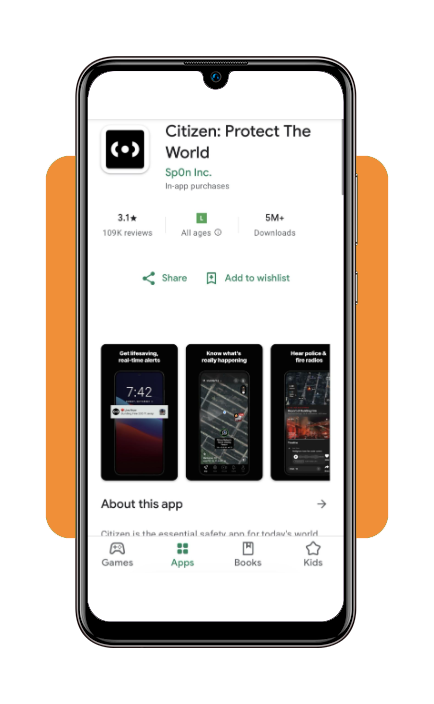
Step 1: download Citizen on your smartphone
The app can be installed on iOS et Android. After creating an account, location permissions help the app show incidents near the user. Without this information, alerts may be less personalized.
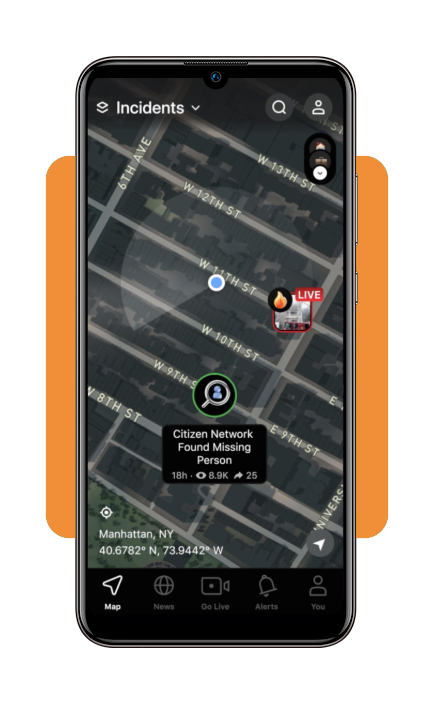
Step 2: open the local safety map
The map provides a visual overview of active reports and events nearby. Users can tap alerts to read additional details.
A notification is a starting point. Official updates from authorities should always be considered when available.
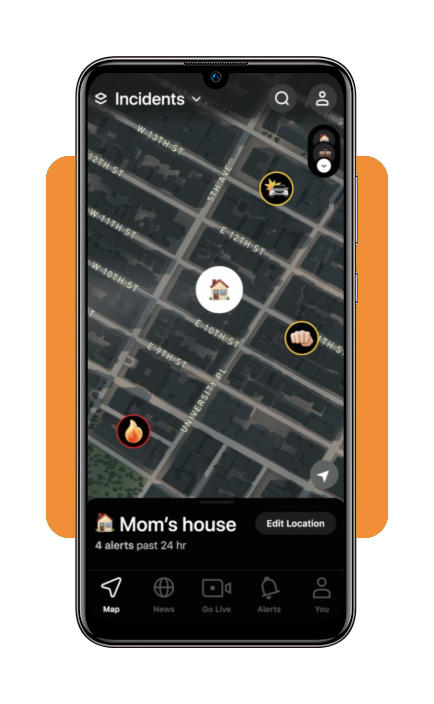
Step 3: adjust notification settings
Users can decide whether they want frequent updates or only major alerts.
An app for alerts about dangerous neighbors works best when it supports awareness instead of encouraging unnecessary fear.
Emergency protocols for active local threats
Even the smartest smartphone cannot replace emergency responders. If there is immediate danger, contacting local emergency services should always come first. Following are some basic safety steps:
- Move away from the situation if possible;
- Avoid confronting suspicious individuals;
- Call emergency services during urgent situations;
- Share your location with trusted contacts;
- Follow instructions from authorities.
A notification can tell you something is happening. It cannot tell you exactly what action is safest in every situation.
Home security cameras with smart defense
While neighborhood apps help people understand what is happening around them, security cameras focus on protecting a specific property.
Modern home security systems often include motion alerts, video recording, night vision, smartphone access, and two-way audio.
The goal is not to live behind a fortress wall with twelve cameras watching a mailbox. It is simply having better information when something unusual happens.
Smart panic buttons and SOS tools
Emergency technology has also become more accessible. Many smartphones, watches, and personal safety devices include SOS features designed to help people quickly request assistance. The most common options are:
- Emergency contact notifications;
- Automatic location sharing;
- One-button alerts;
- Fall detection features;
- Medical information access.
These tools can be especially helpful for older adults, people living alone, or family members who want an extra layer of reassurance.
Home insurance policies with emergency coverage
Digital safety tools are useful, but preparation does not stop there. Insurance coverage can help families handle the financial impact of unexpected events.
Depending on the policy, homeowners may have protection for situations such as:
- Theft;
- Property damage;
- Certain emergencies;
- Temporary housing needs.
Before choosing coverage, residents should carefully review limits, exclusions, and deductibles. The tiny details hiding in insurance documents may not be exciting bedtime reading, but they matter.
Why safety apps need common sense alongside technology
The growing interest in an app for alerts about dangerous neighbors reflect the way people want to feel connected to their surroundings.
Technology has made local information faster and easier to access. A decade ago, many residents depended on newspapers, television reports, or conversations over the fence. Today, updates can arrive directly on a smartphone.
However, speed does not always equal accuracy.
Safety apps should be used as tools for awareness, not as a replacement for judgment. A notification is a piece of information, not a complete biography of everyone involved.
Responsible use means asking questions, checking sources, and avoiding assumptions.
4.7/5
A little more awareness, a little less worry
Modern technology gives families more ways to stay informed about their communities. An app for alerts about dangerous neighbors can be helpful for understanding local events, preparing for emergencies, and making smarter decisions.
Your phone can be a useful safety companion. Just remember: it is there to provide information, not turn you into the neighborhood detective with a digital glass.