
Struggling to translate PDFs and official documents without losing the original layout can turn a five-minute task into a frustrating afternoon spent copying text from one source to the other.
Immersive Translate takes care of that problem for you, and Idées reçues put together this guide covering every feature, from document uploads to browser translation. Keep reading for more.
En rapport : PDF signer app: sign any PDF easily with Adobe Acrobat Reader

4.2/5
The best app to translate your files in 60 seconds
Immersive Translate (Android | iOS) brings translation engines into one platform, letting you compare results from different sources before picking the version that reads the best to you.
The app goes far beyond plain text, letting you translate PDFs and official documents while keeping every line of formatting fully intact through the entire conversion process.
You can pull up the app whenever a menu, contract, or email shows up in a language you don’t understand well and need a fast, readable translation on the spot.
Immersive Translate’s best features
- Screen translation: lets you translate captions, menus, and app interfaces directly on your screen without ever having to leave the page you’re currently viewing;
- Camera translation: points your phone at a menu, sign, or label and turns foreign words into readable text within a couple of seconds flat;
- Area selection tool: lets you circle or highlight any block of text on a page and instantly get a full translation without extra typing;
- Translation history: saves every document and page you’ve translated so you can pull up past results anytime without starting the process over.
Multiple AI engines in one place
Immersive Translate connects you to major translation engines at once, including Google, Bing, DeepL, and ChatGPT, so you never have to settle for just one final result.
You can quickly flip between engines side by side and pick whichever wording feels most natural, giving you far more control than any single fixed translation service alone.
Support for every major file format
The app handles a long list of file types, covering PDF, ePub, DOCX, TXT, HTML, Markdown, subtitle files, and JSON documents without asking you to convert anything first.
Whether you need to translate PDFs and official documents for work, school, or travel, Immersive Translate (Android | iOS) keeps every format intact so you never lose the original page layout.
How to easily translate PDFs and official documents?
Switching between five different tabs in sketchy websites just to get one letter translated wastes time you don’t have, especially when a deadline or appointment is sitting right in front of you.
Immersive Translate (Android | iOS) cuts the mess down to a handful of taps, turning a task that used to take forever into something you finish before your coffee gets cold.
Bank statements, visa forms, and rental agreements all move through the same process, so you can translate PDFs and official documents without downloading multiple programs.
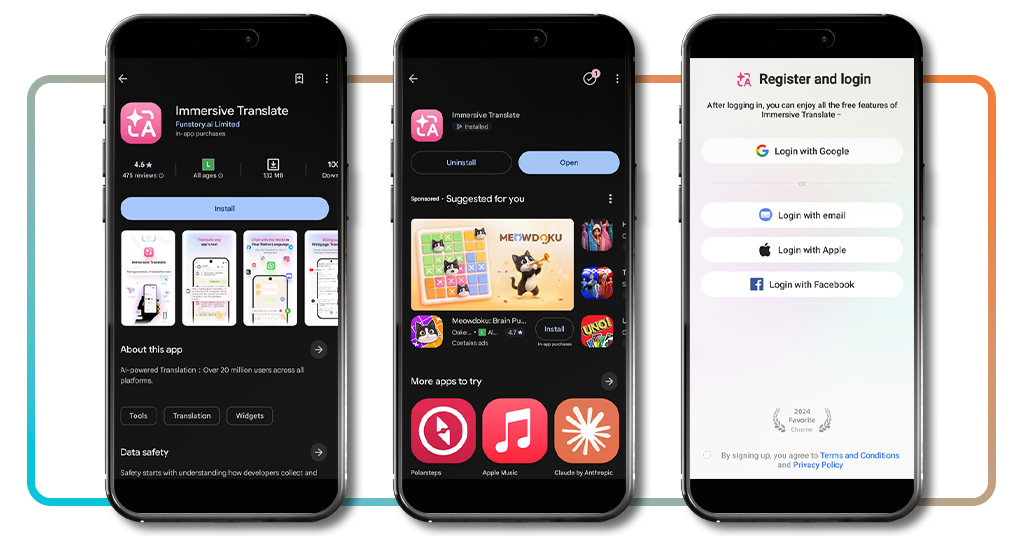
Étape 1 : téléchargez l’application sur votre appareil
Unlock your phone, head over to the Google Play Store or the App Store, search for ‘Immersive Translate’, then install it and give the app a few seconds to finish loading.
Once the installation finishes, open the app and create a free account using your email address or a Google, Apple, or Facebook login, then move on to the next screen.
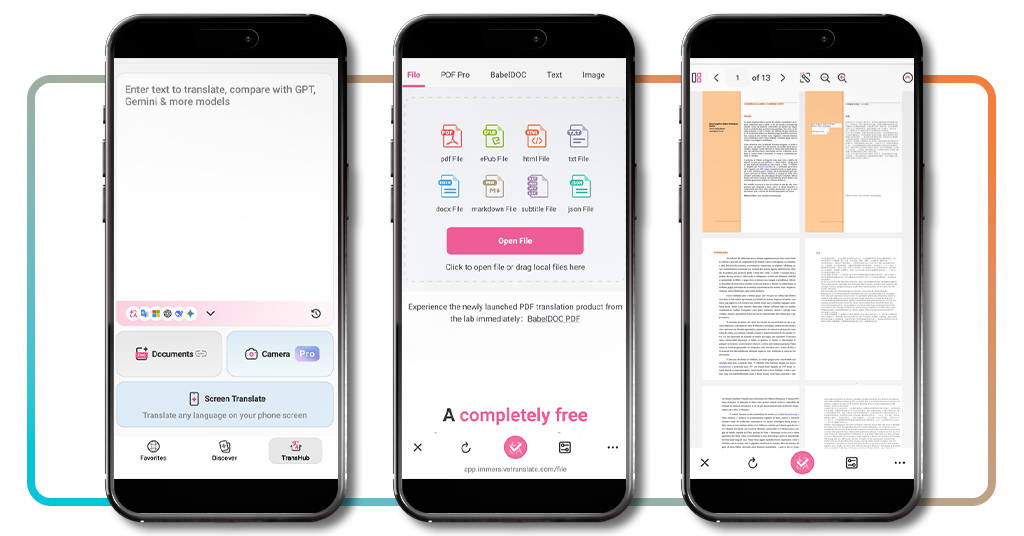
Step 2: upload your file for translation
Tap the ‘TransHub’ tab inside the app and choose the document you want to translate. You can use your camera, translate your screen, or upload a file from your device.
The upload finishes fast, and the app shows a preview of your document so you can confirm every page loaded correctly before you move forward with the translation.
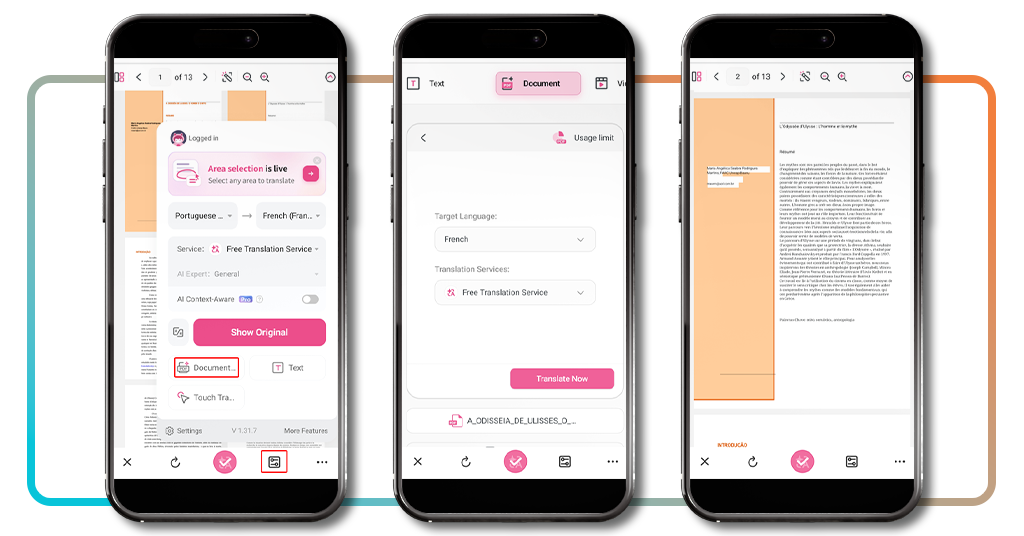
Step 3: select your target language and go
Select the ‘Filter’ tab at the bottom of the page to choose the language you want for your translated document, then tap on ‘Document’ to begin the process.
Confirm your idiom choices, then click ‘Translate Now,’ and the file will process within just a few moments, letting you translate PDFs and official documents without losing their format.
En rapport : Google Translate adds new language learning tools
Bonus option: using the tool as a browser extension
Not every translation job happens on your phone, and plenty of your work probably lives inside a browser tab on your laptop instead, whether that’s email, research, or online shopping.
Immersive Translate (Android | iOS) turns into a browser extension for exactly that reason, sitting quietly in your toolbar until a foreign webpage, comment, or caption needs converting into English.
Contracts, government forms, and lease agreements often show up as browser downloads first, so you can translate PDFs and official documents the moment they land on your screen.
Install directly from the Chrome Store
Open the Chrome Web Store, search for Immersive Translate, and click ‘Add to Chrome’ to install the extension into your browser within seconds.
The icon shows up in your toolbar right away, and clicking it opens a small menu where you pick your target language and turn the extension on.
Translate any webpage instantly
Land on any page written in a language you don’t understand, and the extension flips the entire layout into your chosen language while keeping images and links in place.
Bank portals, shipping trackers, and hotel booking sites all convert instantly too, giving you a fast way to translate PDFs and official documents the moment they pop up mid-browsing.
Watch subtitles translate in real time
Open a video on YouTube or another streaming platform, and the extension pulls the captions and swaps them into your chosen language while the video keeps playing.
The subtitles update on their own as the video moves along, so you never have to pause playback or hunt for a separate translated transcript elsewhere.
Privacy: what to expect when translating official documents
Handing over a passport scan or a signed lease to any app understandably makes you pause, and that hesitation only grows when the document holds personal details.
Immersive Translate (Android | iOS) builds its process around keeping that information contained so you can translate PDFs and official documents without wondering who else might see them.
Security features like encrypted transfers and automatic file deletion give you a real reason to trust the app with sensitive paperwork you’d normally hesitate to upload anywhere.
Where your uploaded files are stored
Secure servers built specifically for translation requests handle your documents, rather than dropping them into some shared folder anyone could stumble across.
The app doesn’t publish or share your files with outside parties, and access stays limited to the systems needed to complete your translation request.
Encryption during document translation
Files move through an encrypted connection the moment you hit upload, which keeps the contents scrambled and unreadable to anyone trying to intercept the transfer.
That protection stays active from the second you translate PDFs and official documents until the finished version lands back on your screen, ready for you to download.
Deleting your data after translation
Once your translation finishes, the app clears most files from active servers shortly after, so it doesn’t hold onto your original document any longer than needed.
You also get the option to manually delete your translation history from within the app, giving you direct control over how long your documents stick around.
En rapport : Traduisez des photos instantanément et comprenez tout dans le monde
4.2/5
The last translation app you’ll need
Immersive Translate (Android | iOS) takes the stress out of reading foreign documents, letting you get through contracts and letters without reaching for a dictionary or a friend who speaks the language.
In this guide, we took a closer look at the app, from uploading your first file to protecting your privacy, so you can translate PDFs and official documents whenever life demands it.
Make sure to keep browsing Idées reçues and learn more ways to make your phone work harder for you, with more guides covering the apps worth having on your home screen.