The grocery run used to be simple, but now it’s a whole mental exercise of remembering which store has chicken on sale, where butter’s cheaper this week, and whether it’s even worth driving across town to save a few dollars. A grocery price comparison app cuts through all of that by pulling deals from thousands of stores into one place, so the work’s already done before you even grab your keys.
Flipp is the app that brings it all together, and it’s free to use on both Android and iOS. This guide by Idées reçues covers everything about it, from how to set it up to where it outperforms the competition on savings. Keep reading to discover if Flipp deserves a permanent spot on your phone and what it could do for your grocery bill every single week.
En rapport : Scan Your Pantry: An App That Builds Your Grocery List Automatically

4.8/5
Why should you use a grocery price comparison app?
Grocery prices shift every week, and without a way to track them, you’ll keep spending more at the same store out of habit rather than actual savings.
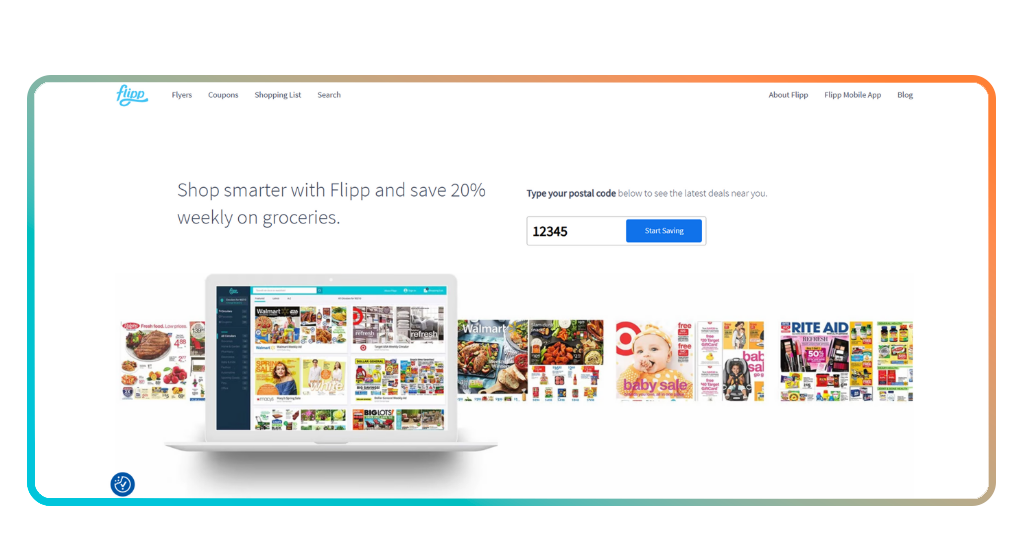
Flipp (Android | iOS) brings weekly ads, coupons and price comparisons together. It’s a grocery price comparison app that covers thousands of stores at once.
It updates every week with fresh deals across groceries, pharmacy and home essentials, so what you see in the app reflects what’s on sale right now near you.
Features available in the Flipp app
- Weekly ads in one place: the app aggregates flyers from thousands of stores so you can browse every local deal without opening a single individual store app;
- Digital coupon clipping: browse and clip coupons directly to your loyalty cards from stores like CVS, Publix, Walgreens and Family Dollar without any paper involved;
- Smart shopping list: add any item to your list and Flipp instantly surfaces the best available deals for it across all connected stores near you;
- Deal Watch alerts: you can add items to your Watch List and Flipp sends you a notification the moment a deal drops for anything on it.
Stop overpaying at your usual store
Using this grocery price comparison app, you’ll notice pretty quickly that your go-to store isn’t always the one with the lowest price on the things you buy.
Flipp lets you search for a specific item and instantly see what different stores are charging for it, so the difference between what you pay and what you could pay becomes obvious.
Switching up where you shop for even a handful of items each week adds up over time, and Flipp makes that call an informed one every single trip.
One app replacing a dozen others
Keeping tabs on deals used to mean downloading an app for every store you like, checking each one separately and still missing half the sales before they expired.
Flipp pulls all of that into a single place, and this grocery price comparison app covers everything from supermarkets to pharmacies and home improvement stores in one clean feed.
Your phone’s storage stays free, your routine gets simpler and the deals from all your favorite stores are waiting in one spot every time you open it.
Step-by-step: how to use Flipp to find better deals
Flipp (Android | iOS) doesn’t ask much from you upfront. A few taps and your location is all it needs to start pulling relevant deals from stores around you.
The setup is free, and this grocery price comparison app walks you through everything on the first open, so nothing about the process feels like a chore or a technical hurdle.
Once you’re in, the whole experience revolves around your shopping list and what’s on sale near you, making every store visit a little more deliberate.
Step 1: download the Flipp app or browse online
Search for ‘Flipp’ on the App Store or Google Play and tap download. It’s free, takes under a minute to install, and opens straight into a clean, easy-to-navigate interface.
You’ll be prompted to enter your location so the app can surface deals from nearby stores right away. Skipping this step means missing out on the local ads that make Flipp useful.
Prefer browsing on a bigger screen? Flipp is also available online, where you get access to the same weekly ads and search tools without needing to grab your phone.
Step 2: browse weekly ads near you
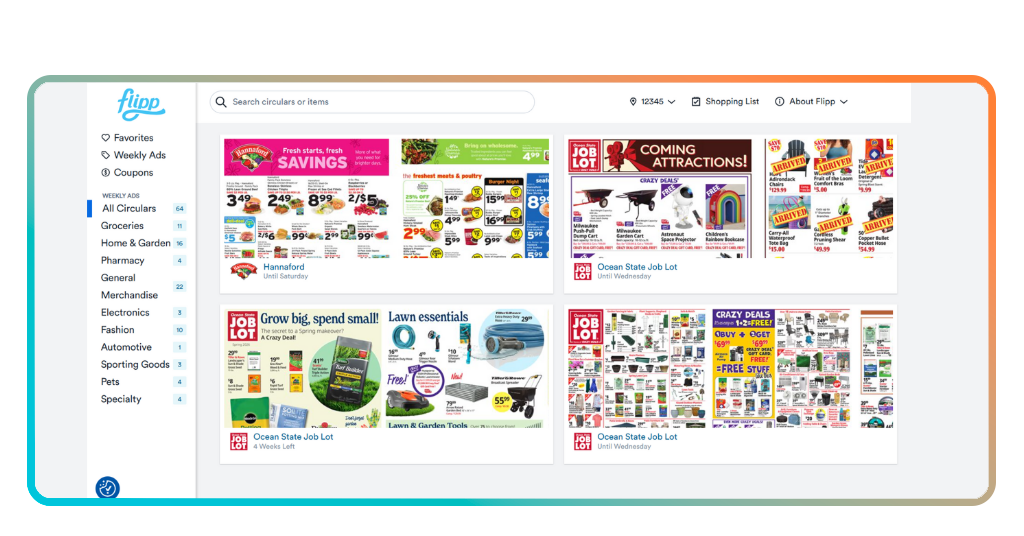
With your location set, Flipp fills your feed with weekly flyers from stores close to you. Tap into any one of them to browse the full ad at your own pace.
The search bar is where this grocery price comparison app separates itself from simply scrolling. Type in any item, and it shows you every store that has it discounted that week.
The ‘All Circulars’ page is worth checking out. It shows stores in your area you might not shop at regularly, and sometimes that’s where the better deal on a staple item is hiding.
Step 3: build your list and clip deals
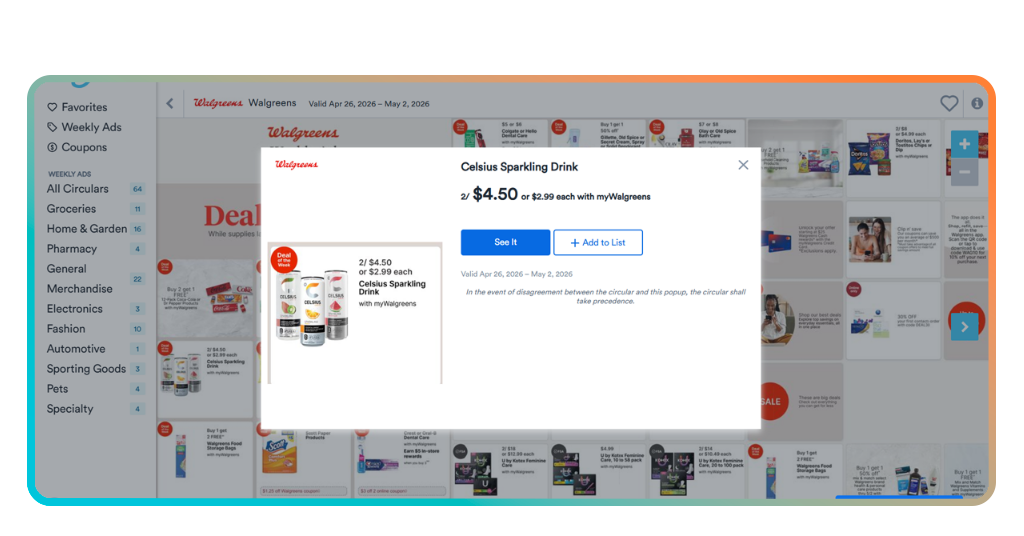
Spotted something worth buying? Tap ‘add to list’ to save it to your shopping list directly from search results or from inside any store’s weekly ad without losing your place.
This grocery price comparison app also connects to loyalty cards from stores like CVS, so you clip digital coupons straight to your card, and the discount applies when you check out.
From your list, you’ll see a price comparison for each item across nearby stores. Share the list with your shopping partner, and you’re both looking at the same deals in real time.
En rapport : Slash grocery bills: best cost-cutting delivery app
Tips for maximizing savings
Flipp works the moment you open it, but there’s a difference between browsing deals and actually building a habit that keeps your grocery bill lower on a consistent basis.
Think of the app like a tool that gets sharper the more you put into it. A couple of tweaks to how you use it, and the savings start showing up without extra effort on your end.
It doesn’t involve spending hours coupon hunting. The grocery price comparison app has features built for people with real schedules who still want to shop without overspending.
Set up deal alerts for your staples
Not every item goes on sale every week, and checking the app repeatedly for the same product gets old. Flipp’s ‘Watch List’ feature takes that task off your plate entirely.
Add any item you buy regularly to your Watch List and Flipp sends you a notification the moment a deal appears for it at a nearby store. No manual checking needed.
It works especially well for pricier staples like meat, dairy, or cleaning products, where catching even one good sale a month adds a noticeable difference to what you spend overall.
Share your list with a shopping partner
If someone else in your household does part of the shopping, keeping separate lists means things get doubled up or bought at the wrong price without either of you realizing.
Flipp lets you share your shopping list so both people view and add to it in real time, and the grocery price comparison app updates for both of you the moment anything changes.
It’s a small feature that removes a lot of back-and-forth texting. Whoever gets to the store first already has the full picture, including which items have deals attached to them.
Explore new local stores on Flipp
Sticking to the same two or three stores is a habit that feels efficient but can quietly cost you. The store you skip over might have better prices on half your list.
The ‘All Circulars’ section shows nearby stores you haven’t browsed before. Scrolling through an unfamiliar flyer is where you find the grocery price comparison app earning its keep most visibly.
Give it a look before your next trip and cross-reference a few items from your usual list. You might find a better price on something you’ve been overpaying for without even knowing.
Other ways to save on groceries
An app alone won’t overhaul your grocery spending if the habits around it stay the same. A few adjustments to how you shop go a long way on their own.
Saving on groceries is as much about timing and planning as it is about finding deals. Some of the biggest wins come from decisions made before you even leave the house.
Pair those habits with the grocery price comparison app and the effect compounds, but even on their own, these moves put a real dent in what you spend each month.
Buy in bulk on non-perishable items
Pasta, canned goods, rice, coffee, paper towels. These are the items where buying more upfront almost always works out cheaper per unit over the course of a few weeks.
The trick is knowing which products you’ll use before they expire or take up too much space. Bulk buying the wrong things just ties up money without any real return.
Warehouse stores like Costco are obvious options, but supermarkets also run bulk deals. Keeping an eye on unit prices rather than shelf prices changes how you evaluate purchases.
Plan your meals around weekly sales
Most people write a meal plan first and then go shopping. Flipping that order, where you check what’s on sale and build meals around it, tends to produce a cheaper cart every time.
If chicken thighs are marked down this week, that’s your protein. This approach keeps the grocery price comparison app useful beyond just deal hunting.
It takes a small mental shift to shop this way, but after a few weeks it starts to feel natural. The meals don’t suffer, and the receipt at the end tells the whole story.
Loyalty programs still earn you points
Every major grocery chain has a loyalty program, and a surprising number of shoppers either forget to use them or never bother signing up in the first place.
These programs don’t require you to change where you shop. Points accumulate on purchases you’d make anyway, and the grocery price comparison app stacks on top of what you’re already earning.
Free items, discounted gas, and cashback on future purchases are the kind of returns that add up over months. It’s worth spending ten minutes signing up for every store you visit regularly.
En rapport : Schedule a grocery delivery for less and save big today
4.8/5
Turn the weekly grocery run into a winning game
Grocery bills don’t shrink on their own, but a little preparation before each trip puts more money back in your pocket than a full week of cutting corners elsewhere.
Le présent Idées reçues guide explained how the grocery price comparison app brings deals, coupons and weekly ads together, saving you the time and money that shopping tends to cost.
Keep browsing Idées reçues for more articles on tools and habits that help you hold onto more of what you earn every time you hit the checkout line.